Yarn: Force yarn resolve always from yarnpkg.com
Hi! :smile:
In our company we have a private registry with sinopia
When we run yarn, we get records like:
resolved "http://private-sinopia-server:4873/glob/-/glob-5.0.15.tgz#1bc936b9e02f4a603fcc222ecf7633d30b8b93b1"
Some of our packages are open-sourced. When we push yarn.lock to github, we want to have:
resolved "https://registry.yarnpkg.com/glob/-/glob-5.0.15.tgz#1bc936b9e02f4a603fcc222ecf7633d30b8b93b1"
Now we just add yarn.lock to .gitignore. Sure, its not OK.
Do someone have any workarounds on this?
 kvolkovich-sc
All 7 comments
Why would you want to use a private npm repository in your company and then publish it open source and want people to use the public npm repo? Are you using Sinopia as a npm cache or something?
 MattJeanes
on 12 Jul 2017
MattJeanes
on 12 Jul 2017
@MattJeanes We don't use our private repository for open source packages. Yes, we use sinopia as npm cache server and problem somewhere here.
kvolkovich-sc
on 12 Jul 2017
Ah okay, that makes sense. Was just trying to understand the use case of this, I'm not part of the Yarn team was just curious, and hopefully this gives them a bit more info to proceed.
MattJeanes
on 12 Jul 2017
You may want to try yarn add "glob@https://registry.yarnpkg.com/glob/-/glob-5.0.15.tgz"
But you won't be able to benefit from the outdated command and probably some other features.
 Volune
on 13 Jul 2017
Volune
on 13 Jul 2017
There is actually a simple solution for this problem: Folder Structure. I have my projects structured like this:
.
├── company
│   ├── super-secret-project # A company package, we just want to publish in our private npm registry
│   └── .npmrc
├── repos
│   ├── company
│   │   └── super-OSS-project # A company package, we want to publish public
│   ├── my-project # Some package I maintain in my free time
│   └── .npmrc
└── .npmrc
Let's check the contents of each of the three .npmrc files:
~/.npmrc. I like to configure all my credentials here:# Private Registry Authentication @npm:registry=https://internal.company.com/npm/ //internal.company.com/npm/:_password=SECRET //internal.company.com/npm/:username=user //internal.company.com/npm/:[email protected] //internal.company.com/npm/:always-auth=true # Public Registry Authentication //registry.npmjs.org/:_authToken=you-only-wish~/company/.npmrc. In the company folder I set our internal registry to the company registry:# Setting internal registry as default registry=https://internal.company.com/npm/~/repos/.npmrc. Actually this file is not needed, at all, but here it is:# Setting public registry explicitly registry=https://registry.npmjs.org/
If you now want to open-source a project, simply do:
mv ~/company/project ~/repos/company/project
cd ~/repos/company/project
rm -f yarn.lock && yarn # or, much more safer, as it keeps the log file versions:
mv yarn.lock yarn.old
sed 's#https://internal.company.com/npm/#https://registry.yarnpkg.com/#g' yarn.old > yarn.lock
rm -f yarn.old
EDIT: If you think, but now I have to remember what is open source and what not, there is a simple solution. Use a good shell jump tool like https://github.com/clvv/fasd
 leipert
on 12 Aug 2017
leipert
on 12 Aug 2017
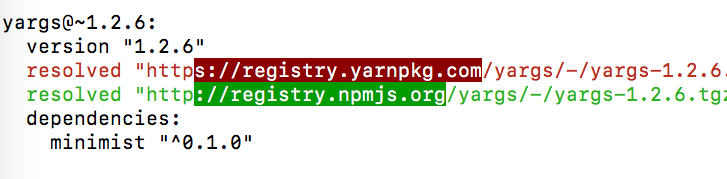
Even without a private registry in play, it seems that in some cases Yarn will resolve somewhat randomly (or according to some indecipherable rule) among:
The latter of which is especially irritating, because it leads to discussions of "can someone please remind me why we are fetching anything over HTTP instead of HTTPS in 2018?"
 kylecordes
on 16 Mar 2018
kylecordes
on 16 Mar 2018
I have the same issue as @kylecordes, for a absolutely public package, got such diff after adding one more package.
 lisovskyvlad
on 11 Sep 2018
lisovskyvlad
on 11 Sep 2018
Related issues
 davidmaxwaterman
·
3Comments
davidmaxwaterman
·
3Comments
 bouk
·
3Comments
bouk
·
3Comments
 chiedo
·
3Comments
chiedo
·
3Comments
 sebmck
·
3Comments
sebmck
·
3Comments
 victornoel
·
3Comments
victornoel
·
3Comments
Most helpful comment
Even without a private registry in play, it seems that in some cases Yarn will resolve somewhat randomly (or according to some indecipherable rule) among:
The latter of which is especially irritating, because it leads to discussions of "can someone please remind me why we are fetching anything over HTTP instead of HTTPS in 2018?"