Yarn: unexpected end of file at Zlib._handle.onerror (zlib.js:370:17)
Yarn Version : 0.24.6
Do you want to request a feature or report a bug?
What is the current behavior?
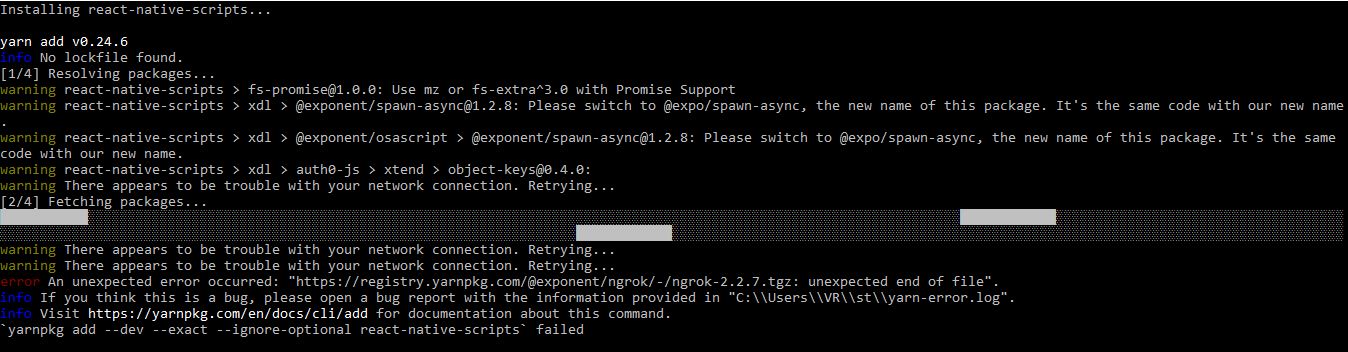
When i try to install the create-react-native-app my-app it shows errors
If the current behavior is a bug, please provide the steps to reproduce.
``
Arguments:
C:Program Files\nodejs\node.exe C:Program Files (x86)\Yarnbin\yarn.js add --dev --exact --ignore-optional react-native-scripts
PATH:
C:ProgramData\Oracle\Java\javapath;C:\Windows\system32;C:\Windows;C:\Windows\System32\Wbem;C:\Windows\System32\WindowsPowerShell\v1.0\;C:Program Files\nodejs\;C:ProgramData\Anaconda3;C:ProgramData\Anaconda3\Scripts;C:ProgramData\Anaconda3\Librarybin;C:Program Files\Git\cmd;C:ProgramData\chocolateybin;C:Program Files (x86)\Yarnbin;C:Py\Scripts\;C:Py\;C:\Users\VR\AppData\Local\Microsoft\WindowsApps;C:\Users\VR\AppData\Roaming\npm;C:\Users\VR\AppData\Local\Yarnbin
Yarn version:
0.24.6
Node version:
6.10.0
Platform:
win32 x64
npm manifest:
{
"name": "st",
"version": "0.1.0",
"private": true
}
yarn manifest:
No manifest
Lockfile:
No lockfile
Trace:
Error: https://registry.yarnpkg.com/@exponent/ngrok/-/ngrok-2.2.7.tgz: unexpected end of file
at Zlib._handle.onerror (zlib.js:370:17)
``
What is the expected behavior?
The react app could be created! But not yet Done!
Please mention your node.js, yarn and operating system version.
Node.js Version : v6.10.0
OS : Microsoft Windows 10 Enterprise Version 10.0.14393 Build 14393
 Vimalraj571
All 8 comments
It looks like internet connection is bad there and .tgz file is delivered broken.
We plan to implement retries soon, that might help a bit.
 bestander
on 21 Jun 2017
bestander
on 21 Jun 2017
bestander
on 21 Jun 2017
bestander
on 21 Jun 2017
@bestander Thanks bro
Vimalraj571
on 21 Jun 2017
I nuked my dev environment, and had to recreate it from scratch, and in doing so @bestander I get similar error message when build my Ember app. When I install the dependencies with npm, my app builds successfully... Yarn 0.27 / 0.26 work on my coworkers machines running Ubuntu 16.04 and OsX as well as worked on my machine (Linux Mint 17.2 based on trusty) before I nuked it.
OS
Linux Mint 18.2 (Based on Ubuntu 16.04 xenial)
Yarn Versions Attempted
v1.0.1, v0.27.5
Node Version (via nvm)
v6.11.3
yarn.lock & package.json
https://gist.github.com/alexander-alvarez/0f67036fb5cbad6ff3f26a6bc5551180
Potentially meaningless stacktrace
The Broccoli Plugin: [BroccoliMergeTrees] failed with:
Error: unexpected end of file
    at Zlib._handle.onerror (zlib.js:370:17)

The broccoli plugin was instantiated at:
    at BroccoliMergeTrees.Plugin (/home/alex/dev/iris-web/node_modules/broccoli-plugin/index.js:7:31)
    at new BroccoliMergeTrees (/home/alex/dev/iris-web/node_modules/broccoli-merge-trees/index.js:42:10)
    at Class.postprocessTree (/home/alex/dev/iris-web/node_modules/ember-browserify/lib/index.js:79:14)
    at projectOrAddon.addons.reduce (/home/alex/dev/iris-web/node_modules/ember-cli/lib/utilities/addon-process-tree.js:6:25)
    at Array.reduce (native)
    at addonProcessTree (/home/alex/dev/iris-web/node_modules/ember-cli/lib/utilities/addon-process-tree.js:4:32)
    at EmberApp.addonPostprocessTree (/home/alex/dev/iris-web/node_modules/ember-cli/lib/broccoli/ember-app.js:596:12)
    at EmberApp.appAndDependencies (/home/alex/dev/iris-web/node_modules/ember-cli/lib/broccoli/ember-app.js:1124:33)
    at EmberApp.javascript (/home/alex/dev/iris-web/node_modules/ember-cli/lib/broccoli/ember-app.js:1235:30)
    at EmberApp.toArray (/home/alex/dev/iris-web/node_modules/ember-cli/lib/broccoli/ember-app.js:1672:12)
    at EmberApp.toTree (/home/alex/dev/iris-web/node_modules/ember-cli/lib/broccoli/ember-app.js:1694:38)
    at module.exports (/home/alex/dev/iris-web/ember-cli-build.js:99:14)
    at Builder.setupBroccoliBuilder (/home/alex/dev/iris-web/node_modules/ember-cli/lib/models/builder.js:56:19)
    at new Builder (/home/alex/dev/iris-web/node_modules/ember-cli/lib/models/builder.js:30:10)
    at ServeTask.run (/home/alex/dev/iris-web/node_modules/ember-cli/lib/tasks/serve.js:24:55)
    at Promise.resolve.then (/home/alex/dev/iris-web/node_modules/ember-cli/lib/models/command.js:243:46)
    at tryCatch (/home/alex/dev/iris-web/node_modules/rsvp/dist/rsvp.js:539:12)
    at invokeCallback (/home/alex/dev/iris-web/node_modules/rsvp/dist/rsvp.js:554:13)
    at /home/alex/dev/iris-web/node_modules/rsvp/dist/rsvp.js:629:16
    at flush (/home/alex/dev/iris-web/node_modules/rsvp/dist/rsvp.js:2414:5)
    at _combinedTickCallback (internal/process/next_tick.js:73:7)
    at process._tickCallback (internal/process/next_tick.js:104:9)
Install command, which seems to work successfully
$ yarn install
yarn install v0.27.5
[1/4] Resolving packages...
[2/4] Fetching packages...
warning [email protected]: The engine "ember-cli-app-version" appears to be invalid.
warning [email protected]: The platform "linux" is incompatible with this module.
info "[email protected]" is an optional dependency and failed compatibility check. Excluding it from installation.
[3/4] Linking dependencies...
[4/4] Building fresh packages...
 alexander-alvarez
on 28 Sep 2017
alexander-alvarez
on 28 Sep 2017
for reference this morning I removed yarn installed from the debian package repo, and installed v1.1.0 through https://yarnpkg.com/lang/en/docs/install/#alternatives-tab > curl -o- -L https://yarnpkg.com/install.sh | bash
and this works... sooo ¯\_(ツ)_/¯
alexander-alvarez
on 28 Sep 2017
I was getting the same error with Node 8 and Yarn v0.27.5 inside an Ubuntu 17.04 Docker container.
FROM ubuntu:17.04

# Install base packages
RUN apt-get -qq update \
  && apt-get -qq -y install curl apt-transport-https build-essential lsb-release git

ENV NODE_VERSION="node_8.x"

# Add sources for Node.js, yarn and Google Chrome
RUN export DISTRO="$(lsb_release -s -c)" \
  && curl -sS https://deb.nodesource.com/gpgkey/nodesource.gpg.key | apt-key add - \
  && curl -sS https://dl.yarnpkg.com/debian/pubkey.gpg | apt-key add - \
  && curl -sS https://dl-ssl.google.com/linux/linux_signing_key.pub | apt-key add - \
  && echo "deb https://deb.nodesource.com/$NODE_VERSION $DISTRO main" | tee /etc/apt/sources.list.d/nodesource.list \
  && echo "deb-src https://deb.nodesource.com/$NODE_VERSION $DISTRO main" | tee -a /etc/apt/sources.list.d/nodesource.list \
  && echo "deb https://dl.yarnpkg.com/debian/ stable main" | tee /etc/apt/sources.list.d/yarn.list \
  && echo "deb [arch=amd64] http://dl.google.com/linux/chrome/deb/ stable main" | tee /etc/apt/sources.list.d/google-chrome.list

# Install Node.js, yarn and Google Chrome
RUN apt-get -qq update \
  && apt-get -qq -y install nodejs yarn google-chrome-stable

CMD [ "node" ]
The yarn cache folder is set to a docker volume, so that it is shared between builds. The build runners also share a mutex, so that they don't corrupt data.
My stack trace looks a bit different, which supports the theory, that some random archive was corrupted (during the download?).
The Broccoli Plugin: [BroccoliMergeTrees: TreeMerger (appAndDependencies)] failed with:
Error: unexpected end of file
    at Inflate.zlibOnError (zlib.js:152:15)

The broccoli plugin was instantiated at:
    at BroccoliMergeTrees.Plugin (/builds/web/frontend/app/node_modules/broccoli-plugin/index.js:7:31)
    at new BroccoliMergeTrees (/builds/web/frontend/app/node_modules/ember-cli/node_modules/broccoli-merge-trees/index.js:16:10)
    at Function.BroccoliMergeTrees [as _upstreamMergeTrees] (/builds/web/frontend/app/node_modules/ember-cli/node_modules/broccoli-merge-trees/index.js:10:53)
    at mergeTrees (/builds/web/frontend/app/node_modules/ember-cli/lib/broccoli/merge-trees.js:85:33)
    at EmberApp._mergeTrees (/builds/web/frontend/app/node_modules/ember-cli/lib/broccoli/ember-app.js:1832:12)
    at EmberApp.appAndDependencies (/builds/web/frontend/app/node_modules/ember-cli/lib/broccoli/ember-app.js:1153:17)
    at EmberApp.javascript (/builds/web/frontend/app/node_modules/ember-cli/lib/broccoli/ember-app.js:1253:30)
    at EmberApp.toArray (/builds/web/frontend/app/node_modules/ember-cli/lib/broccoli/ember-app.js:1689:12)
    at EmberApp.toTree (/builds/web/frontend/app/node_modules/ember-cli/lib/broccoli/ember-app.js:1711:38)
    at module.exports (/builds/web/frontend/app/ember-cli-build.js:108:14)
Completely nuking the cache folder fixed the problem.
 buschtoens
on 6 Oct 2017
buschtoens
on 6 Oct 2017
I don't think this is an issue with the 1.x.x line so closing the issue. @ buschtoens if you still have issues with the latest versions of Yarn, please file a new issue with the details and someone will look into it :)
 BYK
on 30 Oct 2017
BYK
on 30 Oct 2017
I just received this error with Yarn 1.3.2
 mukk85
on 11 Dec 2017
mukk85
on 11 Dec 2017
Related issues
 FLGMwt
·
3Comments
FLGMwt
·
3Comments
 chiedo
·
3Comments
chiedo
·
3Comments
 MunifTanjim
·
3Comments
MunifTanjim
·
3Comments
 catkins
·
3Comments
catkins
·
3Comments
 bouk
·
3Comments
bouk
·
3Comments
Most helpful comment
I just received this error with Yarn 1.3.2