Yarn: Yarn help changes text color in powershell
bug in yarn 0.20.3 (installed through chocolatey)
What is the current behavior?
when running [yarn help] the help is displayed but the textcolor is changed and left to a dark color, so nothing can be read afterwards.
If the current behavior is a bug, please provide the steps to reproduce.
Just run yarn help in powershell (I also have poshgit installed in case that makes a difference)
What is the expected behavior?
The text color should be reset to whatever it was before yarn help was called
Please mention your node.js, yarn and operating system version.
Node 7.5.0
Yarn 0.20.3
As a work around I can run [Console]::ResetColor() in powershell to reset the text
 mika76
All 29 comments
Hmm, I can't reproduce this issue on my computer. Can you please post your PowerShell version? Run $PSVersionTable and copy+paste all the output.
 Daniel15
on 19 Feb 2017
Daniel15
on 19 Feb 2017
This may or may not be applicable, but note that in Windows 10's upcoming update, Microsoft is supporting 256 colours (I've tested in the insider program in Bash).
 mrmckeb
on 20 Feb 2017
mrmckeb
on 20 Feb 2017
Same here :(
Since upgrading nodejs from 7.3 to 7.6.
Using Windows 10 1607 (Build 14393.693).

 viceice
on 23 Feb 2017
viceice
on 23 Feb 2017
I can see the same behavior with grunt. So I think is has somthing to do with libuv 1.11.0 from Node.js 7.6.0.
viceice
on 23 Feb 2017
It's having similar (but different from each other) effects on Powershell, CMD, and Powershell-under-ConEMU:
CMD:
before running yarn help

after:

Notice how the text is whiter.
Powershell:
before:

after:

Conemu:
before:

after:

Also, in ConEMU, it messes the indentation, the yarn progress-bars don't show, the text color becomes transparent:


 kumarharsh
on 6 Apr 2017
kumarharsh
on 6 Apr 2017
So when the PR with a fix is coming? :)
 bestander
on 6 Apr 2017
bestander
on 6 Apr 2017
Yeah I was using con emu as well when I first noticed this...
mika76
on 6 Apr 2017
Yup, this is quite annoying. It not just changes the color. It messes things up. If you do a reset console, it's seemingly fine. But, any other program that uses color after that is messed up.
A program that displays correct colors - notice the "Cyan"

Now, even after the console reset, running the above program again, seems to have messed up colors.

 prasannavl
on 28 Apr 2017
prasannavl
on 28 Apr 2017
This seems to be the issue: chalk/chalk#145
viceice
on 29 May 2017
I would like to submit a PR to workaround this problem by simply reset colors after bold usage.
Would this be an options until ms fixed the escape codes?
Until then using legacy console mode fixes the problem too, but then all new features (like copy&paste) are disabled. 😞
viceice
on 8 Jun 2017
@ViceIce I vote yes - although will this only reset the color and not indentation? I have the same problem reported by @kumarharsh in ConEmu. I guess anything is better 😄
mika76
on 8 Jun 2017
PR should work now but failed with test timeouts. 😞
viceice
on 8 Jun 2017
Is the reset only for win platform?
Tests may fail for other reasons, they can be flaky at times
On Thu, 8 Jun 2017 at 09:55, Michael Kriese notifications@github.com
wrote:
PR should work now but failed with test timeouts. 😞
—
You are receiving this because you were assigned.
Reply to this email directly, view it on GitHub
https://github.com/yarnpkg/yarn/issues/2724#issuecomment-307042242, or mute
the thread
https://github.com/notifications/unsubscribe-auth/ACBdWNx-YzN4otCC6E3Ag6kBNuO1KXFhks5sB7cCgaJpZM4MFdIr
.
bestander
on 8 Jun 2017
Yes. I can make it conditional.
Then i have to modify the ConsoleReporter.header test, because the output will be conditional too.
viceice
on 9 Jun 2017
Sounds good, thanks
On Fri, 9 Jun 2017 at 05:27, Michael Kriese notifications@github.com
wrote:
Yes. I can make it conditional.
Then i have to modify the ConsoleReporter.header
http:///yarnpkg/yarn/blob/25890c8cf90ff23c3230ab7b8debe73ef9a80b34/__tests__/reporters/console-reporter.js#L25
test, because the output will be conditional too.—
You are receiving this because you were assigned.
Reply to this email directly, view it on GitHub
https://github.com/yarnpkg/yarn/issues/2724#issuecomment-307292162, or mute
the thread
https://github.com/notifications/unsubscribe-auth/ACBdWP4R4tbZ2-uajzdMJ5U7mOyg9J8oks5sCMmXgaJpZM4MFdIr
.
bestander
on 9 Jun 2017
Done.
viceice
on 9 Jun 2017
This bug still presents in 0.27.5 on my Windows 10 machine:

 anfomin
on 2 Jul 2017
anfomin
on 2 Jul 2017
@anfomin - It's likely the fix hasn't yet been cherry-picked into a stable release. You could try the latest nightly and see if it's fixed there. https://nightly.yarnpkg.com/latest.msi
Daniel15
on 2 Jul 2017
@Daniel15 I've just tried version you specified. Bug is still there:

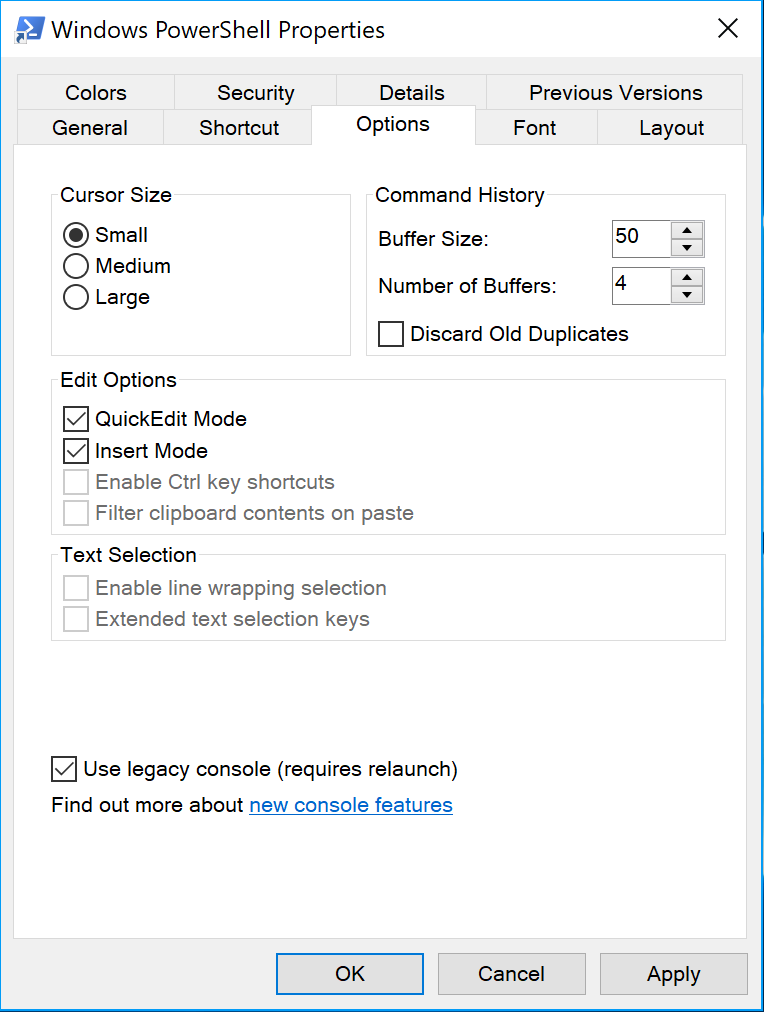
This happens only in non-legacy Powershell console. If I switch to legacy mode then colors are OK.
anfomin
on 3 Jul 2017
Hi, I tried the release candidate Yarn 0.28.4 and I also get the same colour issue. This problem isn't fixed yet, can you reopen it?
 Arminius
on 15 Aug 2017
Arminius
on 15 Aug 2017
Can you try the nightly builds?
 arcanis
on 15 Aug 2017
arcanis
on 15 Aug 2017
xref comment by @BYK here https://github.com/yarnpkg/yarn/issues/4529#issuecomment-331729429
Also, this will be fixed with 1.1.0.
I'm still seeing this on Windows 10.0.15063, yarn 1.1.0 and PowerShell 5.1.15063.632 non-legacy console, (which is the default):

Happy to help troubleshoot further, let me know if there's anything else you need from me.
 shiftkey
on 10 Oct 2017
shiftkey
on 10 Oct 2017
@shiftkey, could you check whether the fix from https://github.com/yarnpkg/yarn/pull/3607 gets executed in your environment?
Also looks like the fix from chalk has some problems and is blocked by some Windows bug https://github.com/chalk/chalk/issues/145.
@mika76 and everyone else can you confirm if the fix works for you?
bestander
on 24 Oct 2017
Have seen this error before i upgraded to Fall Creator's update yesterday. There the unbold is fixed.
I will check this on an other pc without Fall Creator's update.
viceice
on 24 Oct 2017
I've looked at it and it seems that the condition fails, because the process.env.TERM is undefined
viceice
on 24 Oct 2017
PR was merged. Next nightly should have the fix. Hopefully it will get into next stable release.
viceice
on 24 Oct 2017
@bestander apologies for the delay - 1.3.2 looks good here (Win10 15063, so pre-Fall Creator's Update):

shiftkey
on 5 Nov 2017
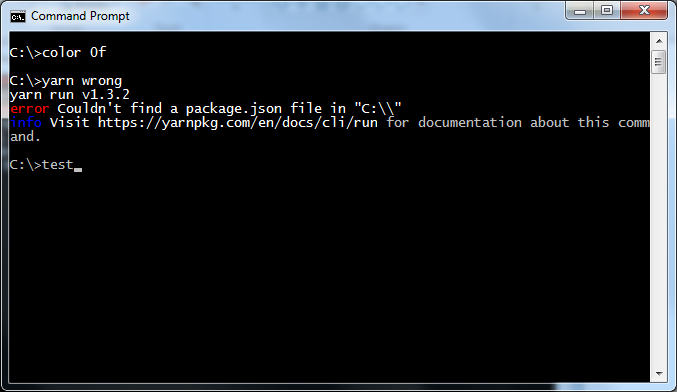
With v1.3.2 I continue to have problems with cmd.exe (Windows 7 64-bit):
 craigholm
on 15 Nov 2017
craigholm
on 15 Nov 2017
Please file a separate issue - This one was tracking PowerShell specifically.
Daniel15
on 15 Nov 2017
Related issues
 bouk
·
3Comments
bouk
·
3Comments
 seansfkelley
·
3Comments
seansfkelley
·
3Comments
 jviotti
·
3Comments
jviotti
·
3Comments
 torifat
·
3Comments
torifat
·
3Comments
 Ambroos
·
3Comments
Ambroos
·
3Comments
Most helpful comment
This bug still presents in 0.27.5 on my Windows 10 machine:
