Do you want to request a feature or report a bug?
Question
What is the current behavior?
I am new to Javascript development and would like to contribute to Yarn. I would like to know how to install the version of Yarn I modified locally, in my system. This would help me debug and understand the code.
If the current behavior is a bug, please provide the steps to reproduce.
What is the expected behavior?
Please mention your node.js, yarn and operating system version.
 sreeramjayan
All 9 comments
I would like to know how to install the version of Yarn I modified locally, in my system.
What I normally do is just run it using the whole absolute path, straight out of the directory containing its code. For example, if your version of Yarn is at c:\src\yarn, run it like c:\src\yarn\bin\yarn (or something like /usr/local/src/yarn/bin/yarn or whatever path on Linux or Mac OS). Alternatively you could add Yarn's bin directory to your path.
Note that you need to build Yarn (npm run build) before running your version of it. You can run npm run watch to automatically rebuild Yarn as you modify its code.
 Daniel15
on 31 Jan 2017
Daniel15
on 31 Jan 2017
Hi @sreeramjayan and welcome to the JS community. :)
This is what the npm link command is for. If you cd to the directory where Yarn itself is and then run npm link, it will look at the bin defined in package.json and set up the appropriate symlinks to them from your global node_modules directory such that they are in your PATH. The end result is that you can run yarn and it will act much like an alias to your local copy of yarn. And you only have to do this once, it will survive across builds when hacking on Yarn.
 sholladay
on 1 Feb 2017
sholladay
on 1 Feb 2017
@sholladay - In the case of Yarn, what's the advantage of using npm link over just adding Yarn's bin directory to the path? I feel like adding the bin directory to the path is cleaner than adding any symlinks.
Daniel15
on 1 Feb 2017
I created a GitHub issue in the website repo, to add better dev docs to the site: https://github.com/yarnpkg/website/issues/366
Daniel15
on 1 Feb 2017
what's the advantage of using
npm linkover just adding Yarn's bin directory to thepath?
How clean is your PATH? Do you have a zillion individual projects in it?
Here is what mine looks like:
$ echo $PATH
/usr/local/sbin:/usr/local/bin:/usr/sbin:/usr/bin:/sbin:/bin
Notice that:
- It is short. This is important for
PATH. Every single time you run a command, the shell iterates through thePATHcomponents and searches them for the given program. - It is generic. These directories exist on most systems and as a result I can have portable dotfiles. If your
PATHcontains things that don't exist, it can cause trouble. sbinalways comes beforebinbecause programs that requiresudopermissions have a higher trust level. Not super relevant to this discussion, except to say that you don't want to be manually modifying yourPATHunless you understand these issues, which most people don't.- It doesn't contain any special snowflakes like Yarn and thus it is easy to maintain and okay to _forget about it_.
Now you might wonder, how do I get things like Yarn on my command line then? It's simple. I have /usr/local/bin/yarn. When I run yarn, it is found very quickly, early in my PATH. I never, ever touch my PATH to get it in there. String manipulation is always messy. It's much better to use command line tools to install / uninstall things. In an abstract sense, this is why we have Yarn!
Okay now let's talk about symlinks.
This is what happens after I run npm install -g yarn:
$ ls -lh /usr/local/bin | grep yarn
lrwxr-xr-x  1 sholladay  staff    36B Feb  1 01:20 yarn -> ../lib/node_modules/yarn/bin/yarn.js
lrwxr-xr-x  1 sholladay  staff    36B Feb  1 01:20 yarnpkg -> ../lib/node_modules/yarn/bin/yarn.js
The l in the permissions section there denotes a symlink. You can see that /use/local/bin/yarn is actually just a pointer to /usr/local/lib/node_modules/yarn/bin/yarn.js. This makes sense because /usr/local/bin is intended only for command line tools, whereas /usr/local/lib/node_modules can contain entire applications and their dependencies. This is just the default behavior of npm, I didn't do anything special here.
There's a problem with using npm install -g yarn, though. It's not convenient for hacking. And this comes down to the fact that it isn't a git repository. If someone wants me to pull some changes, I have to run npm install -g yarn again, which wipes out any changes I made locally. Okay, so that sucks, let's not do that.
Instead, what I really want is to git clone into something like ~/Code/personal/yarn but then somehow get its CLI into my PATH. We already established that editing PATH is bad. And this is where npm link comes in. It does exactly the same thing as npm install -g except rather than putting a bunch of files in a global install location, it makes that path be a symlink to your current working directory. It knows the global path should be for yarn because it inspects package.json.
So after I git clone and cd into Yarn, all I have to do to get it on the command line is npm link.
$ ls -lh /usr/local/lib/node_modules | grep yarn
lrwxr-xr-x   1 sholladay  staff    35B Feb  1 01:30 yarn -> /Users/sholladay/Code/personal/yarn
Another way to say all of this is that npm link takes care of my PATH for me, without me having to think about it.
/usr/local/bin/yarn -> /usr/local/lib/node_modules/yarn/bin/yarn.js -> /Users/sholladay/Code/personal/yarn/bin/yarn.js
sholladay
on 1 Feb 2017
Great comment, thanks for the awesome explanation @sholladay!
And this is where npm link comes in. It does exactly the same thing as npm install -g except rather than putting a bunch of files in a global install location, it makes that path be a symlink to your current working directory
I guess you could do the same thing by manually adding a symlink, npm link just makes it easier?
How clean is your PATH? Do you have a zillion individual projects in it?
lol I'm on Windows and it's a mess. This is from my work PC:
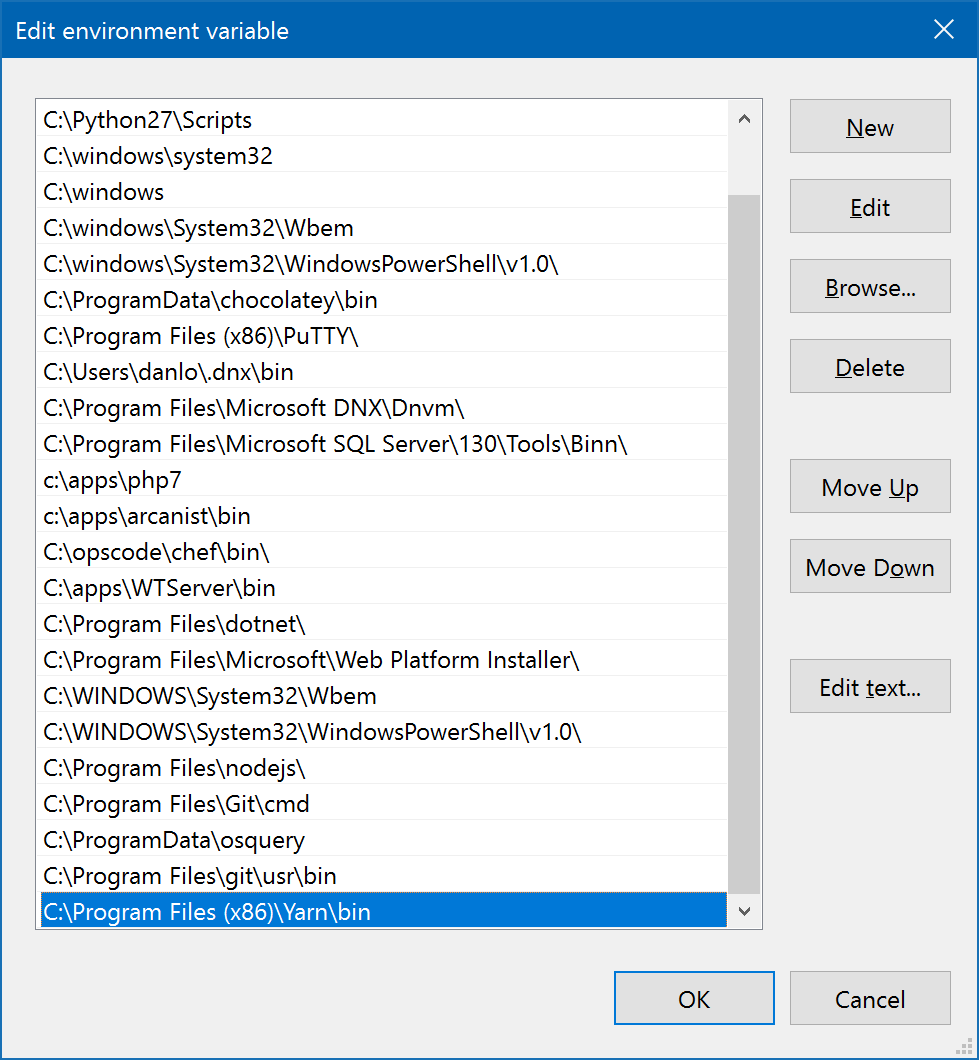
This is one thing Linux (and Mac OSX, to a lesser extent) does a lot better.
Daniel15
on 1 Feb 2017
Thank you @Daniel15 and @sholladay for your insights.
sreeramjayan
on 1 Feb 2017
My old friend Windows. You could use Winbrew to help consolidate some of these installations into a well-known location and reduce the number of entries in your PATH. It's kind of like Chocolatey, which I see you are using. But it has some different conventions.
I guess you could do the same thing by manually adding a symlink, npm link just makes it easier?
npm link makes it significantly easier, IMO.
If I didn't use npm link, I'd have to do:
$ ln -s ../lib/node_modules/yarn/bin/yarn.js /usr/local/bin/yarn
$ ln -s ../lib/node_modules/yarn/bin/yarn.js /usr/local/bin/yarnpkg
$ ln -s "$PWD" /usr/local/lib/node_modules/yarn
Technically, I may be able to get away with deleting the last two and have the first one point directly to "$PWD"/bin/yarn.js. Hopefully it wouldn't break anything. Either way...
Notice that:
- That's a lot to type! Yikes. I might edit my
PATHtoo if this was the only alternative. - It's not cross-platform. Unless you are using Bash for Windows, it ain't gonna work for you. :p
- This relies on some fragile things.
PWDis an environment variable and as such is volatile global state. Also,ln -s "$PWD"andln -s $PWDare two completely different things if the working directory path has spaces in it. This will totally bite you and a lot of people don't know this. The command will silently fail to do what you expect. - This relies on some hard coded values. For example, not everyone's global install location is in
/usr/local. E.g. Windows users. We could usenpm config get prefixto get it dynamically, but ifnpmis in yourPATHand at this point you aren't usingnpm linkthen WTF! Also, we have to talk about subshells and the consequences of running"$(npm config get prefix)". And once again those quotes are meaningful.
sholladay
on 1 Feb 2017
Thanks @sholladay!
@sreeramjayan I'm going to close this issue since I think your question has been answered, please feel free to write more comments if you have any other questions about this, though!
Daniel15
on 1 Feb 2017
Related issues
 seansfkelley
·
3Comments
seansfkelley
·
3Comments
 catkins
·
3Comments
catkins
·
3Comments
 danez
·
3Comments
danez
·
3Comments
 sebmck
·
3Comments
sebmck
·
3Comments
 Ambroos
·
3Comments
Ambroos
·
3Comments
Most helpful comment
How clean is your
PATH? Do you have a zillion individual projects in it?Here is what mine looks like:
Notice that:
PATH. Every single time you run a command, the shell iterates through thePATHcomponents and searches them for the given program.PATHcontains things that don't exist, it can cause trouble.sbinalways comes beforebinbecause programs that requiresudopermissions have a higher trust level. Not super relevant to this discussion, except to say that you don't want to be manually modifying yourPATHunless you understand these issues, which most people don't.Now you might wonder, how do I get things like Yarn on my command line then? It's simple. I have
/usr/local/bin/yarn. When I runyarn, it is found very quickly, early in myPATH. I never, ever touch myPATHto get it in there. String manipulation is always messy. It's much better to use command line tools to install / uninstall things. In an abstract sense, this is why we have Yarn!Okay now let's talk about symlinks.
This is what happens after I run
npm install -g yarn:The
lin the permissions section there denotes a symlink. You can see that/use/local/bin/yarnis actually just a pointer to/usr/local/lib/node_modules/yarn/bin/yarn.js. This makes sense because/usr/local/binis intended only for command line tools, whereas/usr/local/lib/node_modulescan contain entire applications and their dependencies. This is just the default behavior ofnpm, I didn't do anything special here.There's a problem with using
npm install -g yarn, though. It's not convenient for hacking. And this comes down to the fact that it isn't a git repository. If someone wants me to pull some changes, I have to runnpm install -g yarnagain, which wipes out any changes I made locally. Okay, so that sucks, let's not do that.Instead, what I really want is to
git cloneinto something like~/Code/personal/yarnbut then somehow get its CLI into myPATH. We already established that editingPATHis bad. And this is wherenpm linkcomes in. It does exactly the same thing asnpm install -gexcept rather than putting a bunch of files in a global install location, it makes that path be a symlink to your current working directory. It knows the global path should be foryarnbecause it inspects package.json.So after I
git cloneandcdinto Yarn, all I have to do to get it on the command line isnpm link.Another way to say all of this is that
npm linktakes care of myPATHfor me, without me having to think about it./usr/local/bin/yarn->/usr/local/lib/node_modules/yarn/bin/yarn.js->/Users/sholladay/Code/personal/yarn/bin/yarn.js