Yarn: Yarn throws "stdout is not a tty" in Git Bash
Do you want to request a feature or report a bug?
Bug.
What is the current behavior?
I tried installing yarn using the installation script from https://yarnpkg.com/en/docs/install#alternatives-tab (I'm on Windows, but I don't have admin rights, so I can't use the Windows installer). After downloading the script it fails:
$ curl -o- -L https://yarnpkg.com/install.sh | bash
  % Total    % Received % Xferd  Average Speed   Time    Time     Time  Current
                                 Dload  Upload   Total   Spent    Left  Speed
100  6742    0  6742    0     0   1694      0 --:--:--  0:00:03 --:--:--  1701
Installing Yarn!
/c/Users/myuser/.yarn/bin/yarn
stdin is not a tty
When I try to run the install.sh file directly, I get the same error:
$ "./install.sh"
Installing Yarn!
/c/Users/myuser/.yarn/bin/yarn
stdout is not a tty
If the current behavior is a bug, please provide the steps to reproduce.
- Download the
install.shfile from https://yarnpkg.com/en/docs/install#alternatives-tab - Run from Git bash
What is the expected behavior?
It should install successfully.
Please mention your node.js, yarn and operating system version.
node.js v6.3.0
yarn v0.19.1
Windows 7 x64
git version 2.11.0.windows.3
 IgorAufricht
All 24 comments
same issue except on windows 10 and I used the installer .msi
 adamk33n3r
on 31 Jan 2017
adamk33n3r
on 31 Jan 2017
Hmm strange. On Windows, I'd suggest installing using the installer (MSI file) or Chocolatey (choco install yarn).
 Daniel15
on 31 Jan 2017
Daniel15
on 31 Jan 2017
@Daniel15 As I mentioned above, I don't have administrator right for the Windows machine, thus I can't use the installer (MSI file) nor Chocolatey (which I also need admin rights to install). Currently this is preventing me from updating yarn at all.
I was able to update yarn with the install script from 0.17 to 0.19.1 before.
IgorAufricht
on 2 Feb 2017
Also when I try to download the tarball from here:
https://yarnpkg.com/docs/install/#alternatives-tab
the link to latest package points to 0.19.1 instead of 0.20:
https://yarnpkg.com/latest.tar.gz
IgorAufricht
on 2 Feb 2017
0.20 is a release candidate, 0.19 is the stable release.
Sent from my phone.
On Feb 2, 2017 2:43 AM, "IgorAufricht" notifications@github.com wrote:
Also when I try to download the tarball from here:
https://yarnpkg.com/docs/install/#alternatives-tab
the link to latest package points to 0.19.1 instead of 0.20:
https://yarnpkg.com/latest.tar.gz—
You are receiving this because you were mentioned.
Reply to this email directly, view it on GitHub
https://github.com/yarnpkg/yarn/issues/2591#issuecomment-276924244, or mute
the thread
https://github.com/notifications/unsubscribe-auth/AAFnHXCmi3RGHFy98cb9nKr-JFKb4M8Nks5rYbNjgaJpZM4LxpOE
.
Daniel15
on 2 Feb 2017
@Daniel15 Thanks, haven't noticed that.
I found out the same error happens when I try to redirect output of any yarn command:
$ yarn info lodash | grep lodash
stdout is not a tty
$ yarn list lodash | grep lodash
stdout is not a tty
$ yarn --version | grep 0
stdout is not a tty
This is on version 0.20.0.
IgorAufricht
on 3 Feb 2017
Still happening with yarn 0.20.3.
IgorAufricht
on 17 Feb 2017
And with yarn 0.21.3.
IgorAufricht
on 3 Mar 2017
I just hit the same error in AppVeyor when trying to use Yarn within a shell script via Git Bash: https://ci.appveyor.com/project/kittens/yarn/build/1938/job/momtbo9wa2carunr. In my case, I could work around the issue by explicitly running yarn.cmd rather than yarn:
# Workaround for https://github.com/yarnpkg/yarn/issues/2591
case "$(uname -s)" in
*CYGWIN*|MSYS*|MINGW*) yarn=yarn.cmd;;
*) yarn=yarn;;
esac
eval $yarn run build
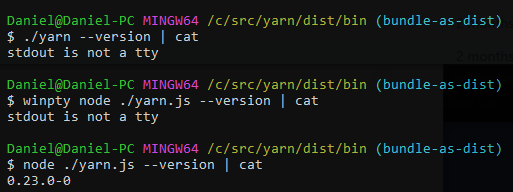
Simple repro:
yarn --version | cat
It does seem like winpty is causing something strange to happen, as it only throws the error when using winpty (which the yarn shell script does do):
Daniel15
on 2 Apr 2017
Also hitting this after installing yarn today and trying to run a shell script that invokes it. Node.js 6.9.1 on Windows 10, installed yarn 0.23.3 via the MSI. Thanks @Daniel15 for the yarn.cmd workaround, that works for me! (Would still like to see a real fix though.)
 kaiyoma
on 1 May 2017
kaiyoma
on 1 May 2017
@Daniel15 yarn init in git bash produces slightly different error message, but seems to be related
Aliasing doesn't help
yarn init v0.24.6
error An unexpected error occurred: "Can't answer a question unless a user TTY".
Trace:
Error: Can't answer a question unless a user TTY
at ConsoleReporter.question (C:\Program Files (x86)\Yarn\lib\yarn-cli.js:78027:59)
at Object.<anonymous> (C:\Program Files (x86)\Yarn\lib\yarn-cli.js:73818:38)
at Generator.next (<anonymous>)
at step (C:\Program Files (x86)\Yarn\lib\yarn-cli.js:91:30)
at C:\Program Files (x86)\Yarn\lib\yarn-cli.js:102:13
 betalb
on 30 Jun 2017
betalb
on 30 Jun 2017
I get @betalb's error on Cygwin also, cannot do yarn init, and using yarn.cmd doesn't seem to work either.
 ElvenSpellmaker
on 6 Aug 2017
ElvenSpellmaker
on 6 Aug 2017
This is not a yarn issue, unfortunately. See the following:
 BYK
on 7 Aug 2017
BYK
on 7 Aug 2017
We can try introducing --non-interactive=false option and then making all interactive parts looking there instead of stdout.isTTY but I feel that's not really safe.
BYK
on 7 Aug 2017
Yeah it really does seem like a Node.js issue...
https://github.com/nodejs/node/wiki/Installation#building-on-cygwin
And NPM goes one step further and is just rude: https://github.com/npm/npm#installing-on-cygwin
(Why am I not surprised about a JavaScript project's attitude... 🙄 It's one of the very few common languages which doesn't have a native Cygwin build.)
I see that yarn will look for winpty and run it through that if possible which is an acceptable workaround for now.
So while it's a workaround, I am now using yarn through winpty and exporting the required variable in my profile, although I might change it so that I just always run node through winpty because that seems more useful.
As a side thought, maybe it's worth bundling winpty with yarn and use it if the user doesn't have it installed, or perhaps display a warning advising the use of winpty on Windows through Cygwin et al. (maybe by checking if Boolean(process.stdout.isTTY) is true on Cygwin et al.?)
ElvenSpellmaker
on 7 Aug 2017
@ElvenSpellmaker thanks for the thoughtful note! It may be reasonable to bundle winpty if it's small enough. Otherwise, it'd just increase the bundle size for everyone. Considering yarn is used on CI environments heavily, I'm not so sure if this would be great.
Maybe we can publish a "recommended solution" on our webpage instead?
BYK
on 7 Aug 2017
@BYK Bundling winpty might be out of the question for you as it'd double the size of your installer. 😑
I reckon a note on the webpage might help, I still think a warning from within yarn itself would be a good thing, by checking the isTTY on Cygwin/Msys shells.
This really threw me as I am using a tty and the message seems to imply I'm not (because it's not as Node is
a Windows process but it just doesn't occur to people!).
ElvenSpellmaker
on 7 Aug 2017
@ElvenSpellmaker - I'm not completely sure about how to word this. Do you have time to open a PR to https://github.com/yarnpkg/website/ or may be provide a sample text?
BYK
on 10 Aug 2017
It is node that has hardcoded alias in gitbash.
if you run the following in in git-bash you will see something like this:
$ type node
node is aliased to 'winpty node.exe'
so when you pipe something into node like
$ echo "console.log('test')" | node
stdin is not a tty
You'll get an error, but if you pipe to node.exe directly:
$ echo "console.log('test')" | /c/Program\ Files/nodejs/node.exe
test
It works, I'll try to come up with a fix to this.
I'll keep you posted.
 thetrompf
on 28 Sep 2017
thetrompf
on 28 Sep 2017
I just tried the commands described on the website for alternative install and it worked without any problems now:
$ curl -o- -L https://yarnpkg.com/install.sh | bash
  % Total    % Received % Xferd  Average Speed   Time    Time     Time  Current
                                 Dload  Upload   Total   Spent    Left  Speed
100  6875    0  6875    0     0  43193      0 --:--:-- --:--:-- --:--:-- 44934
Installing Yarn!
/c/Program Files (x86)/Yarn/bin/yarn
> Downloading tarball...

[1/2]: https://yarnpkg.com/latest.tar.gz --> /tmp/yarn.tar.gz.4sqWIGu1Fj
  % Total    % Received % Xferd  Average Speed   Time    Time     Time  Current
                                 Dload  Upload   Total   Spent    Left  Speed
100    90  100    90    0     0    272      0 --:--:-- --:--:-- --:--:--   277
100   608    0   608    0     0    581      0 --:--:--  0:00:01 --:--:--  593k
100  853k  100  853k    0     0   324k      0  0:00:02  0:00:02 --:--:-- 1153k

[2/2]: https://yarnpkg.com/latest.tar.gz.asc --> /tmp/yarn.tar.gz.4sqWIGu1Fj.asc
100    94  100    94    0     0   2970      0 --:--:-- --:--:-- --:--:--  2970
100   612    0   612    0     0   2915      0 --:--:-- --:--:-- --:--:--  2915
100  1028  100  1028    0     0   3125      0 --:--:-- --:--:-- --:--:-- 1003k
> Verifying integrity...
gpg: Signature made Sun, Sep 24, 2017  8:34:20 PM RDT using RSA key ID FD2497F5
gpg: Good signature from "Yarn Packaging <[email protected]>"
gpg: WARNING: This key is not certified with a trusted signature!
gpg:          There is no indication that the signature belongs to the owner.
Primary key fingerprint: 72EC F46A 56B4 AD39 C907  BBB7 1646 B01B 86E5 0310
     Subkey fingerprint: 6A01 0C51 6600 6599 AA17  F081 46C2 130D FD24 97F5
> GPG signature looks good
> Extracting to ~/.yarn...
> Adding to $PATH...
> We've added the following to your /c/Users/<username>/.bash_profile
> If this isn't the profile of your current shell then please add the following to your correct profile:

export PATH="$HOME/.yarn/bin:$PATH"

> Successfully installed Yarn 1.1.0! Please open another terminal where the `yarn` command will now be available.
$
If I run this then there is no problem:
/c/Program\ Files/nodejs/node.exe /c/Program\ Files\ \(x86\)/Yarn/bin/yarn.js
I think that what ever problem there is its either either a bug in winpty or in MSYS2 system. See also these two isseus:
https://github.com/rprichard/winpty/issues/88
and
https://github.com/rprichard/winpty/issues/127
 lanoxx
on 14 Dec 2017
lanoxx
on 14 Dec 2017
I guess this issue could be closed?
lanoxx
on 14 Dec 2017
@lanoxx - agreed, closing.
BYK
on 14 Dec 2017
Related issues
 danez
·
3Comments
danez
·
3Comments
 esphen
·
3Comments
esphen
·
3Comments
 Ambroos
·
3Comments
Ambroos
·
3Comments
 davidmaxwaterman
·
3Comments
davidmaxwaterman
·
3Comments
 ocolot
·
3Comments
ocolot
·
3Comments
Most helpful comment
It is node that has hardcoded alias in gitbash.
if you run the following in in git-bash you will see something like this:
so when you pipe something into node like
You'll get an error, but if you pipe to
node.exedirectly:It works, I'll try to come up with a fix to this.
I'll keep you posted.