Yalpstore: Some apps are not getting the latest release available on playstore
Some apps are not getting the latest release available on playstore. In fact, Facebook is from 2015. Not sure about other apps.
Expected behaviour
Newer version of app should be downloaded.
Actual behaviour
An older version is downloaded and installed.
Steps to reproduce
- Open Yalp Store
- Search Faceboook
- The app available is from Sep 14, 2015
Info about your device
Android 7
AOSP Extended
The problem occurs both on ASUS ZOLD and Motorola Falcon
Both were tested in Brazil IP address.
I saw that there is a "insert the desired version" option. However, I don't know how to navigate all the numbering.
Maybe Facebook changed it numbering scheme and made Yalp confuse?
 anonimou0
All 15 comments
I cannot reproduce this (Facebook I see is from Jun 26, 2017), so I can not be completely sure, but there have been changes related to app compatibility recently. Please check if this still happens in version 0.19 which will be out in a couple of days.
Maybe Facebook changed it numbering scheme and made Yalp confuse?
That's not how version checking works.
 yeriomin
on 7 Jul 2017
yeriomin
on 7 Jul 2017
Thanks for your reply @yeriomin!
Below is a screenshot from Yalp for Facebook. Is there anything I could do to help to find whats going wrong? Is logcat, in this case, useless?
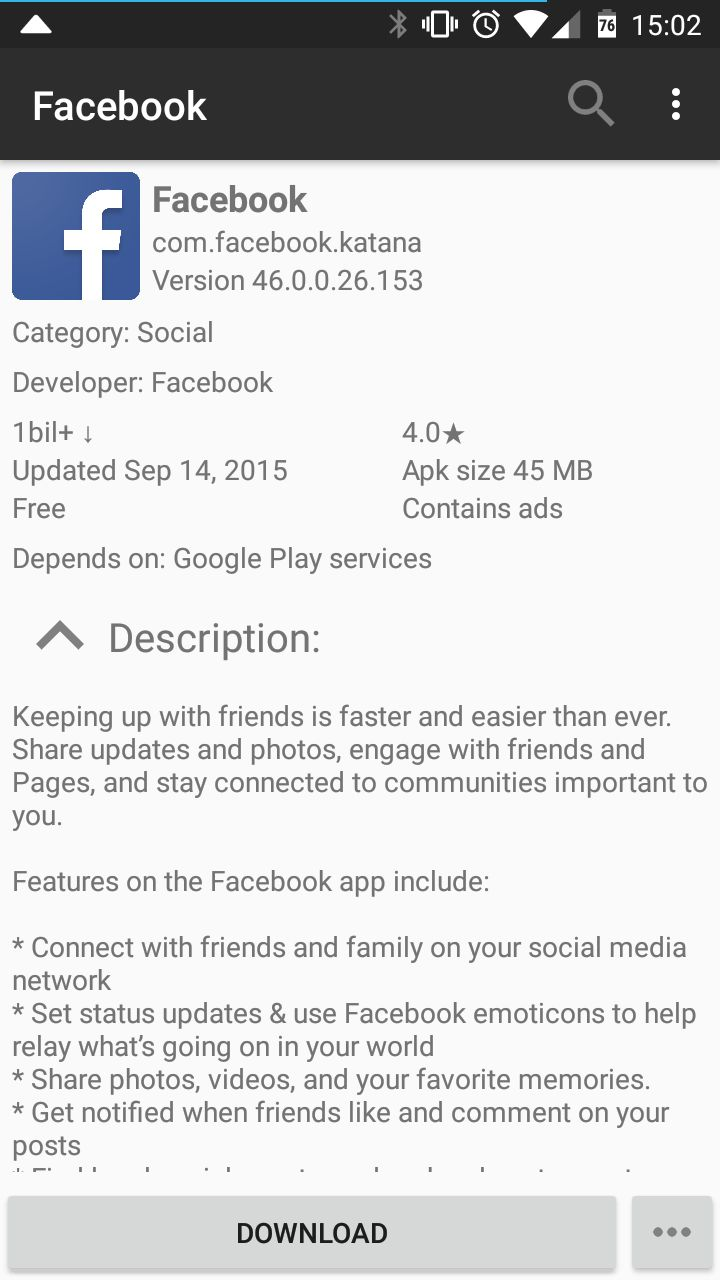
That's not how version checking works.
Thanks for the clarification!
anonimou0
on 7 Jul 2017
Is there anything I could do to help to find whats going wrong?
Hard to say, unfortunately. The compatibility checks are on google's side. You could try logging in with a different account.
Is logcat, in this case, useless?
Probably. Still, if you can, please send me a bug report. You can do it by tapping on the developer's email on the About page inside Yalp Store. Your logcat and device info will be automatically attached to the letter.
yeriomin
on 7 Jul 2017
Is this version (46) the installed version? If yes, the case may be that Yalp is not detecting the version available in Store. When it happens with me, this makes it detect the version: logout, close and reopen app, make a login.
[I still haven't tried with 0.19]
 Rikk
on 11 Jul 2017
Rikk
on 11 Jul 2017
The version is the one available for download through Yalp store.
I've checked on 3 different devices and all of them shows the same version. Even having some version installed or not will show the same.
I'm using the default Yalp Store credentials. I didn't try using one of my own. Might try later.
anonimou0
on 11 Jul 2017
Seems solved on version 0.19!
Thanks! Fantastic job!
anonimou0
on 17 Jul 2017
@anonimou0 where did you get 0.19 apk from?
Rikk
on 17 Jul 2017
@anonimou0 where did you get 0.19 apk from?
@Rikk , from F-droid
anonimou0
on 17 Jul 2017
 nagayev
on 17 Jul 2017
nagayev
on 17 Jul 2017
On my device (kltechnduo, Lineage OS 14.1), the latest update 59.0 for Firefox isn't shown. The one shown in Yalp Store is 58.0.2. The logs were sent by email. I wonder whether this is an issue of Yalp or a result of Google's compatibility checks.
 Iey4iej3
on 16 Mar 2018
Iey4iej3
on 16 Mar 2018
@FrankEular Is it showing for the same Google account on Play Store? Otherwise, it is probably a staged rollout or Mozilla is not pushing it. It seems Firefox 59.0.1 will come very soon.
Rikk
on 16 Mar 2018
@Rikk I didn't try my Google account. Given that Firefox 59.0.1 has already come and been shown in Yalp Store, now I don't know how to test it, but I think that Mozilla has pushed it for the following reasons:
- In Play Store, I saw that Firefox was updated on the 13th Mar, while on Yalp, it was shown updated on the 7th Feb;
- On the 13th Mar (or 14th Mar), I already saw comments about Firefox 59 on Play Store (it was shown on Yalp);
- Firefox 59 is shown in apkmirror: https://www.apkmirror.com/apk/mozilla/firefox/firefox-59-0-release/. I don't know whether apkmirror is an (unofficial) snapshot of Google Play.
Iey4iej3
on 18 Mar 2018
@FrankEular Exactly, when you see a newer version on Google Play and a different version for the account you are using it means the new version is rolling out as "staged rollout"; search on Google for details.
If you accept a tip about Mozilla, since Netscape era they publish all Firefox builds on their site, for mobile use this link: https://ftp.mozilla.org/pub/mobile/releases/
Rikk
on 18 Mar 2018
@Rikk Thank you for this info. I didn't know staged rollout before.
Iey4iej3
on 18 Mar 2018
@FrankEular Added this to FAQ, thanks @Rikk
yeriomin
on 22 Mar 2018
Related issues
 spok9
·
5Comments
spok9
·
5Comments
 faissaloo
·
4Comments
faissaloo
·
4Comments
 syl3nt
·
4Comments
Rikk
·
4Comments
syl3nt
·
4Comments
Rikk
·
4Comments
 ctrl-q
·
4Comments
ctrl-q
·
4Comments