Yakyak: Google Couldn't sign you in Yakyak
The project run correctly but when i tried to sign in show this problem:
You are trying to sign in from a browser or app that doesn't allow us to keep your account secure.
Try using a different browser.

 HeribertoKubuntu
All 38 comments
https://support.google.com/accounts/answer/6010255?hl=en
You'll want to enable less secure apps logging in. It'll work just fine then.
 fortepc
on 30 Nov 2019
fortepc
on 30 Nov 2019
Is it possible Google changed something recently? Even when enabling less secure apps, it's not working.
 pcloadletter75
on 3 Dec 2019
pcloadletter75
on 3 Dec 2019
Been reading around the internet, and apparently this is a recent change that Google has implemented to block embedded browsers:
https://security.googleblog.com/2019/04/better-protection-against-man-in-middle.html
pcloadletter75
on 3 Dec 2019
Any work around for this yet?
 SimplyNoah
on 5 Dec 2019
SimplyNoah
on 5 Dec 2019
https://github.com/yakyak/yakyak/issues/1087#issuecomment-559993748
https://support.google.com/accounts/answer/6010255?hl=en
You'll want to enable less secure apps logging in. It'll work just fine then.
This doesn't work if your account has 2-Step Verification:
This setting is not available for accounts with 2-Step Verification enabled. Such accounts require an application-specific password for less secure apps access. Learn More
 courtney-lang
on 5 Dec 2019
courtney-lang
on 5 Dec 2019
https://support.google.com/accounts/answer/6010255?hl=en
You'll want to enable less secure apps logging in. It'll work just fine then.This doesn't work if your account has 2-Step Verification:
This setting is not available for accounts with 2-Step Verification enabled. Such accounts require an application-specific password for less secure apps access. Learn More
I have enabled less secure apps and do not have 2FA, and it does not work just fine.
pcloadletter75
on 5 Dec 2019
I have hit the same problem, anyone who resolved this issue?
 jongse-park
on 6 Dec 2019
jongse-park
on 6 Dec 2019
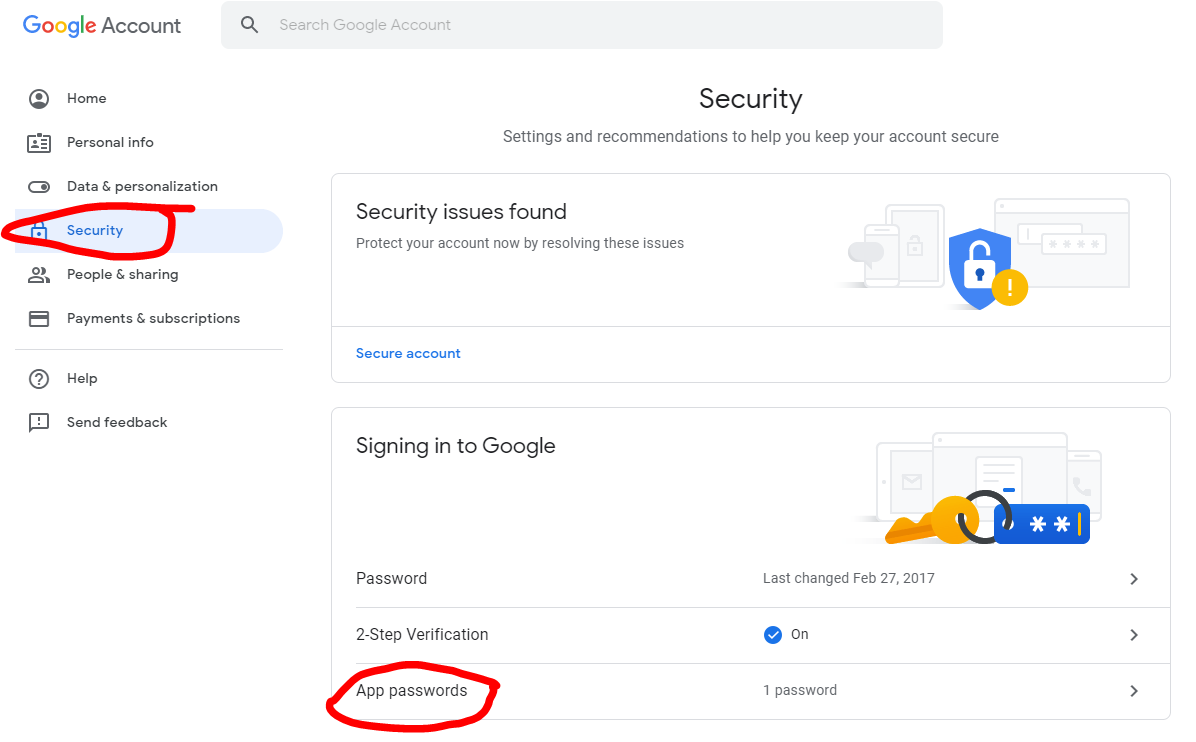
yMine worked after getting the above message. I just closed and reopened Yakyak. But in case it still doesn't work for you, go to accounts.google.com and create an App password. Save it in your password safe of choice, I don't think you can show that password again. It would need to be regenerated if you lose that password.
 cron410
on 6 Dec 2019
cron410
on 6 Dec 2019
App password didn't work for me, either. :(
courtney-lang
on 6 Dec 2019
Ditto. I actually tried an app password before commenting and got the same message. I will try a few more things today.
SimplyNoah
on 6 Dec 2019

SimplyNoah
on 6 Dec 2019
Anyone able to find a workaround?
 esoxjem
on 9 Dec 2019
esoxjem
on 9 Dec 2019
I'm experiencing the same issue. Linux Mint 19.2
I've followed all the steps in previous posts and have not had any luck.
 obiwandanobi
on 9 Dec 2019
obiwandanobi
on 9 Dec 2019
Experiencing this issue as well, App Passwords, Allowing Less Secure Apps, etc. did not help.
 srolandmarshall
on 10 Dec 2019
srolandmarshall
on 10 Dec 2019
Does YakYak use OAuth 2? I'm wondering if this is the issue.
srolandmarshall
on 11 Dec 2019
If you update the user agent it works again. Google Music Desktop Player also ran into this
 Stoom
on 12 Dec 2019
Stoom
on 12 Dec 2019
If you update the user agent it works again. Google Music Desktop Player also ran into this
Is that a coding thing, or can I do that somehow as an end user?
pcloadletter75
on 12 Dec 2019
I may have also deleted the cookies.json file in AppData like #831
cron410
on 12 Dec 2019
Has anyone had any luck logging in? I tried clearing my cookies.json. I am not sure how to update the user agent like @Stoom suggested...
This seems to be how GMDP updated their UserAgent. https://github.com/MarshallOfSound/Google-Play-Music-Desktop-Player-UNOFFICIAL-/commit/3f36c34249ed5b768be52b6b228236f55bede63e
Thanks!
 ryantiger658
on 12 Dec 2019
ryantiger658
on 12 Dec 2019
Wicked hack, but it did work for me.
Replace the /Applications/YakYak.app/Contents/Resources/app/login.js (mac location, probably somewhere in appdata on windows, unsure about linux) file with the contents found here https://pastebin.com/raw/xk0XHpHr
All it does is add an options object with the hacked user agent to the mainWindow.loadURL call.
 Jhall1990
on 12 Dec 2019
Jhall1990
on 12 Dec 2019
@Jhall1990 this is dumb, but could you post that into the issue or into a github gist? My corporate network blocks pastebin. -_-
ryantiger658
on 12 Dec 2019
@ryantiger658 Haha no problem
Jhall1990
on 12 Dec 2019
Works for me on Ubuntu 18.04
ryantiger658
on 12 Dec 2019
Works (Arch and Windows 10)!
 ExploitGF
on 13 Dec 2019
ExploitGF
on 13 Dec 2019
Wicked hack, but it did work for me.
Replace the /Applications/YakYak.app/Contents/Resources/app/login.js (mac location, probably somewhere in appdata on windows, unsure about linux) file with the contents found here https://pastebin.com/raw/xk0XHpHr
All it does is add an options object with the hacked user agent to the mainWindow.loadURL call.
Success! Thank you!
pcloadletter75
on 13 Dec 2019
Wicked hack, but it did work for me.
Replace the /Applications/YakYak.app/Contents/Resources/app/login.js (mac location, probably somewhere in appdata on windows, unsure about linux) file with the contents found here https://pastebin.com/raw/xk0XHpHr
All it does is add an options object with the hacked user agent to the mainWindow.loadURL call.
Works for me on Linux Mint 19.2. Thanks!
Login.js is located at /opt/yakyak/resources/app on Mint just in case anyone were to wonder.
obiwandanobi
on 16 Dec 2019
Is it insane to send up a PR for this? I am sure others will be thankful.
srolandmarshall
on 18 Dec 2019
Works on Linux Manjaro (Arch).
Not sure how the maintainers feel about it but it would be nice if someone created a PR for this fix.
 nickkeyzer
on 19 Dec 2019
nickkeyzer
on 19 Dec 2019
I assume there is a proper way to fix this (I'm not sure what that might be however) with that in mind I won't be creating a PR for it, but someone else is welcome to if they want.
Jhall1990
on 19 Dec 2019
Wicked hack, but it did work for me.
Replace the /Applications/YakYak.app/Contents/Resources/app/login.js (mac location, probably somewhere in appdata on windows, unsure about linux) file with the contents found here https://pastebin.com/raw/xk0XHpHr
All it does is add an options object with the hacked user agent to the mainWindow.loadURL call.
I tried replacing login.js with yours but now I get this error: "The browser you're using doesn't support JavaScript, or has JavaScript turned off"
I'm on macos catalina.
 omikun
on 21 Dec 2019
omikun
on 21 Dec 2019
Works for me on Ubuntu 18.04
Where i put the file on ubuntu? .config/yakyak/ dosnt have Resources directory?
 survivor303
on 29 Dec 2019
survivor303
on 29 Dec 2019
Works for me on Ubuntu 18.04
Where i put the file on ubuntu? .config/yakyak/ dosnt have Resources directory?
@survivor303 , should be in the same place as Linux Mint.
/opt/yakyak/resources/app
Works here on Mint 19.3. Thanks for the work around.
 alinuxfan
on 31 Dec 2019
alinuxfan
on 31 Dec 2019
I just had a rarely used computer ask me to sign in for YakYak and it
worked. Since i have 2factor auth set up, I for sure do NOT have "less
secure app sign-in" enabled. The two features are not compatible.
On Thu, Dec 12, 2019, 11:41 AM Ryan Bolyard notifications@github.com
wrote:
Has anyone had any luck logging in? I tried clearing my cookies.json. I am
not sure how to update the user agent like @Stoom
https://github.com/Stoom suggested...Thanks!
—
You are receiving this because you commented.
Reply to this email directly, view it on GitHub
https://github.com/yakyak/yakyak/issues/1087?email_source=notifications&email_token=AAXQVE3QPWD22VOGPI2AQRLQYJSS5A5CNFSM4JSPCUW2YY3PNVWWK3TUL52HS4DFVREXG43VMVBW63LNMVXHJKTDN5WW2ZLOORPWSZGOEGXIODA#issuecomment-565085964,
or unsubscribe
https://github.com/notifications/unsubscribe-auth/AAXQVE5IYTMXBDY6O6QRNYDQYJSS5ANCNFSM4JSPCUWQ
.
cron410
on 31 Dec 2019
Thank you @Jhall1990 for the fix, I've created PR #1092 with your idea. You're awesome!
Maintainers @averissimo or @maxkueng, thank you so much for Yakyak and all your hard work! Please accept the PR or let me know what edits are required.
 signedbit
on 2 Jan 2020
signedbit
on 2 Jan 2020
I am still getting this issue on the current version - fixes above not longer seem valid.
 fillipbrown
on 16 Jan 2020
fillipbrown
on 16 Jan 2020
We're going back to the dark IE days.
 berarma
on 20 Jan 2020
berarma
on 20 Jan 2020
Version on v1.5.4-beta-rolling should have this problem fixed at the root.
The underlying "browser" was updated. Thanks for the fix and the pull request.
 averissimo
on 26 Jan 2020
averissimo
on 26 Jan 2020
Ideally I would wait until users give some feedback on the beta-rolling to release it officially. See this comment
averissimo
on 26 Jan 2020
Related issues
 Feichtmeier
·
4Comments
Feichtmeier
·
4Comments
 ghost
·
3Comments
ghost
·
3Comments
 naher94
·
6Comments
naher94
·
6Comments
 stacksjb
·
6Comments
stacksjb
·
6Comments
 brian163
·
4Comments
brian163
·
4Comments
Most helpful comment
Wicked hack, but it did work for me.
Replace the /Applications/YakYak.app/Contents/Resources/app/login.js (mac location, probably somewhere in appdata on windows, unsure about linux) file with the contents found here https://pastebin.com/raw/xk0XHpHr
All it does is add an options object with the hacked user agent to the mainWindow.loadURL call.