Yabai: Smart warp/swap for window drag actions
Discussion / Feature request
Currently, dragging window A onto window B (1) swaps their position when they are on the same display, and (2) warps window A onto window B when are on different displays. (3) Dragging window A onto an empty desktop on another display moves window A to the other display.
This feature request aims to unify (1) and (2).
To do this, separate window B into 5 zones: A center rectangle, and four trapezoids by drawing a line from the rectangles corners to the window corners. See the mockup below.
Dragging onto the center rectangle should swap the windows, and dragging onto any of the trapezoids should warp onto the window in that direction.
Obviously some warps are swaps already, and warps that are no-ops (e.g. warp east from the eastward window that is the windows direct child) should be swaps instead.
The edges of the center rectangle should be at 25% and 75% of the total width and height of the window respectively.
An alternative design would be to have the trapezoids have a fixed width/height of maybe 50px, but at most 25% of the total window width/height.

Math to check for the positions is quite simple. Pseudocode:
```python
check if p1 and p2 are on the same side of the line drawn from a to b
function same_side(p1, p2, a, b):
return dot_product(
cross_product(b - a, p1 - a),
cross_product(b - a, p2 - a)) >= 0
check if p is in the triangle with the corners a, b and c
function point_in_triangle(p, a, b, c):
return (same_side(p, a, b, c)
AND same_side(p, b, a, c)
AND same_side(p, c, a, b))
check if p is in the center 50% of the frame
function point_in_inner_rectangle(p, frame):
return (p.x > frame.x + 0.25 * frame.w
AND p.x < frame.x + 0.75 * frame.w
AND p.y < frame.y + 0.25 * frame.h
AND p.y < frame.y + 0.75 * frame.h)
check if p is in the top triangle, but not in the inner rectangle
function is_in_top_trapezoid(p, frame):
a.x, a.y = frame.x, frame.y
b.x, b.y = frame.x + frame.w, frame.y
c.x, c.y = frame.x + 0.5 * frame.w, frame.y + 0.5 * frame.y
return (NOT point_in_inner_rectangle(p, frame)
AND point_in_triangle(p, a, b, c))
 dominiklohmann
All 8 comments
Yeah, as a person who exclusively uses mouse to control the tiling windows, warping will be very, very helpful for my workflow.
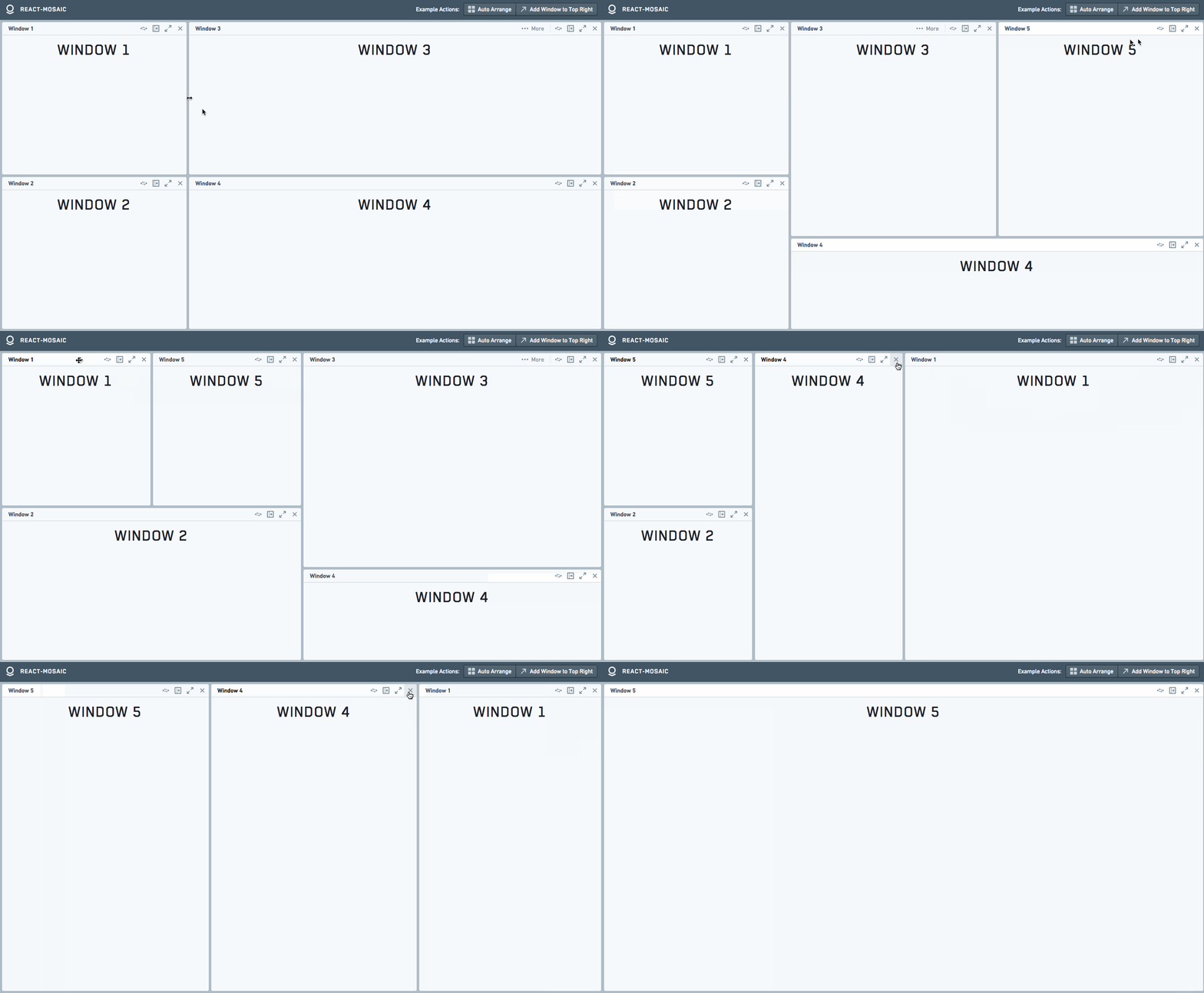
I was playing with react-mosaic the other day and it looks like this might be some inspiration?̊̈
 pcr910303
on 17 Jul 2019
pcr910303
on 17 Jul 2019
I was playing with react-mosaic the other day and it looks like this might be some inspiration?̊̈
This certainly looks nice. Only does warp, no swap like I suggested, and additionally does warp at outer edges of the space. Really nice example to play with.
I also like the overlay. A visual indicator like this might be nice to have.
dominiklohmann
on 17 Jul 2019
Implemented on master, although there is no visual feedback as to which action is performed.
The center 25% -> 75% region (both width and height) will trigger a swap operation.
Any other section will be a warp in the appropriate direction.
I'll likely do some modifications to check whether the warp should actually be a swap etc before this goes public in a release. done.
 koekeishiya
on 11 Oct 2019
koekeishiya
on 11 Oct 2019
This is working amazingly well so far.
One small thing I've noticed:
If I have two windows left/right of each other, dragging one onto the top/bottom trapezoid of the other window should warp instead of swapping the windows position.
dominiklohmann
on 11 Oct 2019
Fixed last quirks on master.
koekeishiya
on 11 Oct 2019
I've wondered whether the same rules should apply for drags across displays. Currently that's always a warp.
dominiklohmann
on 12 Oct 2019
It should follow the same rules across displays. I'll do a test and fix it if not, when I have time.
koekeishiya
on 15 Oct 2019
So the reason that it can only warp when movement happens across displays, is that I am stupid. Will fix later today, hopefully.
Edit: Fixed on latest master.
koekeishiya
on 16 Oct 2019
Related issues
 danijar
·
4Comments
danijar
·
4Comments
 zoenglinghou
·
3Comments
zoenglinghou
·
3Comments
 mattsawyer77
·
4Comments
mattsawyer77
·
4Comments
 eraserhd
·
4Comments
eraserhd
·
4Comments
 brorbw
·
4Comments
brorbw
·
4Comments
Most helpful comment
This certainly looks nice. Only does warp, no swap like I suggested, and additionally does warp at outer edges of the space. Really nice example to play with.
I also like the overlay. A visual indicator like this might be nice to have.