Yabai: FAQ: System Integrity Protection
If SIP has to remain off while running yabai, that may be a non-starter for many potential users...
 IronhandedLayman
All 31 comments
If you are running on macOS High Sierra 10.13.6 you can reenable SIP after the scripting addition has been installed. If you are running on macOS Mojave, SIP will have to remain (partially) disabled. There is simply no way to achieve more sophisticated control on macOS without doing code injection.
This software is mainly developed for my own usage. By that I mean that I evaluate these risks based on how I use my mac and whether or not these benefits outweigh the potential security risk that could come from running with rootless disabled - Which is why I also encourage anyone looking at this software to do their own assessment before giving it a try.
I do understand that not everyone is willing to disable SIP, or even have the capability to do so (work machines etc). However, what I've learned in the past years while making window managers for macOS is that I cannot please everyone, and so this time I decided to simply do what I want with little regard to other people. That is not to say that I'm not trying to create a good user experience, but rather it will be tailored for specific kinds of people. This will probably limit the scope of users, and I'm fine with that.
The functionality that uses the scripting addition, and thus require SIP to be (partially) disabled are as follows:
- instant space switch
- create new space
- destroy space
- move space (and its windows) to other display
- rearrange space on current display
- removing window shadows
- window transparency
- topmost windows / controlling window layers
- sticky windows (make any window appear on all spaces)
- move window by clicking anywhere in its frame
- toggle picture-in-picture for any given window
- border for focused and inactive windows
If someone does not really care about the above functionality, and only want the tiling features, they are free to create a fork that can run with SIP enabled, and I'll be happy to provide them with information to lessen the work necessary to do so.
 koekeishiya
on 1 Jun 2019
koekeishiya
on 1 Jun 2019
I may be interested in maintaining a fork that doesn't require the scripting addition (unfortunately I can't disable SIP on some setups). I think I could live without most of those features, but what would be main drawback of using the old method for focusing a window, instead of the SA?
 choco
on 11 Jun 2019
choco
on 11 Jun 2019
but what would be main drawback of using the old method for focusing a window, instead of the SA?
I don't remember the exact steps to reproduce at this time, but there was/is this issue in chunkwm where when you try to focus a window of an application on one display, while the same application has another window visible on a different display, macOS does not actually focus the window you want.
In yabai this issue has been fixed, by leveraging the window focus mechanism implemented through the Dock, rather than using the accessibility API - which is what a non-SA yabai version would have to sue as well. I've already added code for this, simply toggle the ifdef in window_manager_focus_window_with_raise
In _release v1.0.6_ (and on the _master branch_) this has been fixed in a way that does not rely on the scripting-addition to work.
koekeishiya
on 11 Jun 2019
EDIT: See my first comment in this issue or the following wiki page: https://github.com/koekeishiya/yabai/wiki/Disabling-System-Integrity-Protection
koekeishiya
on 8 Jul 2019
For what it's worth, it's not necessary to disable SIP completely.
- On 10.14+:
csrutil enable --without debug --without fs(disable SIP for debug and filesystem) - On 10.13:
csrutil enable --without debug(disable SIP for debug)
 dominiklohmann
on 12 Jul 2019
dominiklohmann
on 12 Jul 2019
Hey @koekeishiya do you think we can edit /System/Library/Sandbox/rootless.conf with the specific exclusions needed (_Docker.app_ so far).
Here is more info about this.
 qgadrian
on 11 Sep 2019
qgadrian
on 11 Sep 2019
@qgadrian I've tried that one before I found out about the --without flag for csrutil enable. Some notes:
rootless.confshouldn't be touched by users as it gets overridden during software updates- You would still need to disable SIP for filesystem to change
rootless.conf, although adding/Library/ScriptingAdditionsto the file would let you re-enable SIP for filesystem afterwards - You would still need to disable SIP for debug to be able to load the scripting addition
- Starting with 10.15
/Systemis on a readonly partition, so none of the above matters anyways, as this adds yet another barrier (namelysudo mount -uw /; killall Finder)
dominiklohmann
on 11 Sep 2019
If you are running on macOS High Sierra 10.13.6 you can reenable SIP after the scripting addition has been installed. If you are running on macOS Mojave, SIP will have to remain disabled.
Could we add this to the README for clarity? I believe it's a worthwhile point to state up front—I'll submit a PR if you agree.
 kdodia
on 21 Sep 2019
kdodia
on 21 Sep 2019
Sorry if there is a better place for this as it's really a question not an issue.
Does --space work without SIP? And following that does --space work for split_ratio and auto_balance?
Was trying to configure split ratios at the space level and it doesn't seem to work, unsure if this is expected without SIP.
yabairc
yabai -m config split_ratio 0.50
yabai -m config auto_balance on
yabai -m config --space 3 split_ratio 0.75
yabai -m config --space 3 auto_balance off
 charlesdurham
on 3 Dec 2019
charlesdurham
on 3 Dec 2019
Can we have a section on What all works / doesn't work without disabling SIP.
I am also seeing an issue in this.
I am able to see yabai working when i launch in terminal like yabai &
But brew service is not working. Is this also due to not disabling SIP?
 irfn
on 16 Dec 2019
irfn
on 16 Dec 2019
@irfn
See my comment above, or this section of the wiki: https://github.com/koekeishiya/yabai/wiki/Disabling-System-Integrity-Protection
Brew services has nothing to do with disabling SIP or not.
@charlesdurham
Not all settings are available for override per space. There are global settings and space settings, which you can see by their respective section here: https://github.com/koekeishiya/yabai/blob/master/doc/yabai.asciidoc#config
koekeishiya
on 17 Dec 2019
@koekeishiya Thanks for the info.
You misunderstand my comment on brew service.
When i run yabai & I can see tiling working. however when i end the process and instead start it via brew services start yabai it doesnt work. The process is crashing.
irfn
on 18 Dec 2019
Looks like my issue was something to do with permissions. i did sudo rm -rf /usr/local/var/log/yabai
After this the service started fine and recreated the folder. Perhaps some older installation had different permissions.
irfn
on 19 Dec 2019
Switching from Manjaro to macOS and I cannot live without a tiling window manager. By comparing yabai and amethyst, yabai seems to meet my taste and I cannot wait to give it a shot! I noticed this SIP problem and I become a little hesitant.
Do you guys meet some security issues since you started to use yabai?
@koekeishiya Thank you for your efforts to develop yabai. Above you said that:
I mean that I evaluate these risks based on how I use my mac
Do you also use your mac for everything daily use? Actually I am kinda new to macOS and I have no idea how risky to disable SIP if I just use my mac for coding, entertaining and online shopping. Any ideas and suggestions?
Thank you very much!!!!
 yanzhang0219
on 9 Feb 2020
yanzhang0219
on 9 Feb 2020
@yanzhang0219
In short, what SIP does - from the yabai wiki:
System Integrity Protection protects some files and directories from being modified — even from the root user.
I don't use my mbp as frequently as I used to, but there is nothing that I particularly avoid doing on it either. Personally, I think that SIP is very much overrated for users that know what they are doing and don't download and run random things off the internet.
From my experience, having SIP enabled will not prevent e.g code injection into non-system processes. It does prevent loading unsigned kernel extensions and what not, so I'm not trying to say that it isn't useful - but it only really prevents issues that would be caused by someone gaining root access on your system. For the most part a cautious user won't have issues with this..
Now there is always the possibility that some software running on your machine could be vulnerable to sandbox escapes and privilege escalation when combined, and SIP would be useful to minimize potential damage in case someone where to exploit that.
koekeishiya
on 12 Feb 2020
@koekeishiya Thank you so much for this explanation. Really helpful.
yanzhang0219
on 12 Feb 2020
Does someone currently maintain a no-SIP fork? CC @choco
 brandonkal
on 17 Feb 2020
brandonkal
on 17 Feb 2020
You can already use yabai without disabling SIP and it works pretty well. The only changes I made in my version are:
- change notification when there's no SIMBL bundle to a debug log
- change border level to floating
choco
on 17 Feb 2020
Thank you. I've got yabai and skhd installed and the brew services running. I'm not really sure where to go from there. It would seem I would need a config file but the example one provided with skhd is for chunkc. Any pointers would be appreciated.
brandonkal
on 17 Feb 2020
@brandonkal check my dotfiles. https://github.com/irfn/dotfiles/blob/master/skhdrc & https://github.com/irfn/dotfiles/blob/master/yabairc
I have not disabled SIP.
irfn
on 17 Feb 2020
- instant space switch
For those who want to keep the SIP disabled and want to speed-up the space switch, they can check the "reduce motion" settings in the System Prefs/Accessibility/Panel:
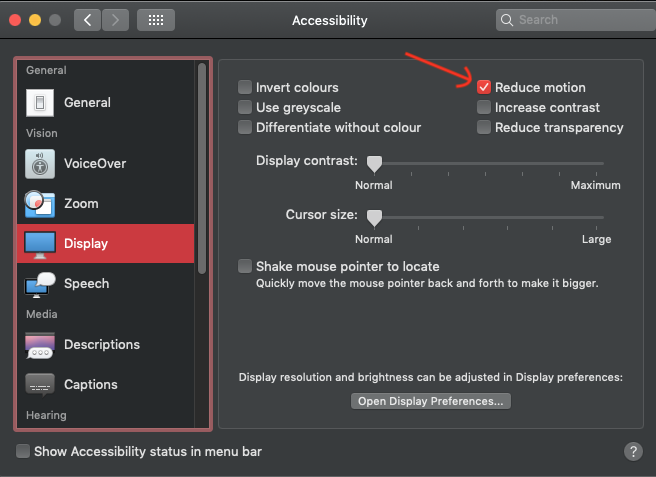
 JonathanHuot
on 21 Apr 2020
JonathanHuot
on 21 Apr 2020
For what it's worth, it's not necessary to disable SIP completely.
- On 10.14+:
csrutil enable --without debug --without fs(disable SIP for debug and filesystem)- On 10.13:
csrutil enable --without debug(disable SIP for debug)
Is that true for 10.15 as well? Thanks!
 emninger
on 10 Jun 2020
emninger
on 10 Jun 2020
Is that true for 10.15 as well? Thanks!
Yes, that's why it says __10.14+__.
dominiklohmann
on 10 Jun 2020
Hi, I used the command csrutil enable --without debug --without fs on my macOS 11 Beta system and csrutil status now says:
System Integrity Protection status: unknown (Custom Configuration).

Configuration:
        Apple Internal: disabled
        Kext Signing: enabled
        Filesystem Protections: disabled
        Debugging Restrictions: disabled
        DTrace Restrictions: enabled
        NVRAM Protections: enabled
        BaseSystem Verification: enabled

This is an unsupported configuration, likely to break in the future and leave your machine in an unknown state.
I know the Wiki already states that "the warning" can be ignored, but it doesn't say exactly what warning, and I'm not usre if macOS 11 is also included in "10.14+". So I would like to ask if this is really without problems, since the warning sounds kind of serious. Thanks!
 phlind
on 15 Aug 2020
phlind
on 15 Aug 2020
For those who want to keep the SIP disabled and want to speed-up the space switch, they can check the "reduce motion" settings in the System Prefs/Accessibility/Panel:
Hi @JonathanHuot, which command do you use to switch between spaces without SIP disabled please ? 😄
yabai -m space --focus 1 do not work for me.
 YohanTz
on 31 Aug 2020
YohanTz
on 31 Aug 2020
@YohanTz yeah that's the unfortunate part of not disabling SIP, I don't think there is such a command. I use the same reduced motion config as JonathanHuot (the sliding motion was slightly nauseating otherwise) and the only workspace-switching option I'm aware of us the stock macos shortcuts to go left/right a worspace (cntrl+left/right). Coming from i3 it's annoying that this is the only option but...
 JZL
on 31 Aug 2020
JZL
on 31 Aug 2020
Thank you @JZL, I didn't know the ctrl + left/right shortcut, I came from i3 too but that's better than nothing!
Edit: I saw that solution too: https://apple.stackexchange.com/questions/347239/change-keyboard-shorcut-for-switching-desktop-workspaces
YohanTz
on 2 Sep 2020
When I had SIP enabled, I used the shortcuts as mentionned in the stackexchange link from @YohanTz .
SystemSettings
Keyboard/Mission Control/Switch to Desktop X
JonathanHuot
on 5 Sep 2020
As per the instructions in the wiki about installation and disabling of SIP i should expect Integrity Protection status: disabled. when running csrutil status, but i instead get System Integrity Protection status: unknown (Custom Configuration).
Complete output:
❯ sw_vers
ProductName:    Mac OS X
ProductVersion: 10.15.6
BuildVersion:   19G2021
❯ csrutil status
System Integrity Protection status: unknown (Custom Configuration).

Configuration:
        Apple Internal: disabled
        Kext Signing: enabled
        Filesystem Protections: disabled
        Debugging Restrictions: disabled
        DTrace Restrictions: enabled
        NVRAM Protections: enabled
        BaseSystem Verification: enabled

This is an unsupported configuration, likely to break in the future and leave your machine in an unknown state.
As someone who is new to SIP i would appreciate some clarification on this, and suggest that the wiki be updated with a bit more details on this specifically..
Given the ramifications and the all too scary unkown state i really dont want to screw this up.
1. What should the config look like, and what exactly should be disabled?
2. Why not show an entire config, as opposed to just System Integrity Protection status in the wiki?
Presuming that the config format has remained the same since 10.13
Thanks!
 hpl002
on 24 Nov 2020
hpl002
on 24 Nov 2020
You did not disable it completely, but rather did so partially. Both ways are described in the wiki, and the wiki says that the printed warning for disabling partially can be safely ignored.
I've added a paragraph noting that the status may show "unknown" if partially disabled.
dominiklohmann
on 24 Nov 2020
To someone who may concern: I have got 4 spaces, and I config skhd, so hyper + hjkl can Switch Space / Move Window in 1 command.
Step 1: In System Prefs - Keyboard shortcut, I changed Control + 1/2/3/4 to Hyper + y/u/i/o. This step is optional, you can feel free to use Control + 1/2/3/4 if you want.
Step 2: Config skhd as below
`hyper - 0x04 : osascript -e "tell application \"System Events\" to keystroke \"y\" using {command down, control down, option down, shift down}" && yabai -m window --space 1
hyper - 0x26 : osascript -e "tell application \"System Events\" to keystroke \"u\" using {command down, control down, option down, shift down}" && yabai -m window --space 2
hyper - 0x28 : osascript -e "tell application \"System Events\" to keystroke \"i\" using {command down, control down, option down, shift down}" && yabai -m window --space 3
hyper - 0x25 : osascript -e "tell application \"System Events\" to keystroke \"o\" using {command down, control down, option down, shift down}" && yabai -m window --space 4
`
At the first run, macOS will ask Automation access permission, you can select it for skhd. That's it.
 thanhtrdang
on 29 Nov 2020
thanhtrdang
on 29 Nov 2020
Related issues
 eramdam
·
3Comments
eramdam
·
3Comments
 chris-kahn
·
3Comments
chris-kahn
·
3Comments
 brentd
·
4Comments
brentd
·
4Comments
 haze
·
4Comments
haze
·
4Comments
 cmacrae
·
4Comments
cmacrae
·
4Comments
Most helpful comment
If you are running on macOS High Sierra 10.13.6 you can reenable SIP after the scripting addition has been installed. If you are running on macOS Mojave, SIP will have to remain (partially) disabled. There is simply no way to achieve more sophisticated control on macOS without doing code injection.
This software is mainly developed for my own usage. By that I mean that I evaluate these risks based on how I use my mac and whether or not these benefits outweigh the potential security risk that could come from running with rootless disabled - Which is why I also encourage anyone looking at this software to do their own assessment before giving it a try.
I do understand that not everyone is willing to disable SIP, or even have the capability to do so (work machines etc). However, what I've learned in the past years while making window managers for macOS is that I cannot please everyone, and so this time I decided to simply do what I want with little regard to other people. That is not to say that I'm not trying to create a good user experience, but rather it will be tailored for specific kinds of people. This will probably limit the scope of users, and I'm fine with that.
The functionality that uses the scripting addition, and thus require SIP to be (partially) disabled are as follows:
If someone does not really care about the above functionality, and only want the tiling features, they are free to create a fork that can run with SIP enabled, and I'll be happy to provide them with information to lessen the work necessary to do so.