Yabai: Wiki / Documentation / Tips and Tricks
This thread is to discuss everything that should be in the wiki: Docs for the community, by the community. Feel free to request stuff or just ask any question that you think should be answered in the wiki.
Anything goes in this thread.
I'll personally do my best to update the wiki to be in line with current master, but it may take a few days for me to update it to recent changes.
Original post:
I've written up some initial documentation for commands, and I've been thinking that the Wiki is a good place for it. Having some reference that's easier to edit and link to than the manpage is a nice-to-have in my opinion. Additionally, I've been thinking about using it to create some sort of FAQ for common user errors and setup questions.
 dominiklohmann
All 65 comments
Wiki should be editable now, let me know if it still does not work. It's open for everyone for the time being, but may have to restrict to collaborators only in the future - we'll see. Feel free to mess around for now :)
 koekeishiya
on 21 May 2019
koekeishiya
on 21 May 2019
Will do. So far I've written (but not yet published):
- Documentation on most (all?) configuration options
- Documentation on most (all?) commands sorted by window / space / monitor level
- A tutorial on first starting with yabai (mostly a tutorial on integrating yabai with skhd)
- A tutorial on code signing and a quick guide for running yabai from
HEAD - A section on why the scripting addition is required and why this means that System Integrity Protection needs to stay disabled
If there's anything else anyone reading this wishes for, now is the time. I plan to have this up by Sunday if no other urgent work comes up. Rest is slightly delayed because butterfly keyboards are a design failure and repairing them takes well over a week apparently.
dominiklohmann
on 23 May 2019
@dominiklohmann
The wiki looks great so far. Thanks again for all the time you put into this - it is much appreciated.
koekeishiya
on 5 Jun 2019
Thanks! I'm far from done yet, still being held back by that stupid keyboard repair aftermath (round two: the display they broke while repairing the keyboard) and the work that piled up in the meantime.
I've written up some stuff for every command with an example and a small section on rules, but I'm still unsure how to sort them. Will probably need to do a custom sidebar of some sort, because the default one is alphabetically sorted. I also have a rework for the readme linking to the relevant articles and an issue template waiting to be written.
I have also extended the update check on launch to include functionality for auto updating when the user clicks a notification, but I'm not sure whether this is portable or just happens to work on my machine. Running osascript via terminal-notifier asks me for sudo privileges using touch id and auto updates yabai for me when I click the notification. I cannot get this to work without requiring the user to click to the notification, though, which leaves me puzzled.
Do you think these things belong in the wiki as well, or should I remove them completely, or keep them in a separate section from "installing from HEAD"?
(Edit: Got autoupdate working without having to click a notification)
# The code below checks for updates asynchronously
# Do not change unless you're a shell script magician
# This requires your codesigning certificate to be named 'yabai-cert' exactly
function check_for_updates() {
set -o pipefail
installed="$(brew info koekeishiya/formulae/yabai | grep 'HEAD-' | awk '{print substr($1,length($1)-6)}')"
remote="$(git ls-remote 'https://github.com/koekeishiya/yabai.git' HEAD | awk '{print substr($1,1,7)}')"
[ ${?} -eq 0 ] && [[ "${installed}" != "${remote}" ]]
}
function install_updates() {
updatefile=$(mktemp)
cat > ${updatefile} <<- EOF
#! /usr/bin/env sh
clear
printf "\e[1mUpdating yabai. Authenticate to continue, Ctrl+C to cancel.\e[0m\n\n"
if sudo -v; then
brew services stop koekeishiya/formulae/yabai
brew reinstall koekeishiya/formulae/yabai
codesign -fs 'yabai-cert' "$(brew --prefix yabai)/bin/yabai"
sudo yabai --uninstall-sa
sudo yabai --install-sa
brew services start koekeishiya/formulae/yabai
killall Dock
fi
ps -eo pid,comm | grep -v grep | grep -i Terminal.app | tail -1 | awk '{print $1}' | xargs kill
EOF
chmod +x ${updatefile}
open -FWnb com.apple.Terminal ${updatefile}
rm -f ${updatefile}
}
(check_for_updates && install_updates) &
still being held back by that stupid keyboard repair aftermath (round two: the display they broke while repairing the keyboard) and the work that piled up in the meantime.
No worries. take all the time you need :)
I've written up some stuff for every command with an example and a small section on rules, but I'm still unsure how to sort them. Will probably need to do a custom sidebar of some sort, because the default one is alphabetically sorted. I also have a rework for the readme linking to the relevant articles and an issue template waiting to be written.
That sounds great!
Do you think these things belong in the wiki as well, or should I remove them completely, or keep them in a separate section from "installing from HEAD"?
I think this is a cool idea and I'd be fine with having it in the "installing from HEAD" section. Feel free to put it where you think it makes the most sense. It would be sort of nice to have a similar system for the bundled version as well, but I believe that requires the actual formulae to be updated through brew update, yes?
koekeishiya
on 5 Jun 2019
It would be sort of nice to have a similar system for the bundled version as well
Yes, this is possible. I should be able to do some sort of selective brew update to fetch only new yabai releases, and then brew upgrade to actually perform the update iff one is available.
Edit: the selective updating is not a thing, so I'd have to manually fetch the tag. Should still be possible, but will require more awk.
Edit 2: Tested this with chunkwm because it has more than one tag, but this should work. The key was learning about -V for sort, which is version sorting.
# get latest tag
git ls-remote --tags https://github.com/koekeishiya/chunkwm.git | sort -t '/' -k 3 -V | tail -1 | awk '{print substr($2,12)}'
# get version installed via brew
brew info --json koekeishiya/formulae/chunkwm | jq -r '.[0].versions.stable'
One thing I would love to see in the wiki is how yabai compares to chunkwm (I'm in no position to answer this).
One question I'm looking to have answered is whether or not one should migrate off chunkwm at this time.
 asselinpaul
on 20 Jun 2019
asselinpaul
on 20 Jun 2019
Noted. I agree this would be a useful chapter, that could even just be named "Comparison with other window managers" and include Amethyst and Hammerspoon as well.
In general: yes, unless you're a) heavily invested into the chunkwm plugin architecture or b) cannot disable SIP whatsoever.
dominiklohmann
on 20 Jun 2019
@dominiklohmann
Would it make sense to add a clickable badge for the changelog in the wiki, next to the version or license badge?
koekeishiya
on 23 Jun 2019
Yes, I've actually thought of this as well. There's a big update coming tonight, I've finally finished the command section and there's a slight reorganisation for installation coming as well. I will then also add a link to the changelog to the wiki. ETA is within a day.
dominiklohmann
on 23 Jun 2019
Sounds great. Thanks again for doing this!
koekeishiya
on 23 Jun 2019
Might as well ask before working on it: Would you accept a change to the README (linking to relevant sections of the wiki) and issue templates (categories: Ask a question, Propose a feature, Report a bug)? GitHub Flavored Markdown supports HTML comment blocks so you can put a lot of information in there that won't be visible in the issue post itself, but will be very visible to the person posting the issue.
Also, do you have any plans for a logo for yabai? Both a wide banner (logo+text, for readme/wiki) and a square logo (for system notifications, Alfred etc.) would be nice-to-have. Maybe it'd be a good idea to create an issue asking the community for a logo, but requiring that any logos be made available under CC0 or something like that?
dominiklohmann
on 23 Jun 2019
Would you accept a change to the README (linking to relevant sections of the wiki)
This would likely be better than the current version. Just make sure that important information that is currently in the README is not lost, I suppose.
issue templates (categories: Ask a question, Propose a feature, Report a bug)? GitHub Flavored Markdown supports HTML comment blocks so you can put a lot of information in there that won't be visible in the issue post itself, but will be very visible to the person posting the issue.
I don't have any objections to this.
Also, do you have any plans for a logo for yabai? Both a wide banner (logo+text, for readme/wiki) and a square logo (for system notifications, Alfred etc.) would be nice-to-have. Maybe it'd be a good idea to create an issue asking the community for a logo, but requiring that any logos be made available under CC0 or something like that?
I haven't actually given this a thought. I agree that a banner would be nice for the readme/wiki, but I don't immediately see what would make sense for this software.
koekeishiya
on 23 Jun 2019
I haven't actually given this a thought. I agree that a banner would be nice for the readme/wiki, but I don't immediately see what would make sense for this software.
Which is why I think you should create an issue and just sticky it, asking for ideas and logos/banners, requiring that images are appropriately licensed. Maybe someone will come along and create something nice. There's no urgency in this, but it's a nice-to-have thing for making the repo look good.
dominiklohmann
on 23 Jun 2019
Which is why I think you should create an issue and just sticky it, asking for ideas and logos/banners, requiring that images are appropriately licensed. Maybe someone will come along and create something nice. There's no urgency in this, but it's a nice-to-have thing for making the repo look good.
Done. Thanks for the suggestion.
koekeishiya
on 23 Jun 2019
@asselinpaul
One thing I would love to see in the wiki is how yabai compares to chunkwm (I'm in no position to answer this).
I've added a table that has yet to be filled with lots of information to the wiki. See https://github.com/koekeishiya/yabai/wiki#comparison-with-other-window-managers.
dominiklohmann
on 23 Jun 2019
For those that subscribe to this thread: I am now hosting a version of the autoupdate script in a gist. Updated explanations are in the wiki. The reason for this is that the script broke with multiple head branches because of an assumption I falsely made. So if you trust me and don't want to bother with patching this manually, feel free to use the hosted version instead.
YABAI_CERT=yabai-cert sh -c "$(curl -fsSL "https://git.io/update-yabai")" &
Current ideas for the wiki
- Group tips and tricks by some categories (System preferences, Working around limitations of specific applications, Configuration tips, Useful scripts)
- This includes scripts for monocle mode and custom wraparound, which are currently somewhere in this issue tracker
- Add window selectors first, last, smallest, biggest
- Organise window, space and display selectors in a table, as especially the list of window selectors got really long
- Add instructions for installing from source
- Add instructions for uninstalling to every installation instruction page
- Add section about changing the config location
- Add section about running in verbose mode
- Add section about debugging yabai, mostly so that users can print backtraces when a crash occurs
- ~Change all instances of
killall Docktoyabai --load-saand add note about 96 byte memory leak in ScriptingBridge.framework~ No longer necessary after recent changes - Some sort of query cookbook with jq
I'm not sure if I also need to mention (See below)--load-sa anywhere, considering it leaks memory and killall Dock does not.
Generally I want to use more tables. I'm very happy with how the new installation requirements table looks.
Once this is done I'll get to re-doing the README, which can be reduced in size by a fair bit.
dominiklohmann
on 9 Jul 2019
I'm not sure if I also need to mention --load-sa anywhere, considering it leaks memory and killall Dock does not.
To clarify this - when the Dock is relaunched yabai just runs --load-sa internally. The leak itself is in the scripting-bridge framework that we have to use retrieve the target for our apple event. Both ways will leak memory, although it is only 96 bytes I believe.
koekeishiya
on 9 Jul 2019
Alright, so I'll just recommend it over killing the Dock.
dominiklohmann
on 9 Jul 2019
As mentioned here https://github.com/koekeishiya/yabai/issues/129 and recommended to copy over for addition to wiki:
I wrote a simple script which changes the font-awesome battery icon depending on what the battery is currently set at (using some arbitrary cutoffs):
#!/bin/bash
# Get the current battery percentage.
BATTERY=$(pmset -g batt | grep -Eo "\d+%" | cut -d% -f1)
# set font-awesome in yabai bar to the correct battery icon.
if (($BATTERY > 84)); then
yabai -m config status_bar_power_icon_strip battery-full plug
elif (($BATTERY < 85)) && (($BATTERY > 60)); then
yabai -m config status_bar_power_icon_strip battery-three-quarters plug
elif (($BATTERY < 61)) && (($BATTERY > 39)); then
yabai -m config status_bar_power_icon_strip battery-half plug
elif (($BATTERY < 40)) && (($BATTERY > 14)); then
yabai -m config status_bar_power_icon_strip battery-quarter plug
else
yabai -m config status_bar_power_icon_strip battery-empty plug
fi
Then set to run every 5 minutes with cron or launchd.
EDIT: to get it working properly with cron I had to put the full path to yabai ie
/usr/local/bin/yabai -m config status_bar_power_icon_strip battery-full plug
etc. There's probably a better way to do this by using launchd and setting up proper PATH but I don't have time to figure it out right now!
 BanjoCam
on 14 Jul 2019
BanjoCam
on 14 Jul 2019
Put it in the wiki and got rid of the bash dependency and removed some redundancy with your else ifs.
The easier solution for running this every 5 minutes is probably to run it async from your config file.
function update_battery_loop() {
while true; do
# update the battery icon
update_battery
# wait 5 minutes
sleep 300
done
}
# run the function async
update_battery_loop &
That's awesome, thank you! It was the first bash script I've written so I really appreciate the code cleanup.
Your async option seems preferable, could add it to the wiki too? I just embedded the entire script directly in the config file inside of the update_battery_loop, makes sense to me!
Also - missing the quick jump url on the right to jump to the battery trick.
Thanks again!
BanjoCam
on 14 Jul 2019
Yeah, will update accordingly.
Also - missing the quick jump url on the right to jump to the battery trick.
I miss this so often. GitHub supports AsciiDoc format which has automatic table of contents, but limits them to the same file for whatever reason. This means I always need to do this manually. >.<
dominiklohmann
on 14 Jul 2019
I just worked on a cool script and just had to share it here:
This lets you swap your focused space with the visible space on another display.
./path/to/script <DISPLAY_SEL> will swap the focused space with the visible space on the selected display. This is super useful if you quickly wanna switch content with your secondary display. I have it set to a keybinding with recent as the display selector and use it a lot.
#! /usr/bin/env zsh
if [ "${#}" -ne 1 ]; then
>&2 echo "Usage: ${0} <DISPLAY_SEL>"
exit 1
fi
source_display_index="$(yabai -m query --displays --display | jq -r '.index')"
target_display_index="$(yabai -m query --displays --display "${1}" | jq -r '.index')"
if [ "${source_display_index}" != "${target_display_index}" ]; then
# grab the focused window's id
wid="$(yabai -m query --windows --window | jq -r '.id')"
# create a new space and grab its id
yabai -m space --create
sid="$(yabai -m query --spaces --display \
| jq -r 'map(select(."native-fullscreen" == 0))[-1].id')"
# move space to target display
yabai -m space --display "${target_display_index}"
# move previously visible space to source display
yabai -m space prev --display recent
# grab the index of the temporary space from its id and destroy it
sidx="$(yabai -m query --spaces --display \
| jq --argjson sid "${sid}" -r 'map(select(.id == $sid))[0].index')"
yabai -m space "${sidx}" --destroy
# focus the window that was focused before all of this
yabai -m window --focus "${wid}"
fi
The script cookbook is coming along nicely. Column/row layout, monocle mode, cycling window focus across visible displays, and so much more.
dominiklohmann
on 26 Jul 2019
I was missing a shortcut to toggle between bsp and float layout on all visible spaces.
Here is my version which toggles based on the value of the current space (i.e. all visible spaces will have the same layout afterwards). It also uses jq.
alt - b : if [ "$(yabai -m query --spaces --space | jq '.type')" = '"bsp"' ]; then;\
LAYOUT='float';\
else;\
LAYOUT='bsp';\
fi;\
for INDEX in $(yabai -m query --spaces | jq '.[] | select(.visible == 1) | .index'); do;\
yabai -m space $INDEX --layout $LAYOUT;\
done
 kiryph
on 2 Aug 2019
kiryph
on 2 Aug 2019
I was missing a shortcut to toggle between bsp and float layout on all visible spaces.
Here is my version which toggles based on the value of the current space (i.e. all visible spaces will have the same layout afterwards). It also uses jq.
@kiryph You can also do this with a single query: (Edit: removed: see the next two comments)
dominiklohmann
on 2 Aug 2019
@dominiklohmann Thanks for your help. But right now it does not work for both displays:
❯ yabai -m query --spaces | jq '.[] | select(.visible == 1)'
{
"id": 4,
"index": 1,
"display": 1,
"windows": [
17654,
17652,
17806,
15596
],
"type": "bsp",
"visible": 1,
"focused": 0,
"native-fullscreen": 0,
"first-window": 15596,
"last-window": 17652
}
{
"id": 15,
"index": 6,
"display": 2,
"windows": [
9326
],
"type": "bsp",
"visible": 1,
"focused": 1,
"native-fullscreen": 0,
"first-window": 9326,
"last-window": 9326
}
Running the first part of your command:
yabai -m query --spaces \
| jq -r '.[] | select(.focused == 1).type as $type
| select(.visible == 1 and .type == $type)
| [ .index, if .type == "bsp" then "float" else "bsp" end ]
| @sh'
returns:
6 'float'
Ah sorry, I ended up pasting an earlier take on this that had the issue you described because of missing brackets.
yabai -m query --spaces \
| jq -r '(.[] | select(.focused == 1).type) as $type
| .[] | select(.visible == 1 and .type == $type)
| [ .index, if .type == "bsp" then "float" else "bsp" end ]
| @sh' \
| xargs -L1 sh -c 'yabai -m space ${0} --layout ${1}' | xargs
Note: the xargs at the very end is only useful if you care about the exit code.
dominiklohmann
on 2 Aug 2019
Yes, this works now on the command line. However, when I add it as following to my ~/.skhdrc
alt - b : yabai -m query --spaces \
| jq -r '(.[] | select(.focused == 1).type) as $type
| .[] | select(.visible == 1 and .type == $type)
| [ .index, if .type == "bsp" then "float" else "bsp" end ]
| @sh' \
| xargs -L1 sh -c 'yabai -m space ${0} --layout ${1}' | xargs
It does not work by pressing alt-b. Do I have to escape differently in the file compared to the command line?
```
❯ skhd -V
skhd: successfully created pid-file..
skhd: using config '/Users/kiryph/.skhdrc'
hotkey :: #29 {
mod: 'alt'
key: 'm' (0x2e)
cmd: 'yabai -m window --swap largest'
}
hotkey :: #39 {
mod: 'alt'
key: 'b' (0x0b)
cmd: 'yabai -m query --spaces \
| jq -r '(.[] | select(.focused == 1).type) as $type '
}
41:13 expected decl, modifier or key-literal
kiryph
on 2 Aug 2019
Yeah, skhd does not support multiline strings, so you need to either end every line in \ or put the whole jq command in one line.
dominiklohmann
on 2 Aug 2019
I managed to get it working with:
alt - b : yabai -m query --spaces \
| jq -r '(.[] | select(.focused == 1).type) as $type'\
'| .[] | select(.visible == 1 and .type == $type)'\
'| [ .index, if .type == "bsp" then "float" else "bsp" end ]'\
'| @sh' \
| xargs -L1 sh -c 'yabai -m space ${0} --layout ${1}' | xargs
Unfortunately, indentation is considered as separation of strings and is not ignored for string concatenation. Placing \ inside ' ' did not work either.
Update \ between " " works:
alt - b : yabai -m query --spaces \
| jq -r "(.[] | select(.focused == 1).type) as $type\
| .[] | select(.visible == 1 and .type == $type)\
| [ .index, if .type == 'bsp' then 'float' else 'bsp' end ]\
| @sh" \
| xargs -L1 sh -c 'yabai -m space ${0} --layout ${1}' | xargs
Or just put it in a file of its own, make that executable, give it a proper name and then invoke it from skhd. That makes the script easier to re-use and debug anyways, with the additional upside of making your skhd config easier to read.
dominiklohmann
on 2 Aug 2019
For someone who wants to go through the whole wiki, start to finish, it would be helpful to have "Next Section" and "Previous Section" links at the bottom of the page, to avoid scrolling to the ToC and selecting the next section. Just a small touch that would offer some convenience to the reader. I can make a PR if you agree with this change. Sorry I forgot wikis are not in source control
Keep up the good work!
 gtsop
on 2 Aug 2019
gtsop
on 2 Aug 2019
Prev/next section links are a good idea. Will add it to the upcoming restructuring that I've been working on lately. Don't have too much time to spend on it, but I'm slowly getting everything organised in tables and the script cookbook with lots of jq goodness is coming along nicely as well. Still no ETA though, might take another week until I'm happy with how everything looks.
dominiklohmann
on 2 Aug 2019
No pressure. If I can help in any way let me know (docs, code, w/e)
gtsop
on 2 Aug 2019
Keep the ideas coming, and if you think anything needs to be explained better, post about it here (or elsewhere on this issue tracker iff relevant). The past few weeks have just been particularly busy, so I'm currently behind the features on recent master with the wiki. Good docs help create better issues—questions like #186 would not be necessary if the docs were not behind by about two weeks.
dominiklohmann
on 2 Aug 2019
In the Mission Control preferences pane in System Preferences, the setting "Automatically rearrange Spaces based on most recent use" should be enabled for commands that rely on the ordering of spaces to work reliably.
shouldn't it say disabled instead of enabled (see bold highlighting), i.e.:
In the Mission Control preferences pane in System Preferences, the setting "Automatically rearrange Spaces based on most recent use" should be disabled for commands that rely on the ordering of spaces to work reliably.
One can find this in the table that talks about Recommendations.
 1g0rb0hm
on 3 Nov 2019
1g0rb0hm
on 3 Nov 2019
I see the wiki is convenient but I am wondering why not create a repo or directoy and render a page with gh-pages. Using a git repo makes collaboration much easier with a PR workflow.
 abelsromero
on 20 Nov 2019
abelsromero
on 20 Nov 2019
I see the wiki is convenient but I am wondering why not create a repo or directoy and render a page with gh-pages. Using a git repo makes collaboration much easier with a PR workflow.
That's a work in progress. It just takes me a while (and likely will a bit more) since there's currently a lot I am working on that takes priority over yabai—mostly for personal reasons. It'll likely take at least until the end of the year until I find the time to finish working on that page.
dominiklohmann
on 20 Nov 2019
My own personal reason for not having set up a gh-pages for yabai is that the functionality has been fluctuating (not so much lately, though) and I find it tedious to personally have to edit and maintain multiple sources that really just relay the same information (in various levels of details). I've made this mistake before and so this time around I figured I'd have a simple asciidoc page (and an autogenerated man-page) that I personally make sure is always up to date with the latest master (or the associated tag if you are browsing git history).
I really do appreciate the time people spend providing other pieces of documentation, such as the current wiki, but I don't have the time to take the responsibility of making sure that information stays relevant as the software progresses.
koekeishiya
on 20 Nov 2019
My own personal reason for not having set up a _gh-pages_ for yabai is that the functionality has been fluctuating (not so much lately, though) and I find it tedious to personally have to edit and maintain multiple sources that really just relay the same information (in various levels of details). I've made this mistake before and so this time around I figured I'd have a simple asciidoc page (and an autogenerated man-page) that I personally make sure is always up to date with the latest master (or the associated tag if you are browsing git history).
I have the same philosophy and I don't see this as contradictory. Even when you can manage the wiki like a git repo collaborarion is more complex and thus makes harder to collaborate.
Having gh-pages does not mean having a full fancy website, there are examples of how to integrate the docs in the same repo so feature commits can include docs, or just docs are fully visible and accessible with normal tools so that anyone can collaborate (e.g. https://github.com/johnrengelman/shadow -> https://imperceptiblethoughts.com/shadow/, or myself build this site with is generated from asciidoc documents https://docs.everisbigcontent.com).
The problem of the wiki is that is not obvious how to send proposals and things get slowed and require a centrilized effort of one person.
Regardless you lead here, but I find that things are made harder for others with a wiki.
abelsromero
on 20 Nov 2019
btw, if you feel you don't have enough time, add a "how to contribute section" in the README & wiki and point ot the wiki from the README.
abelsromero
on 20 Nov 2019
@dominiklohmann
I restricted editing of the wiki to collaborators only for now, as several people have made edits that are wrong and I can't be bothered to monitor and revert these anymore. You should still have access though, but let me know if you experience any issues.
koekeishiya
on 13 Feb 2020
Think I might have found a typo. In the section on disabling SIP the code snippet in step three should say disable instead of enable
In the menu bar, choose Utilities, then Terminal
# If you're on macOS 10.14 and above
csrutil enable --without debug --without fs
# **or** if you're on macOS 10.13
csrutil enable --without debug
cheers!
 teesloane
on 17 Feb 2020
teesloane
on 17 Feb 2020
Think I might have found a typo. In the section on disabling SIP the code snippet in step three should say
disableinstead ofenablecheers!
This is not a typo. The listed command will disable only the parts of SIP that is necessary for yabai to function (partially disabling SIP), instead of turning all protections off.
koekeishiya
on 17 Feb 2020
🤦♂ Welp, I guess I turned off all of SIP! haha. Sorry about that, and thanks for the quick response.
teesloane
on 17 Feb 2020
This article has a nice table comparing what SIP adds compared to sticking with chunkwm.
https://webcache.googleusercontent.com/search?q=cache:eESG-Hpdqu0J:https://piratefache.ch/chunkwm-is-dead-reborn-as-yabai/+&cd=5&hl=en&ct=clnk&gl=nz
 BlueDrink9
on 1 Apr 2020
BlueDrink9
on 1 Apr 2020
Hello All,
Could we have the following snippet added to the Tips-And-Tricks page of the wiki?
### Fix native tab tiling issue
If new windows you open are converted into tabs on an existing window, and yabai creates and maintains empty space where that window would have been (See [Issue #516](https://github.com/koekeishiya/yabai/issues/516) for details of what this problem looks like), then do the following:
In System Preferences, navigate to Dock and set the dropdown "Prefer tabs when opening documents" to anything other than "Always"
 alextremblay
on 9 May 2020
alextremblay
on 9 May 2020
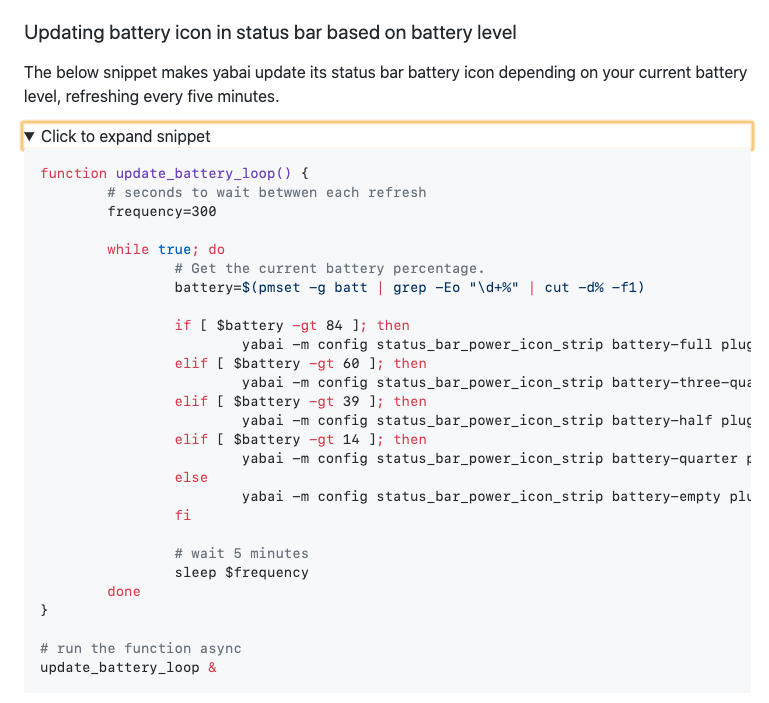
Since the status bar has been removed, does it still make sense to keep this example in the Wiki:
1g0rb0hm
on 28 May 2020
Nope. I have a few things that accumulated for the wiki (e.g., the Nix install instructions). I'll get to them sometime over the long weekend.
dominiklohmann
on 28 May 2020
After the removal of borders and the status bar I needed some other way to (1) display the current space and layout, and (2) provide some visual cue when changing modes in skhd. Below is a combination of BitBar, yabai, and skhd that achieves this without having to run some script every 2 seconds.
The key idea is to use yabais ability to register actions for events, and BitBars ability to nicely update individual plugins.
Here is what the BitBar plugin looks like displaying the Layout | Current Space - Total Spaces in the status bar:

Here is the BitBar plugin script:
!/bin/bash

# <bitbar.dependencies>bash</bitbar.dependencies>

yabai=/usr/local/bin/yabai
jq=/usr/local/bin/jq

# ---------------------------------------------------------

# font color default values
font_color=('')

# ---------------------------------------------------------

# color settings based skhd mode
is_window_mode_active=/tmp/skhd_$USER.mode.window.active
if [ -f $is_window_mode_active ] ; then
  # -- window mode
  font_color=( 'color=#227576' )
else
  # -- default mode
fi

# ---------------------------------------------------------

# retrieve all info about spaces
spaces=$($yabai -m query --spaces)
# space symbols
space_sym=(0 1 2 3 4 5 6 7 8 9)
# determine active space
space_cur=$(echo ${spaces}    | $jq '.[] | select(.visible == 1)')
# extract active space number
space_idx=$(echo ${space_cur} | $jq '.index')
# extract active space layout (remove double quotes -> extract first char -> convert lower to upper
space_lay=$(echo ${space_cur} | $jq '.type' | tr -d '\"' | cut -c 1 | tr '[:lower:]' '[:upper:]')
# determine total # of spaces
space_all=$(echo ${spaces}    | $jq '. | max_by(.index) | .index')

# ---------------------------------------------------------

# produce output for bitbar
echo "${space_lay}⎜${space_sym[$space_idx]}-${space_all} | ${font_color}"
To avoid running this periodically BitBar has the capability to refresh plugins upon request.
Adding the following to .yabairc will refresh the BitBar plugin upon space changes (assuming you name the BitBar plugin space.sh):
...
# signals
# -- update active space in menu bar
yabai -m signal --add event=space_changed \
    action="open -g 'bitbar://refreshPlugin?name=space.sh'"
....
If you use skhd with window modes you can change the colour of that text by doing something like this in .skhdrc to give some visual cue indicating a different mode being active (I am also using a different opacity setting to make it even clearer that I am in a different mode):
# -- Yabai Keyboard Shortcuts
# Example dot.skhdrc can be found at:
#  @ /usr/local/opt/yabai/share/yabai/examples/skhdrc

# -------------------------------------------------------------------
# Window Modes - [default|window]

# add an on_enter command to the default mode
:: default   : yabai -m config active_window_opacity 1.0 ;\
               yabai -m config normal_window_opacity 0.6 ;\
               rm -f /tmp/skhd_$USER.mode.window.active ; \
               open -g 'bitbar://refreshPlugin?name=space.sh'

:: window  @ : yabai -m config active_window_opacity 0.4 ;\
               yabai -m config normal_window_opacity 0.2 ;\
               touch /tmp/skhd_$USER.mode.window.active ; \
               open -g 'bitbar://refreshPlugin?name=space.sh'

# from 'default' mode, activate mode 'window' (`0x39` -> CAPS LOCK)
cmd - x       ; window
# from 'window' mode, activate mode 'default'
window < cmd - x    ; default
window < escape     ; default
window < i          ; default
That presence of the of a file will tell the BitBar plugin what mode is active (crude but works well 😄 )
Finally, we also want to refresh the plugin when we change the layout via skhd between bsp and float so we can see what is active right away. Add something like this to your .skhdrc to achieve this:
window < b : yabai -m space --layout bsp ; open -g 'bitbar://refreshPlugin?name=space.sh'
window < f : yabai -m space --layout float ; open -g 'bitbar://refreshPlugin?name=space.sh'
HTH
1g0rb0hm
on 28 May 2020
@1g0rb0hm In case you haven't seen. I did a full port of the yabai border system into https://github.com/koekeishiya/limelight
koekeishiya
on 28 May 2020
@1g0rb0hm In case you haven't seen. I did a full port of the yabai border system into https://github.com/koekeishiya/limelight
@koekeishiya: Thanks for pointing this out. Will definitely try this as borders and the capability to give them different colours as well as widths is a great way to provide visual cues for different modes. Thanks for putting in the work and porting it 👍
1g0rb0hm
on 28 May 2020
The documentation is great, but unnecessarily discouraging for new users. The 'Integrity Protection' issue is too pronounced and listed as a Caveat in the main README.md. It's much better addressed as 'Recommendation' in the Wiki.
Also the way it the Wiki describes what features need SIP to be disabled leaves an impression that these features (e.g. support for multiple displays) will not work at all. After trying it out I actually can verify that most stuff that worked for me under Amethyst work under yabai as well (monitors, spaces, etc.). What doesn't work are the extra features - which also should probably be indicated in the comparison table as well.
As ybai is really small and has no dependencies I would add an encouraging statement below this parts of the documentation to install it and try it out.
(this is just a note from a long term Spectacle & Amethyst user who is looking into yabai)
 pmilosev
on 3 Jun 2020
pmilosev
on 3 Jun 2020
The 'Integrity Protection' issue is too pronounced and listed as a Caveat in the main README.md.
This is something I did very deliberately because I don't officially support running yabai with SIP enabled. It seems to work fine for some people depending on their needs, but if I at some point come up with a way to e.g make something more efficient, I will not hesitate to make that change even if it is breaking something that used to work with SIP enabled.
As far as I know, there is no place that states multiple display/spaces won't work with SIP enabled; If so, can you link that page to me and I'll review it.
I guess my last note is simply that I don't actually try to or care for marketing this tool at all.
The original project started a long time ago and was something I made for my own use only, and I simply used github as a remote VCS backup. I made some post at reddit and it got some views and kinda blew up a bit from there, and yeah, I just kept improving the software because I knew I could do a lot better, and I also find it interesting to try to solve some of the usability issues I have with macOS. The project is open sourced because I don't see any reason why I should not share that with others who feel similar when using macOS.
I am glad that I can help other people make their system more usable, but my mindset is simply that people who believe this will be beneficial to them will give it a try, and people who don't, won't.
koekeishiya
on 4 Jun 2020
Maybe I found a typo in the wiki page :
At the mouse support section
# set modifier + left-click drag to resize window (default: move)
yabai -m config mouse_action1 move
the resize should be move ?
 scbizu
on 12 Jun 2020
scbizu
on 12 Jun 2020
Installation instructions are practically inaccessible ATM.
The quickstart section in the wiki is referencing itself. The sidebar goes back to this very section and without googling, the actual installation instructions can not be found.
Problem:
- this is not in the sidebar: https://github.com/koekeishiya/yabai/wiki/Installing-yabai-(latest-release)
- the quickstart guide is referencing itself https://github.com/koekeishiya/yabai/wiki#quickstart-guide
 FranzSkuffka
on 13 Jun 2020
FranzSkuffka
on 13 Jun 2020
The link(s) in the sidebar is there:

koekeishiya
on 13 Jun 2020
Sorry, I think I was sleep deprived :joy:. Thank you for you work! I have been using your wms since before chunkwm. 🤘
FranzSkuffka
on 14 Jun 2020
If you are running yabai on macOS 10.13.6 (High Sierra) you can and should re–enable System Integrity Protection after the installation has completed
Should users re-enable SIP after installation on 10.14+ as well?
 kvcrawford
on 15 Jun 2020
kvcrawford
on 15 Jun 2020
On 10.14+ SIP must stay disabled. In High Sierra, scripting additions stored in the /System directory tree could be loaded with SIP enabled, which is why that works, but they changed that in 10.14+.
koekeishiya
on 15 Jun 2020
But to clarify, on 10.14+ SIP only needs fs and debug disabled? I.e. running csrutil enable --without fs --without debug is all that is needed?
BlueDrink9
on 15 Jun 2020
Yeah, that is correct.
On 15 Jun 2020, at 23:40, BlueDrink9 notifications@github.com wrote:
But to clarify, on 10.14+ SIP only needs fs and debug disabled? I.e. running csrutil enable --without fs --without debug is all that is needed?
—
You are receiving this because you were mentioned.
Reply to this email directly, view it on GitHub https://github.com/koekeishiya/yabai/issues/5#issuecomment-644404813, or unsubscribe https://github.com/notifications/unsubscribe-auth/ABPDZV5RYCWEMYBZINI6GPDRW2IMLANCNFSM4HOOUJIA.
koekeishiya
on 15 Jun 2020
How should we contribute to the wiki? I found numerous little tips scattered about the web and in issues, but can't seem to find a way to edit the wiki. Specifically, I thought these snippets would be helpful for the Window Modifications section:
diff --git a/Configuration.md b/Configuration.md
index 002c13c..a4c7c35 100644
--- a/Configuration.md
+++ b/Configuration.md
@@ -137,6 +137,13 @@ yabai -m config window_shadow float
 yabai -m config window_opacity on
 yabai -m config active_window_opacity 1.0
 yabai -m config normal_window_opacity 0.9
+
+# window opacity transition duration (default: 0.2 seconds)
+# example: change opacity transition duration to 0.1 seconds
+yabai -m config window_opacity_duration 0.0
+
+# example: override opacity for an application
+yabai -m rule --add app="Chrome" opacity=1.0
 \```

 ### Status bar
 Exr0n
on 19 Aug 2020
Exr0n
on 19 Aug 2020
Related issues
 mattsawyer77
·
4Comments
mattsawyer77
·
4Comments
 zoenglinghou
·
3Comments
zoenglinghou
·
3Comments
 eramdam
·
3Comments
eramdam
·
3Comments
 imjma
·
3Comments
imjma
·
3Comments
 denisidoro
·
4Comments
denisidoro
·
4Comments
Most helpful comment
After the removal of borders and the status bar I needed some other way to (1) display the current space and layout, and (2) provide some visual cue when changing modes in skhd. Below is a combination of BitBar, yabai, and skhd that achieves this without having to run some script every 2 seconds.
The key idea is to use yabais ability to register actions for events, and BitBars ability to nicely update individual plugins.
Here is what the BitBar plugin looks like displaying the Layout | Current Space - Total Spaces in the status bar:
Here is the BitBar plugin script:
To avoid running this periodically BitBar has the capability to refresh plugins upon request.
Adding the following to
.yabaircwill refresh the BitBar plugin upon space changes (assuming you name the BitBar pluginspace.sh):If you use skhd with window modes you can change the colour of that text by doing something like this in
.skhdrcto give some visual cue indicating a different mode being active (I am also using a different opacity setting to make it even clearer that I am in a different mode):That presence of the of a file will tell the BitBar plugin what mode is active (crude but works well 😄 )
Finally, we also want to refresh the plugin when we change the layout via skhd between bsp and float so we can see what is active right away. Add something like this to your
.skhdrcto achieve this:HTH