Xterm.js: getSelection() does not return a single character selection
Relates to: #2244
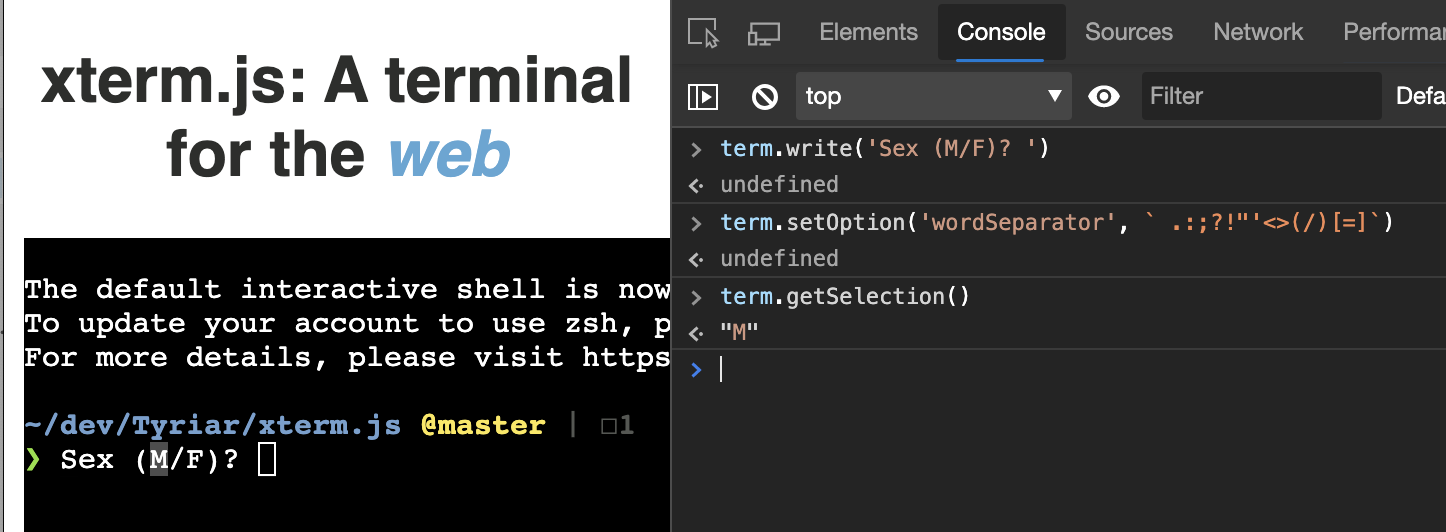
This works fine when a double-click highlights a word selection > 1 character. But if the selection only highlights a single character, getSelection() returns an empty string. Is this by design?
Details
- Browser and browser version: Chrome 78
- OS version: Linux
- xterm.js version: 4.3.0
Steps to reproduce
- ITerminalOptions.wordSeparator = ` .:;?!"'<>(/)[=]`
- term.write('Sex (M/F)? ')
- double-click the 'M'
- getSelection() returns ''
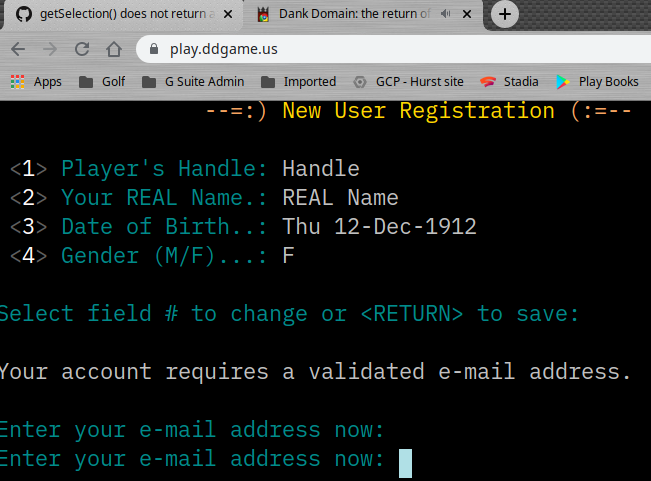
Online example: https://play.ddgame.us
 theflyingape
All 7 comments
I can't repro?
 Tyriar
on 7 Dec 2019
Tyriar
on 7 Dec 2019
Did you double-click the M? It works if you click&hold and select a single character.
Perhaps this missing info is crucial here... my getSelection() occurs within the onSelectionChange() event, i.e.,
    term.onSelectionChange(() => {
        if (carrier) {
            let word = term.getSelection()
            if (word.length > 0 && word.length < 64) {
                socket.send(word + '\x0D')
                term.clearSelection()
            }
        }
    })
- https://play.ddgame.us press RETURN to connect and double-click NEW -- works.
- double-click Handle -- works.
- click&hold to select REAL name -- works.
- type 121212 for a fake date
- now double-click M -- nothing. click&hold to select F -- works.
theflyingape
on 10 Dec 2019
@theflyingape I do see double clicking not sending sometimes, maybe the event isn't firing or something?
Tyriar
on 30 Dec 2019
I took a shot at looking into this and seems like it's related to onMouseUp in the SelectionService... https://github.com/xtermjs/xterm.js/blob/afc39106c3707532136c0818e9d3aa1dbcf176ac/src/browser/services/SelectionService.ts#L665
https://github.com/xtermjs/xterm.js/blob/afc39106c3707532136c0818e9d3aa1dbcf176ac/src/browser/services/SelectionService.ts#L670
https://github.com/xtermjs/xterm.js/blob/afc39106c3707532136c0818e9d3aa1dbcf176ac/src/browser/services/SelectionService.ts#L671
The problem is that if the length of selectionText is <= 1, but event.altKey doesn't return true, the selection gets thrown away and this._onSelectionChange.fire() doesn't get called. Is there a reason that we can't just always call this._onSelectionChange.fire(), even if event.altKey is true?
Thoughts? @Tyriar @theflyingape
 daniel-j-davis
on 11 Jun 2020
daniel-j-davis
on 11 Jun 2020
@daniel-j-davis good find! Moving this event.altKey up one line would probably fix it, do you want to do a PR?
To verify, make sure alt+click still works by moving the cursor horizontally in a prompt with input
Tyriar
on 11 Jun 2020
@Tyriar Yeah, that works too and I've verified that alt+click still works as expected.
daniel-j-davis
on 11 Jun 2020
4.7.0 works great, thanks!
theflyingape
on 11 Jun 2020
Related issues
 jerch
·
27Comments
jerch
·
27Comments
 feamsr00
·
39Comments
feamsr00
·
39Comments
 mqliang
·
41Comments
Tyriar
·
54Comments
Tyriar
·
73Comments
mqliang
·
41Comments
Tyriar
·
54Comments
Tyriar
·
73Comments
Most helpful comment
4.7.0 works great, thanks!