Xterm.js: altgr+num prints wrong character on French azerty keyboard
VS Code issue: https://github.com/microsoft/vscode/issues/82489
Using French (France) AZERTY keyboard
Expected:
- 2: é
- 7: è
- altgr+2: (nothing)
- altgr+7: (nothing)
- altgr+2, space: ~
- altgr+7, space: `
Actual:
- 2: é
- 7: è
- altgr+2: é
- altgr+7: è
- altgr+2, space: é~
- altgr+7, space: è`
This does not happen in monaco or other apps.
 Tyriar
All 33 comments
Might be related to https://github.com/xtermjs/xterm.js/issues/2151
Tyriar
on 17 Oct 2019
All keyboard event handling code is in this file:
Tyriar
on 17 Oct 2019
@Tyriar What kind of help are you looking for? (In case I would be capable of.)
 willemavjc
on 17 Oct 2019
willemavjc
on 17 Oct 2019
@willemavjc someone needs to investigate why the extra character gets printed (in Keyboard.ts) as since the monaco text editor doesn't we should be able to avoid the problem too. There may be something else on KeyboardEvent that we need to be looking at?
Tyriar
on 18 Oct 2019
I've been able to reproduce this on all dead keys that require using the AltGr key, including on the BÉPO keymap, which is a French DVORAK keyboard. There is probably a missing return or break somewhere that would tell xterm.js to stop trying to identify the key if it's a dead key. It should be noted that dead keys that do not use the AltGr key still work perfectly fine (both for AZERTY and BÉPO).
I'm unfamiliar with the TypeScript language but the exact cause may be found by debugging the Keyboard.ts file
 utybo
on 19 Oct 2019
utybo
on 19 Oct 2019
Also, I just found out that typing Ctrl+Alt and then the key works fine, as AltGr is some sort of alias for Ctrl+Alt on Windows.
To recap:
| Key sequence | Expected | Actual |
| --- | --- | --- |
| Ctrl+Alt+2 then Space | ~ | ~ |
| AltGr + 2 then Space | ~ | é~ (é appears on AltGr + 2, ~ appears on Space) |
| Ctrl+Alt+7 then Space | ` | ` |
| AltGr + 7 then Space | ` | è` (è appears on AltGr + 7, ` appears on Space) |
There's definitely something wrong with how the AltGr key is handled
utybo
on 19 Oct 2019
@utybo Well if you want to help digging into this (we cannot as we all use QWERTY derived layouts - English and German), maybe this comes handy https://w3c.github.io/uievents/tools/key-event-viewer.html. We kinda rely on the reported stuff from the events shown there, not sure yet how AltGr on AZERTY plays into that.
 jerch
on 19 Oct 2019
jerch
on 19 Oct 2019
@jerch
AltGr + 2 (1 to 6) then Space (7 to 11) which results in ~

Ctrl + Alt + 2 (1 to 6) then Space (7 to 11) which results in ~

AltGr + 7 (1 to 6) then Space (7 to 11), which results in the backtick character `

Ctrl + Alt + 7 (1 to 6) then Space (7 to 11) which results in the same character
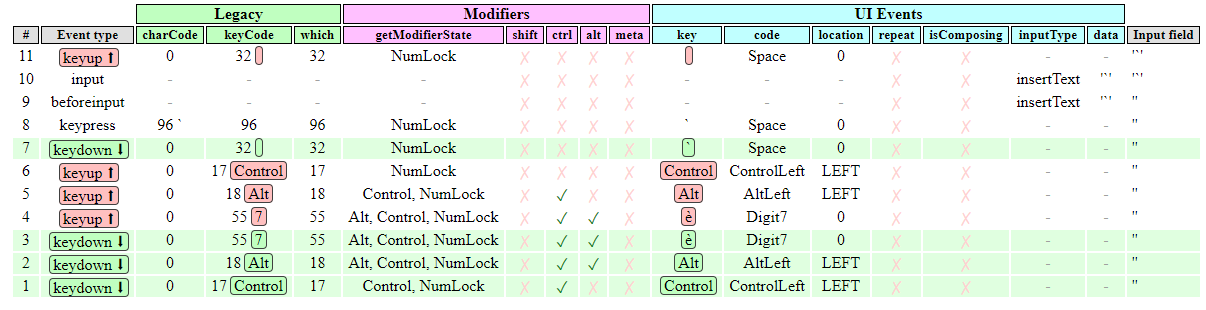
For testing purposes, I believe that the right Alt key on QWERTY keyboards acts as the AltGr key on AZERTY/BEPO keymaps, but I may be wrong
utybo
on 19 Oct 2019
@utybo So this page reports the correct values? If so the problem is prolly on our side (already thought that in the first place). Well in Keyboard.ts happens some magic and even worse, almost no comments. Its abit hard to start there somewhere without breaking something else. If you are still up to - go for it :)
jerch
on 19 Oct 2019
Strangely enough, I'm unable to replicate this using the sources. It works perfectly fine when using the local webserver that's launched with yarn. Maybe VS Code is using an older version?
utybo
on 20 Oct 2019
@Tyriar FYI, as #2151 seems only to happen in vscode.
jerch
on 20 Oct 2019
Trying this issue now on my work PC and it seems fine 😕 (using on screen keyboard)
Tyriar
on 22 Oct 2019
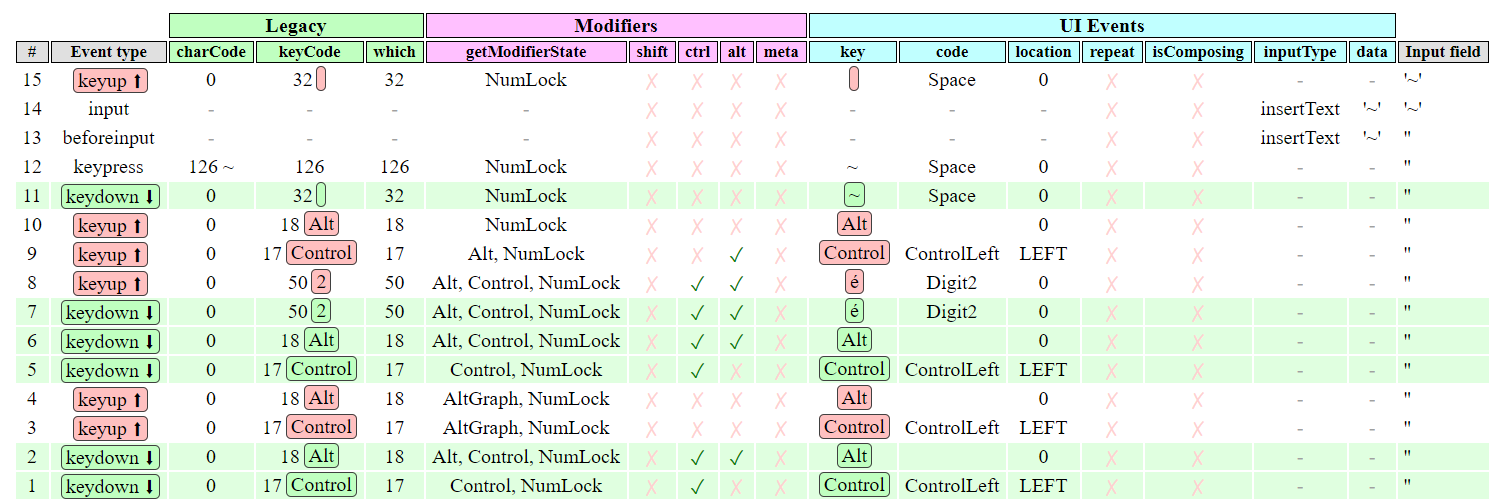
Looks like the onscreen keyboard just uses Ctrl+Alt instead of AltGraph, so the output is different than the one from the actual keyboard
utybo
on 22 Oct 2019
Also interestingly when the onscreen keyboard is up i cannot type in ~ at all using the physical keyboard, it just writes That's actually just some strange behavior caused by the onscreen keyboard. The onscreen keyboard seems to handle AltGr very differently at Windows' level.é in VS Code's terminal. There is something wrong with how AltGr is handled (I can't check if this also happens with just xterm.js right now).
utybo
on 22 Oct 2019
@utybo pretty sure I tested it at home using the on-screen keyboard and could repro though 🤔
Tyriar
on 22 Oct 2019
Even with a physical keyboard sometimes it works perfectly fine, but most of the time the bug is here. This whole issue is kind of confusing.
utybo
on 22 Oct 2019
Even with a physical keyboard sometimes it works perfectly fine, but most of the time the bug is here. This whole issue is kind of confusing.
Please try to narrow the circumstances - maybe its related to how you start vscode? Does it only happen in the terminal or does the editor show the same weird behavior? Which OS + version? Is the keyboard layout correctly set up in the OS?
jerch
on 22 Oct 2019
I honestly have no idea. Sometimes the issue just does not exist but that's fairly rare. I am able to reliably repro this on my two PCs:
- Windows 10 (10.0.18362.418) with VS Code 1.39.2, with the French (France) layout
- Windows 10 (10.0.18362.10024) with VS Code 1.39.2 and VS Code Insider 1.40.0-insider with the French (France) layout
The keyboard layout is the basic one from Windows.
utybo
on 22 Oct 2019
@jerch As stated in https://github.com/microsoft/vscode/issues/82489 it only appears in the Terminal section of VSCode editor. No issue in the Code section or anywhere else in the editor. Whatever is the underlying shell (PowerShell, git-bash, etc.), it is affected. And that same shell outside of VSCode works perfectly fine.
willemavjc
on 23 Oct 2019
@Tyriar Not sure how to approach this - it seems to be a random on/off problem. Since a computer is still a deterministic machine there is some hidden root cause imho.
@willemavjc, @utybo Can you confirm that this never happens in the xterm.js demo, only in vscode terminal?
jerch
on 24 Oct 2019
I confirm that it never happens in the xterm.js demo and only in the vs code terminal, even when trying really hard with things like alternative keymaps. @jerch
As for the "random on/off problem", I'd say the issue happens 90% of the time on my sad. Just know that you can't use the onscreen keyboard to try this (it handles AltGr differently): as far as I've tried it has to be the actual AZERTY keymap on your keyboard.
utybo
on 25 Oct 2019
Tried on home PC, it seems to happen 100% of the time on both vscode and the xterm.js demo
Tyriar
on 25 Oct 2019
Could be another issue with not using the input event? The first 2 are from pressing alt, the 3rd is 2, the 4th is space:
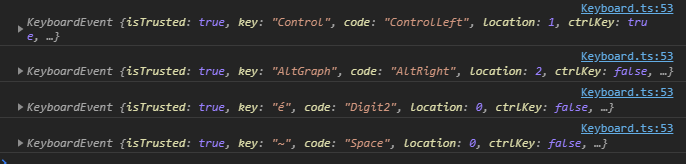
That first event seems weird but I don't think it would cause this issue.
Tyriar
on 25 Oct 2019
If key is the property xterm.js uses, then it explains as the key property of keydown when pressing AltGr + 2 is not correct in Chromium.
Compare with FF, which generates a dead key in this case
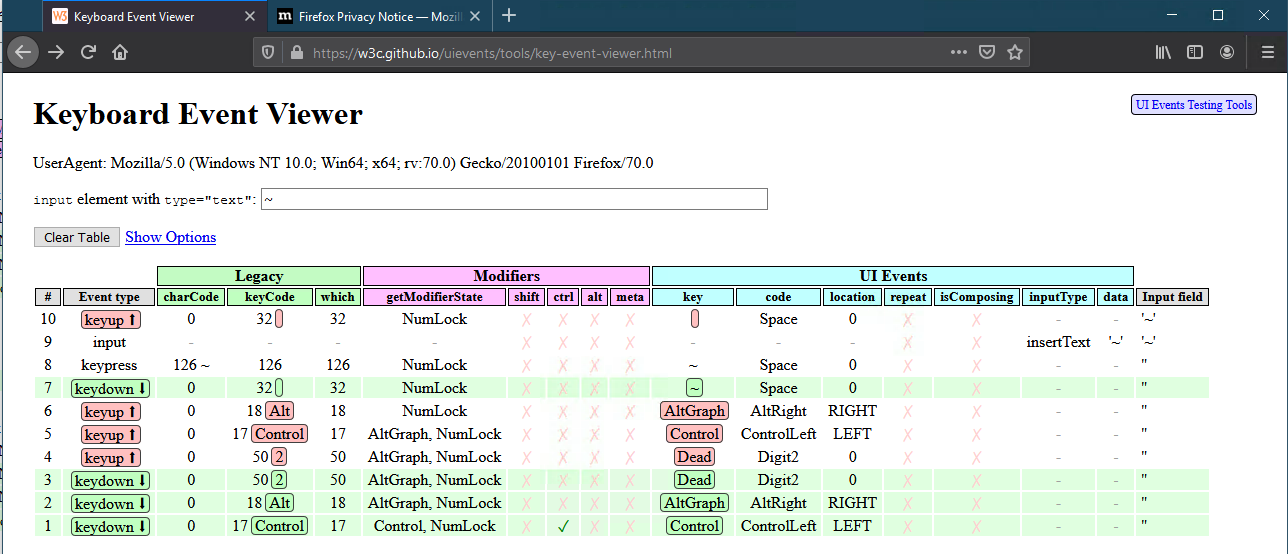
 rebornix
on 25 Oct 2019
rebornix
on 25 Oct 2019
I think we need to move to input to fix this properly, just like in https://github.com/xtermjs/xterm.js/issues/469
Tyriar
on 25 Oct 2019
Kinda summing things up:
Environment used:
- Machine: Surface Pro 6 w/ AZERTY keyboard
- OS Version: Microsoft Windows (Pro) Version 1903 (OS Build 18362.449)
- PowerShell Version: 5.1
- VSCode Version: 1.39.2
AltGraph 2 Space to obtain ~
- x86/x64 apps (Office, etc.) : Passing
- Native PowerShell : Passing
- Git bash : Passing
- VSCode Editor : Passing
- VSCode Terminal (PowerShell) : Failing
Additional test with on-screen AZERTY keyboard:
- VSCode Terminal (PowerShell) : Passing
Additional test with xterm.js demo:
- Physical keyboard: Failing
- On-screen keyboard: Passing
Using Keyboard Event Viewer website results in the same screenshots as @utybo pointed here. Tests done with Brave browser (means Chromium).
@utybo statement must be right: AltGraph in on-screen keyboard is handled as Control and Alt combination.
@Tyriar @jerch @rebornix Would not be this the easy clue in the end? Mapping AltGraph as Control plus Alt within xterm.js too?
willemavjc
on 31 Oct 2019
@willemavjc I think we've identified the cause is that we're not using input (plus Chrome might have a bug where it's not flagging the key as dead on keydown), the fix isn't super trivial as it involved switching how all input is handled which needs a lot of verification.
Tyriar
on 31 Oct 2019
@Tyriar Okay. If you need some sort of testing or such, just let me know. I'll be happy to help.
willemavjc
on 31 Oct 2019
I think our key event source code is stuck between the old paradigms (a really bad hack of keypress vs. keydown juggling, originates to times when browsers did all their very own thing) and special cases we need for proper terminal key sending.
Guess its time for a clean rewrite with better docs (doh, all those magic constants w'o any comment lol). Also not sure if input maps all needed bits or if we still need keydown shims - this gonna need serious forth and back testing. Since I cannot repro the issue at hand - any takers to get their hands dirty?
jerch
on 31 Oct 2019
I can't reproduce this anymore 🤔 Does anyone else still have this issue?
utybo
on 23 Apr 2020
I just tried on both vscode insider and xterm.js and I still have this issue.
 clemjlt
on 23 Apr 2020
clemjlt
on 23 Apr 2020
I have this problem as well. Still hoping for a fix... such a pain for foreign speakers.
 jesusredondo
on 3 Sep 2020
jesusredondo
on 3 Sep 2020
If anyone wants to tackle this, plz see my last comment in PR #2976.
jerch
on 4 Sep 2020
Related issues
 chani
·
27Comments
Tyriar
·
25Comments
chani
·
27Comments
Tyriar
·
25Comments
 vincentwoo
·
26Comments
jerch
·
27Comments
vincentwoo
·
26Comments
jerch
·
27Comments
 cristynkells
·
26Comments
cristynkells
·
26Comments