Xterm.js: Random 1px white borders in Firefox in `xterm-text-layer` canvas
Details
- Browser and browser version: Firefox Nightly
- OS version: Mac OS
- xterm.js version: Latest
Steps to reproduce
- Visit https://xtermjs.org/ in Firefox
- Open Devtools, set
document.body.style.backgroundColor = 'black' - Resize the window to get the example xterm to resize
In some sizes, there is a random 1px white border (either top, bottom, left, right, or a combination of those). E.g.:

(bottom)

(top)
This line looks like some off-by-one error. I also believe the error is only inside this canvas:
<canvas class="xterm-text-layer" style="z-index: 0; width: 720px; height: 384px;" width="1440" height="768"></canvas>
(Deleting the others doesn't impact the white lines, while deleting this one removes all white lines.)
 jankeromnes
All 12 comments
Could not repro this on Firefox 63, 65 and 66 on Windows 10.
 Tyriar
on 23 Mar 2019
Tyriar
on 23 Mar 2019
I saw it once on macOS but not again, seems pretty hard to repro 🤔
Tyriar
on 23 Mar 2019
It happens consistently for me on https://gitpod.io (which uses xtermjs for its terminal) on Mac OS in Firefox Nightly.
Please let me know if I can do anything to help debug this.
jankeromnes
on 27 Mar 2019
I'm seeing this issue and working around it with the following CSS:
.xterm .xterm-screen canvas {
  // fix bug where 1px white stripe appears atop terminal in Firefox
  border-right: 1px solid transparent;
}
 rhamilto
on 18 Apr 2019
rhamilto
on 18 Apr 2019
Thanks for the tip @rhamilto! Unfortunately, playing with transparent borders on .xterm-screen canvas did not work around the issue in my Firefox Nightly on MacOS:
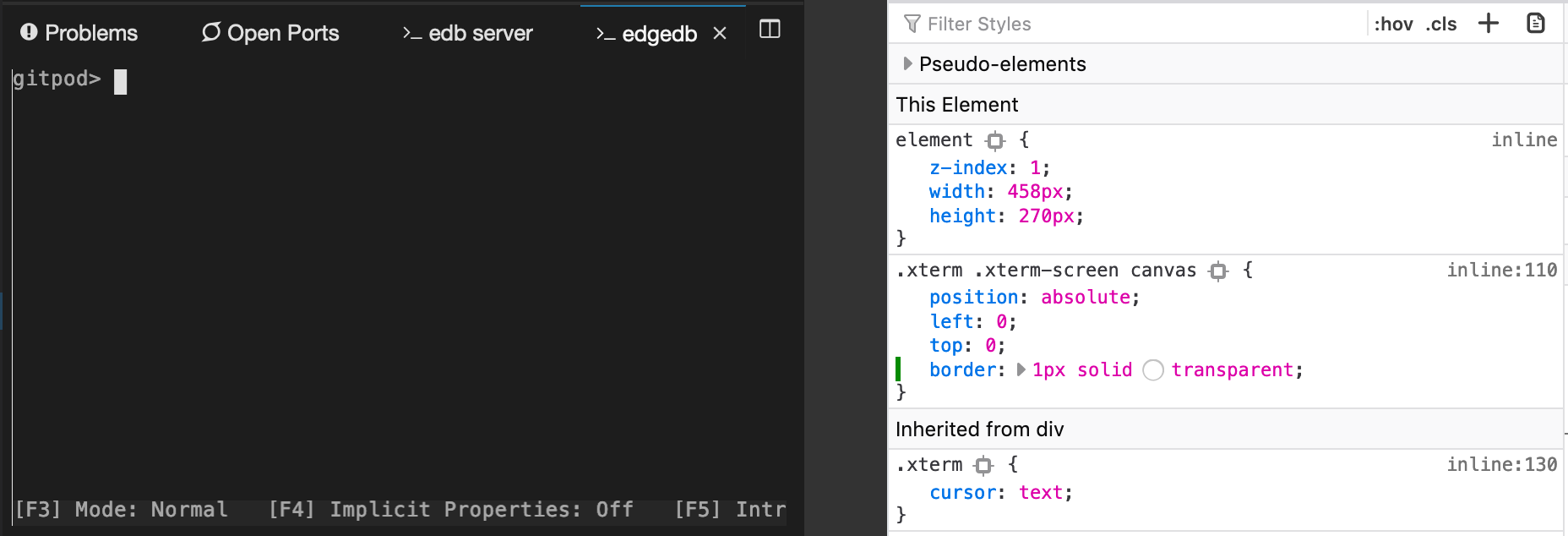
EDIT: Ah, except when I use border: 1px solid <same color as the background>, apparently. Maybe all Xterm installs should use this workaround, but I'd really prefer to find a way to properly fix this in Xterm itself.
jankeromnes
on 22 May 2019
Unable to repro on Firefox nightly on MacOS.
 lramos15
on 29 Jul 2019
lramos15
on 29 Jul 2019
@lramos15 @Tyriar FYI this bug still reproduces for me (Firefox Nightly on MacBook Pro):
jankeromnes
on 30 Jul 2019
Issue still happens, can we have a fix please.. This is bad from User experience.
OS: Mac
Browser: Firefox 79.0
 imdurgadas
on 6 Aug 2020
imdurgadas
on 6 Aug 2020
FYI, in Eclipse Theia and Gitpod.io we ended up using a CSS hack as workaround for this issue:
https://github.com/eclipse-theia/theia/issues/4665#issuecomment-494699663
jankeromnes
on 6 Aug 2020
I'm good to accept a PR for the hack as long as the reason for it is called out in a comment. Since it needs the background color it will need to be set in JS instead of CSS.
Tyriar
on 10 Aug 2020
Saw this bug with Firefox 82.0.2 and managed to reproduce it with the following code:
If the padding instead is changed to 4px instead of 4pt the border disappears. Easiest way I found to reproduce the issue was to switch back and forth between another tab.
 flippy84
on 9 Nov 2020
flippy84
on 9 Nov 2020
I changed the rendererType to dom to resolve this in firefox (linux OS).
 rivelbab
on 2 Dec 2020
rivelbab
on 2 Dec 2020
Related issues
Tyriar
·
54Comments
 anatoly-spb
·
24Comments
anatoly-spb
·
24Comments
 vincentwoo
·
26Comments
Tyriar
·
26Comments
Tyriar
·
25Comments
vincentwoo
·
26Comments
Tyriar
·
26Comments
Tyriar
·
25Comments