Xterm.js: Buttery smoothness 60fps performance issues
Hello, I'm trying to make a roguelike game (like nethack) in full screen browser, with lots of animations and full screen effects in ASCII. That is 211x60 characters on my 1080p screen. Each one may be different and may have different color or other attributes every 16 milliseconds. Xtermjs is not handling my case very well. From my own little investigation I found out that the canvas rendering and parsing are the two biggest offenders.
Suggestions/Ideas
- I was thinking maybe we could implement a webgl renderer to speed things up?
- Not sure how parsing is handled but maybe we could cache more intensively there?
- Make a canvas per line (or few lines) and let parsing/rendering for that chunk be done by web worker, make multiple of those webworker/few-lines combos to render
entire terminal?
Details
- Browser and browser version: Chrome 66
- OS version: OSX 10.13
- xterm.js version: 3.3.0
- hardware: MacBook Air 2012 1,7GHz i5, 4GB DDR3
Steps to reproduce
const { columns, rows } = process.stdout
let counter = 0
let now = Date.now()
let then = now
function hm() {
  process.stdout.write('\x1b[H')
}
function cls() {
  process.stdout.write('\x1b[J')
}
function render() {
  process.nextTick(render)
  now = Date.now()
  const delta = now - then
  if (delta < 1000/60) {
    return false
  }
  counter = counter >= 9 ? 1 : ++counter
  let content = ''
  for (let i=0; i<columns*rows; i++) {
    content += String(counter)
  }
  hm()
  cls()
  process.stdout.write(content)
  hm()
  process.stdout.write(String(delta))
  then = now
}
process.nextTick(render)
hm()
cls()
- Create myperftest.js somewhere with above contents
- Run
npm run startin xterm.js - Increase number of rows and columns (I was testing on 250x50)
- Open the demo and run
node myperftest.js - Run chrome devtools performance
I am not sure what's happening here. This test code above is generating a screen full of a single character (every character on the screen is the same). I know that Xtermjs implements character atlases so this test code should be running very fast? I need this to be 60fps. I also need each character on the screen to be different and the frame rate to keep the stable 60fps.

 pyzozord
All 11 comments
@odrzutowiec first thing I'd recommend is trying out the just released 3.4.0 and using the dynamic cache:
const term = new Terminal({
  experimentalCharAtlas: 'dynamic'
});
Particularly if you're using 256 colors or background colors heavily.
 Tyriar
on 19 May 2018
Tyriar
on 19 May 2018
With the new parser and a few more perf changes I am able to get ~10 FPS for 250x50:
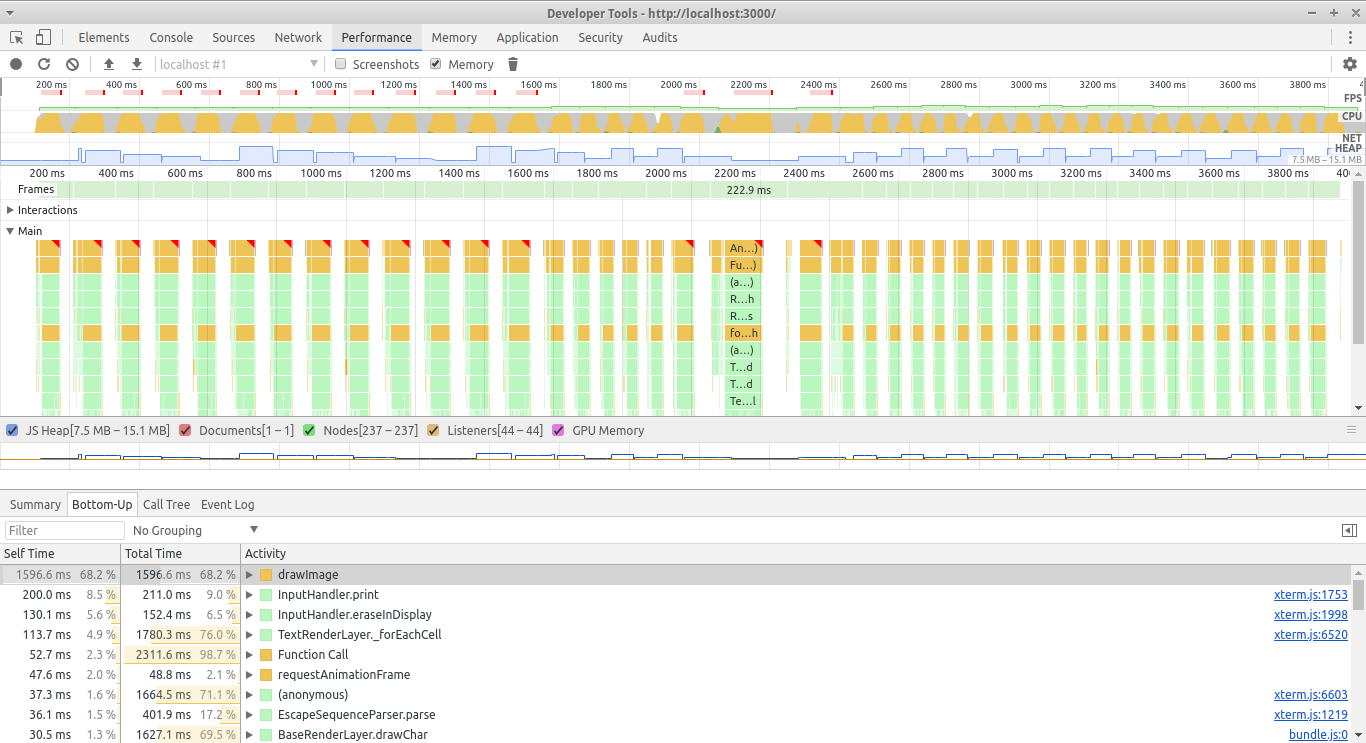
Seems the raw canvas image drawing is limiting it.
@odrzutowiec
Do you really have to update the whole screen at 60 FPS? It is very unlikely that it can be done at 60 FPS fullscreen ever, unless some totally different renderer (webgl?) will be several times faster. Note that the canvas renderer is already much faster than a DOM equivalent. You really should consider identifying changed parts and only transmit those for an update.
 jerch
on 19 May 2018
jerch
on 19 May 2018
@jerch I believe webgl renderer could be helpful if the canvas render is the bottleneck. From your screenshot it seems like it is and just swapping the renderer for webgl would make it run very fast. I don't know how did you manage that though in my screenshot parsing takes much more time.
Regarding webgl renderer: Instead of doing draw calls for each character we could feed the character buffer data into a webgl shader and make it generate the full screen delegating the whole rendering process to a video card and avoiding per-character javascript calls for rendering.
Regarding your advices yes I am fully aware and intend to send only changed characters. This is somewhat a stress test. Also I'm quite aware of slowness of DOM. I first tried a naive vanilla implementation of my game prototype in DOM here https://odrzutowiec.github.io/js_roguelike_engine. That very crude demo updates dom elements only when they change but features like grass in few different shades of green, effects like heavy rain and running with screen always centred on the player can make the whole screen update. And this is only the beginning. Imagine thunderbolt, pulsating red tint for damage, dynamic lighting and shadowing with few magical effects on the screen, camera shaking... All in real time. This can get hectic very fast - hence my stress test demo. Also I had to increase font size just for performance but ideally I'd like to keep it around 12px range.
Anyway thanks for great and very fast responses. I am willing to help make a very simple webgl renderer. I'm not the best programer but you know, I'm another few free hours with hands, keyboard and a brain. :)
pyzozord
on 19 May 2018
@odrzutowiec
The parser speedup is due to the new parser (upcoming change).
To get close to something like 60 FPS fullscreen the renderer would need to be >6 times faster. Imho that is not doable with the current renderers even with the most clever magic shortcuts, something like 20-30 FPS might be achievable though with the current canvas renderer.
Webgl might help here alot, but keep in mind that it will lock out many setups. Therefore it might be better, to design the game with a lower FPS target. Even for the native xterm 60 FPS is a tough target.
jerch
on 20 May 2018
@odrzutowiec I think you might be underestimating how much effort it will take to create a reliable and correct webgl renderer. I'm sure we could squeeze more pixels out of such a renderer but it will take a long time to get everything to work right with all the options, making sure text is rendering correct (using SPAA when it's meant to or not), supporting transparency, all the font styles/colors/etc., supporting unicode/emoji/etc.
The changes I have in mind around minimizing character updates will probably solve most of the problems you're having. Have a bunch of debt and Windows support work to get to first though.
Tyriar
on 20 May 2018
@Tyriar I know I'm all talk so far but I checked out the code yesterday. It looks like the atlas feature could be reused. A new WebglTextRenderLayer.ts could be implemented which would be based on a new WebglBaseRenderLayer.ts. I am thinking about a hybrid solution where canvas 2d is used to generate the full atlas (as it does right now) but later webgl is used to draw all lines from onGridChanged in just a single draw call. I believe the biggest slow down in canvas 2d is the amount of javascript calls to it, not the internal rendering procedure of the canvas. By switching to webgl we could reduce number of javascript calls to just one per frame and let webgl shader take care of looping through all columns and rows and copy-pasting pixels from the atlas to the screen. Of course the whole thing could fall back to non-webgl layer in case webgl is not supported or also the webgl layer could be an opt-in feature. What do you think about that?
pyzozord
on 20 May 2018
@odrzutowiec if you have time you could put together a proof of concept 😄 to see the sort of perf we can get. I haven't touched shaders at all, just read about them so far.
Tyriar
on 20 May 2018
Will try, lets see if I can come up with something. 😅
pyzozord
on 20 May 2018
@odrzutowiec keep us posted 😃
Tyriar
on 20 May 2018
Soooo, any updates? 😬
 InDieTasten
on 1 Nov 2019
InDieTasten
on 1 Nov 2019
@InDieTasten https://www.npmjs.com/package/xterm-addon-webgl, current issues: https://github.com/xtermjs/xterm.js/issues?utf8=%E2%9C%93&q=is%3Aissue+is%3Aopen+label%3Aarea%2Faddon%2Fwebgl+
Tyriar
on 1 Nov 2019
Related issues
Tyriar
·
26Comments
 feamsr00
·
39Comments
feamsr00
·
39Comments
 anatoly-spb
·
24Comments
anatoly-spb
·
24Comments
 ixrock
·
34Comments
Tyriar
·
31Comments
ixrock
·
34Comments
Tyriar
·
31Comments
Most helpful comment
@InDieTasten https://www.npmjs.com/package/xterm-addon-webgl, current issues: https://github.com/xtermjs/xterm.js/issues?utf8=%E2%9C%93&q=is%3Aissue+is%3Aopen+label%3Aarea%2Faddon%2Fwebgl+