Xterm.js: Support option to set bold text as bright
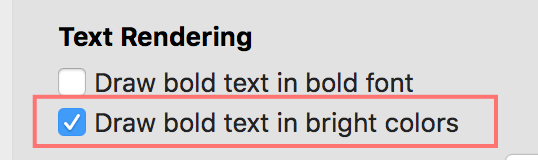
Terminal.app/iTerm2 have similar settings, see https://github.com/Microsoft/vscode/issues/35666#issuecomment-336633040
Related: Clean up font style settings https://github.com/xtermjs/xterm.js/issues/1237
 Tyriar
All 7 comments
actually, this is what most of the commercial VT terminal emulators do -- you can define color scheme per font style -- so for example, inverse text has blue background and bold text is red, underline is yellow, etc. i have hacked this into my fork of xtermjs and didn't even raise a ticket as it seemed a bit exotic requirement to me. but i guess the main motivation is that if you have character cell application user, you use bold to emphasise some information so on monochromatic screen, it is at least bold. on color terminals, you can get it even more emphasised by setting bold stuff to be red without change to the app. at least that is my explanation of what motivated people to implement such a feature.
 ztmr
on 24 Jan 2018
ztmr
on 24 Jan 2018
Just FYI:
gnome-terminal/vte has just added a "Show bold text in bright colors" checkbox (the same as the 2nd one in your screenshot). Previously, as per the default behavior of xterm, the first 8 colors were turned bright+bold by SGR 1, but only if the legacy SGR 30 .. SGR 37 escape sequences were used to select these colors, not if their 256-color counterpart SGR 38;5;0 .. SGR 38;5;7 was used (the text was/is made bold but not brighter in that case). This is still our default for legacy reasons (that is, the checkbox is enabled), but now it can be disabled for a technically more logical behavior that gets rid of the legacy crap, and is the desired behavior for Solarized users. See GNOME 762247 for details / our opinion.
In the mean time, as part of the same bug, we've removed the "Allow bold text" (the same as the 1st in your screenshot) from our UI, it has become a hidden pref and we're planning to eventually deprecate and fully remove it. I don't see any reason for not showing bold text when that's what an application asks for (just as we have no option to ignore italic, underlined etc. attributes).
See also Kitty 135 for pretty much the same opinion.
See also GNOME 791596 (esp. comment 1) for some far-fetched (or maybe not) thoughts about auto-brightening bold colors perhaps just doing the opposite of its intent on "black on white" color schemes.
What @ztmr mentioned is a different, yet sure somewhat similar issue. xterm allows you to define "bold color" which is applied as the color when the default(!) color is combined with the bold attribute (for other colors boldness applies in the regular way), "italic color" to be applied on italic text of the default(!) color etc. g-t/vte only supports this with the bold color, and IMHO it's also a legacy kludge that shouldn't exist, and we're planning to deprecate/remove, and planning to mark the feature requests to implement the same for italic and underline as wontfix (see GNOME 792501).
Another approach could be just to delegate all these decisions to the containing application, similarly to the ideas outlined in GNOME 758368, perhaps even involving the attributes in the game. (Note that I still haven't tried or taken a closer look at xterm.js, my understanding is that this is a "library" pretty much corresponding to vte, whereas applications like hterm make it a complete app like gnome-terminal. Not sure if I'm right...)
Hope I could help... or did I just confuse you even more? :-)
 egmontkob
on 24 Jan 2018
egmontkob
on 24 Jan 2018
We recently added fontWeight and fontWeightBold so you can set the font weight of both the bold and non-bold. As a result of this we're going to deprecate the enableBold option as the same effect can be achieved via fontWeightBold: "normal".
Note that I still haven't tried or taken a closer look at xterm.js, my understanding is that this is a "library" pretty much corresponding to vte, whereas applications like hterm make it a complete app like gnome-terminal. Not sure if I'm right...
hterm is an alternative to xterm.js, hterm was build for Chrome devtools and used to be used in Hyper. Hyper has since moved over to use xterm.js instead.
Tyriar
on 29 Jan 2018
We recently added fontWeight and fontWeightBold
Cool! (I guess one could find such workaround for gnome-terminal (and presumably many other terminal emulators too) by tweaking the underlying font engine, e.g. fontconfig).
hterm is an alternative to xterm.js
Oops, my bad, I meant to say hyper... same initial and same word length makes them easy for me to swap :) Thanks for the clarification!
egmontkob
on 29 Jan 2018
I'm a little hesitant to flip the default as I think my prompt won't look right as well 😄. The option would definitely be good though.
/cc @mofux
Tyriar
on 22 Mar 2018
Thanks for your deep insights @egmontkob, really helpful!
I agree that disabling the behaviour should be optional via a config flag. I'm going to label this as "good first issue" because it shouldn't be too hard to implement.
 mofux
on 22 Mar 2018
Tyriar
on 14 May 2018
mofux
on 22 Mar 2018
Tyriar
on 14 May 2018
Related issues
 BengBu-YueZhang
·
63Comments
Tyriar
·
31Comments
BengBu-YueZhang
·
63Comments
Tyriar
·
31Comments
 cristynkells
·
26Comments
cristynkells
·
26Comments
 vincentwoo
·
26Comments
Tyriar
·
26Comments
vincentwoo
·
26Comments
Tyriar
·
26Comments