Xrdp: Dynamic resolution update (resizing without reconnection)
The feature "Dynamic resolution update" was introduced in RDP 8.1. It enables to resize screen resolution on-the-fly.
Dynamic resolution update
One of the changes we’ve made as part of RDP 8.1 is the addition of a new message that can be sent from the client to the server to dynamically update the resolution inside the remote session to match what is available on the client without the need to do a complete reconnect of the session. Previously, we only set the remote resolution during the initial connection. With this change, the resolution is set at connect time and can be updated when the client-side resolution changes while the app is in full screen mode, or when the app transitions from windowed mode to full screen. The resolution change is quick enough to be practically the same as a local change.
Let's bring this to xrdp if possible. I'm still looking for MS documents about dynamic resolution update. If anyone know where it is, I'd appriciate leting me know.
 metalefty
All 63 comments
xrdp Xorg driver and X11rdp are ready to accept resizing. The RandR extension is there and working.
 jsorg71
on 20 Oct 2016
jsorg71
on 20 Oct 2016
AFAIK, xrdp resizes session but it is only connect time, right? What I want to implement is different from it. As xorgxrdp and x11rdp are ready to accept resizing, what we need to do is to catch "a new resize message" from the client and tell xorgxrdp/x11rdp to resize.
I'm looking for "a new message" of resizing in MS documents.
metalefty
on 20 Oct 2016
Yes, I know what you mean. I can't find it in the protocol docs. It's either added to MS-RDPBCGR or it's a new virtual channel.
jsorg71
on 20 Oct 2016
Quick lookup for "resolution" in [MS-RDP*], is "DISPLAYCONTROL_MONITOR_LAYOUT_PDU" of [MS-RDPEDISP] related to dynamic resolution update? I haven't read MS-RDPEDISP deeply but just FYI.
Dynamic resolution update is introduced in RDP 8.1. MS-RDPEDISP is added on Aug 8, 2013. Windows 8.1 was released in October 2013. The date of the MS blog article is December 2013. Probably they're relevant.
metalefty
on 20 Oct 2016
It's a new virtual channel, but I think it's dynamic channel.
בתאריך יום ה׳, 20 באוק׳ 2016 ב-7:03 מאת metalefty <[email protected]
:
Quick lookup for "resolution" in [MS-RDP*], is
"DISPLAYCONTROL_MONITOR_LAYOUT_PDU" of [MS-RDPEDISP] related to dynamic
resolution update? I haven't read MS-RDPEDISP deeply but just FYI.—
You are receiving this because you are subscribed to this thread.
Reply to this email directly, view it on GitHub
https://github.com/neutrinolabs/xrdp/issues/448#issuecomment-255003841,
or mute the thread
https://github.com/notifications/unsubscribe-auth/ADTH1AlgAzT7haW5fPyvgtvW13KQKKQoks5q1ugfgaJpZM4KbrXR
.
Idan Freiberg
PGP FP: 8108 7EC9 806E 4980 75F2 72B3 8AD3 2D04 337B 1F18
 speidy
on 20 Oct 2016
speidy
on 20 Oct 2016
Yup, this is it
MS-RDPEDISP
jsorg71
on 20 Oct 2016
I noticed RemoteFX session cannot be resized with this virtual channel function. It sounds I can gain little benefit.
1.5 Prerequisites/Preconditions
If the RemoteFX codec ([MS-RDPRFX] sections 2.2.2 and 3.1.8) is being used to encode graphics data from a remote session, then the Remote Desktop Protocol: Display Control Virtual Channel Extension SHOULD NOT be used to request display configuration changes.
metalefty
on 30 Aug 2017
Hi - Can I check on the state of this issue? Is it still the case that there isn't a mechanism for resizing without reconnecting in xrdp?
 mrichar1
on 22 Jan 2018
mrichar1
on 22 Jan 2018
Still on TODO list but nothing's being done. If you want the feature, react with 👍 icon on the first post. Then I can know how many people want the feature.
metalefty
on 23 Jan 2018
I implemented MS-RDPEDISP and MSTSC seems to only send client data to the server when in full screen mode. I was expecting non full screen resizing to work but I don't see any data. I wonder how MSTSC to Windows 10 does this.
jsorg71
on 17 Apr 2018
Nice, can you share your work?
I've found a document about display update not only in MS-RDPEDISP.
https://msdn.microsoft.com/en-us/library/dd303566.aspx
metalefty
on 17 Apr 2018
Sure I can share it. I had to move the drdynvc handling to libxrdp from chansrv but we need that anyway for GFX and a bunch of other new work.
jsorg71
on 17 Apr 2018
I’ve also implemented it as a standalone executable at the past.
It doesn’t work in non full screen scenarios by design it’s wirtten
somewhere at the docs
בתאריך יום ג׳, 17 באפר׳ 2018 ב-4:04 מאת jsorg71 notifications@github.com:
I implemented MS-RDPEDISP and MSTSC seems to only send client data to the
server when in full screen mode. I was expecting non full screen resizing
to work but I don't see any data. I wonder how MSTSC to Windows 10 does
this.—
You are receiving this because you commented.
Reply to this email directly, view it on GitHub
https://github.com/neutrinolabs/xrdp/issues/448#issuecomment-381796667,
or mute the thread
https://github.com/notifications/unsubscribe-auth/ADTH1Pew3uo6R9RjRg0kk44OerRmIDhnks5tpT-egaJpZM4KbrXR
.>
Idan Freiberg
GPG FP: 8108 7EC9 806E 4980 75F2 72B3 8AD3 2D04 337B 1F18
speidy
on 17 Apr 2018
@speidy well in fact fullscreen doesn't mean anything at the protocol level. Except if you consider that the DesktopWidth/DesktopHeight match the size of a single monitor means fullscreen...
When I've implemented dynamic resolution in FreeRDP I'm just announcing a monitor that has the size of the window...
 hardening
on 17 Apr 2018
hardening
on 17 Apr 2018
That is what I was hoping mstsc would do, report a dummy monitor that is the size of the window.
jsorg71
on 17 Apr 2018
It’s not documented at the protocol docs but in technet blog w.r.t Mstsc.exe
To leverage the dynamic update features for resolution and scaling level, you must start the desktop session with a Display configuration set to Full Screen on the Display tab. Doing so tells Remote Desktop Connection to manage the resolution and scaling level for you and keep it in sync with changes happening locally.
speidy
on 17 Apr 2018
@hardening What version of freerdp has your dynamic resolution change?
jsorg71
on 19 Apr 2018
@jsorg71 current master has it (/dynamic-resolution on the command line)
hardening
on 19 Apr 2018
That works as I'd expect. It does look like you are setting the PhysicalWidth and PhysicalHeight wrong. They should not be the same as width and height. They should be in mm. The DPI per monitor is calculated from this. In X11 xandr can supply this.
jsorg71
on 19 Apr 2018
@jsorg71 can u tell me how to configure xrdp to accept display-update on resize method.? on master branch, I'm trying to build xrdp with dynamic-resolution option. But i can't see the option. I've loaded the git repo locally. Installed dependencies. Then did ./bootstrap. followed by ./configure . IN the ./configure -help i can't see any option for dynamic-resolution.
 rahulm-gdb
on 7 Jun 2018
rahulm-gdb
on 7 Jun 2018
I ran into problems. The FreeRDP implementation does not work well with a Windows 10 server because the mmWidth and mmHeight are same as width and height and not mm. The MS client does not do this at all if not in full screen. I think there is a HyperV connection to xrdp that does work but I didn't find out how that works. It looks like the dynamic virtual channel is used to report the new monitor layout to the server but the server(xrdp) needs to send a new 'demand active'. Xrdp has a 'server_reset' function for this but FreeRDP did not like it and I stopped there.
jsorg71
on 27 Jun 2018
@jsorg71 I think i was stopping at the same point at the past.
I'm not sure if we can send a demand_active again, afaik mstsc will throw an error.
I think mstsc will resize the local screen area after the dynamic channel message accepted by the server and we just need to resize it remotely in xrdp_wm and X11
speidy
on 27 Jun 2018
The channel in mstscax that Hyper-V uses is done in two ways from a client perspective:
- When a full screen mode is entered a call to SyncSessionDisplaySettings is made which takes into account the use of all monitors (if enabled).
- When the client UX resize in windowed mode a call to UpdateSessionDisplaySettings is sent for only the size of the client display area in the DPI of the current display monitor the UX is on.
 jterry75
on 27 Jun 2018
jterry75
on 27 Jun 2018
We should use libxrdp_reset on server to trigger capabilites re-exchange after MS-RDPEDSIP message exchange is done.
speidy
on 28 Jun 2018
Any further update?
 comphilip
on 10 Sep 2018
comphilip
on 10 Sep 2018
Say @jsorg71 can you share/upstream your code? It feels like you are very close? I work for Microsoft with @scooley and I know the world would LOVE to see this! Let us know how we can help.
 shanselman
on 3 Oct 2018
shanselman
on 3 Oct 2018
Yup, lets push this ahead. I have the needed changes to drdynvc done and tested. After that, this should be much easier. One thing that would be nice is if mstsc supported this feature. I think it does if you connect "full screen" but mstsc could support this in windowed mode too.
Anyway, I'll prepare a PR.
jsorg71
on 3 Oct 2018
I can help implementing this after ‘drdynvc’ changes will be pushed.
One thing me and Jay talked about was maintaining a user process like
rdpclip.exe in Windows which will take care over session related stuff just
like Xrandr monitor changes etc.
בתאריך יום ד׳, 3 באוק׳ 2018 ב-10:29 מאת jsorg71 notifications@github.com:
Yup, lets push this ahead. I have the needed changes to drdynvc done and
tested. After that, this should be much easier. One thing that would be
nice is if mstsc supported this feature. I think it does if you connect
"full screen" but mstsc could support this in windowed mode too.
Anyway, I'll prepare a PR.—
You are receiving this because you were mentioned.
Reply to this email directly, view it on GitHub
https://github.com/neutrinolabs/xrdp/issues/448#issuecomment-426538565,
or mute the thread
https://github.com/notifications/unsubscribe-auth/ADTH1GI0Wz_PJJOP_xxPKvVCkEmMRJqzks5uhGdjgaJpZM4KbrXR
.>
Idan Freiberg
GPG FP: 8108 7EC9 806E 4980 75F2 72B3 8AD3 2D04 337B 1F18
speidy
on 3 Oct 2018
I created #1222 to track the DVC progress.
jsorg71
on 5 Oct 2018
Awesome! I work with @jterry75 - we're excited to pick this up for better Linux VM viewing. Thanks!
 scooley
on 11 Oct 2018
scooley
on 11 Oct 2018
I created branch
https://github.com/jsorg71/xrdp/commits/dynamic_monitor
for working on this. So far it only the xrdp login screen that resizes.
jsorg71
on 16 Oct 2018
Works well!
metalefty
on 16 Oct 2018
Works well with freerdp with /dynamic-resolution and works with mstsc when you go full screen after resizing desktop. I have not got the hyper-v session working yet.
jsorg71
on 16 Oct 2018
@cwilhit - Did you give this a shot with Hyper-V yet?
jterry75
on 17 Oct 2018
@jterry75 tested with Hyper-V but was not able to get past the xrdp login.
I did try connecting via mstsc and saw that I could resize the xrdp login window.
 cwilhit
on 17 Oct 2018
cwilhit
on 17 Oct 2018
To complete this, we have to serialize some things. I think this is how this needs to work.
1 - client sends dynamic resize message over the virtual channel.
2 - xrdp starts the demand active / confirm active process. This involves capabilities re negotiation. At this point, xrdp and client are resized.
3 - xrdp starts the reset / resize of the backend (Xorg )
4 - full screen invalidate.
jsorg71
on 13 Dec 2018
Any updates on this feature?
 BiatuAutMiahn
on 22 Jun 2019
BiatuAutMiahn
on 22 Jun 2019
Does anyone know if resizing via "xrandr" executed in the VM should work with xrdp on Hyper-V ?
For some reason when I invoke xrandr, nothing happens. In the output of xrandr I see that the size of the screen does get changed, but the resolution of the "rdp0" output remains unchanged.
 mikov
on 9 Sep 2019
mikov
on 9 Sep 2019
Jay told me that one of the reasons he'd stopped working on it was that MSTSC, the official Microsoft Windows client, didn't seem to support it.
However, the Mac RDP client does support it, and knowing that, he told me he could be unblocked on it.
So stay tuned, this feature has not been forgotten!
 Nexarian
on 5 Nov 2019
Nexarian
on 5 Nov 2019
I believe mRemoteNG also supports it.
 nahun
on 5 Dec 2019
nahun
on 5 Dec 2019
Any update on this?
 Ebrithil95
on 12 Feb 2020
Ebrithil95
on 12 Feb 2020
would be nice to have it merged, we have to apply this patch to our custom build
 krisss85
on 20 Apr 2020
krisss85
on 20 Apr 2020
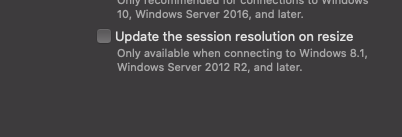
@jsorg71 @metalefty FYI: the official MS Remote Desktop client app for Mac now supports resizing
 bolkedebruin
on 14 Jun 2020
bolkedebruin
on 14 Jun 2020
Any update on this? I want to move my ubuntu18.04 from vmware to hyper-v, but the dynamic resolution things blocked me, using linux-vm-tools only gives me a fixed resolution
 terrencewei
on 31 Jul 2020
terrencewei
on 31 Jul 2020
Any update on this? I want to move my ubuntu18.04 from vmware to hyper-v, but the dynamic resolution things blocked me, using linux-vm-tools only gives me a fixed resolution
I ended up using tigervnc with noVNC over secured websockets.
Edit:
The issue has been resolved
BiatuAutMiahn
on 31 Jul 2020
@BiatuAutMiahn
How do you get dynamic resolution with TigerVNC? I am using it over SSH local port forward and do not see dynamic resolution resizing capability.
 artis3n
on 31 Jul 2020
artis3n
on 31 Jul 2020
I simply run tigervncserver.
with noVNC theres an option called Scaling Mode which I set to Remote Resizing
BiatuAutMiahn
on 1 Aug 2020
Any updates on this? Getting some bug reports regarding this for freerdp and can not do much on my side :/
 akallabeth
on 20 Nov 2020
akallabeth
on 20 Nov 2020
So as I'd like to start traction on this, I'm trying to figure out how to make this code change myself.
I've studied the code a little bit, and concluded that "xrdp_bitmap" is really code for the login screen, or really, it can be any bitmap but defaults to blue, and the network communication is set up and working, but we've yet to connect it to the xorgxrdp driver.
What I don't understand is how xrdp and xorgxrdp communicate. In order to build xorgxrdp you need a header file from xrdp, which I'm guessing is where some callbacks are set up, but I'm having trouble finding it.
My thought is to try to send the "randr" signal through that communication mechanism at the same place where the xrdp_bitmap_resize call is being made in the dynamic_monitor branch, and then see what happens.
@jsorg71 am I on the right track here? I'm happy to do the implementation if you give me some further pointers.
Nexarian
on 29 Jan 2021
Ah ha! Found it: https://github.com/neutrinolabs/xorgxrdp/blob/devel/module/rdpClientCon.c
Saw the reference that it communicated with the client through a unix socket.
Now to figure out how to send the signal when this happens.
Nexarian
on 29 Jan 2021
This looks like the right signal to process it: https://github.com/neutrinolabs/xorgxrdp/blob/devel/module/rdpClientCon.c#L682
Nexarian
on 30 Jan 2021
This looks like the place where the message is sent FROM xrdp: https://github.com/neutrinolabs/xrdp/blob/devel/xup/xup.c#L272
Looks like it may require a bit of refactoring to get this wired up.
Nexarian
on 30 Jan 2021
@Nexarian yes, I think you are right about the message. There is also the monitor list message. I think either can resize the backend.
I think it's still the best plan to get the login screen resizing without logging in. After that works, then start working on resizing a logged in session. My thinking is that when it's just the login screen, you can minimize the moving parts.
jsorg71
on 30 Jan 2021
I thought the login screen already worked? (At least, that's my interpretation of the comments from a few years ago).
If not, I'll try to get that to work. I should also probably get my own personal fork of XRDP and merge dynamic_monitor with the current master branch. One step at a time...
Nexarian
on 30 Jan 2021
Performed this merge to my own fork: https://github.com/Nexarian/xrdp/commit/7f3d33df09340b42e42af436790acc25be1afc08
Any ideas as to what these errors are?
[20210131-02:03:26] [ERROR] error unknown xrdp_sec_process_mcs_data tag 0xc006 size 8
[20210131-02:03:26] [ERROR] error unknown xrdp_sec_process_mcs_data tag 0xc00a size 8
From looking them up it looks like they are these:
and
Uncertain if they're related or not.
Nexarian
on 31 Jan 2021
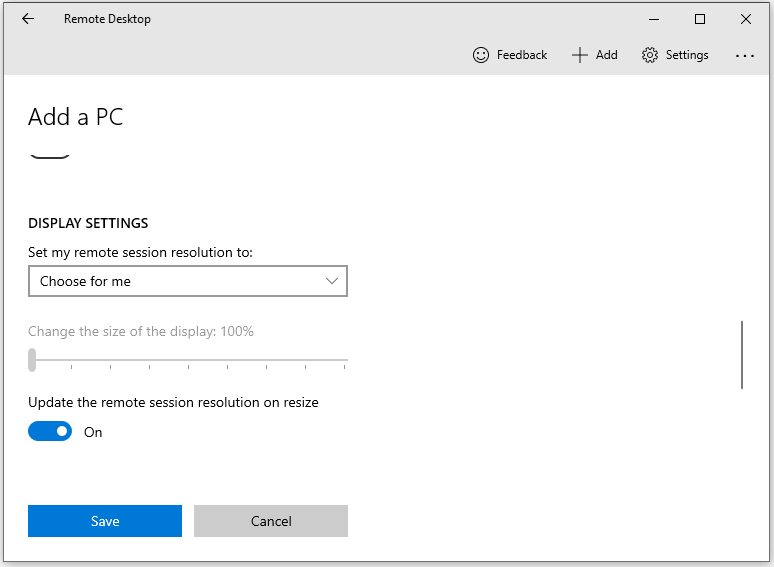
@jsorg71 You may be interested to know that there is now a "version" of MSTSC that supports dynamic resizing!
The old-skool actual MSTSC does not support it, but if you go to the Windows 10 app store and search for "Microsoft Remote Desktop" you'll find the UI is similar to that of the Mac OS client, and it DOES support dynamic resizing. This should make testing much, much easier!
Nexarian
on 2 Feb 2021
Nexarian
on 2 Feb 2021
I was able to get the branch of mine merged with devel linked above working with this new Microsoft Remote Desktop client on the login screen. Now I'm working on figuring out how logging works and turning it on. I've verified that even after I log into the main session, the dynamic monitor channel is still active and the data is being logged.
Still working on the plumbing to the xorg part. It seems like xrdp_mm.c is where most of this happens, and I'm working on figuring out how the "mod_init" struct is used. I was up late spelunking through the code.
Will continue to try to update regularly on my adventures
Nexarian
on 3 Feb 2021
Next update is more about tactical development. I have Ubuntu 20.04.2 that I'm running inside VirtualBox, and while running GNOME the UI and Visual Studio Code would become unresponsive. I had to reboot it so frequently that I got fed up and switched to MATE. XRDP often works better with MATE anyway, though I am able to get it working with GNOME most of the time.
Nexarian
on 4 Feb 2021
Further documentation of my investigation.
Here is where Jay added the original ability to resize the session on connect: https://github.com/neutrinolabs/xrdp/commit/4c603d985535b44d1a6806fe32e39326fd09d906#diff-c3c65bb5a14ac4b7f1173e29399efa3c9be1daf1df0b9f84ae4c18d9cc930502
And here is where a new function was added to xup.c, which provides a template for how to do this:
https://github.com/neutrinolabs/xrdp/commit/1dd191ab1bfadb108dae3440d5c15f278830220d
However, what is still unclear is in the massive switch statement, of which my function will be 62, where that value is used to call the function in the order list. Continuing to look.
Nexarian
on 5 Feb 2021
I suspect the answer to how to wire up a new xup.c function to xrdp_mm.c is here, the very next commit in the history: https://github.com/neutrinolabs/xrdp/commit/1dd191ab1bfadb108dae3440d5c15f278830220d
Nexarian
on 5 Feb 2021
Ugh I'm still having trouble figuring out how to connect xrdp_mm.c to xup.c. I've moved what appears to be the resize monitor function into its own function: https://github.com/Nexarian/xrdp/commit/d06b37f635af4df7cf8d042b7f16ef4881f2ad55
Do I invoke it from here (https://github.com/Nexarian/xrdp/commit/d06b37f635af4df7cf8d042b7f16ef4881f2ad55#diff-e60b8fc679e75b5fda6f69663b8379a1bdf2f74c47cdb2db31a0c8fa7b2dce3bR1142) or somewhere else? And how do I make that connection in the code. From what I can tell, passing a network message directly to xorgxrdp, as we wish to do in this case, is a rare event. Most of the code seems to deal with xrdp <-> client communication, and messages TO xorgxrdp are few? But where are they?
Nexarian
on 5 Feb 2021
I tried to simply add int send_server_monitor_resize(struct mod *mod, struct stream *s); to xup.h and then including that in xrdp_mm.c but the mod structures are different and don't inherit from each other, so I have to do the real work of figuring out the proper signaling mechanism... This could take a bit.
Next lead, looks like this change may contain the type of interaction I need, maybe: https://github.com/neutrinolabs/xrdp/commit/21f90e3ca288bacb6d6c69bf9d3b0f0d1aca977e#diff-dd6dc787788bd1b54555c7f4daec8a3ca70cd02f072124436a4619e0561a239c
Nexarian
on 6 Feb 2021
Related issues
 sblack1969
·
7Comments
sblack1969
·
7Comments
 zilongo
·
7Comments
zilongo
·
7Comments
 eduardolucioac
·
3Comments
eduardolucioac
·
3Comments
 Zer0CoolX
·
3Comments
Zer0CoolX
·
3Comments
 monken
·
4Comments
monken
·
4Comments
Most helpful comment
Any updates on this feature?