Xournalpp: preferences dialog is too wide for my screen
Affects versions :
- OS: Windows, Fedora GNU/Linux]
- Version of Xournal++ branch
LittleHuba:fix_device_listing_new, master a37524e2626e269e1c1defbdf5abe3305d29e863
Describe the bug
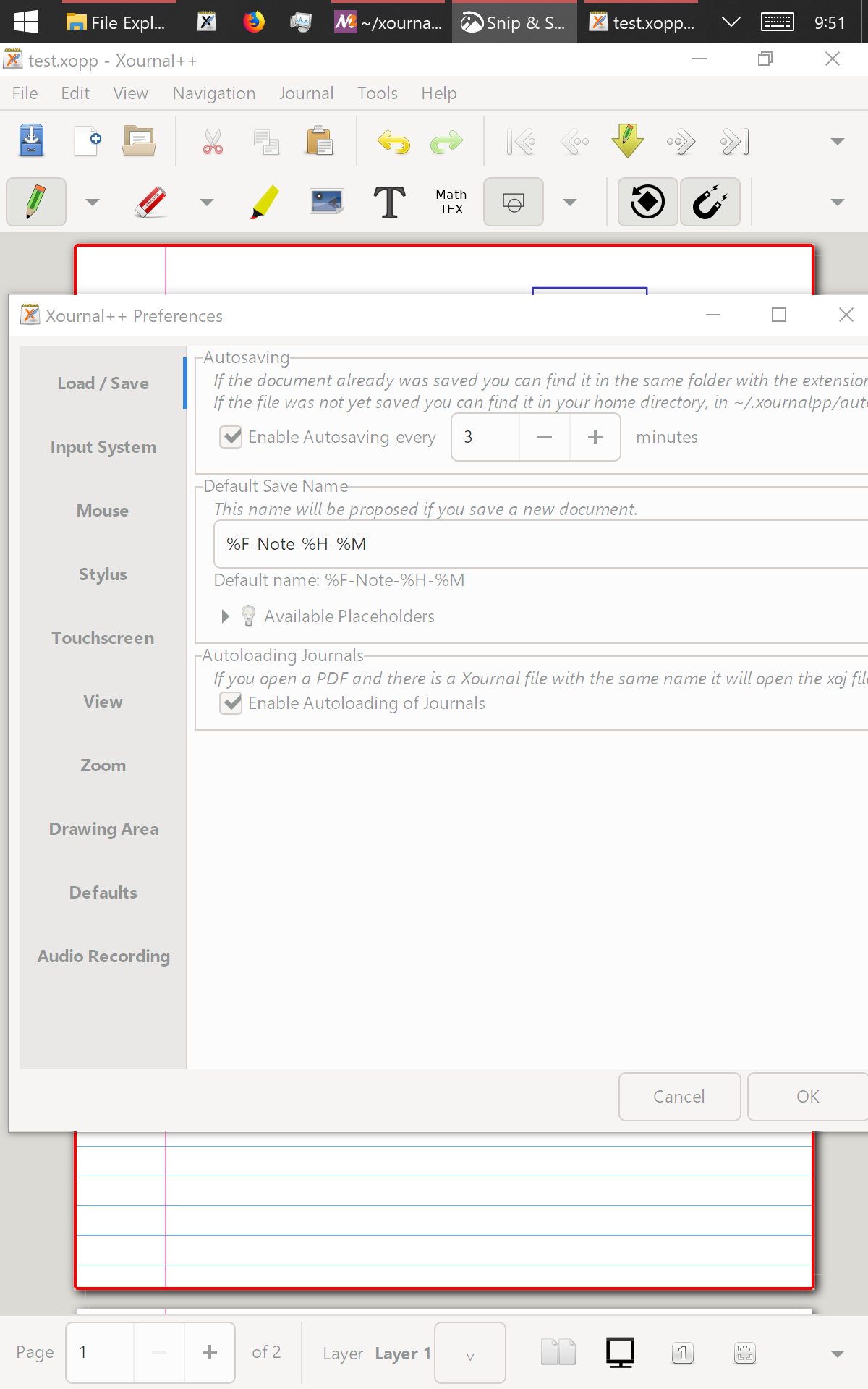
On Windows 10, I have a portrait screen that is 1200 pixels wide. But I have some big fonts and/or other scaling selected (could check details if needed). With this setup, the preferences dialog doesn't fit horizontally on the screen (screenshot below).
On my Fedora laptop, I checked the master branch and the minimum size of the preferences dialog is 968 pixels. But I suspect this depends on OS fontsize preferences etc.
To Reproduce
- select a low res screen (I guess something like 800 pixels wide)
- open preferences
Expected behavior
If the preferences dialog were a bit more compact or was able to shrink a little more then it would fit. Or the panes would scroll horizontally as they already do vertically.
Screenshots of Problem
 cbm755
All 3 comments
I see two potential solutions
- slightly reorganize the grid of the "Action on Tool Tap" setting, which is the largest element in the Settings.
- allow horizontal scrolling
I think we can do both, what do you think?
 sanette
on 25 Dec 2020
sanette
on 25 Dec 2020
by the way, there is a missing GtkScrolledWindow in inputTabBox, I can add it too
sanette
on 25 Dec 2020
This was fixed in PR #2592
 rolandlo
on 26 Dec 2020
rolandlo
on 26 Dec 2020
Related issues
 enricoar
·
3Comments
enricoar
·
3Comments
 greghab
·
5Comments
greghab
·
5Comments
 dimkab
·
4Comments
dimkab
·
4Comments
 VickySteeves
·
3Comments
VickySteeves
·
3Comments
 LittleHuba
·
5Comments
LittleHuba
·
5Comments