Xlpagertabstrip: How to add headerview of ButtonBarPagerTabStripViewController programming?
I want XLPagerTabStrip under my customized view like following image.
How to achieve this view?
Thanks.

 Bruce9487
👍3
All 9 comments
I also want to know
 Jokemac
on 15 Oct 2018
Jokemac
on 15 Oct 2018
Yeah, me too
 alexanderathan
on 15 Nov 2018
alexanderathan
on 15 Nov 2018
Me too
 qasimsina
on 6 Jan 2019
qasimsina
on 6 Jan 2019
I also need this
 tariqul000
on 4 Feb 2019
tariqul000
on 4 Feb 2019
override func viewDidLayoutSubviews() {
super.viewDidLayoutSubviews()
buttonBarView.frame = CGRect(
x: 0,
y: headerView.frame.height,
width: self.view.bounds.width,
height: 50.0)
}
 kimlada
on 21 Feb 2019
kimlada
on 21 Feb 2019
👎2
override func viewDidLayoutSubviews() { super.viewDidLayoutSubviews() buttonBarView.frame = CGRect( x: 0, y: headerView.frame.height, width: self.view.bounds.width, height: 50.0) }
don't work correctly...
qasimsina
on 25 Feb 2019
What kind of problem do you have with the code?
kimlada
on 25 Feb 2019
don't work correctly...
Alternatively You can simply use something like this after super.viewDidLoad():
// Remove TabBarView and ContainerView from Superview
buttonBarView.removeFromSuperview()
containerView.removeFromSuperview()

// Add your HeaderView and put back TabBarView and ContainerView
view.addSubview(headerView)
view.addSubview(buttonBarView)
view.addSubview(containerView)

// Setup frames
headerView.frame = CGRect(
    x: 0,
    y: 0,
    width: self.view.bounds.width,
    height: 100.0)

buttonBarView.frame = CGRect(
    x: 0,
    y: headerView.frame.height,
    width: self.view.bounds.width,
    height: 50.0)

containerView.frame = CGRect(
    x: 0,
    y: headerView.frame.height + buttonBarView.frame.height,
    width: self.view.bounds.width,
    height: self.view.bounds.height - (headerView.frame.height + buttonBarView.frame.height))
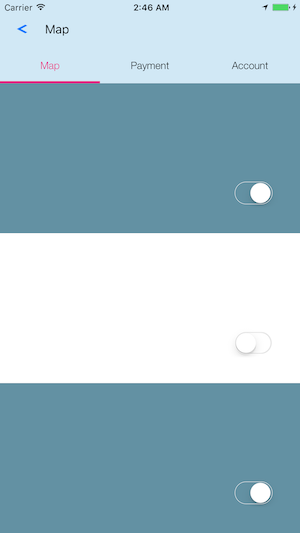
1) TabBarView and ContainerView were removed and put back to Superview
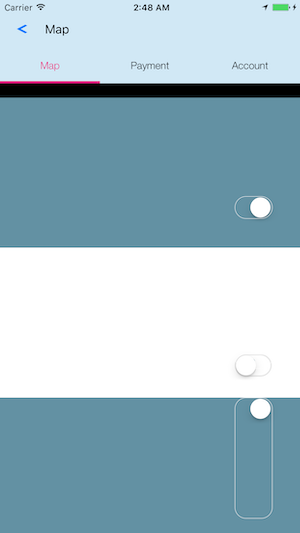
2) TabBarView and ContainerView were not removed from Superview
kimlada
on 26 Feb 2019
👍2
don't work correctly...
Alternatively You can simply use something like this after
super.viewDidLoad():// Remove TabBarView and ContainerView from Superview buttonBarView.removeFromSuperview() containerView.removeFromSuperview() // Add your HeaderView and put back TabBarView and ContainerView view.addSubview(headerView) view.addSubview(buttonBarView) view.addSubview(containerView) // Setup frames headerView.frame = CGRect( x: 0, y: 0, width: self.view.bounds.width, height: 100.0) buttonBarView.frame = CGRect( x: 0, y: headerView.frame.height, width: self.view.bounds.width, height: 50.0) containerView.frame = CGRect( x: 0, y: headerView.frame.height + buttonBarView.frame.height, width: self.view.bounds.width, height: self.view.bounds.height - (headerView.frame.height + buttonBarView.frame.height))1. TabBarView and ContainerView were removed and put back to Superview 2. TabBarView and ContainerView were not removed from Superview
Yep. this work correctly!
Thanks
qasimsina
on 26 Feb 2019
Was this page helpful?
0 / 5 - 0 ratings
Related issues
 andrewabdalla
·
6Comments
andrewabdalla
·
6Comments
 nikhil191090
·
5Comments
nikhil191090
·
5Comments
 Mohammed-Eliass
·
4Comments
Mohammed-Eliass
·
4Comments
 unittesting0
·
3Comments
unittesting0
·
3Comments
 dkononenko
·
4Comments
dkononenko
·
4Comments
Most helpful comment
Alternatively You can simply use something like this after
super.viewDidLoad():1) TabBarView and ContainerView were removed and put back to Superview
2) TabBarView and ContainerView were not removed from Superview