Xlpagertabstrip: First Child View Controller is shifted down on ViewDidLoad
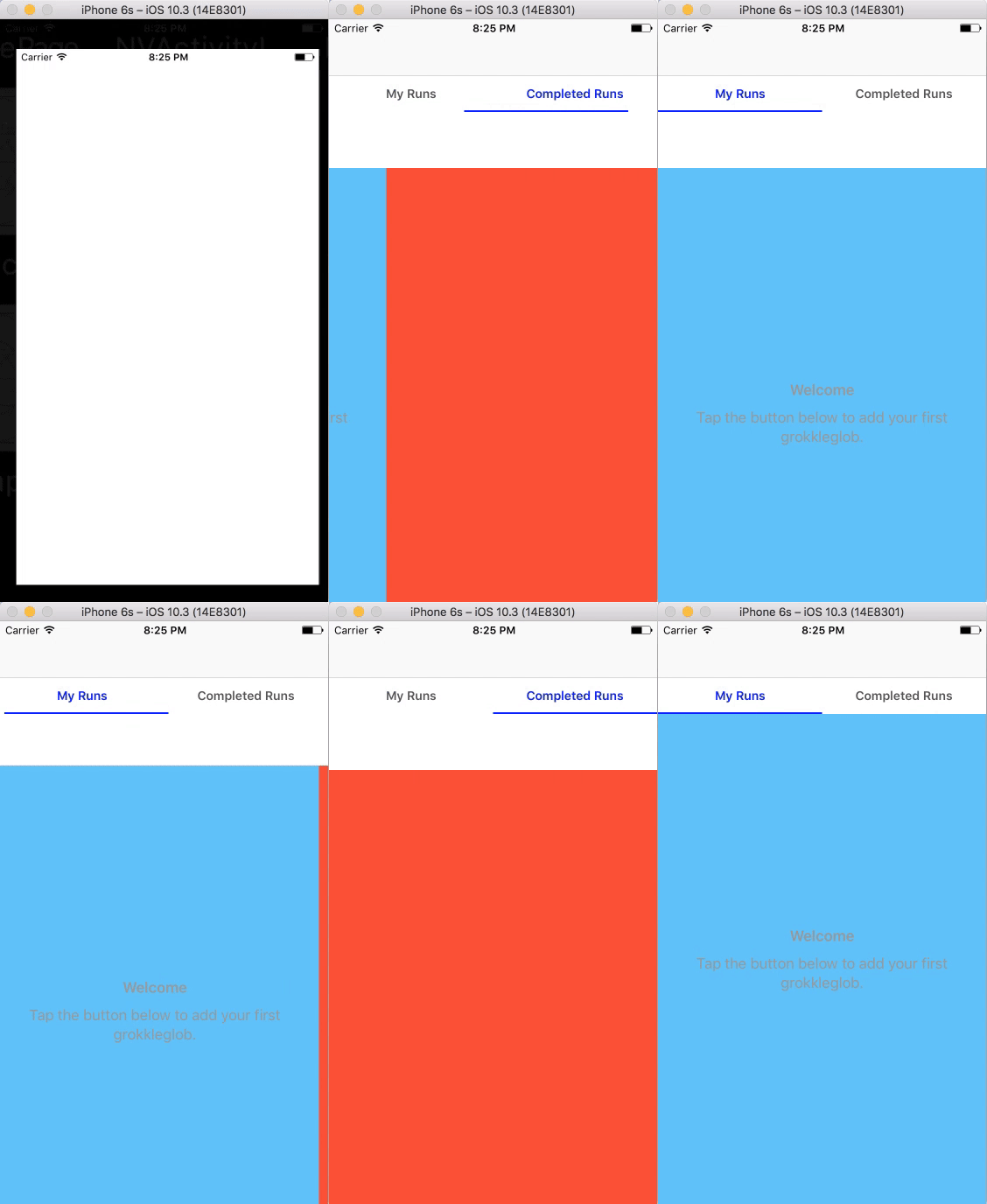
I am using ButtonBarPagerTabStripViewController and used the Blog post instruction but I am facing a weird issue. My View controllers which is basically a UITableViewController and a UIViewController show up slightly shifted downwards on load inside the container view. Once I tap on the bar button and change back, the view seem to position itself correctly. This happens with a regular UIViewController as well and is not specific to TableViewController. When the app loads, if I use gesture swipe to swipe left then the position remains shifted down, only when I tap the button in the bar pager the first VC seem to position it correctly by itself. (Somewhat illustrated as shown below). This is happening with the second VC as well.
Am I missing something here?
Notice the white space just below the pager bar, and notice how it positions itself as soon as I tap on the second pager button. I am also able to drag the first VCs down using gesture which shifts the whole VC down again.
 annjawn
All 6 comments
I have the same issue here.
 Amefuri
on 29 Jun 2017
Amefuri
on 29 Jun 2017
I am not sure why but when I add
self.automaticallyAdjustsScrollViewInsets = false
in viewDidLoad() (in the tab controller not each child controller)
The issue was gone.
Amefuri
on 29 Jun 2017
@Amefuri I have managed to resolve it by putting these two lines of code just after the super.viewDidLoad() in the viewDidLoad()method
self.buttonBarView.collectionViewLayout = UICollectionViewFlowLayout()
self.buttonBarView.frame.size.height = 40.  //should be the height of your button bar as per your IB
@annjawn
Thank you,
I did solve mine with a difference approach. maybe because it is from a difference root cause.
I will note yours, Just in case I happen to find this similar issue in the future. Thanks again.
Amefuri
on 29 Jun 2017
@Amefuri actually both of these solutions are listed in another thread #229 . 👍 It's just that the author didn't get to fix them, may be a PR would help.
annjawn
on 29 Jun 2017
It's Because of Under Top Bars is active, and it needs to be disabled and the Tabs Overlaping the the ScrollView.

 Kaakati
on 25 Jul 2017
Kaakati
on 25 Jul 2017
Related issues
 359796875
·
10Comments
359796875
·
10Comments
 imadeit
·
16Comments
imadeit
·
16Comments
 hrsalehi
·
20Comments
hrsalehi
·
20Comments
 jhkersul
·
15Comments
jhkersul
·
15Comments
 Raymond26
·
14Comments
Raymond26
·
14Comments
Most helpful comment
It's Because of Under Top Bars is active, and it needs to be disabled and the Tabs Overlaping the the ScrollView.