Xiaomi-pro-hackintosh: Airportitlwm SecureBootModel not Disabled?
can I set up SecureBootModel to make Airportitlwm work?
I tried to set Default but OC does not start
 Giannidmg
All 11 comments
As the OpenCore Configuration mentions, you need to
either reinstall the operating system or copy the manifests (files with .im4m extension, like boot.efi.j137.im4m) from /usr/standalone/i386 to /Volumes/Preboot/
/System/Library/CoreServices.
 stevezhengshiqi
on 18 Sep 2020
stevezhengshiqi
on 18 Sep 2020
the files were already present in the folder, I don't get the error but it gets stuck on the MI logo and doesn't go on

Giannidmg
on 18 Sep 2020
You have to use Debug version of OpenCore to see the error information. I never tried Default SecureBootModel so no more suggestions I can provide. BTW, if you just want to use AirportItlwm, updating to Big Sur to use KernelCollection could work without Default SecureBootModel, no guarantee.
stevezhengshiqi
on 18 Sep 2020
ok now i'm updating to big sur and i try to load Airportitlwm
Giannidmg
on 18 Sep 2020
Also, you can always load kexts after boot. In Terminal.app, run:
sudo chown -R root:wheel <kext_location>
sudo chmod -R 755 <kext_location>
sudo kextload <kext_location>
In this way I read that it does not load correctly and the apple functions do not work
"Note:
OpenCore requires 0.6.1 or higher. Please read OpenCore's Official Document for more details.
Kernel Extension Mode details can be found in OpenCore related documents.
Workaround for Users with Prelinked Kernel without ImmutableKernel
Load AirportItlwm from Terminal (Continuity features may not work)
Extract IO80211Family from the system, insert AirportItlwm as a Plugin, and load the bundle with a bootloader.
Or disable SIP and install AirportItlwm into /Library/Extensions (Take your own risk)
The latter two methods are not recommended, hence details are not provided."
Giannidmg
on 18 Sep 2020
It works perfectly for me to load in Terminal on 10.15.6 except for Continuity features like handoff.
stevezhengshiqi
on 18 Sep 2020
Ok in bigsur works without problems
Giannidmg
on 18 Sep 2020
For anyone who wants to boot AirportItlwm on macOS10.15,
- Change your
SecureBootModelto allow loading immutablekernel. If your macOS version >= macOS11 (KernelCollection), you don't need to do the following steps:
    <key>DmgLoading</key>
-   <string>Any</string>
+   <string>Signed</string>
    <key>SecureBootModel</key>
-   <string>Disabled</string>
+   <string>Default</string>
More details have been posted on https://github.com/daliansky/XiaoMi-Pro-Hackintosh/wiki/Drive-Native-Intel-Wireless-Card
stevezhengshiqi
on 18 Sep 2020
if you can't boot with SecureBootModel set to Default then you can try forcing the kext to load. Courtesy of trashNerdSlavCollectionAcidSP in /r/rHackintosh Paradise Discord
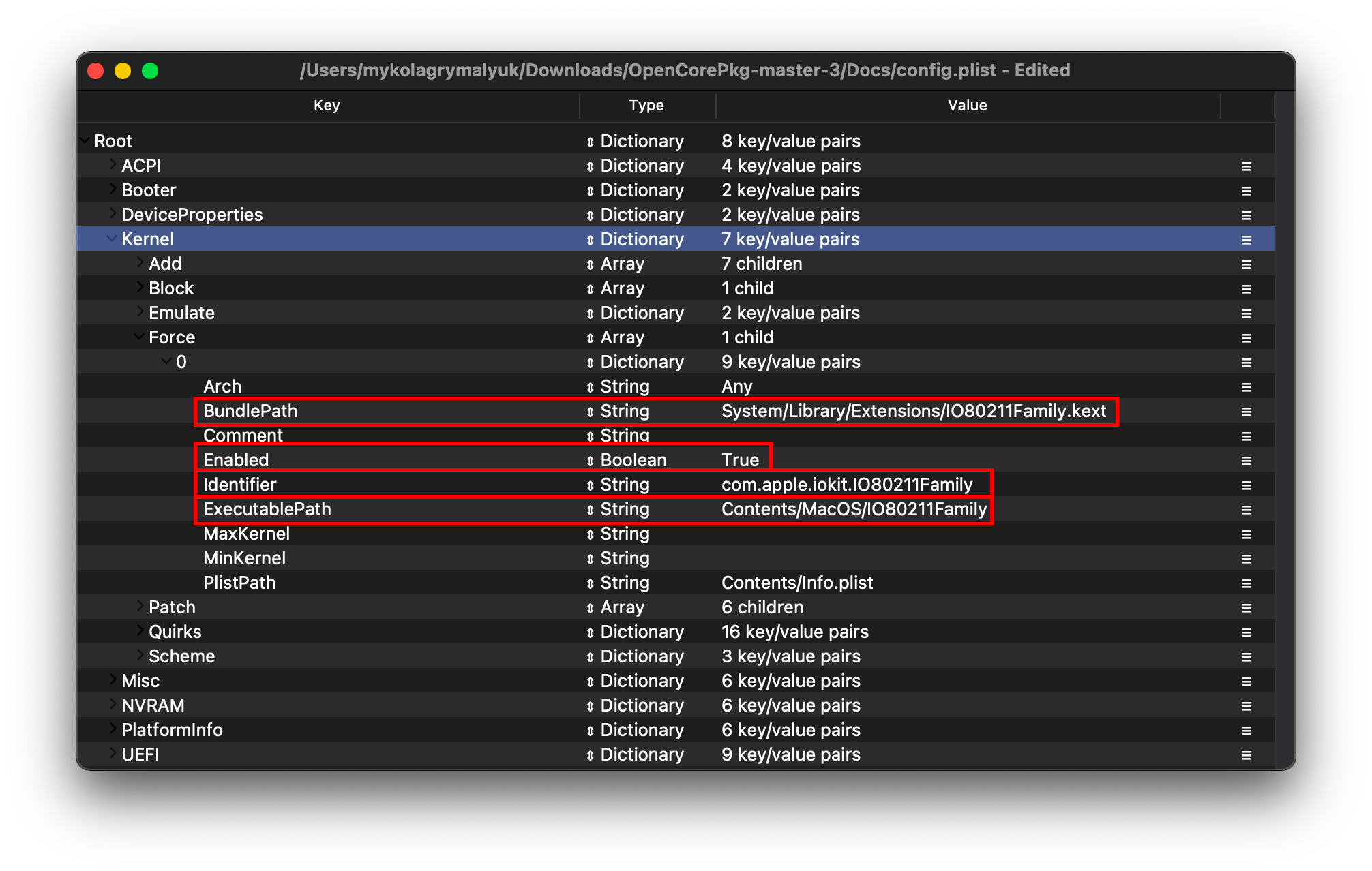
 reyzafany
on 21 Sep 2020
reyzafany
on 21 Sep 2020
@reyzafany Already covered that in https://github.com/daliansky/XiaoMi-Pro-Hackintosh/wiki/Drive-Native-Intel-Wireless-Card#use-airportitlwm
stevezhengshiqi
on 24 Sep 2020
Related issues
 fang0814
·
6Comments
fang0814
·
6Comments
 spita90
·
4Comments
spita90
·
4Comments
 wuchuguang
·
5Comments
wuchuguang
·
5Comments
 BASSA89
·
7Comments
BASSA89
·
7Comments
 Mateo1234454545
·
5Comments
Mateo1234454545
·
5Comments
Most helpful comment
For anyone who wants to boot AirportItlwm on macOS10.15,
SecureBootModelto allow loading immutablekernel. If your macOS version >= macOS11 (KernelCollection), you don't need to do the following steps:More details have been posted on https://github.com/daliansky/XiaoMi-Pro-Hackintosh/wiki/Drive-Native-Intel-Wireless-Card