Xdrip: Android 10+ asks every 5 minutes for pairing with Dexcom transmitter
After updating in October 2020 from android to samsung a50 every 5 minutes xdrip 2020 asks for dexcom Bluetooth connections. The xdrip app released in 2019 works fine.
How to remove the request to connect dexcom via bluetooth on a50 smartphone?
 vitalykekukh
All 195 comments
After upgrade to oct 2020 android samsung a50 every 5 minutes xdrip 2020 asks for dexcom bluetooth connection when syncing. If you do not agree with the request to connect the dexcom bluetooth sensor, xdrip sync does not work.
The xdrip app released in 2019 works fine. Synchronization of the smartphone and dexcom takes place without a request.
How to remove the request to connect dexcom via bluetooth on the a50 smartphone on xdrip later edition of xdrip?
vitalykekukh
on 1 Nov 2020
I am experiencing what I believe may be the same issue. xDrip making a bluetooth pairing request for the Dexcom
transmitter every couple of minutes. It is extremely annoying and frustrating.
This is on a Samsung Galaxy S10 and started happening with the last phone update yesterday.
Galaxy S10 (SM-G973U1)
Build Number : G973U1UES4ETJ3
Android version : Q(Android 10)
Release Date : 2020-11-02
Security patch level : 2020-11-01
2020.07.13 e14bae1
Have not been able to work around this :(

 BKrueckeberg
on 4 Nov 2020
BKrueckeberg
on 4 Nov 2020
@BKrueckeberg Can you confirm that the nightly from May 18, 2019 works for you?
@vitalykekukh Please help us by finding the latest version which works for you.
 tolot27
on 4 Nov 2020
tolot27
on 4 Nov 2020
now this version works well
https://github.com/NightscoutFoundation/xDrip/releases/tag/2019.05.18
vitalykekukh
on 4 Nov 2020
@vitalykekukh Now, I'm confused. What is the difference between the latest comments with respect to the release tag? Please can you remove redundant comments and just edit a (potentially) wrong comment?
tolot27
on 4 Nov 2020
@vitalykekukh I cannot believe that 2019.05.18 is the latest version which works because there are only Libre-related changes in 2019.05.19, for instance. It would be really helpful to find the latest tagged version which works for you. Please can you try newer versions of every month after May, 2019 until you found a breaking version and than go stepwise back the tags?
tolot27
on 4 Nov 2020
I am having the same issue on my Pixel 5. I tried the May 19 version but the same thing happened
 chrisc93
on 4 Nov 2020
chrisc93
on 4 Nov 2020
I tried the 2019.05.18 build on my Samsung Galaxy S10.
I am NOT experiencing the ongoing Bluetooth pairing requests anymore BUT am also loosing transmitter connection after only a handful of successfully received signals. I am seeing 'Aggressively restarting collector service due to lack of reception backoff' being logged every couple of minutes.
Bottom line is that the 2019.05.18 doesn't work. Please let me know how I can support you in figuring out a solution!
Thanks
BKrueckeberg
on 4 Nov 2020
The difference between the old and new versions of Android is the enhanced Bluetooth security system. The developers claim that hackers can steal data from a smartphone via Bluetooth. So in the new version of Android, they have enabled an additional pairing request.
The 2019 version of xdrip is permanently paired via Bluetooth. To save battery power, the 2020 versions connect via Bluetooth every 5 minutes and then disconnect. Therefore, when paired, Android recognizes the pairing as connecting a new device and issues a request to the smartphone user. In this situation, either the xdrip developers in the new versions will make permanent pairing via Bluetooth, or the Android developers will make it possible to make a one-time request to pair with a known (allowed) device.
vitalykekukh
on 4 Nov 2020
Thanks for the explanation @vitalykekukh. That would make sense based on what I am experiencing with my phone.
Do you happen to know with what version this power save feature was added exactly? I have tried the 2019.05.18 version but this hasn't worked well for me either (due to other issues).
BKrueckeberg
on 4 Nov 2020
If it is not possible to install an earlier version of xdrip, then you need to lower the android firmware. The September 2020 firmware should work.
vitalykekukh
on 5 Nov 2020
It looks like this issue is caused by the fixes of CVE-2020-12856, specifically A-157038281 [3]. For details see Android Security Bulletin—November 2020.
tolot27
on 5 Nov 2020
You need to write a complaint to the android developers, you need to ask them to fix our problem in the next update!
vitalykekukh
on 5 Nov 2020
Thanks for your comments guys. It sounds this will become a huge issue for many xdrip users tben unfortunately. I will try to contact Google about it but am not confident my (our) concern(s) will be important enough for them to rethink their strategy. Will you also consider to fall back to the continuous Bluetooth connection for future releases of xdrip? Make it optional maybe?
BKrueckeberg
on 5 Nov 2020
If it is not possible to install an earlier version of xdrip, then you need to lower the android firmware. The September 2020 firmware should work.
What earlier version of xDrip will not have this problem?
 Navid200
on 5 Nov 2020
Navid200
on 5 Nov 2020
If it is not possible to install an earlier version of xdrip, then you need to lower the android firmware. The September 2020 firmware should work.
What earlier version of xDrip will not have this problem?
You must install the firmware before September 2020.
You say if it is not possible to install an earlier version of xDrip. It is. My question is if it is possible to install an earlier version, which version?
Or, are you saying it is not enough to go back in xDrip, we also need to change the firmware?
Navid200
on 5 Nov 2020
Если нет возможности установить более раннюю версию xdrip, то нужно понизить прошивку андроида. Прошивка от сентября 2020 года должна работать.
В какой более ранней версии xDrip не будет этой проблемы?
Вы должны установить прошивку до сентября 2020 года.
Вы говорите, если невозможно установить более раннюю версию xDrip. Это. У меня вопрос, можно ли установить более раннюю версию, какую версию?
Или вы говорите, что недостаточно вернуться в xDrip, нужно еще поменять прошивку?
if this version of xdrip is suitable, then the android firmware does not need to be changed
https://github.com/NightscoutFoundation/xDrip/releases/tag/2019.05.18
vitalykekukh
on 5 Nov 2020
Update on S10 causing same problem here. Will try the older Xdrip version but second the comment above that an option to stay connected would help a lot.
 afreitag33
on 5 Nov 2020
afreitag33
on 5 Nov 2020
If you are using the new g6 transmitter an old xdrip version won't work afaik. I've gone back to the dexcom app for now but can still use xdrip with dexshare
chrisc93
on 5 Nov 2020
The first person, on facebook, has confirmed that 2019.05.18 has resolved the issue. Of course, he is using G5.
Edit: But, he has connectivity issues with that version.
Navid200
on 5 Nov 2020
I am on a galaxy s10+. I updated today to latest samsung release and now I am receiving this prompt every 5 minutes. Tried other fixes here and reverting to old version of xdrip does not work. I am on a g6.
 gfginter
on 6 Nov 2020
gfginter
on 6 Nov 2020
I am on a galaxy s10+. I updated today to latest samsung release and now I am receiving this prompt every 5 minutes. Tried other fixes here and reverting to old version of xdrip does not work. I am on a g6.
Also I have updated my s10 + and I am using the g6 and I am having the same problem. I had to install the dexcom application for now
 davide1985
on 6 Nov 2020
davide1985
on 6 Nov 2020
Same here Samsung S10e SEPF_SM970F_10_0024 with G6(reciver 8K) and Xdrip 2020.10.01/a91b660. I'll downgrad/factory reset my phone.
 martinachtman
on 6 Nov 2020
martinachtman
on 6 Nov 2020
I tried the 2019.05.18 build on my Samsung Galaxy S10.
I am NOT experiencing the ongoing Bluetooth pairing requests anymore BUT am also loosing transmitter connection after only a handful of successfully received signals. I am seeing 'Aggressively restarting collector service due to lack of reception backoff' being logged every couple of minutes.
Bottom line is that the 2019.05.18 doesn't work. Please let me know how I can support you in figuring out a solution!
Thanks
Hello, I am experiencing same issue. With the downgrade the BT connection is stable (i guess). But after couple of cycles i loose signal in xDrip. I tried to fix this issue yesterday late in the evening. I was so tired i went to sleep. Today at the morning my transmitter is very low on battery (maybe even dead). I feel it has something to do with this.
 fatalkrutorking
on 6 Nov 2020
fatalkrutorking
on 6 Nov 2020
То же самое и с Samsung S10e SEPF_SM970F_10_0024 с G6 (ресивер 8K) и Xdrip 2020.10.01 / a91b660. Я верну свой телефон обратно к заводским настройкам.
Restoring factory settings will not help, the kernel version will remain from October 2020. You need to make an earlier version of Android firmware (kernel).
vitalykekukh
on 6 Nov 2020
Not sure if this information is helpful but my insulin pump Dana RS is not expreriencing no issue. I am using AAPS to control the pump on my phone. Right now my do not use closed loop since this issue exist.
fatalkrutorking
on 6 Nov 2020
Experiencing the same issue with an updated Samsung Galaxy S10 since yesterday.
Sadly the dexcom is the only BLE device i have so i cannot tell if this is a kernel / android issue or xdrip handling issue.
G970FXXU9DTJA G970FXXU9DTJB says the last update page
Savety patch level 1.Nov.2020
@martinachtman can you point me on where did you find an older image of the os for this phone? (or how did you actualy downgrade)
It drives me nuts. It feels like locomotive driver having to push the food pedal every 30 seconds...
 JanFellner
on 6 Nov 2020
JanFellner
on 6 Nov 2020
@martinachtman can you point me on where did you find an older image of the os for this phone? (or how did you actualy downgrade)
check https://www.sammobile.com/samsung/galaxy-s10e/firmware/#SM-G970F and https://www.androidinfotech.com/return-back-security-patch-os/#Samsung_Galaxy_Devices
martinachtman
on 6 Nov 2020
I also see this on my Pixel 3a after the November security update. However, it will go away if I react to the notification quick enough after it pops up. Usually takes 1-2 tries. After that, it works until the phone and G6 lose connection, then repeat...
 jredders
on 6 Nov 2020
jredders
on 6 Nov 2020
I also see this on my Pixel 3a after the November security update. However, it will go away if I react to the notification quick enough after it pops up. Usually takes 1-2 tries. After that, it works until the phone and G6 lose connection, then repeat...
Is there no option on the notification that would let you automate the response for the following identical notifications?
Navid200
on 6 Nov 2020
Is there no option on the notification that would let you automate the response for the following identical notifications?
Nope
jredders
on 6 Nov 2020
If you are using the new g6 transmitter an old xdrip version won't work afaik. I've gone back to the dexcom app for now but can still use xdrip with dexshare
@chrisc93 Can you confirm that no pairing request dialog appears with the Dexcom app?
tolot27
on 7 Nov 2020
I received the pairing request once with the Dexcom app and then never again. My connection is stable. I have moved my data source to Dex Sharing.
gfginter
on 7 Nov 2020
I also went back to using the Dexcom app :(. It is working fine... not seeing any excessive Bluetooth pairing requests.
BKrueckeberg
on 7 Nov 2020
@tolot27 as others have reported there was an initial pairing request but none since.
chrisc93
on 7 Nov 2020
Please can someone send me some logs of the event? The best would be to have the top 500 records of the UserErrors table from the SQLite DB.
Before, please enable verbose logging in settings > less common settings > extra tags for logging and then add there: BluetoothScan:v,DexCollectionService:v,Ob1G5CollectionService:v,Ob1G5StateMachine:v,G5CollectionService:v and post relevant lines here or attach SQLite DB entries.
tolot27
on 7 Nov 2020
Android is not going to change this new working of bluetooth. It's up to the app developers to adjust their apps accordingly. No issues with any others apps using bluetooth, including the Dexcom app. So, make xDrip function like the Dexcom app.
 lanceblaise
on 7 Nov 2020
lanceblaise
on 7 Nov 2020
Please can someone send me some logs of the event? The best would be to have the top 500 records of the
UserErrorstable from the SQLite DB.Before, please enable verbose logging in settings > less common settings > extra tags for logging and then add there:
BluetoothScan:v,DexCollectionService:v,Ob1G5CollectionService:v,Ob1G5StateMachine:v,G5CollectionService:vand post relevant lines here or attach SQLite DB entries.
Hi,
I am also experiencing this problem (Galaxy S9+, also appeared first when doing the Android November update; xDrip latest nightly).
Here you can find my logs - on 9:44, I confirmed the bonding request - on 9:49 I declined.
Thank you very much in advance!
https://user-images.githubusercontent.com/32902785/98437108-11e64980-20e0-11eb-8869-aa0e8e8d0e05.jpg
 maberlin
on 7 Nov 2020
maberlin
on 7 Nov 2020
Android is not going to change this new working of bluetooth. It's up to the app developers to adjust their apps accordingly. No issues with any others apps using bluetooth, including the Dexcom app. So, make xDrip function like the Dexcom app.
I would be so sure about all other apps working... I know I was getting repeated pairing requests on my tizen watch too. So much so I actually reverted back to the October security patch
 vytux-com
on 7 Nov 2020
vytux-com
on 7 Nov 2020
It is necessary to write complaints about the android update regarding Bluetooth pairing requests. If complaints are massive, then they will be forced to make changes to the android.
vitalykekukh
on 7 Nov 2020
@maberlin Please can you enable "Minimize Scanning" in the "G5/G6 Debug Settings"? This probably avoids unbonding.
tolot27
on 7 Nov 2020
@maberlin Please can you enable "Minimize Scanning" in the "G5/G6 Debug Settings"? This probably avoids unbonding.
@tolot27 Thanks for your answer. I tried enabling "Minimize Scanning" as well as disabling "Allow OB1 unbonding" and "Allow OB1 initiate bonding", but none of these options resolved the problem. :/
maberlin
on 7 Nov 2020
@maberlin Please can you send me a new log? Your previous log contains minimize: false.
tolot27
on 7 Nov 2020
@tolot27 Yes, sure:
https://user-images.githubusercontent.com/32902785/98445793-e84a1400-2119-11eb-82a1-24ce84583eac.jpg
maberlin
on 7 Nov 2020
Minimize scanning is working somewhat on Pixel 4XL, latest software
 JonathanM32
on 7 Nov 2020
JonathanM32
on 7 Nov 2020
I have a Samsung Note 20 Ultra and this morning the device received the November security patch. I started seeing the 'Bluetooth Pairing Request' pop-up after that.
Tried fiddling with the pairing and related Bluetooth settings but couldn't get it to read data without first manually accepting the pairing request.
As a fallback I have enabled Dexcom Share in the official app and have set Xdrip to use Dexcom Share Follower as data source.
Please note the setting under Cloud Upload -> Dexcom Share Server Upload -> Dexcom USA based account.
I had to disable this setting as I am in the UK and would see an SSO login error otherwise.
 detellis
on 7 Nov 2020
detellis
on 7 Nov 2020
Hey there,I'm very new to xDrip and have been loving it so far. I just got a pixel 5 and all was good until the stupid November update. At first I was getting the bluetooth pair request every 5 minutes, I resolved by re-installing latest nightly (Oct.). Now I have to re-pair each time I lose connection. ( a few times a day).
Am interested in helping anyway I can, so if you need me to capture logs, or go and log an issue with Google, please let me know. Thanks to the devs who work on this. So impressed, the Dexcom app was pretty lacklustre in comparison.
 bsw-del
on 8 Nov 2020
bsw-del
on 8 Nov 2020
Is there any idea what can be done to fix this issue? xDrip is essentially unusable at the moment
JonathanM32
on 9 Nov 2020
Is there any idea what can be done to fix this issue? xDrip is essentially unusable at the moment
I am facing same issue. Was tring to solve it (reinstalling older version of xDrip), but that did not helped me. My last hope is to downgrade Android update which start causing this issue. I do not have functional transmitter at the moment, so I can not do this. Hope someone find the way to fix it.
fatalkrutorking
on 9 Nov 2020
I moved back to the Dexcom app and it has only asked me to pair once (after installation). Running November security patch.
Will report back if any issues arise. Would prefer xdrip of course. 😀
bsw-del
on 9 Nov 2020
Please can someone try 2019.12.05? This will likely reintroduce the problem described in #1061 but that's just for testing.
Currently, I don't have a phone or tablet for testing. Have to wait till 12th Nov. to get the newer LineageOS image.
tolot27
on 10 Nov 2020
My recommend settings for testing with xDrip nightly of 2019.12.05 and the following settings:
- [x] Minimize Scanning
- [ ] Allow OB1 unbonding
- [x] Allow OB1 initiate bonding
tolot27
on 10 Nov 2020
Is the purpose of the test to help with fixing 1494? So, it is for those with Samsung, right?
Navid200
on 10 Nov 2020
Is the purpose of the test to help with fixing 1494? So, it is for those with Samsung, right?
This affects everyone with an Android and Nov 2020 Security Patch... So also all Pixel 2 and above owners and probably quite a few other phone manufacturers
vytux-com
on 10 Nov 2020
My question was not about whom this issue affects.
If you look above my question, you can see we have been asked to help by performing a test.
Who should participate in this test?
Can someone whose phone is on Android 8 do what tolo27 asked, and more importantly, will that help him towards finding a solution for this issue?
Navid200
on 10 Nov 2020
Yes, I get that, based on what tolo27 said it would be anyone that has a new enough version of android to be affected by this issue
Testing on an older version would be secondary to ensure no unintended errors were introduced with this fix for older devices. So testing on Android 8 won't hurt, but it will also not be an accurate test of a fix as that device does not have the current issue.
vytux-com
on 10 Nov 2020
Can we get comments on this issue from the xdrip developers? Their app is useless now! They will fix xdrip or we will massively switch to other applications! Unfortunately, there are no other options!
vitalykekukh
on 10 Nov 2020
There are those who use xDrip for Libre. They are not affected by this issue.
My phone still has Android 9. I have no problem using xDrip with Dexcom G6.
There are people who use Motorola and Android 10. They are not affected.
Yes, there are individuals who are affected by this issue. But, they are a portion of the overall xDrip users. Saying "the app is useless" would be an exaggeration.
It seems reasonable to switch to something else if one has to. I don't think anyone would blame you.
But, what is the point of putting pressure on the developers? Are they paid for developing and maintaining xDrip? I've never paid for using xDrip.
Yet, they are working on resolving this issue.
Navid200
on 10 Nov 2020
We want the xdrip developers to express their position on this issue. And we, in turn, will decide what to do. If there is a promise to fix this problem, we will follow up on this topic. If they explain that they will not solve the problem, then we will move on to other applications. I would like them to express their opinion on this matter.
vitalykekukh
on 10 Nov 2020
@vitalykekukh Indeed, the issue will be fixed. It is a breaking one and more and more users get affected. But it takes some time to solve complex problems. From the users point of view it is just a simple touch on "OK" but it is much more complicated from the developers side. Remember, Android is raising the pop-up, not xDrip.
I know, it is an annoying bug for the affected users and I fully understand the consequences on therapy. But please remember, Github is a code repository for open source projects. Every contributor becomes a developer.
And as long as the core developers do not have affected devices, it is hardly possible for them to find a good solution rather than a workaround.
tolot27
on 10 Nov 2020
Is the purpose of the test to help with fixing 1494? So, it is for those with Samsung, right?
Yes, it is to help fixing this issue. Since not only Samsung phones are affected, I'm going to change the issue title.
tolot27
on 10 Nov 2020
My recommend settings for testing are 2019.12.05 and the following settings:
- [x] Minimize Scanning
- [ ] Allow OB1 unbonding
- [x] Allow OB1 initiate bonding
Unfortunately, these settings do not help on Samsung Galaxy Note 10.
 michalhudecek
on 10 Nov 2020
michalhudecek
on 10 Nov 2020
@michalhudecek The settings alone won't help. You need to go back to the xDrip nightly of 2019.12.05, too.
tolot27
on 10 Nov 2020
Actually, when I roll back to 2019.12.05, I completely stop receiving any data. I had to upgrade back to 2020.07.13. Pairing every 5 minutes is still better than nothing.
michalhudecek
on 10 Nov 2020
Actually, when I roll back to 2019.12.05, I completely stop receiving any data. I had to upgrade back to 2020.07.13. Pairing every 5 minutes is still better than nothing.
I downgraded my Note 10 Plus to October Security Patch (DTI5) and its working great again.
But remember, you will loose all your phone data, if you downgrade
 Gufur48387
on 10 Nov 2020
Gufur48387
on 10 Nov 2020
On my Pixel 3a, I've found that if I reboot my phone, I'll get the pairing notification only once after startup, then it works fine until I lose connection between my phone and G6. Once the connection is lost, I get the pairing notification every five minutes until I reboot again.
jredders
on 10 Nov 2020
I have the same problem. Every 5 Minutes xDrip+ aked for pairing my Dexcom G6 and I`m loosing my connection. This error exists sine I have update my Samsung S10+ this morning.
How is it possible to upgrade to the previous software version?
 Quergestreift
on 10 Nov 2020
Quergestreift
on 10 Nov 2020
I have the same problem. Every 5 Minutes xDrip+ aked for pairing my Dexcom G6 and I`m loosing my connection. This error exists sine I have update my Samsung S10+ this morning.
How is it possible to upgrade to the previous software version?
Find previous Firmware for you device
Download it
Download Odin (Flash Tool)
Flash previous Firmware with odin
Beware that you will loose all your data
There are a lot of guides out There how to use Odin, if you Nerd Further help, contact me
Gufur48387
on 10 Nov 2020
Is there any hope, the problem will be solved by xdrip? What do you think?
Quergestreift
on 10 Nov 2020
Is there any hope, the problem will be solved by xdrip? What do you think?
Yes, I think so
The Dexcom App is still working, so it can be done correctly
In the menatime im Just happy to have xdrip+ its a lifesaver, and I will happily wait for an Update with a fix :)
Gufur48387
on 10 Nov 2020
thanks for yor answer. I`m abit lsot now.
Quergestreift
on 10 Nov 2020
sorry, I´m a bit lost now ;-)
Quergestreift
on 10 Nov 2020
I have full confidence that some of the smartest ppl of the web meet here and solve the issue. For the time being I was wondering, if there's a way for me to get the Dexcom G6 readings on my smartwatch. I thought maybe using xDrip setup as a follower could read the data from the dexcom share - even though that would propably come with a hefty delay. Cheers, Pete
 MikeUniformCharlie
on 10 Nov 2020
MikeUniformCharlie
on 10 Nov 2020
@jredders
On my Pixel 3a, I've found that if I reboot my phone, I'll get the pairing notification only once after startup, then it works fine until I lose connection between my phone and G6. Once the connection is lost, I get the pairing notification every five minutes until I reboot again.
Please can you post such a cycle with with the initial pairing, two successful bg readings without pairing request, connection loss for at least 3 readings (min. 15 minutes) and then reconnect with at least two repeated (and accepted) pairing requests?
Before, please enable verbose logging in settings > less common settings > extra tags for logging and then add there: BluetoothScan:v,DexCollectionService:v,Ob1G5CollectionService:v,Ob1G5StateMachine:v,G5CollectionService:v and post relevant lines here or attach SQLite DB entries of table UserErrors (most useful).
That would further narrow down the problem and will improve my understanding of reconnect problems (#1061).
tolot27
on 10 Nov 2020
Pixel 4a user here. 2020.07.13 was working great for me on Android 11. This issue started happening for me right after I applied the November 2020 Android security patch.
 foodevnul
on 10 Nov 2020
foodevnul
on 10 Nov 2020
My apologies, I haven't been able to read through all the comments on this issue, but can anyone confirm if this is an issue affecting Dexcom only?
I've just received the notification to upgrade, but I use Libre+MiaoMiao. Since I use this to loop I cannot risk it not working if I install the update.
Can anyone confirm whether MiaoMiao is affected like the Dexcom is?
Thanks
 mistermintsgh
on 10 Nov 2020
mistermintsgh
on 10 Nov 2020
My apologies, I haven't been able to read through all the comments on this issue, but can anyone confirm if this is an issue affecting Dexcom only?
I've just received the notification to upgrade, but I use Libre+MiaoMiao. Since I use this to loop I cannot risk it not working if I install the update.
Can anyone confirm whether MiaoMiao is affected like the Dexcom is?
Thanks
It seems to affect the Bluetooth stack so is very likely to affect anything related to xdrip and Bluetooth (MiaoMiao included)
vytux-com
on 10 Nov 2020
My apologies, I haven't been able to read through all the comments on this issue, but can anyone confirm if this is an issue affecting Dexcom only?
I've just received the notification to upgrade, but I use Libre+MiaoMiao. Since I use this to loop I cannot risk it not working if I install the update.
Can anyone confirm whether MiaoMiao is affected like the Dexcom is?
ThanksIt seems to affect the Bluetooth stack so is very likely to affect anything related to xdrip and Bluetooth (MiaoMiao included)
Forgive my ignorance on this, but if it affects everything Bluetooth related, isn't there an impact on things like headphones, speakers, anything else? Or is it only everything Bluetooth that connects via xDrip?
Would it affect a RileyLink connected via AAPS?
mistermintsgh
on 11 Nov 2020
RileyLink is working fine for me. It stays connected though and isn't in the official BT stack.
afreitag33
on 11 Nov 2020
Same issue here. My Samsung Galaxy Fold just updated to latest November 1, 2020 (Android 10) security patch.
Every 5 minutes on latest nightly version of xdrip, I get that annoying pop up to pair my Dexcom transmitter (see screenshot below). Cannot roll back to the May 2019 build to test (as suggested earlier) as it gives sensor sanity failure.
If you need me to test any beta type nightly, let me know. I've had flawless connectivity prior to this.
Only xdrip is affected. My car, my Ticwatch Pro 3, Ticwatch 4G, and Airpods are unaffected.
Thank you, developers for your efforts and time. I know this is annoying for you as well and not an easy thing.

 opasha
on 11 Nov 2020
opasha
on 11 Nov 2020
I have a Pixel 2 on Google Fi and had this happen when I updated to the latest on Nov 5th on Android 11.
For me, reverting to https://github.com/NightscoutFoundation/xDrip/releases/tag/2019.05.18 actually worked to resolve this issue. There are still some connection problems when my phone dies or is away from the Dexcom transmitter, but it can be resolved by hitting "forget device" and then restarting the collector.
 diabeticpilot
on 11 Nov 2020
diabeticpilot
on 11 Nov 2020
Yeah, I tried that same version again, forgot it like you said, then did restart transmitter.
It worked. It changed from Sensor Raw Data Sanity Failure to the correct glucose. Thanks! I'll keep an eye on it.
Just after 5.18.19 version install:

After forgetting and restarting transmitter on 5.18.19 version - give it a minute or two to refresh:

Proof that the previous 5.18.19 version of xdrip is working just fine without any loss of Bluetooth since my last reading above at 140 mg/dL:

The random transmitter connection loss as other reported above is present on this version (5.18.19) despite bluetooth connection being fine:

UPDATE: SCRATCH THAT, PREVIOUS VERSION ALSO HAS BLUETOOTH ISSUE - DO NOT DOWNGRADE XDRIP:

opasha
on 11 Nov 2020
Actually, when I roll back to 2019.12.05, I completely stop receiving any data. I had to upgrade back to 2020.07.13. Pairing every 5 minutes is still better than nothing.
Please can at least a second user try 2019.12.05? I can't really believe that it should not work wit 2019.12.05.
BTW: Hopefully the Nov. security patch will be released for S7, tomorrow. Than I can continue digging into this issue.
tolot27
on 11 Nov 2020
Actually, when I roll back to 2019.12.05, I completely stop receiving any data. I had to upgrade back to 2020.07.13. Pairing every 5 minutes is still better than nothing.
Please can at least a second user try 2019.12.05? I can't really believe that it should not work wit 2019.12.05.
BTW: Hopefully the Nov. security patch will be released for S7, tomorrow. Than I can continue digging into this issue.
This version leads to a not found error - missing or dead link. Can someone upload it so we can test?
opasha
on 11 Nov 2020
This version leads to a not found error - missing or dead link. Can someone upload it so we can test?
Sorry, fixed the link.
tolot27
on 11 Nov 2020
One more update. Please can anyone having this issue try the following extra logging tags and post the log of one confirmed pairing process?
BluetoothScan:v,DexCollectionService:v,Ob1G5CollectionService:v,Ob1G5StateMachine:v,G5CollectionService:v,jamorham JoH:v
tolot27
on 11 Nov 2020
Actually, when I roll back to 2019.12.05, I completely stop receiving any data. I had to upgrade back to 2020.07.13. Pairing every 5 minutes is still better than nothing.
Please can at least a second user try 2019.12.05? I can't really believe that it should not work wit 2019.12.05.
BTW: Hopefully the Nov. security patch will be released for S7, tomorrow. Than I can continue digging into this issue.
This version (https://github.com/NightscoutFoundation/xDrip/releases/tag/2019.12.05) is working flawlessly! Thank you!

UPDATE: Nevermind, spoke too soon, lol. It lost connection as well. Just stays connected longer, but got the same Bluetooth pairing request:

opasha
on 12 Nov 2020
Just a shot in the dark, but maybe the developers can use this to figure something out?
BluetoothLibraryPatcher - Fix bluetooth pair… | Samsung Galaxy Note 9
https://forum.xda-developers.com/galaxy-note-9/development/zip-libbluetooth-patcher-fix-losing-t4017735
Thanks!
I'm back on the latest nightly. As others have said, it's better to have Bluetooth pairing annoyance as opposed to signal/data loss with the old versions:

opasha
on 12 Nov 2020
Had the same issue with my S10, Dexcom G6, AAPS and 1. november Patch installed this morning. The 2019.12.5 version fix the problem :-). Thanks for the information about this issue and how to resolve the problem...
 heba29
on 12 Nov 2020
heba29
on 12 Nov 2020
Had the same issue with my S10, Dexcom G6, AAPS and 1. november Patch installed this morning. The 2019.12.5 version fix the problem :-). Thanks for the information about this issue and how to resolve the problem...
Unfortunately, it does not fix the problem. Monitor it, and you'll start to see signal loss to your transmitter the same way you would with being too far from your phone and the same way sensor errors occur after restarts - that is the behavior reported by others and my tests above.
If you lose signal and have issues, please update this thread. Thank you!
opasha
on 12 Nov 2020
Had the same issue with my S10, Dexcom G6, AAPS and 1. november Patch installed this morning. The 2019.12.5 version fix the problem :-). Thanks for the information about this issue and how to resolve the problem...
Unfortunately, it does not fix the problem. Monitor it, and you'll start to see signal loss to your transmitter the same way you would with being too far from your phone and the same way sensor errors occur after restarts - that is the behavior reported by others and my tests above.
If you lose signal and have issues, please update this thread. Thank you!
Yes, you are right. Connection lost after 15 minutes. Restart collector do not work. But my Dexcom Transmitter is pared. Update to the last Nightly Version :-)
heba29
on 12 Nov 2020
Had the same issue with my S10, Dexcom G6, AAPS and 1. november Patch installed this morning. The 2019.12.5 version fix the problem :-). Thanks for the information about this issue and how to resolve the problem...
Unfortunately, it does not fix the problem. Monitor it, and you'll start to see signal loss to your transmitter the same way you would with being too far from your phone and the same way sensor errors occur after restarts - that is the behavior reported by others and my tests above.
If you lose signal and have issues, please update this thread. Thank you!
Also just downgraded. Seems to work a bit better but I am still seeing significant signal loss like this
JonathanM32
on 12 Nov 2020
Had the same issue with my S10, Dexcom G6, AAPS and 1. november Patch installed this morning. The 2019.12.5 version fix the problem :-). Thanks for the information about this issue and how to resolve the problem...
Unfortunately, it does not fix the problem. Monitor it, and you'll start to see signal loss to your transmitter the same way you would with being too far from your phone and the same way sensor errors occur after restarts - that is the behavior reported by others and my tests above.
If you lose signal and have issues, please update this thread. Thank you!Also just downgraded. Seems to work a bit better but I am still seeing significant signal loss like this
Only usable and stable option as another user mentioned earlier is to download custom dexcom app, turn off alerts and glance notifications, use dexcom share within the dexcom app (make your follower), then login with your dexcom ID into dexcom share within xdrip.
Rock solid connection without any Bluetooth issues.
STEPS: Simply stop sensor with xdrip. Remove transmitter from sensor. Wait 30 minutes. Setup your dexcom app (use 2 hour default in your option at the end), start transmitter/sensor in the dexcom app, setup dexcom share (share button within the app), then open xdrip and settings, hardware data source as dex share follower - use your dexcom username login and password.
UPDATE: nickb24's comment below: "If you want to switch from xDrip to Dexcom app on an already running sensor you don't need to stop the sensor. Just stop the xDrip app, then run the Dexcom app. It will pickup on the already running session and continue.
*Note: this is assuming you have a G6."

Working flawlessly (for real this time) since restarting using the same sensor and transmitter as in my earlier tests with xdrip.

opasha
on 12 Nov 2020
Can we stop the Sensoren XDrip, Wait 30 Minutes, Remote transmitter and install patched dexcom App??
So my Sensor ist from yesterday 😬
heba29
on 12 Nov 2020
I would like to add my input in case it helps someone in the future. I've been looking at the xDrip bluetooth code for the last 2 days intensively. As @tolot27 already mentioned, the android source code has been updated to fix a bug but has now also introduced a security measure that shows a popup to the user each time a new bluetooth devices is connected.
When you break down the issue from a code perspective, the issue becomes clear. The popup only occurs when a bluetooth devices is first added to your Android bluetooth list. Once it is added and the user accepts the prompt from the Android OS, then it will never show again. This is why with the Dexcom app it only shows the first time adding a transmitter or running the Dexcom app from a new install. @vitalykekukh has already mentioned this:
The difference between the old and new versions of Android is the enhanced Bluetooth security system. The developers claim that hackers can steal data from a smartphone via Bluetooth. So in the new version of Android, they have enabled an additional pairing request.
The 2019 version of xdrip is permanently paired via Bluetooth. To save battery power, the 2020 versions connect via Bluetooth every 5 minutes and then disconnect. Therefore, when paired, Android recognizes the pairing as connecting a new device and issues a request to the smartphone user. In this situation, either the xdrip developers in the new versions will make permanent pairing via Bluetooth, or the Android developers will make it possible to make a one-time request to pair with a known (allowed) device.
I don't think this change was done only to save power. Not from what I can see in the code.
What is not discussed is why does the Dexcom app work without unbonding and then rebonding the bluetooh device? This is the questions we need to answer. The older versions of xDrip never removed the bluetooth bond (therefore never removed the bluetooth devices in the Android device list) and this is why the popup doesn't occur with the old version. However, at the same time Dexcom changed something in their transmitters and then it caused what xDrip users here describe as 'signal lost', but it's not a signal loss. It is a breakdown of the bluetooth communication. What xDrip does when the communication protocol is broken is to unbond the transmitter and do a full rebond and authentication. So then why was unbonding not necessary at one point then become necessary, what changed? It's clear that the xDrip unbond/bond technique is a patch that is hiding a deeper issue.
What I believe the solution is to this problem, is to remove the code that unbonds the transmitter. However, at the moment if we do that then the communication will fail after a certain amount of time. As others have mentioned above, it seems to be around 15 minutes. Based on my findings I mention in this issue, https://github.com/NightscoutFoundation/xDrip/issues/1279#issuecomment-725774671 , I believe the issue could be related to the way xDrip is handling the communication protocol to the transmitter. There looks to be a security mechanism that xDrip is not using. I believe that if this bluetooth dialog issue is fixed for this set of users, then all of you would then get the other issue here https://github.com/NightscoutFoundation/xDrip/issues/1279#issuecomment-725774671 if you start running one of the new transmitters.
 nickb24
on 12 Nov 2020
nickb24
on 12 Nov 2020
Can we stop the Sensoren XDrip, Wait 30 Minutes, Remote transmitter and install patched dexcom App??
So my Sensor ist from yesterday 😬
If you want to switch from xDrip to Dexcom app on an already running sensor you don't need to stop the sensor. Just stop the xDrip app, then run the Dexcom app. It will pickup on the already running session and continue.
*Note: this is assuming you have a G6.
nickb24
on 12 Nov 2020
Can we stop the Sensoren XDrip, Wait 30 Minutes, Remote transmitter and install patched dexcom App??
So my Sensor ist from yesterday 😬If you want to switch from xDrip to Dexcom app on an already running sensor you don't need to stop the sensor. Just stop the xDrip app, then run the Dexcom app. It will pickup on the already running session and continue.
*Note: this is assuming you have a G6.
Yes thats works great for me. Thank you. Now i can sleep without alarms. Hope the Developer of XDrip solve the problems. You made a great Job!!
heba29
on 12 Nov 2020
Hmmm I have a Pixel 3a, just updated to the November update, and encountered the issue. I began following @tolot27 request a few days ago to gather log data. I restarted by phone, paired, received a few successful readings, set phone in microwave and missed readings for ~30 minutes, removed phone from microwave, received the pair request message and paired again, and it's been humming along fine for 20 minutes since then.
Basically, it's (so far) working again for me after a simple reboot. I'm on the 2020.10.01 nightly version.
 spencertollefson
on 12 Nov 2020
spencertollefson
on 12 Nov 2020
I had the same issue after updating to android 10 today (note 10+)
After rebooting and resetting the network settings it's started to read without requesting a pair each time.
 AppEternal
on 12 Nov 2020
AppEternal
on 12 Nov 2020
Where/which network settings did you reset?
On Thu, Nov 12, 2020 at 12:25 PM AppEternal notifications@github.com
wrote:
I had the same issue after updating to android 10 today (note 10+)
After rebooting and resetting the network settings it's started to read
without requesting a pair each time.—
You are receiving this because you are subscribed to this thread.
Reply to this email directly, view it on GitHub
https://github.com/NightscoutFoundation/xDrip/issues/1494#issuecomment-726221625,
or unsubscribe
https://github.com/notifications/unsubscribe-auth/AJG7U2UYDIP6YUUQKDVVU3DSPQLCDANCNFSM4TGMLYVA
.
 evanheics
on 12 Nov 2020
evanheics
on 12 Nov 2020
I have a Pixel3a as well, it holds the transmitter for aprox. 5 hours, then when the signal is lost, I have to re-pair it, sometimes two or three times ... when it happens at night it is kind of anoying of course ... does not SEEM to be a big programming problem, but then again, what do I know ... 😁 Started yesterday morning after I did the 'security update' ... Android 11
 Chris2001
on 12 Nov 2020
Chris2001
on 12 Nov 2020
It appears that after an hour it has started doing it again.
AppEternal
on 12 Nov 2020
It appears that after an hour it has started doing it again.
It seems to start again e.g. when you miss a value ...
Chris2001
on 12 Nov 2020
I see a fix is underway, but here's a basic Automate task I made so it could continue working while sleeping.
https://m.imgur.com/a/Q6DZag6
AppEternal
on 13 Nov 2020
I see a fix is underway, but here's a basic Automate task I made so it could continue working while sleeping.
https://m.imgur.com/a/Q6DZag6
Thank you AppEternal. This is working perfectly! I don't even notice it when its called.
After the Android 10.security update this morning on my Note 10+, I started getting the re-pair notice every 10 minutes. Argh. I downgraded to the xdrip Dec-2019 release that was mentioned earlier, but I kept getting missed readings (that release never worked well for me).
Then I tried AppEternal's Automate work-around and it's working PERFECT. The only difference is, I had to remove my lock screen security.
 WayneGriswold
on 13 Nov 2020
WayneGriswold
on 13 Nov 2020
Is anyone actively working on this? The last nightly was on 10/1? Being in IT when a security fix drops I tend to install it, now whish I hadn't. Since my phone is company owned I can't disable the lock screen to use the Automate task provided nor roll back to a previous version of Android. I love xDrip I really hope we can keep using it. Dexcom follow option doesn't work for me as it's not supported on Pixel 4 XL.
 cwpeterson
on 13 Nov 2020
cwpeterson
on 13 Nov 2020
Is anyone actively working on this? The last nightly was on 10/1? Being in IT when a security fix drops I tend to install it, now whish I hadn't. Since my phone is company owned I can't disable the lock screen to use the Automate task provided nor roll back to a previous version of Android. I love xDrip I really hope we can keep using it. Dexcom follow option doesn't work for me as it's not supported on Pixel 4 XL.
If you want to use a modified Dexcom app that ignores the phone compatibility check then you can take a look at the following: https://www.reddit.com/r/dexcom/comments/fqvpsf/oc_build_your_own_dexcom_app_update_base_version/
Note: If you ever have a problem with your transmitter, don't call Dexcom tech support. They will know that you are using a modified Dexcom app. That's the risk you take.
I'm using the official Dexcom app (not the modified one) and using Dexcom Share to read the data on xDrip. I've hidden the notification of Dexcom and disabled notifications from the Android settings. From the notification drawer everything looks as it did when only using xDrip.
nickb24
on 13 Nov 2020
Is anyone actively working on this? The last nightly was on 10/1? Being in IT when a security fix drops I tend to install it, now whish I hadn't. Since my phone is company owned I can't disable the lock screen to use the Automate task provided nor roll back to a previous version of Android. I love xDrip I really hope we can keep using it. Dexcom follow option doesn't work for me as it's not supported on Pixel 4 XL.
If you want to use a modified Dexcom app that ignores the phone compatibility check then you can take a look at the following: https://www.reddit.com/r/dexcom/comments/fqvpsf/oc_build_your_own_dexcom_app_update_base_version/
Note: If you ever have a problem with your transmitter, don't call Dexcom tech support. They will know that you are using a modified Dexcom app. That's the risk you take.
I'm using the official Dexcom app (not the modified one) and using Dexcom Share to read the data on xDrip. I've hidden the notification of Dexcom and disabled notifications from the Android settings. From the notification drawer everything looks as it did when only using xDrip.
And you are able to enter treatment information and save statistics as though xDrip is doing the collection?
cwpeterson
on 13 Nov 2020
Is anyone actively working on this? The last nightly was on 10/1? Being in IT when a security fix drops I tend to install it, now whish I hadn't. Since my phone is company owned I can't disable the lock screen to use the Automate task provided nor roll back to a previous version of Android. I love xDrip I really hope we can keep using it. Dexcom follow option doesn't work for me as it's not supported on Pixel 4 XL.
If you want to use a modified Dexcom app that ignores the phone compatibility check then you can take a look at the following: https://www.reddit.com/r/dexcom/comments/fqvpsf/oc_build_your_own_dexcom_app_update_base_version/
Note: If you ever have a problem with your transmitter, don't call Dexcom tech support. They will know that you are using a modified Dexcom app. That's the risk you take.
I'm using the official Dexcom app (not the modified one) and using Dexcom Share to read the data on xDrip. I've hidden the notification of Dexcom and disabled notifications from the Android settings. From the notification drawer everything looks as it did when only using xDrip.And you are able to enter treatment information and save statistics as though xDrip is doing the collection?
Yes. However I did notice an issue that seems like it's by design. My glucose readings are not uploading to Nightscout anymore, but my treatments still are. But that is not very important for me at the moment. There is an option in the settings to backfill data to Nightscout that I could use in the future (which I think would work). I usually only use the Nightscout site to generate reports before a doctor's visit anyways.
nickb24
on 13 Nov 2020
Is anyone actively working on this? The last nightly was on 10/1? Being in IT when a security fix drops I tend to install it, now whish I hadn't. Since my phone is company owned I can't disable the lock screen to use the Automate task provided nor roll back to a previous version of Android. I love xDrip I really hope we can keep using it. Dexcom follow option doesn't work for me as it's not supported on Pixel 4 XL.
If you want to use a modified Dexcom app that ignores the phone compatibility check then you can take a look at the following: https://www.reddit.com/r/dexcom/comments/fqvpsf/oc_build_your_own_dexcom_app_update_base_version/
Note: If you ever have a problem with your transmitter, don't call Dexcom tech support. They will know that you are using a modified Dexcom app. That's the risk you take.
I'm using the official Dexcom app (not the modified one) and using Dexcom Share to read the data on xDrip. I've hidden the notification of Dexcom and disabled notifications from the Android settings. From the notification drawer everything looks as it did when only using xDrip.And you are able to enter treatment information and save statistics as though xDrip is doing the collection?
Yes. However I did notice an issue that seems like it's by design. My glucose readings are not uploading to Nightscout anymore, but my treatments still are. But that is not very important for me at the moment. There is an option in the settings to backfill data to Nightscout that I could use in the future (which I think would work). I usually only use the Nightscout site to generate reports before a doctor's visit anyways.
I use Nightscout also, but it's more for my wife to be able to check up on me. LOL In my case I'm using a tSlim pump that uploads data automatically via the tSlim app so Nightscout isn't as important to me for my Dr visits any longer.
I'll see about setting this up so I can be rid of these non stop pairing messages. Thanks!
cwpeterson
on 13 Nov 2020
Is anyone actively working on this? The last nightly was on 10/1? Being in IT when a security fix drops I tend to install it, now whish I hadn't. Since my phone is company owned I can't disable the lock screen to use the Automate task provided nor roll back to a previous version of Android. I love xDrip I really hope we can keep using it. Dexcom follow option doesn't work for me as it's not supported on Pixel 4 XL.
If you want to use a modified Dexcom app that ignores the phone compatibility check then you can take a look at the following: https://www.reddit.com/r/dexcom/comments/fqvpsf/oc_build_your_own_dexcom_app_update_base_version/
Note: If you ever have a problem with your transmitter, don't call Dexcom tech support. They will know that you are using a modified Dexcom app. That's the risk you take.
I'm using the official Dexcom app (not the modified one) and using Dexcom Share to read the data on xDrip. I've hidden the notification of Dexcom and disabled notifications from the Android settings. From the notification drawer everything looks as it did when only using xDrip.And you are able to enter treatment information and save statistics as though xDrip is doing the collection?
Yes. However I did notice an issue that seems like it's by design. My glucose readings are not uploading to Nightscout anymore, but my treatments still are. But that is not very important for me at the moment. There is an option in the settings to backfill data to Nightscout that I could use in the future (which I think would work). I usually only use the Nightscout site to generate reports before a doctor's visit anyways.
I use Nightscout also, but it's more for my wife to be able to check up on me. LOL In my case I'm using a tSlim pump that uploads data automatically via the tSlim app so Nightscout isn't as important to me for my Dr visits any longer.
I'll see about setting this up so I can be rid of these non stop pairing messages. Thanks!
If it's for your wife then she can use the official share app to follow at that point.
nickb24
on 13 Nov 2020
Is there any hope that xdrip will work the same as it did before the android update? Or do we need to use workarounds in the future? Will the current Android update work with the latest xdrip?
vitalykekukh
on 14 Nov 2020
I want to let everyone know that after my last posting, 10+ hours ago. I was still getting the pairing requests. I went into XDrip, tapped forget device on the status screen and then rebooted my phone.
After doing this, it hasn't missed a single connection.
I have fingers crossed that it will continue to work this way for me. I'm on a Pixel 4XL with the November security patch installed.
If it starts requesting pairing again, I will go the modified Dexcom app option until XDrip is updated.
cwpeterson
on 14 Nov 2020
Yes, same here, but after aprox. 24 hrs I suddenly got another pairing request out of the blu. Very strange.
Chris2001
on 14 Nov 2020
And now it won't stop ... giving up for now ... switching phones. :(
Chris2001
on 14 Nov 2020
I started having the same pair request problems as everyone else after installing the 11/2020 security update on my Pixel 3. It's super annoying, I agree. It makes xdrip borderline unusable now. During the night I was constantly hearing the "beep beep" vibration pattern to accept the pair request, which also wakes up the display too, and my Garmin watch is no longer reliable at displaying my glucose in the night and randomly throughout the day. At work it's really frustrating because the phone screen will light up every few minutes and my battery drain has gotten a lot worse.
I can also say that the security update HAS affected some of my other bluetooth devices, such as my car. Every time I start my car (Volkswagen Golf R) my phone prompts me for the message pairing request. However the car automatically pairs to audio, just not to messages for some reason. My garmin watch does not need to re-pair and neither do my bluetooth headphones, so it definitely seems specific to the way xdrip app is handling bluetooth pairing/bonding.
I found some settings that do seem to work reasonably well for now and I haven't been receiving pairing requests anymore as long as I keep the phone on my person. However if I leave the phone in another room and come back to it, I have to accept the pair request one time to resume the readings. This is at least a lot better than before, because now it will stay connected for much longer and I don't get the constant requests. Here are the settings I'm using:
In the xdrip G6 settings (latest nightly build) menu I have only the following ENABLED:
- Use the OB1 Collector
- Native Algorithm
- Go on without calibrations
- Minimize Scanning
- G6 Support
- Allow OB1 initiate bonding
- Authenticate G5 before each read
In the "less common settings->Bluetooth settings" I have only the following ENABLED:
- Turn Bluetooth On
- Bluetooth Watchdog
- G5 Bluetooth Watchdog
- Trust Auto-Connect
- Use Background Scans
- Allow blucon unbonding
In "Less common settings" I also have "Aggressive Service Restarts" enabled.
I really hope someone has ideas on how to fix this and make it compatible with the latest security updates. If I run into problems again I will probably use the Dexcom share workaround.
Update 1: I tried setting up Dex Share Follower according to the instructions in this thread. The dexcom app is working flawlessly for me. However setting up Xdrip+ as the Dex Share Follower with my account info does not work. I keep getting "Share login error: Synchronization of SSO account during login failed. HttpStatus='Unauthorized(401)'. Msg='Cannot Authenticate". errors:["BadUserNameOrPassword"]. Key='SSO_AuthenticatePasswordInvalid' code: 500.
I have double and triple checked my username and password and both are entered correctly, and both work in the Dexcom app itself.
Update 2: I was able to get Dex Share Follower working by changing my password through Dexcom. I logged in to Dexcom on a desktop machine at dexcom.com and changed my password. I'm not sure if there was a password compatibility issue before or what, but the new password seems to work now with xdrip, and I can receive Share data successfully. The password needs to be 6-20 characters with at least one digit, and in my case I did not use any special characters either. I entered the new password on Dexcom's website and then I copied that password into xdrip and now it works.
 Vaughanabe13
on 14 Nov 2020
Vaughanabe13
on 14 Nov 2020
I've had to do the forget and reboot 3x now since I posted last. It's better than every 5 minutes at least and fortunately stayed connected overnight as I was woken up early with a serious low.
cwpeterson
on 14 Nov 2020
Wrote a blog on this issue with some workarounds. Took me 2 nights with 4 hours of sleep for investigation and implementation of workaround but AndroidAPS setup works again. Will include a link to this pull request. Good luck all! https://petervanrijt.nl/2020/11/09/huge-bluetooth-problem-after-samsung-update-of-nov-1-with-dexcom-g6-sensor/
 petervanrijt
on 15 Nov 2020
petervanrijt
on 15 Nov 2020
Here is what is working for me on my Samsung Note-10+ with Android-10 and the dreaded security patch installed:
1.) In the xDrip app settings, set "Hardware Data Source" to "Dexcom Share Follower".
2.) While still in the xDrip settings, fill in the "Share Username" and "Share Password" options that now appear below hardware after step 1. Use your Dexcom/Clarity login credentials.
3.) Force close xDrip.
4.) Go to Bluetooth settings and upair your transmitter.
5.) Install the Dexcom-G6 app from the playstore and configure it with your Transmitter and Sensor codes. Wait for it to connect and take a few readings (30 minutes).
6.) Enable Sharing on the Dexcom-G6 app. Create a Follower using your email. (I just ignored the email it sent, so the app shows "no active followers", but that's fine).
7.) Launch xDrip. It should start receiving the readings from the Dexcom-G6 app.
8.) Turn off notifications for Dexcom-G6 app so that you'll only have your normal xDrip notifications.
Seems to work fine. All my alarms and the widget work fine.
Caveat 1.) There is no backfill on xDrip - if you go out of range or reboot, the Dexcom-G6 app will pull in the backfill but it doesn't send those missed readings to xDrip.
Caveat 2.) I expect you can't extend the sensor. But I stopped doing that months ago. With the new transmitters, it never seems to work anyway.
Surprisingly, my transmitter is on day 92 and the Dexcom-G6 app doesn't seem to care. I wonder if it's going to expire the transmitter?
WayneGriswold
on 15 Nov 2020
Wrote a blog on this issue with some workarounds. Took me 2 nights with 4 hours of sleep for investigation and implementation of workaround but AndroidAPS setup works again. Will include a link to this pull request. Good luck all!
@petervanrijt Thanks for the blog post. Just a minor thing: please can you update the post and replace "pull request" with "issue"? This here is the issue and the pull request fixing this issue is #1505. Thanks.
I'm waiting for feedback from @jamorham. Hopefully, he will create a new nightly soon.
tolot27
on 15 Nov 2020
jamorham solved this issue with commit d90388e which got merged into nightly 2020.11.15.
We will focus on the depending issues, now.
tolot27
on 15 Nov 2020
This issue should be resolved with the disabling by default of the Android 10 work-around which is to solve: https://github.com/NightscoutFoundation/xDrip/issues/1061 - That work-around was put in for a reason though and so it is possible that devices that have the november security patch may also need this work-around and they are incompatible with each other.
Because of this I have also implemented a new Avoid Scanning option in the Nov 15th nightly that is an attempt to resolve the Android 10 work-around in a different manner. Because of different implementations on different handsets/android versions and how the behavior may be affected by power-saving and only after a certain period of time I don't know for sure which of these strategies is needed on which handset. People should test and feedback what is working and what is not.
 jamorham
on 15 Nov 2020
jamorham
on 15 Nov 2020
Thanks Jon, seems to be working at first try over here with my Pixel3a, had to pair it once, now the second value came without asking for the pairing again.
Chris2001
on 15 Nov 2020
One pair request. Then five good readings. Then no readings for the last 40
minutes.
On Sun, Nov 15, 2020, 08:48 Chris notifications@github.com wrote:
Thanks Jon, seems to be working at first try over here with my Pixel3a,
had to pair it once, now the second value came without asking for the
pairing again. Pixel3a—
You are receiving this because you commented.
Reply to this email directly, view it on GitHub
https://github.com/NightscoutFoundation/xDrip/issues/1494#issuecomment-727581282,
or unsubscribe
https://github.com/notifications/unsubscribe-auth/AEAJANCJUOGAM6PCPB2MYG3SP7S27ANCNFSM4TGMLYVA
.
WayneGriswold
on 15 Nov 2020
Confirmed the nightly is working for me as well with no issues so far. I did a settings/storage clear and set up my G6 with all default settings using the wizard. Android 11 w/ nov20 update, Pixel 3.
Jamorham you da real mvp!
Vaughanabe13
on 15 Nov 2020
Getting error: "Would have tried to unpair but preference setting prevents
it. (unbond)"
On Sun, Nov 15, 2020, 09:01 Wayne Griswold griswoldcharter@gmail.com
wrote:
One pair request. Then five good readings. Then no readings for the last
40 minutes.On Sun, Nov 15, 2020, 08:48 Chris notifications@github.com wrote:
Thanks Jon, seems to be working at first try over here with my Pixel3a,
had to pair it once, now the second value came without asking for the
pairing again. Pixel3a—
You are receiving this because you commented.
Reply to this email directly, view it on GitHub
https://github.com/NightscoutFoundation/xDrip/issues/1494#issuecomment-727581282,
or unsubscribe
https://github.com/notifications/unsubscribe-auth/AEAJANCJUOGAM6PCPB2MYG3SP7S27ANCNFSM4TGMLYVA
.
WayneGriswold
on 15 Nov 2020
@WayneGriswold Please check if #1061 could be the cause and continue there. Otherwise, open a new issue and add the log entries.
tolot27
on 15 Nov 2020
Did not help, now I get no readings at all.
- I updated to https://github.com/NightscoutFoundation/xDrip/releases/tag/2020.11.15
- Set Android 10 work-around to OFF
- Set Avoid Scanning to ON
I have Samsung Galaxy Note 10+.
EDIT: Here is a log:

michalhudecek
on 15 Nov 2020
Thank you!
Updated new version, had 1 request to pair, second one worked fine.
Hoping it lasts through the night now.
Couldn't authorize miband, says it needs to be authenticated but doesn't give me an option to enter the code. Bit new still to all this so apologies if there is an obvious answer to this (the xdrip version before had a box to enter the code).
Will update in a few hours to confirm if readings stayed stable throughout the night. (Galaxy S10+).
 Sgathach
on 15 Nov 2020
Sgathach
on 15 Nov 2020
Pixel 4xl here. With the new nightly installed. It pairs once then never connects again. Have deleted the device from Bluetooth settings, removed in xDrip and rebooted. It asks to pair, get one reading and then nothing. It just says connecting in the status screen.
cwpeterson
on 15 Nov 2020
Pixel 4xl here. With the new nightly installed. It pairs once then never connects again. Have deleted the device from Bluetooth settings, removed in xDrip and rebooted. It asks to pair, get one reading and then nothing. It just says connecting in the status screen.
All of a sudden it's working after 10 minutes scanning. Will keep an eye on it.
cwpeterson
on 15 Nov 2020
Got a Pixel 3 here with the 11.15 the new nightly install. I got to be honest: I am not certain which options to select anymore... I have tried all manner of settings, restart collector, forget device, change out transmitter, change out sensor. Sorry for being so lost, but is there a way to get a recommendation on what the settings are so that this might work again? I pulled out an old phone last night and worked through the morning to get it to work with the October install, but I really don't want to carry two phones around all the time... I'm so tired...
I tried the November install this morning and 2 hour restart has, for some reason extended to over 3 hours now. I know I should probably shut it down and start over, but I'm loathe to invest another 2 more hours only to find that it won't work. I really have no idea what to try...Did anyone get this to work on a Pixel 3? Would you be willing to share your settings if you did? I don't mean this in any negative way because I know tons of people have worked tons and tons to get this to work, but I have to ask if anyone knows how does this experience differs from that of an iPhone (that is, is it worthwhile to just get the iPhone?)
I've got 15 screenshots of Bluetooth settings, g5-g6 debug settings, Event log settings, and system status shots. What would be the most valuable to share?
Thanks in advance for the help and if there is any way I can help please let me know!
 Epod123
on 15 Nov 2020
Epod123
on 15 Nov 2020
Got a Pixel 3 here with the 11.15 the new nightly install. I got to be honest: I am not certain which options to select anymore... I have tried all manner of settings, restart collector, forget device, change out transmitter, change out sensor. Sorry for being so lost, but is there a way to get a recommendation on what the settings are so that this might work again? I pulled out an old phone last night and worked through the morning to get it to work with the October install, but I really don't want to carry two phones around all the time... I'm so tired...
I tried the November install this morning and 2 hour restart has, for some reason extended to over 3 hours now. I know I should probably shut it down and start over, but I'm loathe to invest another 2 more hours only to find that it won't work. I really have no idea what to try...Did anyone get this to work on a Pixel 3? Would you be willing to share your settings if you did? I don't mean this in any negative way because I know tons of people have worked tons and tons to get this to work, but I have to ask if anyone knows how does this experience differs from that of an iPhone (that is, is it worthwhile to just get the iPhone?)
I've got 15 screenshots of Bluetooth settings, g5-g6 debug settings, Event log settings, and system status shots. What would be the most valuable to share?
Thanks in advance for the help and if there is any way I can help please let me know!
I'm in the same boat. After my last post it simply will not get a reading after the initial connection. I actually downgraded to the 10/1 nightly. At least it'll stay connected for a few hours and gives me readings.
cwpeterson
on 15 Nov 2020
Got a Pixel 3 here with the 11.15 the new nightly install. I got to be honest: I am not certain which options to select anymore... I have tried all manner of settings, restart collector, forget device, change out transmitter, change out sensor. Sorry for being so lost, but is there a way to get a recommendation on what the settings are so that this might work again? I pulled out an old phone last night and worked through the morning to get it to work with the October install, but I really don't want to carry two phones around all the time... I'm so tired...
I tried the November install this morning and 2 hour restart has, for some reason extended to over 3 hours now. I know I should probably shut it down and start over, but I'm loathe to invest another 2 more hours only to find that it won't work. I really have no idea what to try...Did anyone get this to work on a Pixel 3? Would you be willing to share your settings if you did? I don't mean this in any negative way because I know tons of people have worked tons and tons to get this to work, but I have to ask if anyone knows how does this experience differs from that of an iPhone (that is, is it worthwhile to just get the iPhone?)
I've got 15 screenshots of Bluetooth settings, g5-g6 debug settings, Event log settings, and system status shots. What would be the most valuable to share?
Thanks in advance for the help and if there is any way I can help please let me know!
If the issue is causing you this much stress I suggest you use the official Dexcom app. If you want to use a modified Dexcom app that ignores the phone compatibility check then you can take a look at the following: https://www.reddit.com/r/dexcom/comments/fqvpsf/oc_build_your_own_dexcom_app_update_base_version/
With the Dexcom app you don't need to restart your current sensor session. If you have a session already started it will pick it up automatically after connecting to your transmitter.
nickb24
on 15 Nov 2020
Got a Pixel 3 here with the 11.15 the new nightly install. I got to be honest: I am not certain which options to select anymore... I have tried all manner of settings, restart collector, forget device, change out transmitter, change out sensor. Sorry for being so lost, but is there a way to get a recommendation on what the settings are so that this might work again? I pulled out an old phone last night and worked through the morning to get it to work with the October install, but I really don't want to carry two phones around all the time... I'm so tired...
I tried the November install this morning and 2 hour restart has, for some reason extended to over 3 hours now. I know I should probably shut it down and start over, but I'm loathe to invest another 2 more hours only to find that it won't work. I really have no idea what to try...Did anyone get this to work on a Pixel 3? Would you be willing to share your settings if you did? I don't mean this in any negative way because I know tons of people have worked tons and tons to get this to work, but I have to ask if anyone knows how does this experience differs from that of an iPhone (that is, is it worthwhile to just get the iPhone?)
I've got 15 screenshots of Bluetooth settings, g5-g6 debug settings, Event log settings, and system status shots. What would be the most valuable to share?
Thanks in advance for the help and if there is any way I can help please let me know!If the issue is causing you this much stress I suggest you use the official Dexcom app. If you want to use a modified Dexcom app that ignores the phone compatibility check then you can take a look at the following: https://www.reddit.com/r/dexcom/comments/fqvpsf/oc_build_your_own_dexcom_app_update_base_version/
With the Dexcom app you don't need to restart your current sensor session. If you have a session already started it will pick it up automatically after connecting to your transmitter.
Thanks. I'm on G5 and I have poured time into the official Dexcom G5 application for Android without any success (my Dexcom receiver has failed as well, but I really hate using that thing anyway).
As far as the modified Dexcom app, I haven't had the time to experiment with that tack just yet. That said, I am really interested in investing time in a more stable solution.
At this point, the only thing that works so far is the old xDrip version on an older phone (thanks to Petervanrijt for the idea).
Thanks again for the ideas.
Epod123
on 15 Nov 2020
code
Mine lasted for most of the night, failed for about 35 minutes around 4am and now I woke up and it hasn't yet connected back. Tried restarting my phone ans it hasn't worked yet.

Sgathach
on 15 Nov 2020
I went back to the Dexcom/Follower/xDrip option.
On Sun, Nov 15, 2020, 16:19 Sgathach notifications@github.com wrote:
code
Mine lasted for most of the night, failed for about 35 minutes around 4am
and now I woke up and it hasn't yet connected back. Tried restarting my
phone ans it hasn't worked yet.
[image: Screenshot_20201116-071914_xDrip+]
https://user-images.githubusercontent.com/62937600/99198468-15fb2100-27dc-11eb-8359-7394ee3a96e0.jpg—
You are receiving this because you were mentioned.
Reply to this email directly, view it on GitHub
https://github.com/NightscoutFoundation/xDrip/issues/1494#issuecomment-727646837,
or unsubscribe
https://github.com/notifications/unsubscribe-auth/AEAJANHZODM7ISD6K6FPJXTSQBHY3ANCNFSM4TGMLYVA
.
WayneGriswold
on 15 Nov 2020
I went back to the Dexcom/Follower/xDrip option.
…
On Sun, Nov 15, 2020, 16:19 Sgathach @.*> wrote: code Mine lasted for most of the night, failed for about 35 minutes around 4am and now I woke up and it hasn't yet connected back. Tried restarting my phone ans it hasn't worked yet. [image: Screenshot_20201116-071914_xDrip+] https://user-images.githubusercontent.com/62937600/99198468-15fb2100-27dc-11eb-8359-7394ee3a96e0.jpg — You are receiving this because you were mentioned. Reply to this email directly, view it on GitHub <#1494 (comment)>, or unsubscribe https://github.com/notifications/unsubscribe-auth/AEAJANHZODM7ISD6K6FPJXTSQBHY3ANCNFSM4TGMLYVA .
I'm trying to connect to dexcom now, waiting on 2h warm up period. On the search now to connect dexcom to xdrip and nightscout.
Sgathach
on 16 Nov 2020
Sadly I'm also seeing connection issues now. It was flawless for a while but when I left the phone in another room and came back, I no longer got readings. I never got pairing requests either, it just didn't do anything. Restarting the phone didn't help. Clearing the app storage/cache and reconfiguring G6 didn't help. Adjusting the new scanning settings didn't help. :/
Switching back to the Dexcom share/follower strategy for now since that is working much better.
Vaughanabe13
on 16 Nov 2020
Jamoran's tip works. I have a Samsung S10+ mobile with Android 10 on it.
To solve the reconnection problem with the G6 transmitter, I installed the new xDrip+ nightly build version from 15/11/202020.
Under Settings>Advanced Settings>Bluetooth Settings I had initially only activated "Trust Auto Restore". So it ran for about an hour. But then I didn't get any more blood glucose values and I could do what I wanted, xdrip didn't get any information.
So I activated "minimize scanning" and "avoid scanning". I also still have activated "Trust Auto Restore". I haven`t disabled this function. Nevertheless the system works now about 16 hours.
Quergestreift
on 16 Nov 2020
I'm running a Samsung Note 20 Ultra 5G with the newest security patch that was causing issues. The November 15 daily build seems to have fixed my problems, using a G6 sensor with the following options enabled in the debug settings:
Use the OB1 Collector
Native Algorithm
Minimize Scanning
Avoid Scanning
G6 Support
Allow OB1 initiate bonding
For bluetooth settings, I have the following enabled:
Turn Bluetooth on
Bluetooth Watchdog
Trust Auto-Connect
It has only been running for 90 minutes at this point, so I will update if I run into any issues.
 major-moses
on 16 Nov 2020
major-moses
on 16 Nov 2020
I'm running a Samsung Note 20 Ultra 5G with the newest security patch that was causing issues. The November 15 daily build seems to have fixed my problems, using a G6 sensor with the following options enabled in the debug settings:
Use the OB1 Collector
Native Algorithm
Minimize Scanning
Avoid Scanning
G6 Support
Allow OB1 initiate bondingFor bluetooth settings, I have the following enabled:
Turn Bluetooth on
Bluetooth Watchdog
Trust Auto-ConnectIt has only been running for 90 minutes at this point, so I will update if I run into any issues.
Thanks I tried your settings and it looks like it is working better! Fingers crossed.
cwpeterson
on 17 Nov 2020
The Avoid Scanning is likely the crucial option that you need to both work-around the Android 10 issues and the November security patch. You have to also enable Minimize Scanning before it will let you enable Avoid Scanning
jamorham
on 17 Nov 2020
Thank you so much, Jamorham, this finally fixed it! Bless you for all your efforts 🙏
 EmGee5
on 17 Nov 2020
EmGee5
on 17 Nov 2020
Yes! That seems to have solved my issue as well. Thank you!
WayneGriswold
on 17 Nov 2020
What exactly is the configuration that works for you? I tried everything but can't make the latest nightly build to work. I have Samsung Galaxy Note 10+ with the latest security patch and Dexcom G5.
michalhudecek
on 17 Nov 2020
What exactly is the configuration that works for you? I tried everything but can't make the latest nightly build to work. I have Samsung Galaxy Note 10+ with the latest security patch and Dexcom G5.
These are the settings that worked for me and it has not dropped since I updated them. I am using Dexcom G6 on Pixel 4XL.
Use the OB1 Collector
Native Algorithm
Minimize Scanning
Avoid Scanning
G6 Support
Allow OB1 initiate bonding
For bluetooth settings, I have the following enabled:
Turn Bluetooth on
Bluetooth Watchdog
Trust Auto-Connect
cwpeterson
on 17 Nov 2020
What exactly is the configuration that works for you? I tried everything but can't make the latest nightly build to work. I have Samsung Galaxy Note 10+ with the latest security patch and Dexcom G5.
These are the settings that worked for me and it has not dropped since I updated them. I am using Dexcom G6 on Pixel 4XL.
Use the OB1 Collector
Native Algorithm
Minimize Scanning
Avoid Scanning
G6 Support
Allow OB1 initiate bondingFor bluetooth settings, I have the following enabled:
Turn Bluetooth on
Bluetooth Watchdog
Trust Auto-Connect
I see. It looks like you have G6 not G5. Could that be the problem?
michalhudecek
on 17 Nov 2020
What exactly is the configuration that works for you? I tried everything but can't make the latest nightly build to work. I have Samsung Galaxy Note 10+ with the latest security patch and Dexcom G5.
Here are my G5 settings that have been working for the past 18 hours or so...
Use the OB1 Collector
Minimize Scanning
Avoid Scanning
Allow OB1 unbonding
Allow OB1 initiate bonding
Android 10 workaround (to be honest I thought I turned that off, but it was on when I just checked now)
For bluetooth settings, I have the following enabled:
Turn Bluetooth on
Bluetooth Watchdog
G5 Bluetooth Watchdog
Trust Auto-Connect

vytux-com
on 17 Nov 2020
What exactly is the configuration that works for you? I tried everything but can't make the latest nightly build to work. I have Samsung Galaxy Note 10+ with the latest security patch and Dexcom G5.
Here are my G5 settings that have been working for the past 18 hours or so...
Use the OB1 Collector
Minimize Scanning
Avoid Scanning
Allow OB1 unbonding
Allow OB1 initiate bonding
Android 10 workaround (to be honest I thought I turned that off, but it was on when I just checked now)For bluetooth settings, I have the following enabled:
Turn Bluetooth on
Bluetooth Watchdog
G5 Bluetooth Watchdog
Trust Auto-Connect
And everything else is turned off on those screens? Unfortunately, this still doesn't work for me. No data at all.
michalhudecek
on 18 Nov 2020
Tried settings -
Use the OB1 Collector
Native Algorithm
Minimize Scanning
Avoid Scanning
G6 Support
Allow OB1 initiate bonding
For bluetooth settings, I have the following enabled:
Turn Bluetooth on
Bluetooth Watchdog
Trust Auto-Connect
I found that without scanning it never finds the Transmitter at all.... I did uncheck the Avoid scanning and it did find it and then gave the notice for pairing prompt. I then re-checked "Avoid Scanning" and so far it might be working.... Something really wrong still though after changing the transmitter...
 TimothyGold
on 19 Nov 2020
TimothyGold
on 19 Nov 2020
What exactly is the configuration that works for you? I tried everything but can't make the latest nightly build to work. I have Samsung Galaxy Note 10+ with the latest security patch and Dexcom G5.
Here are my G5 settings that have been working for the past 18 hours or so...
Use the OB1 Collector
Minimize Scanning
Avoid Scanning
Allow OB1 unbonding
Allow OB1 initiate bonding
Android 10 workaround (to be honest I thought I turned that off, but it was on when I just checked now)For bluetooth settings, I have the following enabled:
Turn Bluetooth on
Bluetooth Watchdog
G5 Bluetooth Watchdog
Trust Auto-Connect
Has anyone gotten a Miband to work on the new nightly build?
Sgathach
on 22 Nov 2020
Wow. This is a great thread! I just came here to try to get ideas as to why my Google pixel was no longer connecting, and found the reason right here. I am trying the November 15 nightly build. Thank you very much!!
 pgpalmer
on 23 Nov 2020
pgpalmer
on 23 Nov 2020
I've finally got the Android 11 update + November security update and now have a proper test phone for this.
Make sure that you have enabled background location access. xDrip should just ask for this when you enter for example the Preferences page, but if you blocked it then it could be disabled. You can go in to the main phone Settings -> App settings -> xDrip -> Location and check that it says Allow all the time
Google have made it so that we need Location access to scan for Bluetooth which is needed for the initial synchronization of a transmitter and they insisted this needs a foreground service, but now if the app launches a background service which then relaunches the foreground service (which happens occasionally) then location access only works if it is set to all the time - even then there are some issues I'm trying to diagnose, but it means the performance of the app can vary, so make sure this setting is enabled.
I'm planning to shortly produce a new version to make all this easier to deal with. Its completely stupid what they have done with the pairing dialog which doesn't even seem to wake up the phone and you only have a short time to accept it. The change was a really poor way to alter the bluetooth stack when fixing an unrelated issue.
jamorham
on 25 Nov 2020
If you're using the Nov 15th version then I recommend trying the Nov 26th release. This should solve the heart of 3 different issues that affect especially Android 11 but also Android 10. Tested on Google Pixel 3a Android 11 with November security patch it appears to be working perfectly.
You shouldn't need to apply any special settings, the default ones should be fine. We no longer user the Avoid Scanning option.
You do need to make sure that background location and power saving whitelisting is enabled. Both of these options xDrip should prompt you about when you do things like visit the Settings page if they are set incorrectly. After a fresh install it may take some minutes before it has asked you about all the permissions as it tries not to bombard you. You can also manually check/change these settings in the phone system settings -> app settings for xDrip.
For new transmitters or transmitters which are not paired, you will get a system notification asking if you want to pair. You only have a limited time to respond to this and you need to approve it. I added an additional sound effect beep when this happens because the system notification makes only the tiniest noise by default and could easily be missed, especially if the screen is off.
The System Status page for G5 / G6 now keeps the screen on, so you can hang around on that screen while waiting for the first connection to ensure that the screen is on when it happens.
Google have basically fundamentally changed how the bluetooth workflow now works just in a security update.. Android 11 also changes how the location security dialogs are implemented (which they only introduced in Android 10) - We now have work-arounds in the code where things that we must do on android 8-9 break with android 10+ and in fact revert to android 5 style behavior. There are parts of the stack changed in Android 10 that I consider fundamentally broken. At some point in the future I may dig in to try to fix this within the framework itself and submit change request to google, but I don't hold a great deal of hope that any such fix will trickle down to various manufacturers, so simply working around it seems the most pragmatic way to deal with this.
I'm very interested to know whether this version fixes things for the people who said they were still having problems with the Nov 15th version.
jamorham
on 26 Nov 2020
What are the options if someone misses the short (limited time to respond) pair request?
Navid200
on 26 Nov 2020
Hi,
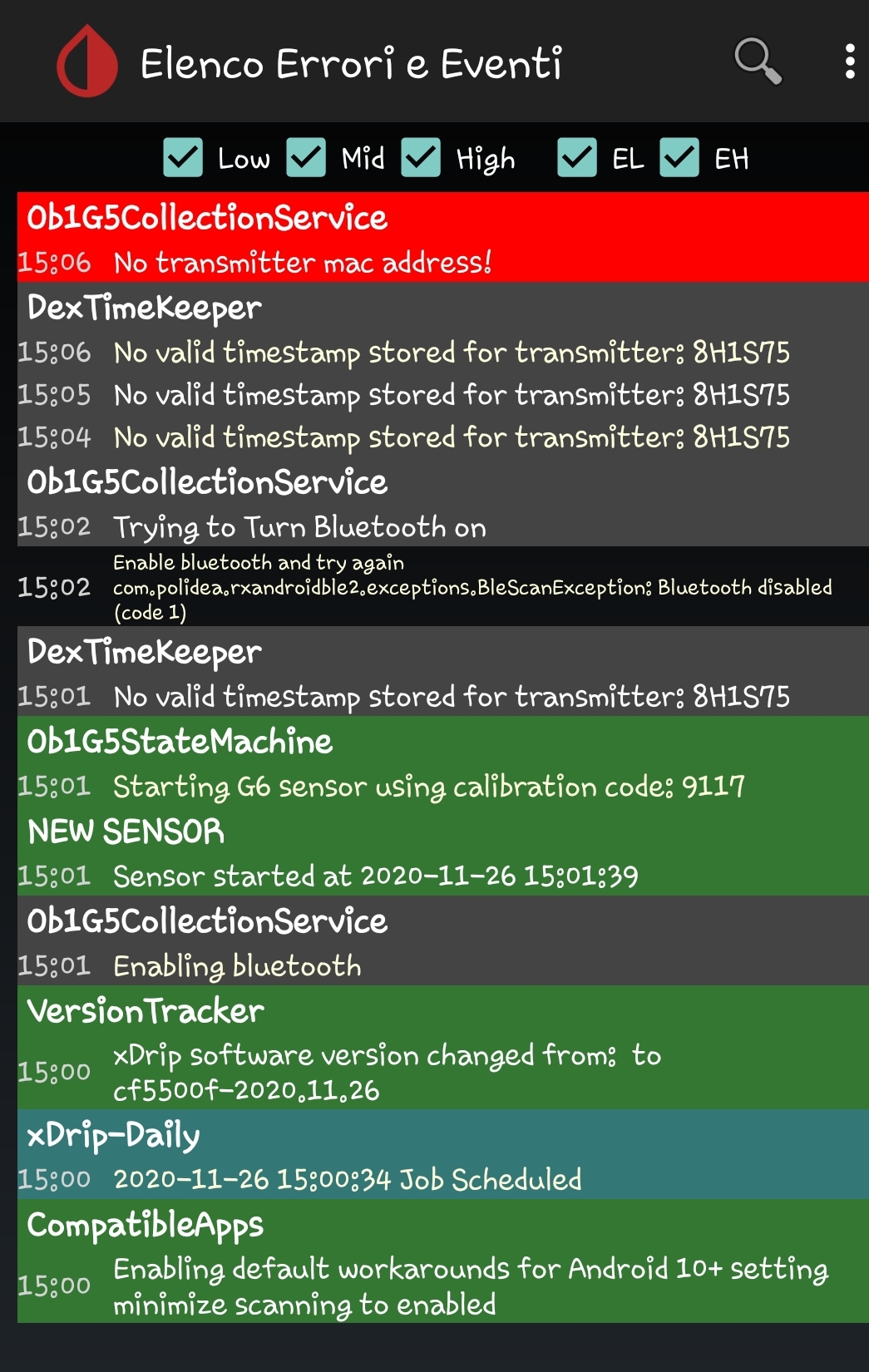
I wanted to thank you for the support you are giving us.
As I had the problem of requesting pairing every 5 minutes, I was temporarily using the dexcom app. Now I have downloaded the latest version of xdrip and I started the sensor initialization, but I get this error that I am attaching. I also tried to change the sensor but the problem was not solved. I think there is something wrong with the transmitter. Thanks
davide1985
on 26 Nov 2020
Just installed the latest and then went back to the settings with scanning enabled.... it now goes back to asking for pairing confirmation every time it reads (5min)... rechecked minimize scanning and it seems to be working again... not sure what will happen when i need to pair a new TX... I'm sure i will have to re-enable scanning so it will find the new TX and the disable it again to keep from seeing the prompts every 5 min..
TimothyGold
on 26 Nov 2020
@TimothyGold do you have the Android 10 workaround enabled? In fact you should disable this option and I will remove it in future.
@davide1985 Wait for a while and try again. It may need to connect to the transmitter one time before you try to start sensor.
jamorham
on 26 Nov 2020
Is this a valid starting point recommendation for G6?
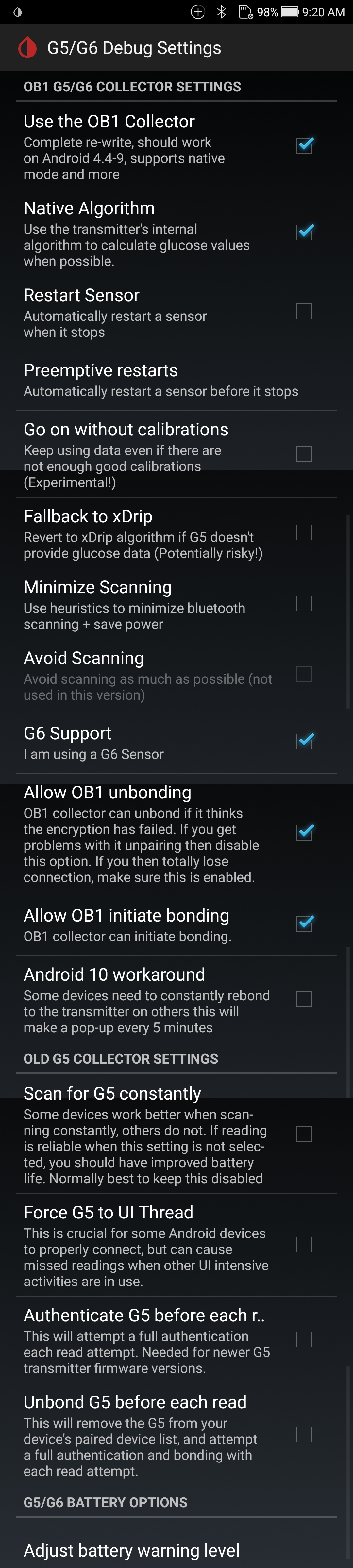
Navid200
on 26 Nov 2020
I don't see Nightly in the update settings, even after choosing Alpha,
going completely out and back in. How can I change that?
(Lots of thanks for the whole project, by the way!)
 Lipman2
on 26 Nov 2020
Lipman2
on 26 Nov 2020
You'll need to pull the APK directly.
Release link: https://github.com/NightscoutFoundation/xDrip/releases/tag/2020.11.26
APK: https://github.com/NightscoutFoundation/xDrip/releases/download/2020.11.26/xDrip-plus-20201126-cf5500f.apk
evanheics
on 26 Nov 2020
You shouldn't need to pull the APK directly but if you select the Alpha update channel and then go completely out of settings, when you go back in you should be able to choose the Nightly update channel.
jamorham
on 26 Nov 2020
Not even after force-stopping and opening manually.
Lipman2
on 26 Nov 2020
@jamorham thanks for the reply. Once i disabled the workaround and then re-enabled scanning it is working.
TimothyGold
on 26 Nov 2020
I installed the nightly manually and it works nicely so far. (The update
settings still don't show Nightly, though.)
>
Lipman2
on 26 Nov 2020
I tried the 11.26 nightly and it didn't work, so went back to try the 11.15 but still getting those endless pairing errors. I'm worried about burning out my transmitter! Using Android 9 on a Samsung 8+
 DjinnGallagher
on 26 Nov 2020
DjinnGallagher
on 26 Nov 2020
I tried the 11.26 nightly and it didn't work, so went back to try the 11.15 but still getting those endless pairing errors. I'm worried about burning out my transmitter! Using Android 9 on a Samsung 8+
What settings did you use in 11.26?
vytux-com
on 26 Nov 2020
I used the standard G6 template that Navid scanned above, and tried minimise scanning, and not minise scanning, etc - but nothing worked
DjinnGallagher
on 26 Nov 2020
@jamorham
If you're using the Nov 15th version then I recommend trying the Nov 26th release. This should solve the heart of 3 different issues that affect especially Android 11 but also Android 10.
Please can you include the numbers of issues which should be solved by this release?
tolot27
on 26 Nov 2020
I have had the above-mentioned issue, and it went away (for a while) with
11/15, but seemed to recur today. I've switched over to 11/26, turned off
"Android 10 Workaround" and will report back my experience with it.
Thank you again, so much, for your commitment to this project. Makes a big
difference in my life and so many others.
Jason
On Thu, Nov 26, 2020 at 1:09 PM Mathias Walter notifications@github.com
wrote:
@jamorham https://github.com/jamorham
If you're using the Nov 15th version then I recommend trying the Nov 26th
release. This should solve the heart of 3 different issues that affect
especially Android 11 but also Android 10.Please can you include the numbers of issues which should be solved by
this release?—
You are receiving this because you are subscribed to this thread.
Reply to this email directly, view it on GitHub
https://github.com/NightscoutFoundation/xDrip/issues/1494#issuecomment-734478347,
or unsubscribe
https://github.com/notifications/unsubscribe-auth/AAGSNR666J6PS2HLRKXYB3TSR27Z5ANCNFSM4TGMLYVA
.
 jlecount
on 26 Nov 2020
jlecount
on 26 Nov 2020
I tried the 11.26 nightly and it didn't work, so went back to try the 11.15 but still getting those endless pairing errors. I'm worried about burning out my transmitter! Using Android 9 on a Samsung 8+
Have you disabled battery optimization and enabled background location as jamorhan suggested?
Can you also set these and let me know how it goes?

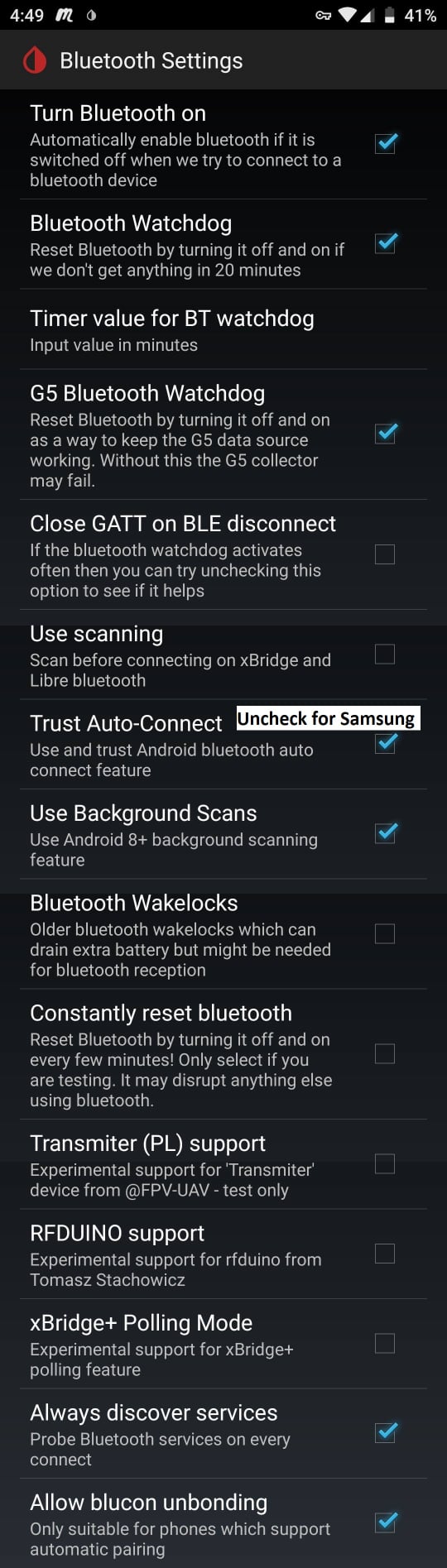
Navid200
on 26 Nov 2020
I tried the 11.26 nightly and it didn't work, so went back to try the 11.15 but still getting those endless pairing errors. I'm worried about burning out my transmitter! Using Android 9 on a Samsung 8+
Have you disabled battery optimization and enabled background location as jamorhan suggested?
Yes, I've disabled battery optimisation and enabled background location
DjinnGallagher
on 26 Nov 2020
@Navid200 I've ticked every box except Always discover services, which is greyed out
DjinnGallagher
on 26 Nov 2020

DjinnGallagher
on 26 Nov 2020
@Navid200 I've ticked every box except Always discover services, which is greyed out
After a phone restart, are you still having connectivity issues?
Navid200
on 26 Nov 2020
There is no reason to keep posting the same image over and over again unless you intend to offend everyone.
Navid200
on 26 Nov 2020
Hi @Navid200 My whole AAPS rig is working perfectly, the only problem is the error messages that seem to be burning up my phone battery and possibly risking my transmitter. I can live with it, but I'm wondering if it would be wiser to just give up on xdrip and use the dexcom patched app (I love xdrip and would rather stick with it if possible)
DjinnGallagher
on 26 Nov 2020
There is no reason to keep posting the same image over and over again unless you intend to offend everyone.
I'm really sorry - this is my first time using this forum and I'm having trouble figuring out how to post screenshots
DjinnGallagher
on 26 Nov 2020
Hi @Navid200 My whole AAPS rig is working perfectly, the only problem is the error messages that seem to be burning up my phone battery and possibly risking my transmitter. I can live with it, but I'm wondering if it would be wiser to just give up on xdrip and use the dexcom patched app (I love xdrip and would rather stick with it if possible)
What error message exactly?
Navid200
on 26 Nov 2020
That's what I was trying to screenshot
DjinnGallagher
on 26 Nov 2020
That's what I was trying to screenshot
Can you not explain the message and where you see it?
Navid200
on 26 Nov 2020
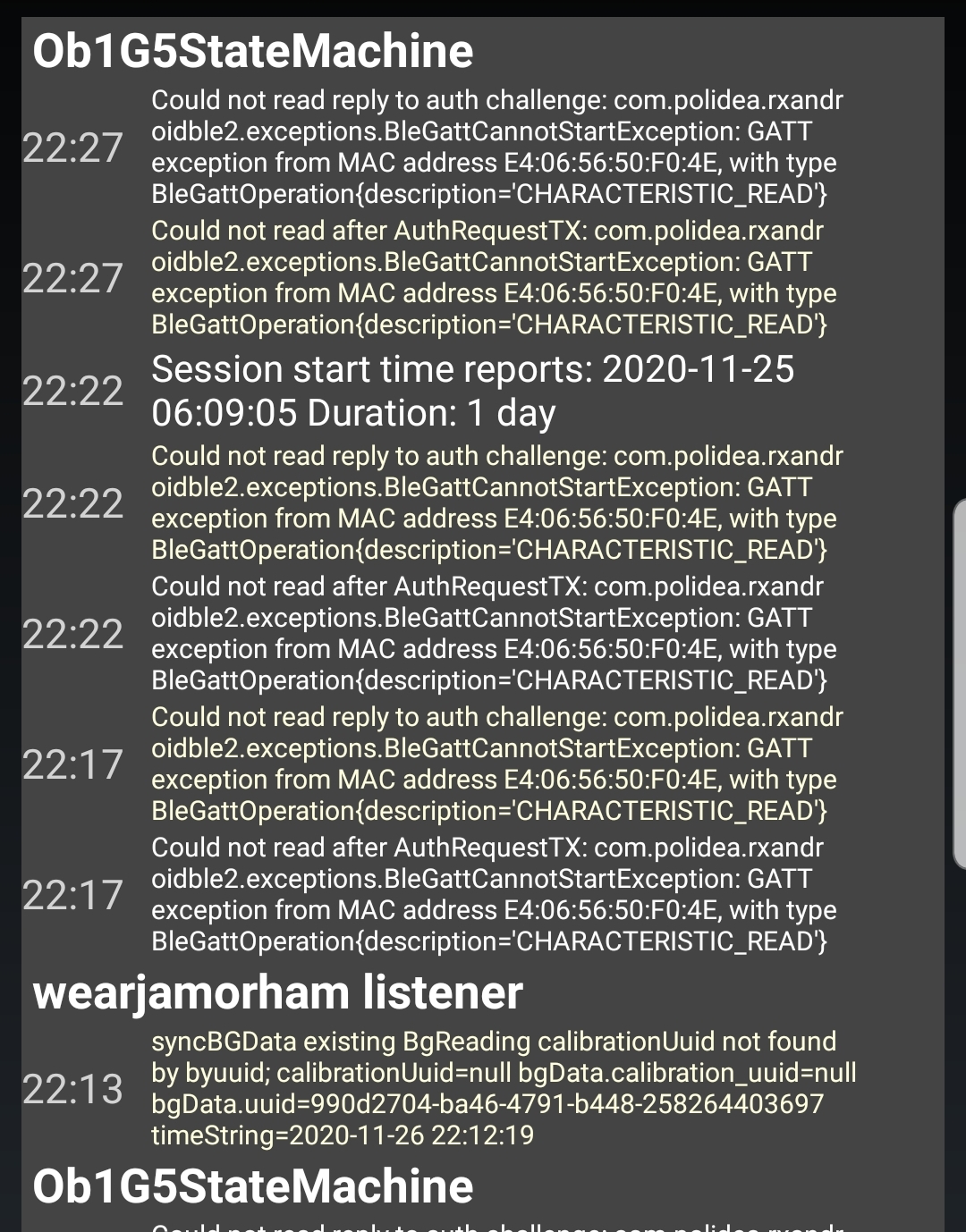
DjinnGallagher
on 26 Nov 2020
Are you talking about the event log? You are not the only one who gets those.
That's a known issue. https://github.com/NightscoutFoundation/xDrip/issues/1279
People have used transmitters throughout their lifetime with those logs showing all the time. They are annoying. They will hopefully be addressed. But, I wouldn't stop using xDrip because of them. Why would you?
Navid200
on 26 Nov 2020
Thank you for the encouragement, and I think you're saying that I should continue with xdrip. My concern is that I read in another thread that someone's transmitter had died early because of constant error messages. I can live with it reducing the battery of my phone, as I'm at home all the time now and can keep it recharged, but I don't want to be without a transmitter
DjinnGallagher
on 26 Nov 2020
Thank you for the encouragement, and I think you're saying that I should continue with xdrip. My concern is that I read in another thread that someone's transmitter had died early because of constant error messages. I can live with it reducing the battery of my phone, as I'm at home all the time now and can keep it recharged, but I don't want to be without a transmitter
You shouldn't believe everything you read. The person may have been talking about a different error.
I posted a link above. I suggest you look at it. Evidenced by that issue, we have been getting those logs at least since March of 2020. That's 8 months ago. The lifetime of a G6 transmitter, if you know how to do it, is 110 days only (less than 4 months). Do you really think all of us using our transmitters since then are losing transmitters because of the errors?
The subject you are discussing now has nothing to do with 1494, nor 1061. So, I respectfully ask you to stop. If you like, you can post on facebook and we can chat.
https://www.facebook.com/groups/xDripG5
Navid200
on 26 Nov 2020
Are you talking about the event log? You are not the only one who gets those.
That's a known issue. #1279
People have used transmitters throughout their lifetime with those logs showing all the time. They are annoying. They will hopefully be addressed. But, I wouldn't stop using xDrip because of them. Why would you?
Great to be nudged in the right direction #1279 is exactly what I needed. I appreciate your time and your help.
DjinnGallagher
on 26 Nov 2020
@tolot27 my reference to "issues" above was in relation to android bluetooth stack anomalies detected during debugging rather than github issues reported by users.
There is now a 27th Nov nightly. This removes the code that used the Android 10 workaround setting which with the 26th Nov nightly would have caused constant pairing pop-ups if it were enabled. Now the only reason anyone should get repeated pop-ups for pairing is if they are not completing the pairing process - eg clicking to approve the pairing quick enough or if there is some other fault.
I have also improved the overall first-run and sensor start workflow. If xDrip has been unable to communicate with the transmitter or the transmitter is not responding properly then it will refuse to start the sensor session and instead take you to the System Status page to observe waiting to connect to the transmitter. I also have disabled the "When did you insert sensor" dialogs when using Native mode as they serve no purpose.
jamorham
on 27 Nov 2020
I'm on a Pixel 2 and just tried the Nov 27th nightly. I installed the new version, clicked forget device and then rebooted. I waited about 5 minutes and there were no pairing requests. I checked settings and unchecked the minimize scanning option. Right after that I got the pairing request and then it got the glucose successfully.
Great work! So far been running about 20 minutes no issues.
diabeticpilot
on 27 Nov 2020
@jamorham
Someone has posted this on facebook.
Even though it says not used in this version, shouldn't it be unchecked?
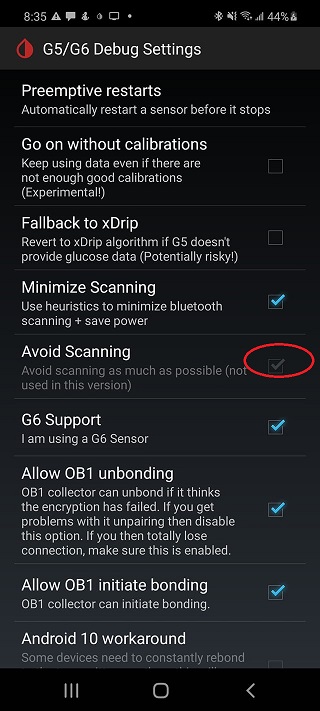
Navid200
on 29 Nov 2020
It's just whatever you had it set to before the upgrade. It's not used so it doesn't matter if it's ticked or not
vytux-com
on 29 Nov 2020
Im on S10 Lite and the newest version (27.11) did the job. Currently 3 hours without annoying pairing requests.
Used @Navid200 configuartion on screens.
 Jeschyk
on 29 Nov 2020
Jeschyk
on 29 Nov 2020
Pixel 3 with G5, 27.11 release, settings as per the Navid Fo settings posted on Facebook.
All is working flawlessly. Many thanks to all that have worked to resolve this issue (Many many many many thanks, and many more after that...)
Epod123
on 29 Nov 2020
I am on Google Pixel 4a. After the November Security Update, I reinstalled version e14bae1-2020.07.13 . After reconnecting the transmitter(I had to restart the collector), the phone did not give me any pairing requests (unless the transmitter got out of range).
 andrewsawesome
on 6 Dec 2020
andrewsawesome
on 6 Dec 2020
@andrewsawesome
More than happy to help you on facebook.
https://www.facebook.com/groups/xDripG5
Navid200
on 7 Dec 2020
Related issues
 gruoner
·
5Comments
gruoner
·
5Comments
 arsinn
·
10Comments
arsinn
·
10Comments
 dideldum
·
7Comments
dideldum
·
7Comments
 tynbendad
·
19Comments
tynbendad
·
19Comments
 xannasavin
·
10Comments
xannasavin
·
10Comments
Most helpful comment
The
Avoid Scanningis likely the crucial option that you need to both work-around the Android 10 issues and the November security patch. You have to also enableMinimize Scanningbefore it will let you enableAvoid Scanning