Xdrip: Dexcom G6 / 8G tx: every 5mins "Could not read after AuthRequestTX" & "Could not read reply to auth challenge"
Since using 8G transmitters my error log shows always the same errors every 5 mins, see below. Error messages: "Could not read after AuthRequestTX" & "Failed to write DisconnectTxMessage" with "GATT expection" etc.
- G6 Firmware 2.18.2.88 and running xDrip+ nightly 2020-03-11 [same with previous versions]
- Using G5/G6 settings OB1, Native, Allow OB1 unbonding and Allow OB1 initiate bonding; all remaining options are OFF.
For the rest everyhing's working fine but these error messages are really annoying. Anyone else having these issues? How to turn it off?

 emp-00
All 40 comments
Same device (8G), firmware and settings and I get the same error messages. Very annoying noise in the logs, but it doesn't seem to break anything.
 m-goetz
on 29 Mar 2020
m-goetz
on 29 Mar 2020
Same thing here. Trying to figure out what causes it, but so far no luck.
 doc77
on 4 Apr 2020
doc77
on 4 Apr 2020
More strange behaviour: menu item "Initial Calibration" stays all the time even after calibrating with this function. Is this normal? Why is it still called "initial"?
In my case I can only calibrate with this function - the syringe always gives me "Invalid Impossible Slope Calibration" errors... I've seen many tipps mentioning for 8G only the syringe calibrabration function should be used. This does not work in my case or is the error message wrong and it still works? Would it be possible to correct these functions with a new xDrip+ release?
emp-00
on 4 Apr 2020
@emp-00 This is the exact behavior of my xDrip+ installation.
Also, I had to re-pair my watch (SSW3), and cannot get xDrip+ to load on the watch. I wonder if there is any relationship?
doc77
on 7 Apr 2020
@doc77 I don't have a watch, just xDrip+ on smartphone - maybe we have one or two "wrong/bad" settings en/disabled others don't have? we need somebody with a working setup to compare settings - I have posted my "main" settings above but maybe the issue is hidden in a different feature?
emp-00
on 7 Apr 2020
@emp-00 I have the same settings and Dexcom firmware. I have already tried turning off what was on, and turning on what was off. But, doing it one at a time. Didn't help. Currently, I'm using native, OB1, go on without calibrations, G6 Support, and OB1 initiate bonding and allow OB1 unbundling.
I've also downgraded xDrip+ by a few versions, since re upgraded to the most current.
I don't know what else to try.
doc77
on 7 Apr 2020
Maybe it's our phone? I'm on Samsung A8.
Or maybe everybody with 8G+ has these errors but nobody cares?
emp-00
on 7 Apr 2020
@emp-00 I'm on the Samsung Note 8. It might have something to do with the way Samsung BLE handles GATT. I think that this is what the Samsung Workaround is supposed to take care of. I disabled it, but it still showed as active in System Status.
But this is way beyond my knowledge of Android.
doc77
on 8 Apr 2020
So we both are on Samsungs! That's a lead. Here come my "Bluetooth Settings" (under Less Common Settings):
All settings OFF except for these five: Turn BT on, BT Watchdog, G5 BT Watchdog, Use Background Scans, Allow blucon unbonding.
I remember I had changed one or two of these options when I started with G6 (80/81 tx's) half a year ago. Does anybody know the default settings in this menu? We could try reverting to defaults and see if this helps!
emp-00
on 8 Apr 2020
@emp-00 I already cycled all the Bluetooth settings on and off. Didn't hurt function, but made no difference in the log.
doc77
on 8 Apr 2020
I am also running into the same issue. Connects to dexcom sensor for few hours than disconnects. Stopping the loop. Really annoying. I am on a OnePlus 6... Hope to find a solution
 Rolfvanderplas
on 2 Jul 2020
Rolfvanderplas
on 2 Jul 2020
Dear xdrip users, I hope the following helps you. I also had connection problems when changing from G5 / G6. Through settings in the cell phone (Samsung) I was able to eliminate them. For xdrip and Bluetooth -> Handy Settings-> Apps energy saving options = off ,and background data = allow. for bluetooth it may be necessary, depending on android, that you have to activate the system apps in the settings
 mk886714
on 4 Jul 2020
mk886714
on 4 Jul 2020
However, with note 8, I am not sure whether this works because I have never received any feedback from the Note users. So far, cell phone users have always had positive feedback
mk886714
on 4 Jul 2020
Is there an update to this?
I have a Motorola phone (Moto Z3 Play) and G6 8J. Every 5 minutes, I get those two logs.
 Navid200
on 30 Sep 2020
Navid200
on 30 Sep 2020
I also still have these two messages every 5 minutes on Samsung A8, currently with 8J transmitter, no change since my first posting. Only solution for me is to ignore these errors - for the rest xDrip+ is working fine for me. Event log is heavily overcrowded, don't like it either. Maybe somebody has a fix?
emp-00
on 30 Sep 2020
@emp-00 Which xDrip version are you running?
 jamorham
on 1 Oct 2020
jamorham
on 1 Oct 2020
My xDrip version:
67014b0-2020.07.25
Navid200
on 1 Oct 2020
My xDrip version:
e14bae1-2020.07.13
emp-00
on 1 Oct 2020
I'm on https://github.com/NightscoutFoundation/xDrip/releases/tag/2020.10.01
with a OnePlus 7, newest Android version. Also have the log entries and think they're annoying. I guess it's got something to do with bluetooth settings in xdrip but haven't found out which one yet
 Pentagit
on 12 Oct 2020
Pentagit
on 12 Oct 2020
I have the same issue. Running version a91b660-2020.10.01
Phone is a Pixel 2 running Android 11. Problem only started when I went from an 81 transmitter to a 8Q.
 nickb24
on 11 Nov 2020
nickb24
on 11 Nov 2020
This issue is for me also unresolved ever since (currently on the same nightly as @nickb24. However, I can live with it, not a very serious problem ==> only the Event Log is close to useless since it's totally crowded with these messages every 5 mins.
emp-00
on 11 Nov 2020
I started digging into the code to see if I could resolve this issue. While doing so I discovered and opened #1504 . I think there are more changes under the hood with the new transmitters that we are unaware of. I've been digging through the Dexcom app decompiled code to try to reverse engineer some functions. The more I dig, the more I realize that there are a lot of things that xDrip is probably not doing right when communicating with the transmitter.
At this point, I wish there was a solution where you could use the official Dexcom app (which probably has more robust bluetooth communication code) that is modified in a way that disables all notifications and only pipes the glucose data straight to your xDrip application running on the same device. I wish there was a way we could pay a group of developers to work on something like that.
nickb24
on 11 Nov 2020
I've been digging through the Dexcom app decompiled code to try to reverse engineer some functions. The more I dig, the more I realize that there are a lot of things that xDrip is probably not doing right when communicating with the transmitter.
Please can you report all things which xDrip is not doing right?
 tolot27
on 12 Nov 2020
tolot27
on 12 Nov 2020
I've been digging through the Dexcom app decompiled code to try to reverse engineer some functions. The more I dig, the more I realize that there are a lot of things that xDrip is probably not doing right when communicating with the transmitter.
Please can you report all things which xDrip is not doing right?
I'm not sure where the best place to bring some of these issues up. I don't want to get off topic on this current thread. But I'll pick two examples to demonstrate.
From the decompiled Dexcom app, you can see the following list of opcodes for messages to and from the transmitter:
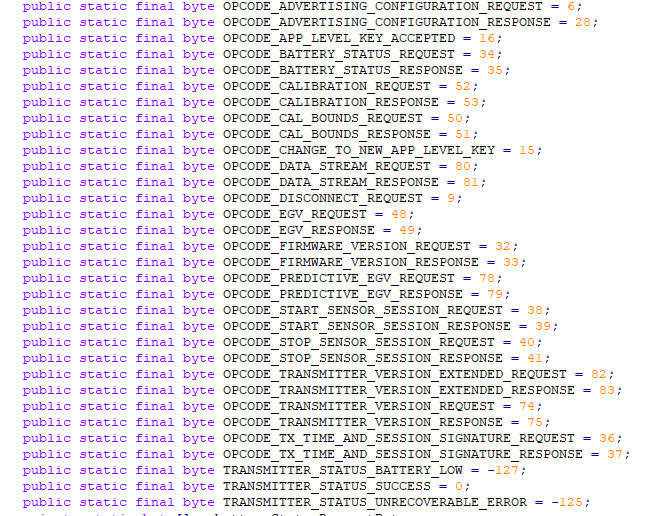
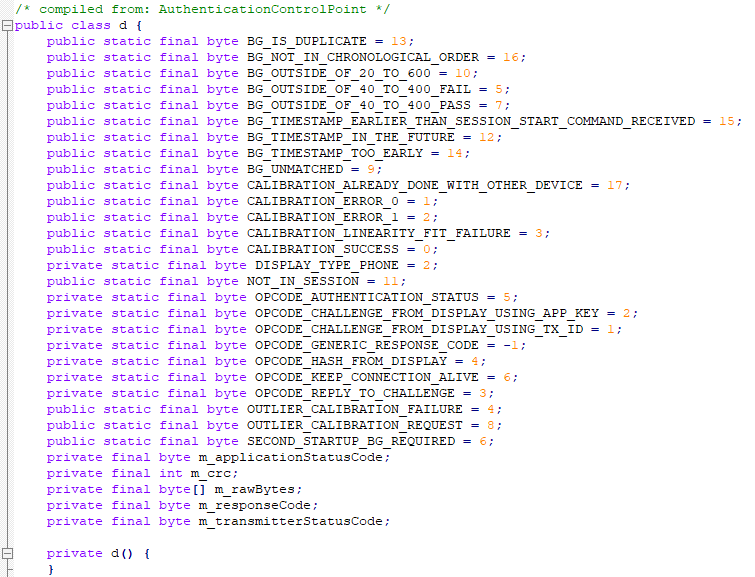
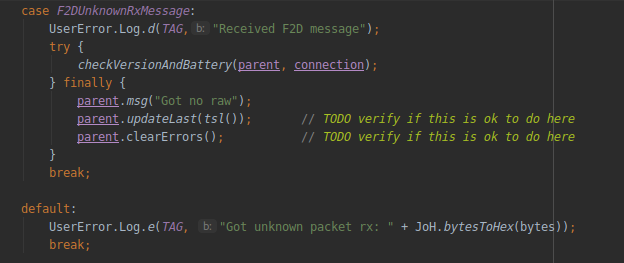
Some of those opcodes I can find no reference to in the xDrip code. Maybe it's not needed or maybe it's new codes that were added for the G6 and maybe we should be using. I know my phone is receiving some unknown codes because in my logs I get the message "Received F2D message". From the xDrip code it seems like it is treated as "a raw", which I don't think is right. I need to add some debug outputs to see what the actual message is and compare it to the decompiled code:
Another code snippet I find interesting is this one:
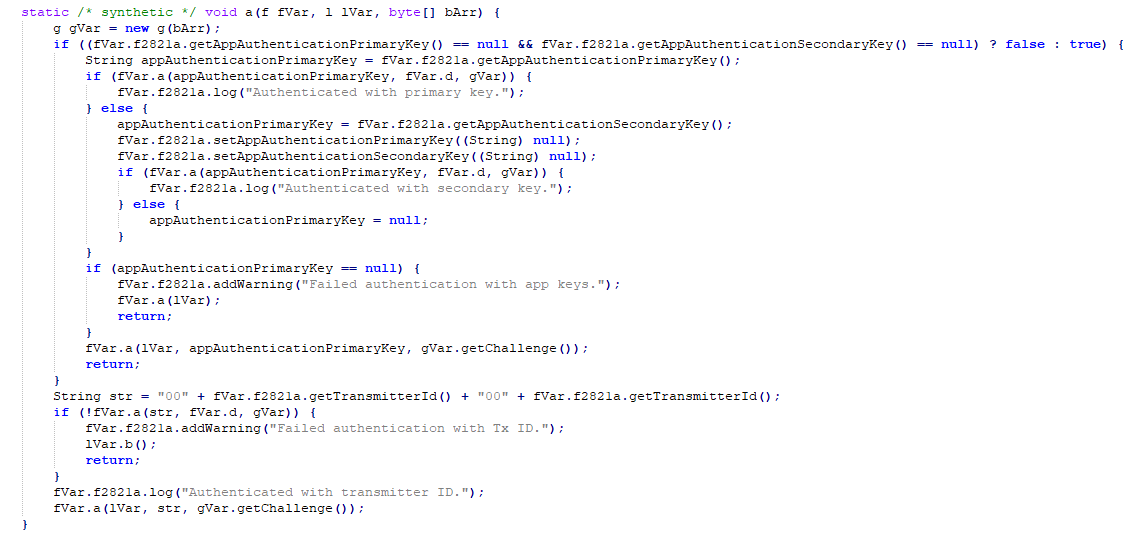
It shows how there are two app keys that can be used to authenticate with the transmitter. If both those fail then the transmitter id can be used. From what I can tell xDrip is using the transmitter id to authenticate. I haven't dug deeper in the decompiled code to see what is different about using other authentication keys. It might be nothing or might mean that Dexcom is preparing to crack down on non-official means of accessing the transmitter.
Back to the current issue of this thread. My suspicion is that initially xDrip is trying to communicate to the transmitter in a non support way, either with a wrong sequence of events or incorrect challenge response. Then once it fails once or twice the transmitter reverts to an older method and then the transmitter accepts the request. I think this could be a sign that Dexcom is phasing out older methods. This is getting to the limit of my skill set, however I will continue to support if I can.
nickb24
on 12 Nov 2020
Excellent post - very interesting! Was the decompiled Dexcom App code already known to the xdrip devs? First time I'm seeing such an analysis - does this help to improve the xdrip code? Shall we maybe open a separate discussion on the Dexcom decompilation topic?
emp-00
on 12 Nov 2020
Excellent post - very interesting! Was the decompiled Dexcom App code already known to the xdrip devs?
Yes, they know it.
Shall we maybe open a separate discussion on the Dexcom decompilation topic?
Yes, at a separate place.
tolot27
on 12 Nov 2020
Pretty sure I'm having a same or similar issue, but the GATT error is actually stopping communication. I am getting no readings
 fclingen
on 15 Nov 2020
fclingen
on 15 Nov 2020
@fclingen Please can you enable verbose logging in settings > less common settings > extra tags for logging and then add there: BluetoothScan:v,DexCollectionService:v,Ob1G5CollectionService:v,Ob1G5StateMachine:v,G5CollectionService:v.
Afterwards, please post the log here.
tolot27
on 15 Nov 2020
What is a good way to share screenshots from my phone?
fclingen
on 15 Nov 2020
Earlier today I tried adjusting about half a dozen settings. I don't know exactly what I did, but it changed the error well after I made the modifications:
https://drive.google.com/file/d/10b1sdg_JO-OVIQlQUGANmMQ8gXdHg9nk/view?usp=drivesdk
My best guess,: the only change I remember leaving in place for me than a couple minutes was "Constantly Reset Bluetooth" so maybe the resets straightened something?
I can't get the GATT errors back:
https://drive.google.com/file/d/10_mDNZ1HlVwh01_X3fTkhvQlri1uNcXz/view?usp=drivesdk
fclingen
on 15 Nov 2020
What is a good way to share screenshots from my phone?
Simply add it using the image icon (blue symbol above this box) and choose file.

tolot27
on 15 Nov 2020
@fclingen Please can you post the two starting letters of your transmitter serial as well as the firmware version?
tolot27
on 15 Nov 2020
8L / 2.18.2.98
Thanks, I see the image widget now
fclingen
on 16 Nov 2020
Searching more, it seems like I'm actually suffering from
https://github.com/NightscoutFoundation/xDrip/issues/1365
fclingen
on 19 Nov 2020
I believe I found where the bug originates from.
https://github.com/NightscoutFoundation/xDrip/blob/master/app/src/main/java/com/eveningoutpost/dexdrip/G5Model/Ob1G5StateMachine.java#L156
After enabling debug logs of the rxandroidble2 library, I get the following:

The characteristic doesn't support the read operation.
nickb24
on 22 Nov 2020
From the debug log of rxandroidble, I get the following discovery information from the Dexcom device:
Primary Service - Unknown service (f8083532-849e-531c-c594-30f1f86a4ea5)
Instance ID: 0
-> Characteristics:
* Unknown characteristic (f8083533-849e-531c-c594-30f1f86a4ea5)
Properties: [ READ NOTIFY ]
-> Descriptors:
* Client Characteristic Configuration (00002902-0000-1000-8000-00805f9b34fb)
* Unknown characteristic (f8083538-849e-531c-c594-30f1f86a4ea5)
Properties: [ READ NOTIFY ]
-> Descriptors:
* Client Characteristic Configuration (00002902-0000-1000-8000-00805f9b34fb)
* Unknown characteristic (f8083534-849e-531c-c594-30f1f86a4ea5)
Properties: [ WRITE INDICATE ]
-> Descriptors:
* Client Characteristic Configuration (00002902-0000-1000-8000-00805f9b34fb)
* Unknown characteristic (f8083535-849e-531c-c594-30f1f86a4ea5)
Properties: [ WRITE INDICATE ]
-> Descriptors:
* Client Characteristic Configuration (00002902-0000-1000-8000-00805f9b34fb)
* Unknown characteristic (f8083536-849e-531c-c594-30f1f86a4ea5)
Properties: [ NOTIFY ]
-> Descriptors:
* Client Characteristic Configuration (00002902-0000-1000-8000-00805f9b34fb)
* Unknown characteristic (f8083537-849e-531c-c594-30f1f86a4ea5)
Properties: [ READ ]
The authentication characteristic "F8083535-849E-531C-C594-30F1F86A4EA5" is advertising as WRITE and INDICATE, while xDrip is attempting to do a READ operation here, here and here. Is this a problem only on the new G6 firmware? It seems so.
I have modified my own version of the code to take into account that a READ operation is not possible. I also added my solution to #1504 . My testing so far shows that everything is working correctly with no more packet errors. I will continue to test and report back if I don't have any errors.
This bug has been open since March, let's work together to finally close this one out.
nickb24
on 24 Nov 2020
@nickb24, we also have the exact messages. Message me when I can contribute on helping debugging / testing. Thanks for developing!!
Technical details of our setup:
- Samsung Galaxy S10e
- Sensor Dexcom G6 starts with 8H
- Most recent versions of:
- AndroidAPS (2.7.0)
- Nightscout (14.0.7)
- xDrip+ (2020.11.27)
- Samsung phone software (updated to security level of 1-nov-2020)
 petervanrijt
on 4 Dec 2020
petervanrijt
on 4 Dec 2020
@nickb24, we also have the exact messages. Message me when I can contribute on helping debugging / testing. Thanks for developing!!
Technical details of our setup:
- Samsung Galaxy S10e
- Sensor Dexcom G6 starts with 8H
Most recent versions of:
- AndroidAPS (2.7.0)
- Nightscout (14.0.7)
- xDrip+ (2020.11.27)
- Samsung phone software (updated to security level of 1-nov-2020)
I've been running my own version since my last post without any errors. If you want to try for yourself you can take a look at my fork and try for yourself.
I think my code is only for the Firefly transmitters. So to properly integrate my code to the main xDrip repository would require that it have a senior xDrip developer take a look and see what the best way to do it.
nickb24
on 4 Dec 2020
@nickb24
I think my code is only for the Firefly transmitters. So to properly integrate my code to the main xDrip repository would require that it have a senior xDrip developer take a look and see what the best way to do it.
Please provide a clean PR; then I'll have a look.
tolot27
on 4 Dec 2020
@nickb24
I think my code is only for the Firefly transmitters. So to properly integrate my code to the main xDrip repository would require that it have a senior xDrip developer take a look and see what the best way to do it.
Please provide a clean PR; then I'll have a look.
I've made a separate clean branch on my fork: https://github.com/nickb24/xDrip/tree/firefly_transmitter
Let me know if this is all that's required or if you want me to make a pull request to xDrip master.
nickb24
on 4 Dec 2020
Related issues
 jo1st
·
19Comments
jo1st
·
19Comments
 aeonsablaze
·
12Comments
aeonsablaze
·
12Comments
 adenis76
·
10Comments
adenis76
·
10Comments
 dlopez1984
·
6Comments
dlopez1984
·
6Comments
 WalkingMyRoad
·
10Comments
WalkingMyRoad
·
10Comments