Xdrip: Displaying blood glucose on Xiaomi MiBand 4
Hello, It's posible to integreated this versión in our xdrip?
https://bigdigital.home.blog/2019/11/21/xdrip-miband/#xdrip_miband
 davidnatalia2000
All 77 comments
I'd like to see this too, but I'm afraid it takes a MR - and the author, last time I asked him, didn't feel ready for that.
 steve8x8
on 22 Jan 2020
steve8x8
on 22 Jan 2020
A shame……
Have you tried the application? It works great, but I dare not put it on my daughter xdrip because she is the xdrip master and I don´t want to install this verison because is not the "official" xdrip. Only her mother has it installed as a follower.
But as I said, It Works great!!!!!
davidnatalia2000
on 24 Jan 2020
A quick'n'dirty idea:
Since there are "variants" of the official xDrip app (which, I suppose, get updated with every nightly) it should be possible to run an official _variant_ as master, and the bigdigital one as follower, on the _same_ smartphone.
If this is possible at all - has anyone ever tried it?
steve8x8
on 26 Jan 2020
Today i've released a new version https://bigdigital.home.blog/2020/01/23/future-of-the-xdrip-miband-project/ which should work better for mibandv4 . The v2 and v3 would work as before . If this version would be stable, i’ll create a pull request for the Xdrip master record. So i would be grateful if someone can help to test it on different miband versions and let me know if there some issues.
 bigdigital
on 29 Jan 2020
bigdigital
on 29 Jan 2020
Downloaded 0.2.0, installed it on my follower phone.
With a MiBand2 connected, on "Update BG manually", I only see a "waving" notification bubble - but no text.
BTW, the "authentication" thingy is bit fragile, as the only hint at a missing auth is in the System Status, far far away.
So let's try the MiBand4 instead?
First I mistyped the auth key, causing xDrip to FC with "invalid hex char 'r'". Please add some sanity check...
After app data reset: Yes, the 4 shows the notifications as it did yesterday.
For the watchface, it's almost empty, _no curve_, no (obviously visible) value.
On top, battery, date (_wrong_, instead encoding the value!!!) and time (_no separator_, btw) on top and two very small numbers (step counter, and some _random heart rate_) above the four colour bars at the bottom.
Close, but no cigar yet, I'd say. Going back to 0.1.4 for now (which I didn't test with the MB2 yet)
steve8x8
on 29 Jan 2020
Thank you for suggestion regarding sanity check, i'll add it. Unfortunately, at the moment, i do not have any device which can generate glucose bg values, but i have access to MiBands models v2, v3 and v4 . So i can't test all functions without real bg readings. I guess if someone can add me as a follower so i can receive bg readings in realtime, this will allow me to test these devices better on teal bg values. If someone can do this, please email me at bigdigital.[email protected] . Thanks
bigdigital
on 29 Jan 2020
Something I've encountered several times when trying to switch things back and forth: I've been kicked back to the home screen (or even got an "app failure" message from MIUI) multiple times when trying to check/change the band MAC or Auth Key, with Use=Off. This also happens with 0.1.4 - one shouldn't do that too often. Sometimes, after restarting the app, the previous MAC magically reappears.
What would be really helpful - if there was (a) a change on the MiBand page that shows which type has been paired, and (b) en/disabling items that don't make sense, e.g., "Install watchface" isn't useful with <4 bands.
I completely failed to pair the Band2 with 0.1.4.
As for followership, I haven't yet fully understood how this works at all (and apparently it doesn't work when the two devices aren't in the same network), so this probably wouldn't help, sorry...
steve8x8
on 29 Jan 2020
Thank you, i already got a message from one guy, he shared an own nightcloud server with me, so i can receive a live bg readings. Now i see a problem with the black screen you mentioned. And i guess fixed it https://imgur.com/a/rzBOTO0 . Also i will check auth and MAC fields.
bigdigital
on 29 Jan 2020
0.2.0.1 is much much better now on my Band4, I'm going to like it! Thanks a bunch for that update.
A few minor things:
- The "trend/last" line is rather hard to read, this must be the smallest font available. Can this be made a bit bigger, for ageing eyes? (What about dropping the unit completely? The smartwatch watchface doesn't show it either, and the user knows it. Also replacing the "at " string with a single "@" might further shorten this line.)
- The date (on top, in grey) is plain wrong. (showing Fri 2/10, maybe a leftover representation of a former glucose value?)
- May I ask for a battery percentage?
- Disabling the Heart Rate in the Features section might also remove it from the display... (I haven't found how to configure HR measurements at all?)
- Any means to show "treatments" (meals, boluses) attached to the curve, as coloured dots?
I'll go back to my old trusted Band2 and check what went wrong with the pairing/auth later, for now I'm rather happy. Thanks again!
There seem to be a few inconsistencies in the MiBand config page of the app though.
- If "Send Readings" is disabled, "Update manually" can still be selected (and confirmed) but nothing happens - this and "watchface diagram" should be disabled IMHO?
Do you have an idea how much battery will be drawn by the frequent watchface updates, both from the smartphone and the band? The band display backlight gets activated each time a new value is sent...
steve8x8
on 30 Jan 2020
@steve8x8
- Yes, i've noticed this when i get a real bg values from nightcloud server. I also think that bg units can be removed from the delta. Regarding replacing "at" to @, these symbols take almost the same width, but i guess "at" can be more descriptive.
- This leftover from the previous xdrip version. Now all miband features should control thirdparty applications. The xdrip will only send xdrip related notifications and would upload watchfaces. So to set the correct date, you would need to synchronize miband with MiFit, or any other thirdparty applications that can work with miband.
- Unfortunately, there would be not enough place to display battery percentage. The only solution is to remove bat icon at all.
- This is how watch faces work on miband. Yes, it is possible to generate a new watch face without a heart icon. But HR measurements digits would be still there. Actually, at the moment my watchface generator is very limited. I still can't normally generate an image with any color palette. And sometimes miband do not want to display generated image (the problem which was in 2.0.0). And seems this related to the total number of colors used on an image.
- I guess it would be possible, but it required to improve current image encoding algorithm to able to generate more colors on the image.
- i'll add dependencies for these properties.
Regarding battery consumption, yes the consumption increased significantly, almost in two times. Before releasing v 2.0.0 i've made some tests https://i.imgur.com/8xwP2Zf.png
The average time between uploading watch face was 5 minutes.
As i know, this is better than even on pebble watch.
But i have thoughts regarding optimization which at the moment was delayed. Will back to this when all main things would work stable.
And again thank you for suggestions and testing.
bigdigital
on 30 Jan 2020
Hi, some feedback to your feedback which is appreciated ;)
- looking forward to testing this :)
- I paired the band with GadgetBridge (no MiFit around) and it indeed got the right date set
- there also seems to be no other place that shows battery percentage :( not even in Status, but an icon is better than nothing - mine looks like >50% still (was at 70% last time I could connect to GB)
- I don't really mind...
- there are already 3 colours in the graph (curve, low, high), reuse them?
For updates and battery drain, I'll continue watching - runtime is still much longer than what I get from my Sony smartwatch. Now if there wasn't that constant wakeup - at night, or during meetings... Perhaps I'll go back to the old "static" watchface approach. Would be great if that was supported as well.
For the MiBand2, I found that it isn't able to show notifications at all, it takes at least a 3 to present their content (beyond the existence of a notification which, on a 2, is only useful to learn xDrip is still kicking). It would be great if you could add a note to your initial (December) blog post that MiBand2 is almost useless for this purpose...
steve8x8
on 31 Jan 2020
Todas I have installed the new version at my wife band 4.
It works great!!!
Thanks a lot for your work.
I hope you can integreated It in xdrip oficial versión soon.
davidnatalia2000
on 7 Feb 2020
Hi. Could you please show here an image of the actual watch face?
Thank you.
Pippo
 ANDREAPIPPI
on 7 Feb 2020
davidnatalia2000
on 8 Feb 2020
ANDREAPIPPI
on 7 Feb 2020
davidnatalia2000
on 8 Feb 2020
Sorry, image doesn't show.... can you check, please?
Thanks.
Pippo
ANDREAPIPPI
on 8 Feb 2020

davidnatalia2000
on 9 Feb 2020
Thank you, appreciated.
Pippo
ANDREAPIPPI
on 9 Feb 2020
Hi, there is a problem. The clock only lowers the brightness to a minimum and it is very difficult to see the screen. Does the same thing happen to you?
davidnatalia2000
on 9 Feb 2020
IIRC the Brightness can be set in More > Settings?
steve8x8
on 11 Feb 2020
Hi Steve. Yes I can change in settings.
I installed again your xdrip version and It's working very well now. No
problems with brightness.
Thanks !!!!!
El mar., 11 feb. 2020 16:52, Steve Sixty-Four notifications@github.com
escribió:
IIRC the Brightness can be set in More > Settings?
—
You are receiving this because you modified the open/close state.
Reply to this email directly, view it on GitHub
https://github.com/NightscoutFoundation/xDrip/issues/1189?email_source=notifications&email_token=AJ3NXYUCOQYEYK5G2T4DIYTRCLCSZA5CNFSM4KJEZUYKYY3PNVWWK3TUL52HS4DFVREXG43VMVBW63LNMVXHJKTDN5WW2ZLOORPWSZGOELM53VQ#issuecomment-584703446,
or unsubscribe
https://github.com/notifications/unsubscribe-auth/AJ3NXYWBVGGSKTZQJU3DAYLRCLCSZANCNFSM4KJEZUYA
.
davidnatalia2000
on 11 Feb 2020
xdrip_miband_0.2.2.apk, which is about a week old now, seems to be the latest version.
Does this still wake up the band every five minutes?
Wearing a MiBand4 in public with this "feature" is asking for more attention than I can stand, not talking about battery (and flash?) wear...
I'd be rather happy with 0.1.4 (using a "static" watchface instead) if that had a battery level icon/percentage.
steve8x8
on 18 Feb 2020
Answering myself...
The wakeups still happen but are somewhat "hidden" by using a very low brightness. One shouldn't touch the button while the upgrade is in progress otherwise the dark setting may persist (for a while only though). I haven't tried this in a low-light setting, but it might be acceptable (I'm using a Sony SW3 right now with display always on but backlight off).
What isn't clear to me is whether this temporary watchface gets actually flashed (if yes, I'd be worried about flash life).
What needs more observation is battery life, but everything longer than a week is OK with me.
The settings interface needs a bit of polishing (auth key handling, 24-hour mode), but we're getting close ;)
steve8x8
on 19 Feb 2020
Hi. We are all this time with the last versión and I think It's working great!!!!
I hope you can integrated this versión in the "official" xdrip soon.
Thanks for all your work. !!!!!!!! You make our childrens lives easier. That is not paid
davidnatalia2000
on 4 Mar 2020
This feature is encountering a great success and I would be happy to see it merged in the official release (to avoid having people regularly lose all data when uninstalling the mainstream version as they forget to backup the database and settings).
 psonnera
on 9 Mar 2020
psonnera
on 9 Mar 2020
Yes, please, merge it in the official xdrip+ release.
Many people will be happy for this!
Thank you!
Pippo
ANDREAPIPPI
on 9 Mar 2020
Hi all.
No news about merging in the official xdrip+ release?
Hope to have good news in a short time, I'm going to receive my MiBand 4 in a short time....
Andrea :-)
ANDREAPIPPI
on 25 Mar 2020
18.04.2020 my code from https://bigdigital.home.blog/2019/11/21/xdrip-miband/#xdrip_miband was approved and merged into the official xdrip. So i guess this issue can be closed.
bigdigital
on 22 Apr 2020
Hi Artem.
Could you please wait to close it, till when the merge will be issued and tried by some of us?
This just in case there be any issue, or explanation needs, or settings info.
Thank you so much.
Pippo :-)
On Wed, 22 Apr 2020 09:59:43 -0700
Artem notifications@github.com wrote:
18.04.2020 my code from https://bigdigital.home.blog/2019/11/21/xdrip-miband/#xdrip_miband was
approved and merged into the official xdrip. So i guess this issue can be closed.--
You are receiving this because you commented.
Reply to this email directly or view it on GitHub:
https://github.com/NightscoutFoundation/xDrip/issues/1189#issuecomment-617904525
Andrea Pelloni
ANDREAPIPPI
on 22 Apr 2020
Hi i tried on my xdrip+app by giving authentication key but nothing happened in mi4 band ,can anyone plz explain complete set up in new xdrip app and do i have to install mi official app again
 saurabh1480
on 14 May 2020
saurabh1480
on 14 May 2020
I have a different problem with the authentication code... in settings the auth request
disappeared from the settings, as shown in the attached images.
My question: what is the procedure to follow ton restart installation from scratch?
Thank you.
Andrea :-)
http://www.easybytez.com/38dqw3fx0h9x
http://www.easybytez.com/uf08ue6c08vy
On Thu, 14 May 2020 12:25:44 -0700
saurabh1480 notifications@github.com wrote:
Hi i tried on my xdrip+app by giving authentication key but nothing happened in mi4 band ,can
anyone plz explain complete set up in new xdrip app and do i have to install mi official app
again--
You are receiving this because you commented.
Reply to this email directly or view it on GitHub:
https://github.com/NightscoutFoundation/xDrip/issues/1189#issuecomment-628840832
Andrea Pelloni
ANDREAPIPPI
on 14 May 2020
Ok i got it but it is coming in notifications how to show it in screen permanently
saurabh1480
on 14 May 2020
@bigdigital plz help sir my watched is connnected to latest xdrip version but bg is showing in notifications and no watch face as shown by you works and my_watchface.bin and my image.png is to be downloaded from where
saurabh1480
on 15 May 2020
@bigdigital plz help sir my watched is connnected to latest xdrip version but bg is showing in notifications and no watch face as shown by you works and my_watchface.bin and my image.png is to be downloaded from where
Please try the following suggestions
https://bigdigital.home.blog/2019/11/21/xdrip-miband/#comment-381
bigdigital
on 15 May 2020
@bigdigital plz help sir my watched is connnected to latest xdrip version but bg is showing in notifications and no watch face as shown by you works and my_watchface.bin and my image.png is to be downloaded from where
Please try the following suggestions
https://bigdigital.home.blog/2019/11/21/xdrip-miband/#comment-381
@bigdigital yes sir it was done quicky thank you very much if you give setting details in app itself only it will be of help to others too,by putting user manual ,and sir again thanks for making such a wonderful app.
saurabh1480
on 15 May 2020
On version 3f17d8e-2020.05.05 the miband 4 reverts to the stock screen.
I've followed the config. I was able to "free my band" and etc. There is a problem retaining BG watch face (or any other for that matter which is surprising, but perhaps related to the problem so here goes what I did):
- Tried to updated the watch face (band face? :) ) manually from Xdrip - > update started stopped with error
- Changed the watch face from the stock to custom via the Mi App
- Tried again in Xdrip to update the readings, and it worked.
- After some time face reverted to stock
- Tried again to send readings from Xdrip again update failed.
- Changed the face from stock to custom via the app and waited for some minutes
- Face reverted to stock
- Changed the face to custom via the app unintalled the Mi app
- Updated the readings manually (worked!)
- Waited some time reverted back at some point.
So emm please help :D I got a bit stuck I don't know if I messed something up with the config or setting... or it's Mi doing something or well what ever.
 kapollo
on 31 May 2020
kapollo
on 31 May 2020
The watch face can be reverted to the stock version if you have a weak Bluetooth connection during watchface uploading. For example if you leave your phone into one room and go to another room, and if there would be an errors while data transmissions due to weak connection, the band will interrupt uploading process and revert watchface to the stock version. After the next reading, if watchface data would be successfully uploaded, you will see xdrip watchface again.
bigdigital
on 3 Jun 2020
Anyone with the MiBand5 to confirm this still works?
steve8x8
on 4 Aug 2020
It would not work on miband5 for sure. At least the watchface format and the hardware signature was changed. I'm currently working on watchface adaptation (almost done reverse engineering, need only test on the real device). Also waiting for the miband5 delivery (thanks for guys who did donations on Patreon service). When i get a new watch, need to check if the command protocol was not changed. If Huami developers had left the same communication protocol, the adapted xdrip version will be ready very soon.
bigdigital
on 4 Aug 2020
Salve, novità per xdrip su mi band 5? Avrei davvero bisogno di usarlo
 diegoka-85
on 11 Aug 2020
diegoka-85
on 11 Aug 2020
I received my mi Band 5, tried to configure it using the same way than for the mi band 4, but can't update BG manually. Xdrip says that the MAC address is not valid. Is there something I can test with the mi band 5?
 paulobenoit
on 11 Aug 2020
paulobenoit
on 11 Aug 2020
Ma c'è una guida dettagliata per mi band 4 in modo tale che possa provare anche io con la 5?
diegoka-85
on 11 Aug 2020
Ma c'è una guida dettagliata per mi band 4 in modo tale che possa provare anche io con la 5?
https://bigdigital.home.blog/2020/01/23/future-of-the-xdrip-miband-project/
paulobenoit
on 11 Aug 2020
Una versione di mifit mod compatibile con la mi band 5? Quella nell'articolo non si sincronizza
diegoka-85
on 11 Aug 2020
Una versione di mifit mod compatibile con la mi band 5? Quella nell'articolo non si sincronizza
check the website: freemyband
https://shorturl.at/gotM8
paulobenoit
on 11 Aug 2020
Inutile.. non va..
diegoka-85
on 11 Aug 2020
Same for me, I am absolutely unable to get the AUTH key.
My problem could be due to having a xiaomi phone, which has its own passcode paired to my first email address and having paired the original MiFit to my second email address.
I was having trouble with this, so I tried to use my phone passcode to log into MiFit, and now it's all messed up.
I absolutely have to start from scratch, deleting both signatures and starting new ones, but I can't do that, because the captchas for a new passcode are written in very light green on white, and even with the magnifying glass I can't read them.
Shit xiaomi!
Beg your pardon, but I'm really exasperated!
Pippo :-(
ANDREAPIPPI
on 11 Aug 2020
Inutile.. non va..
Same for me, I am absolutely unable to get the AUTH key.
My problem could be due to having a xiaomi phone, which has its own passcode paired to my first email address and having paired the original MiFit to my second email address.
I was having trouble with this, so I tried to use my phone passcode to log into MiFit, and now it's all messed up.
I absolutely have to start from scratch, deleting both signatures and starting new ones, but I can't do that, because the captchas for a new passcode are written in very light green on white, and even with the magnifying glass I can't read them.
Shit xiaomi!
Beg your pardon, but I'm really exasperated!
Pippo :-(
Using the right version mi band 4.2.0 from the website freemyband.com, you should be able to get the authkey folloiwing the written notice
Mi Band 4 / Mi Band 5 Auth key
In few simple steps you can get your Mi Band 4 / Mi Band 5 Auth key to connect any app
1) Unpair band from existing official app
2) Uninstall official app
3) Reset your Mi Band (optional)
4) Download and install the Mi Fit mod apk version
5) Pair the band
6) Uninstall the Mi Fit mod
7) Finished! You can find your Auth key on /sdcard/freemyband folder of your band
But this Auth Key is not accepted by xdrip when I try to write this key on xdrip, by leaving the requested field blank, xdrip is not able to find the mi band 5. That means xdrip needs to be updated to recognize and connect to the mi band 5.
PS: the auth key is "just" the bluetooth address of your mi band 5 withtout the ":"
Paulo
paulobenoit
on 12 Aug 2020
Sì infatti la chiave di autenticazione l'ho ottenuta ma xdrip non la riconosce.. magari con un aggiornamento dell'app xdrip si risolve... Speriamo bene
diegoka-85
on 12 Aug 2020
It would not work on miband5 for sure. At least the watchface format and the hardware signature was changed. I'm currently working on watchface adaptation (almost done reverse engineering, need only test on the real device). Also waiting for the miband5 delivery (thanks for guys who did donations on Patreon service). When i get a new watch, need to check if the command protocol was not changed. If Huami developers had left the same communication protocol, the adapted xdrip version will be ready very soon.
Please read above before posting. MiBand 5 not yet: WIP.
psonnera
on 12 Aug 2020
Sorry.. attendo sviluppi
diegoka-85
on 12 Aug 2020
@bigdigital do we have an ETA for when this would be developed and available for mi band 5? Just got a libre and miaomiao, so looking for a watch that will have a good battery life still...
Do you still achieve 10+ days battery whilst running xdrip?
 lwychan
on 15 Aug 2020
lwychan
on 15 Aug 2020
Hola muchas gracias por su trabajo, tengo una pregunta, ¿Es posible crear mi propia esfera y usarla con xdrip? De ser posible ¿Existe algún tutorial para implementarlo? Muchas gracias
 yaiza88
on 17 Aug 2020
yaiza88
on 17 Aug 2020
Hi there.
Just installed on a Mifit 4 with Xdrip and Miaomiao collector and working brilliantly thanks. Only one problem, the Mifit vibrates every few minutes and I can't see why. All notifications are cleared. Any ideas?
 rdicey
on 25 Aug 2020
rdicey
on 25 Aug 2020
Hi!
I have successfully paired the miband 4, but the only thing it shows is 'no data'.
Am I missing something.
In a previous comment I saw something about installing the watchface, a button. I did not get that button.
Can someone please help me what to do next?
Thanks in advance!
 mirjamraaf
on 27 Aug 2020
mirjamraaf
on 27 Aug 2020
Hi!
I have successfully paired the miband 4, but the only thing it shows is 'no data'.
Am I missing something.In a previous comment I saw something about installing the watchface, a button. I did not get that button.
Can someone please help me what to do next?
Thanks in advance!
Follow the advice in this link. I did and it worked perfectly. https://bigdigital.home.blog/2019/11/21/xdrip-miband/#xdrip_miband
rdicey
on 27 Aug 2020
Hi!
I have successfully paired the miband 4, but the only thing it shows is 'no data'.
Am I missing something.
In a previous comment I saw something about installing the watchface, a button. I did not get that button.
Can someone please help me what to do next?
Thanks in advance!Follow the advice in this link. I did and it worked perfectly. https://bigdigital.home.blog/2019/11/21/xdrip-miband/#xdrip_miband
I have, but it still shows the same. In the first screen, with the graphs, it keeps asking me what I use. I can click on freestyle libre, but then it asks me another question I can not answer, because the miband isn't an options. It is either bluetooth devices, Sony smartwatch or a third option.
mirjamraaf
on 27 Aug 2020
Hi!
I have successfully paired the miband 4, but the only thing it shows is 'no data'.
Am I missing something.In a previous comment I saw something about installing the watchface, a button. I did not get that button.
Can someone please help me what to do next?
Thanks in advance!
If you see "no data" on your band. this means the connection with your band was successfully established, but you do not have any valid data from xdrip to display. Make sure you configured glucose data source in xdrip and this data is valid and not outdated.
bigdigital
on 27 Aug 2020
Hi!
I have successfully paired the miband 4, but the only thing it shows is 'no data'.
Am I missing something.
In a previous comment I saw something about installing the watchface, a button. I did not get that button.
Can someone please help me what to do next?
Thanks in advance!Follow the advice in this link. I did and it worked perfectly. https://bigdigital.home.blog/2019/11/21/xdrip-miband/#xdrip_miband
I have, but it still shows the same. In the first screen, with the graphs, it keeps asking me what I use. I can click on freestyle libre, but then it asks me another question I can not answer, because the miband isn't an options. It is either bluetooth devices, Sony smartwatch or a third option.
You need to choose the top option to link with the Miaomiao. I think it's Limiter/Tomato/Libre or similar. The Miaomiao works with Tomato
rdicey
on 27 Aug 2020
Hi!
I have successfully paired the miband 4, but the only thing it shows is 'no data'.
Am I missing something.
In a previous comment I saw something about installing the watchface, a button. I did not get that button.
Can someone please help me what to do next?
Thanks in advance!Follow the advice in this link. I did and it worked perfectly. https://bigdigital.home.blog/2019/11/21/xdrip-miband/#xdrip_miband
I have, but it still shows the same. In the first screen, with the graphs, it keeps asking me what I use. I can click on freestyle libre, but then it asks me another question I can not answer, because the miband isn't an options. It is either bluetooth devices, Sony smartwatch or a third option.
You need to choose the top option to link with the Miaomiao. I think it's Limiter/Tomato/Libre or similar. The Miaomiao works with Tomato
Buuuttt, I don't have a miaomiao. Choose it anyway?
mirjamraaf
on 27 Aug 2020
Hi!
I have successfully paired the miband 4, but the only thing it shows is 'no data'.
Am I missing something.
In a previous comment I saw something about installing the watchface, a button. I did not get that button.
Can someone please help me what to do next?
Thanks in advance!Follow the advice in this link. I did and it worked perfectly. https://bigdigital.home.blog/2019/11/21/xdrip-miband/#xdrip_miband
I have, but it still shows the same. In the first screen, with the graphs, it keeps asking me what I use. I can click on freestyle libre, but then it asks me another question I can not answer, because the miband isn't an options. It is either bluetooth devices, Sony smartwatch or a third option.
You need to choose the top option to link with the Miaomiao. I think it's Limiter/Tomato/Libre or similar. The Miaomiao works with Tomato
Buuuttt, I don't have a miaomiao. Choose it anyway?
Ok, if you are not using a collector/transmitter on your Libre, I'm afraid I can't help.
rdicey
on 27 Aug 2020
@bigdigital do we have an ETA for when this would be developed and available for mi band 5? Just got a libre and miaomiao, so looking for a watch that will have a good battery life still...
Do you still achieve 10+ days battery whilst running xdrip?
It is already available https://bigdigital.home.blog/2020/08/25/new-xdrip-now-supports-miband-5/ . Regarding battery life time. On new miband5, i guess the battery life time should be a little shorter because battery capacity was reduced in comparison to miband4. In my first test, miband5 lasted 7 days on a single charge. But during this time і did a lot of development requests to band, which can drain the battery much faster. I guess in normal use, it would work at least 10 days.
bigdigital
on 27 Aug 2020
Hi there.
Just installed on a Mifit 4 with Xdrip and Miaomiao collector and working brilliantly thanks. Only one problem, the Mifit vibrates every few minutes and I can't see why. All notifications are cleared. Any ideas?
If it vibrates after every display synchronization, make sure you have disabled option "Vibrate on reading" in xdrip->miband settings
bigdigital
on 27 Aug 2020
Hi there.
Just installed on a Mifit 4 with Xdrip and Miaomiao collector and working brilliantly thanks. Only one problem, the Mifit vibrates every few minutes and I can't see why. All notifications are cleared. Any ideas?If it vibrates after every display synchronization, make sure you have disabled option "Vibrate on reading" in xdrip->miband settings
Thanks. This setting is set to off. I have a workaround by snoozing the notification in Xdrip but it's a pain in the butt 🙂
rdicey
on 27 Aug 2020
Hi!
I have successfully paired the miband 4, but the only thing it shows is 'no data'.
Am I missing something.
In a previous comment I saw something about installing the watchface, a button. I did not get that button.
Can someone please help me what to do next?
Thanks in advance!Follow the advice in this link. I did and it worked perfectly. https://bigdigital.home.blog/2019/11/21/xdrip-miband/#xdrip_miband
I have, but it still shows the same. In the first screen, with the graphs, it keeps asking me what I use. I can click on freestyle libre, but then it asks me another question I can not answer, because the miband isn't an options. It is either bluetooth devices, Sony smartwatch or a third option.
You need to choose the top option to link with the Miaomiao. I think it's Limiter/Tomato/Libre or similar. The Miaomiao works with Tomato
Buuuttt, I don't have a miaomiao. Choose it anyway?
Ok, if you are not using a collector/transmitter on your Libre, I'm afraid I can't help.
I was under the impression I did not need additional tech. Was I wrong?
mirjamraaf
on 28 Aug 2020
Hi!
I have successfully paired the miband 4, but the only thing it shows is 'no data'.
Am I missing something.
In a previous comment I saw something about installing the watchface, a button. I did not get that button.
Can someone please help me what to do next?
Thanks in advance!Follow the advice in this link. I did and it worked perfectly. https://bigdigital.home.blog/2019/11/21/xdrip-miband/#xdrip_miband
I have, but it still shows the same. In the first screen, with the graphs, it keeps asking me what I use. I can click on freestyle libre, but then it asks me another question I can not answer, because the miband isn't an options. It is either bluetooth devices, Sony smartwatch or a third option.
You need to choose the top option to link with the Miaomiao. I think it's Limiter/Tomato/Libre or similar. The Miaomiao works with Tomato
Buuuttt, I don't have a miaomiao. Choose it anyway?
Ok, if you are not using a collector/transmitter on your Libre, I'm afraid I can't help.
I was under the impression I did not need additional tech. Was I wrong?
You need a wireless collector like Miaomiao if you want the data continuously. If you don't have one I guess you'd have to manually update using NFC.
rdicey
on 28 Aug 2020
I was under the impression I did not need additional tech. Was I wrong?
Nope. If you use sensors like libre1, you would need to read data with your phone via nfc, or use a wireless collectors like Miaomiao, bubble, etc, which would send data from the sensor to the xdrip app.
You can also use a libre2 sensors which can send data directly to the phone via Bluetooth, in such case, you won't need any additional wireless readers
The miband watch only displays the data from xdrip and nothing else.
bigdigital
on 28 Aug 2020
I am trying to follow the below advise... :
_So if you want to see the reading on the main screen and ready to sacify life tracking functionality, you can disable “BG readings as notification” option and press on “Install miband4 watchface” button to install a custom watcface, which will display a bg readings directly on the main watch screen_.
But I disable BG readings as a notification, and there is no "install miband4 watchface" button anywhere.

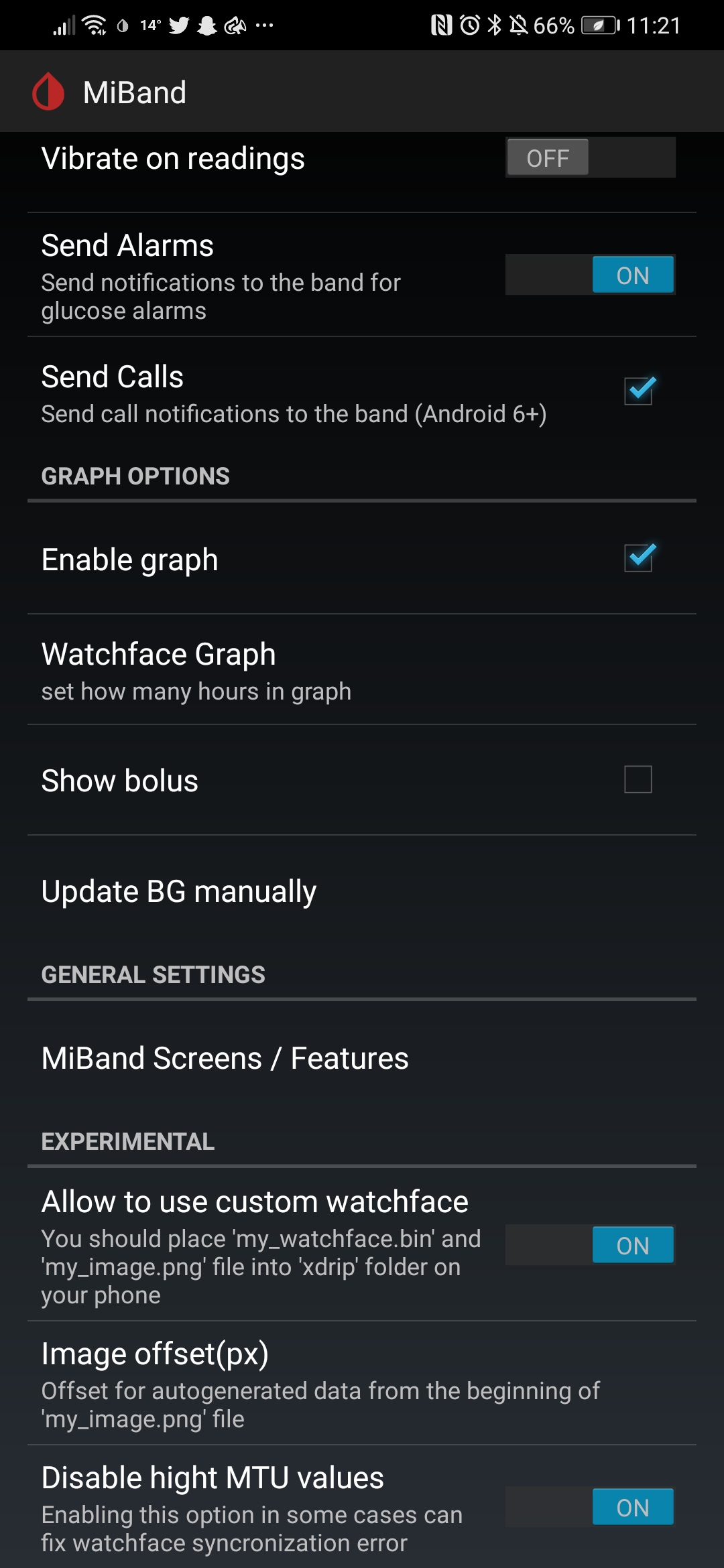
lwychan
on 30 Aug 2020
But I disable BG readings as a notification, and there is no "install miband4 watchface" button anywhere.
It seems you are following an incorrect instruction for older xdrip version. Please follow configuration steps described here https://bigdigital.home.blog/2020/01/23/future-of-the-xdrip-miband-project/
bigdigital
on 2 Sep 2020
But I disable BG readings as a notification, and there is no "install miband4 watchface" button anywhere.
It seems you are following an incorrect instruction for older xdrip version. Please follow configuration steps described here https://bigdigital.home.blog/2020/01/23/future-of-the-xdrip-miband-project/
This did eventually work, I think the fact I was still running glance and the Fitbit webservice might of been causing an interference.
2 things, occasionally I'm not getting the reading from the phone to my miband4, I'll have a reading 3 mins ago on phone and miband shows a reading from 25 minutes ago, I normally reboot everything and it eventually works.
 here I've had my reading, and I've then had an alarm warning me they were going up, but the watchface doesn't show that.
Secondly, I can't seem to get predicted low alerts like I do with the low alerts... All turned on in settings etc, ani idea?
lwychan
on 8 Sep 2020
Mi smo spojili xdrip sa mi band 4 ali na ekranu ne prikazuje nista samo se alarm ponekad na mi band 4 upali kad i na telefonu.Do cega je to i sta da uradimo da nam na mi band prikazuje ocitavanja????
 majamajaa
on 19 Sep 2020
majamajaa
on 19 Sep 2020
Али онемогућујем очитавање БГ као обавештење и нигде нема дугмета „инсталирај мибанд4 ватцхфаце“.
Изгледа да следите нетачна упутства за старију верзију кдрип-а. Слиједите кораке за конфигурацију описане овдје хттпс://бигдигитал.хоме.блог/2020/01/23/футуре-оф-тхе-кдрип-мибанд-пројецт/
То је на крају успело, мислим да је чињеница да сам још увек бацио поглед и да је Интернет услуга Фитбит могла да изазове сметње.
2 ствари, повремено не примам очитавање са телефона на мибанд4, имаћу очитавање пре 3 минута на телефону, а мибанд приказује очитање од пре 25 минута, обично све поново покренем и на крају успе.
Друго, не могу да добијем предвиђена упозорења са ниским нивоом као што то радим са упозорењима са ниским ... Све укључено у подешавањима итд, ани идеја?
Kako si ga spojio sa zdripom da prikazuje ocitavanja?nama se samo ponekad alarm javi
majamajaa
on 19 Sep 2020
@majamajaa Please write in English.
 tolot27
on 19 Sep 2020
tolot27
on 19 Sep 2020
@bigdigital Is this issue solved or is there something left?
tolot27
on 19 Sep 2020
We connected xdrip and mi band 4,xdrip find it but it doesn't show readinigs on the screen except that sometimes the alarm goes off when on the phone.Will anyone know what it can be?
majamajaa
on 19 Sep 2020
@bigdigital Is this issue solved or is there something left?
Initially, this issue was related to my fork integration, which was successfully done. Now, it seems this thread is more a discussion than an issue. I guess we can close this issue. I see there another discussion issue thread https://github.com/NightscoutFoundation/xDrip/issues/1441 so i think we can close the current issue, and leave https://github.com/NightscoutFoundation/xDrip/issues/1441 thread for discussions.
bigdigital
on 21 Sep 2020
Closed in favour of #1441.
tolot27
on 21 Sep 2020
Can someone send me the watch face? It is located in the "Xdrip" folder. Just send the .bin file. I'm making a new watchface and I intend to release it but I need the standard watch face
 Chabetico
on 27 Nov 2020
Chabetico
on 27 Nov 2020
Related issues
 TecMunky
·
12Comments
TecMunky
·
12Comments
 WalkingMyRoad
·
10Comments
WalkingMyRoad
·
10Comments
 ArkonPhoenix
·
4Comments
ArkonPhoenix
·
4Comments
 m1st0
·
10Comments
m1st0
·
10Comments
 ARkaine2
·
3Comments
ARkaine2
·
3Comments
Most helpful comment
It would not work on miband5 for sure. At least the watchface format and the hardware signature was changed. I'm currently working on watchface adaptation (almost done reverse engineering, need only test on the real device). Also waiting for the miband5 delivery (thanks for guys who did donations on Patreon service). When i get a new watch, need to check if the command protocol was not changed. If Huami developers had left the same communication protocol, the adapted xdrip version will be ready very soon.