Xdrip: Samsung October patch causing signal loss issues
Samsung released the October update/security patch recently which was installed on my S9+ on 31st October (I assume that the S9, Note 9 and potentially other 2018 Samsung phones got the update on or around the same time).
Since then I am having frequent "signal not received" issues with the MiaoMiao, however Bluetooth _is_ connected according to the system status screen. No other items or settings on my phone or in xDrip have changed other than this update.
- Bluetooth is on
- Trust auto connect is turned off
- Bluetooth watchdog is on
- All other settings under Bluetooth menu are off
 mistermintsgh
All 135 comments
- set Trust Auto Connect to on
- reboot phone
- reset MM
id still issue, please provide logs or at least some screenshots from logs, I am digging into that part od Code
 gregorybel
on 2 Nov 2018
gregorybel
on 2 Nov 2018
other try:
- Trust Auto Connect to off
- close GATT on disconnect to on
- reset MM
- reboot phone
gregorybel
on 2 Nov 2018
I had to turn trust auto connect off originally as it was causing disconnect. Have turned back on but no change in result.
Phone and MM have both been restarted/reset numerous times over last 24 hours including after changing settings.
Logs have just been uploaded from within xDrip
I can't seem to copy the log text so hopefully this will work to embed a picture.

mistermintsgh
on 2 Nov 2018
Last time this happened we had to wait for Samsung's next update which came shortly afterwards and fixed the bluetooth functions they had broken.
 jamorham
on 3 Nov 2018
jamorham
on 3 Nov 2018
I hope not jamorham! The updates come fairly frequently, but would still be looking towards the end of November before the next one, and hoping Samsung manage to update what they've broken in that.
I'll keep tinkering, and if it means having to do a software reset or firmware downgrade then that's what I'll have to do.
mistermintsgh
on 3 Nov 2018
It seems that as long as you never lock your phone or close the app it maintains connection, but obviously this isn't realistic to do.
Possible that there's been some kind of change to Bluetooth sleep/shutdown settings because of the Samsung update, and could this be worked around with an xDrip update?
mistermintsgh
on 4 Nov 2018
are you sure Xdrip is not being killed by Android?
gregorybel
on 5 Nov 2018
Absolutely certain. I've made sure it isn't, and never has been, on any list of apps to close for battery optimisation, freeing up RAM or whatever else.
mistermintsgh
on 5 Nov 2018
For Libre + miaomiao I am using now galaxy A8 (2018) android 8.0.0and xDrip+ variant build and for miaomiao to be consistently connected I needed to manually put the xdrip app under "unmonitored apps" within battery settings of the phone.
I don't know what has been changed in latest samsung software update, but it is not the same for all phones. For instance, S9 release notes doesn't mention Bluetooth changes, while A8 (2018) does. So I am reluctant for now to apply latest updates because it works great with previous version.
 bordeb
on 5 Nov 2018
bordeb
on 5 Nov 2018
I'm seeing exactly the same thing reported by @mistermintsgh. I'm using Xdrip on a Note 9 and it was working perfectly until immediately following the latest phone update. Xdrip will connect and read sugars properly so long as the phone is in active use, but as soon as it is locked, I get no more measurements. I've tried tweaking all the settings described above and nothing has helped. I switched back to the Dexcom app to confirm the transmitter and sensor are working properly and it is working without any issues, so something else is going on specific to Xdrip. I'm happy providing logs or anything else that may aid in debugging further, just let me know which settings you'd like me to apply before gathering the logs.
 yarmatr
on 5 Nov 2018
yarmatr
on 5 Nov 2018
Please contact Samsung to tell them that they have broken bluetooth with their update again.
jamorham
on 5 Nov 2018
I have the same problem with my note 9 and if I load the dexcom app, it never misses a beat so I'm not sure it is a Bluetooth issue.
 dougstanton
on 5 Nov 2018
dougstanton
on 5 Nov 2018
I'm not sure what else it could be though @dougstanton ? Perhaps the MM handshakes slightly differently than other Bluetooth devices and that's what's causing the disconnect?
I've spoken to Samsung already @jamorham and all they were interested in was doing factory resets and all the usual "have you tried turning it off and on again?" troubleshooting. They weren't interested in logging an issue about the problem. I will try again however, and if others on here could do the same at least it wouldn't be an isolated incident from me
mistermintsgh
on 5 Nov 2018
from what I read, I am not sure too it is a Bluetooth issue, I wonder if maybe xdrip get killed?
I think logs are interesting.
I started this page:
could be great to enable more logs before sending logs.
gregorybel
on 6 Nov 2018
@gregorybel I followed the instructions from your link above and enabled remote logging -- I assume that is all that is required for you to see my logs? Please let me know if there is anything I need to do on my side. Thanks.
yarmatr
on 7 Nov 2018
Great but would be better if you click on 3 points on the right, view events logs and upload logs.
Did you enable more logs first?
gregorybel
on 7 Nov 2018
Hi guys. First of all, thanks for such an amazing app. :-) very grateful for it.
I started having the same exact problem with my note 9 after the update from yesterday :(
I am using a G5 though. Gregory, should I follow the same steps as given to yarmatr?
I can downgrade to the last firmware also, but hopeful that a solution will come. Using another phone temporarily ...
Thanks so much and let us know. Willing to donate as this has saved me so much money and time.
TJ
 tjir81
on 9 Nov 2018
tjir81
on 9 Nov 2018
I am having the same issues on the note 9 October update. I posted my logs
 playingbball20
on 9 Nov 2018
playingbball20
on 9 Nov 2018
Please contact Samsung to tell them that they have broken bluetooth with their update again.
I wouldn't be so quick to blame Samsung. I think their BT implementation is fine. I've received the update and nothing has gone wonky with any of my BT connections including your app. And how come you won't address the fact that your app has been broken since some time after the 7/15 version with respect to sending notifications to a Tizen watch. EVERY OTHER APP on my phone that I want to show up on my Gear 2 still works. xDrip won't show up on my watch (via Android Notifications) since an overnite or two versions later than the 7/15 version which I have to stick with in order to use the MOST USEFUL function of xDrip besides the "speak readings" function. Why won't you fix what used to work? perhaps you could sell the code to a large company that can maintain and update xDrip in the manner in which it deserves. I am so disappointed that you don't see fit to fix a common function of an app.
 dave1812
on 9 Nov 2018
dave1812
on 9 Nov 2018
I would blame Samsung @dave1812 unfortunately. It is their update that has killed the functionality, and even before this update came out xDrip had to implement a "buggy Samsung" workaround - they just don't seem to have implemented Bluetooth in the same way as other manufacturers at all.
I've been in contact with them via email over the past week or so and all they can suggest is a factory reset (and they keep telling me this will reset the phone to exactly how it was when it was manufactured - removing any patches and updates - which is clearly bollocks) or to put me in touch with the "Galaxy Stars" team who can help me reset it remotely.
Lucky you though for the update not breaking your functionality.
mistermintsgh
on 11 Nov 2018
It certainly would appear that samsung have changed something. Last time this happened there was such outcry as to all the apps they had broken regarding bluetooth connectivity that they very shortly issued another update which resolved the problems.
We already have to work around the fact that their implementation of android does not follow the android reference specifications.
Regardless of all of this, we may be able to find another work-around. Gathering log data can help with this but it rather depends what it is. As the issue is affecting miaomiao and dexcom collectors it smells like its going to be bluetooth related.
To solve the last work-around issue, someone sent me a Galaxy A3, however that device is on security patch level July 2018 and no additional updates are being offered by samsung and it isn't experiencing this problem.
Do we know what the least expensive phone is which is exhibiting this problem? Or does anyone in europe have one they can loan for me to investigate?
jamorham
on 11 Nov 2018
@jamorham If you have logs, I am interested looking at it. I spent a lot of time looking at this module and maybe I see how to workaround it.
regarding phones, I don't know but I remember the Nightscout Foundation offering us to buy devices if needed. Maybe you can ask Dana or Scott how to proceed?
gregorybel
on 11 Nov 2018
I have an S7 as does my wife. There is no big issue with BT working with xDrip on either of our phones. Once in a blue moon we have to go to BT settings and remove the transmitter from the list of paired devices but that's so rare. The only time I had a major hassle with BT on the S7 was about 2 years ago when it refused to stay connected to my Camry. Believe it or not I had to do 3 factory resets before it worked. I've never heard of needing to do more than 1 FR to get things working again. I was nearly ready to have Verizon switch out my phone before I did that 3rd FR. I didn't want to switch my nearly new phone for a refurb; that's why I was so intent of getting mine to work again.
dave1812
on 11 Nov 2018
Is this only affecting S9+ and Note 9 do we think or are other phones impacted?
jamorham
on 11 Nov 2018
I haven't heard anyone complain other than S9/S9+/Note 9 owners unfortunately @jamorham and I would guess at that being because they are the current flagships, they are the ones being updated. I don't know if Samsung have changed policy (last time I had one it was S3!) but they were notoriously crap at updating older, cheaper/budget or not-current-flagship devices.
I wish I had a spare I could lend you, but since I don't, I'm happy to do any testing or submit any logs I can to help resolve the issue. I had sent my logs through previously but from the user end there's no way of know if they arrived, or whether they help.
mistermintsgh
on 12 Nov 2018
I've uploaded my logs and if there is anything else wanted let me know. It is an issue with the Note 9 and it's not just with this. Android Auto down't work on most car head units either an I have been reading about the Bluetooth issues with the Note 9, so I hope they come out with a new update soon. I'm even so antsy I am willing to try the alpha version of pie to see if I can fix both issues.
playingbball20
on 13 Nov 2018
I've uploaded my logs and if there is anything else wanted let me know. It is an issue with the Note 9 and it's not just with this. Android Auto down't work on most car head units either an I have been reading about the Bluetooth issues with the Note 9, so I hope they come out with a new update soon. I'm even so antsy I am willing to try the alpha version of pie to see if I can fix both issues.
I know how painful it is to do a FR, but that fixed my BT issues to my car a couple years ago on an S7. My wife's S7 wasn't affected. It took THREE factory resets to get it to work. Makes no sense to me that it would require more than one but I was there and did the work myself. LOL!
dave1812
on 13 Nov 2018
FYI I did an factory reset and it didnt do any good.
dougstanton
on 13 Nov 2018
I downgraded my Note 9 so I am going to be trying the software again. I'll let the note 9 users if it works.
playingbball20
on 14 Nov 2018
Hope it works with the updates as Android 9 is coming...
I downgraded mine using Sam mobile and Odin (remember not to use home CSC as my phone didn't work right, so I did a full flash with full reset option CSC instead of home csc) and it works perfect, so for now, those with the Note 9, do not upgrade.
Use the software that came with your phone until there is a fix. Will appreciate if an update is posted here whenever it's fixed. :-)
tjir81
on 14 Nov 2018
Downgrading worked. I used this zip and odined everything but the USERDATA and CSC file. Download odin from here https://forum.xda-developers.com/attachment.php?attachmentid=4446947&d=1521037501 and the firmware from here https://mega.nz/#!MRUyzKxZ!1vJHa1Ad1z0bHSokALzbkf7uYN2Cw8dY7O14nc1_p7A.
Put your Galaxy Note 9 into Odin mode by turning it off then holding Power + Volume Down + Bixby button.
Open Odin and put the corresponding BL, AP, CP only.
If you need help I got the sources from here https://www.xda-developers.com/install-early-android-pie-samsung-experience-10-snapdragon-samsung-galaxy-note-9/
go to step 4 to put yourself into download mode and use odin. Do NOT factory reset unless you want to wipe everything!!!
playingbball20
on 14 Nov 2018
It works, but I did not have luck at first flashing and trying to maintain my files apps, etc... I had to redo a new flash from 0 without keeping my files.
Thanks for the links and info. It will help a lot of people.
tjir81
on 14 Nov 2018
@playingbball20 did you manage to do this WITHOUT wiping all your data then? The forum users over at XDA are telling me that it is only possible to upgrade without wiping, but all downgrades do end up with a data wipe and effectively a factory reset device.
mistermintsgh
on 14 Nov 2018
@playingbball20 ignore me. I should've read your post properly. Looks like you've upgraded to Pie and that's why your data isn't gone.
XDA doesn't yet have the Exynos builds for the S9+ so that isn't something I can do just yet.
mistermintsgh
on 14 Nov 2018
That's correct, seems that all downgrades fail using the home CSC file to keep current data. Must do a clean install from zero.
tjir81
on 14 Nov 2018
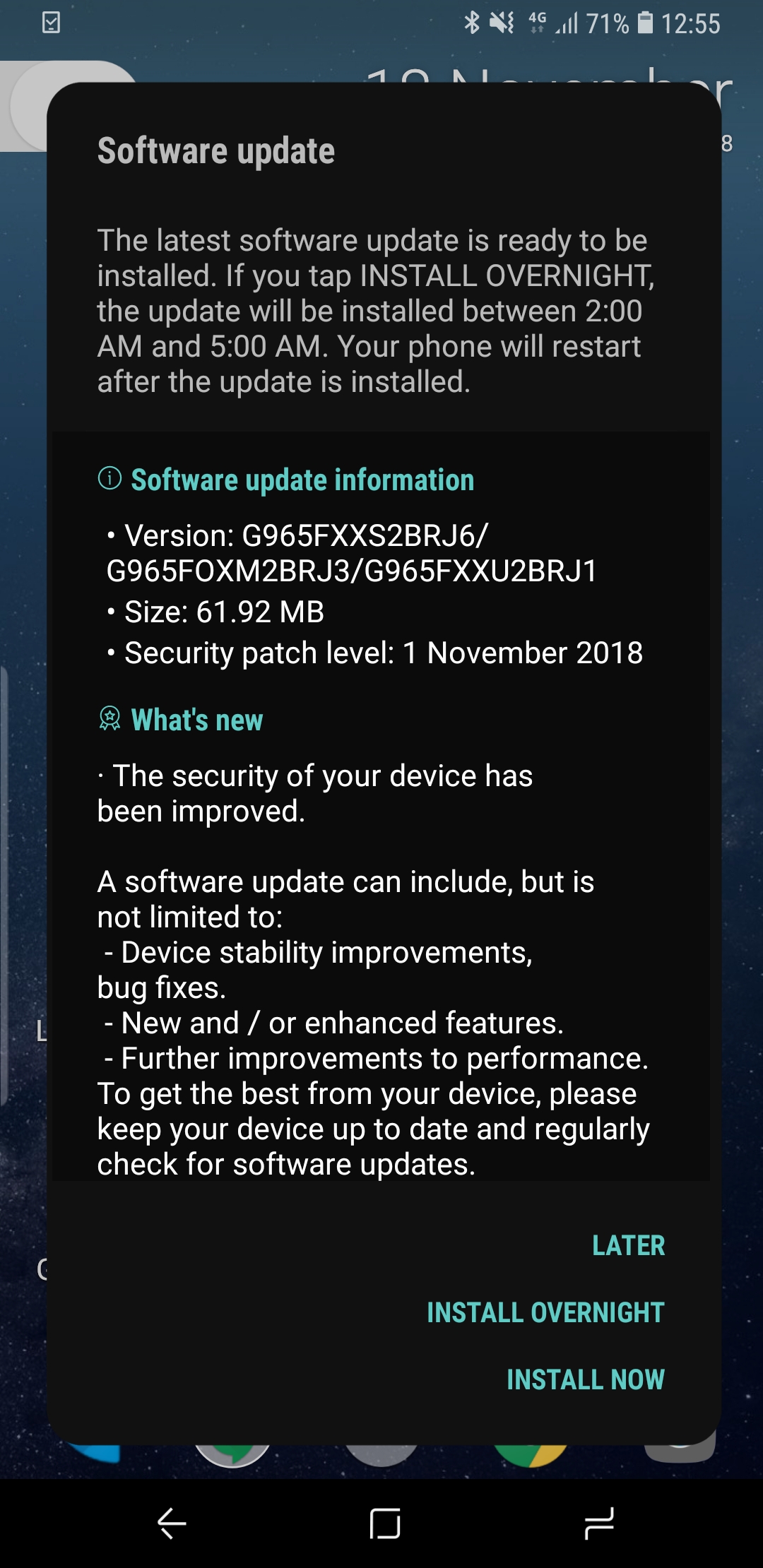
I've had a notification on my S9+ this morning to update with this patch. I'll get it installed, have a play around and see if it has fixed the connection problems
mistermintsgh
on 18 Nov 2018
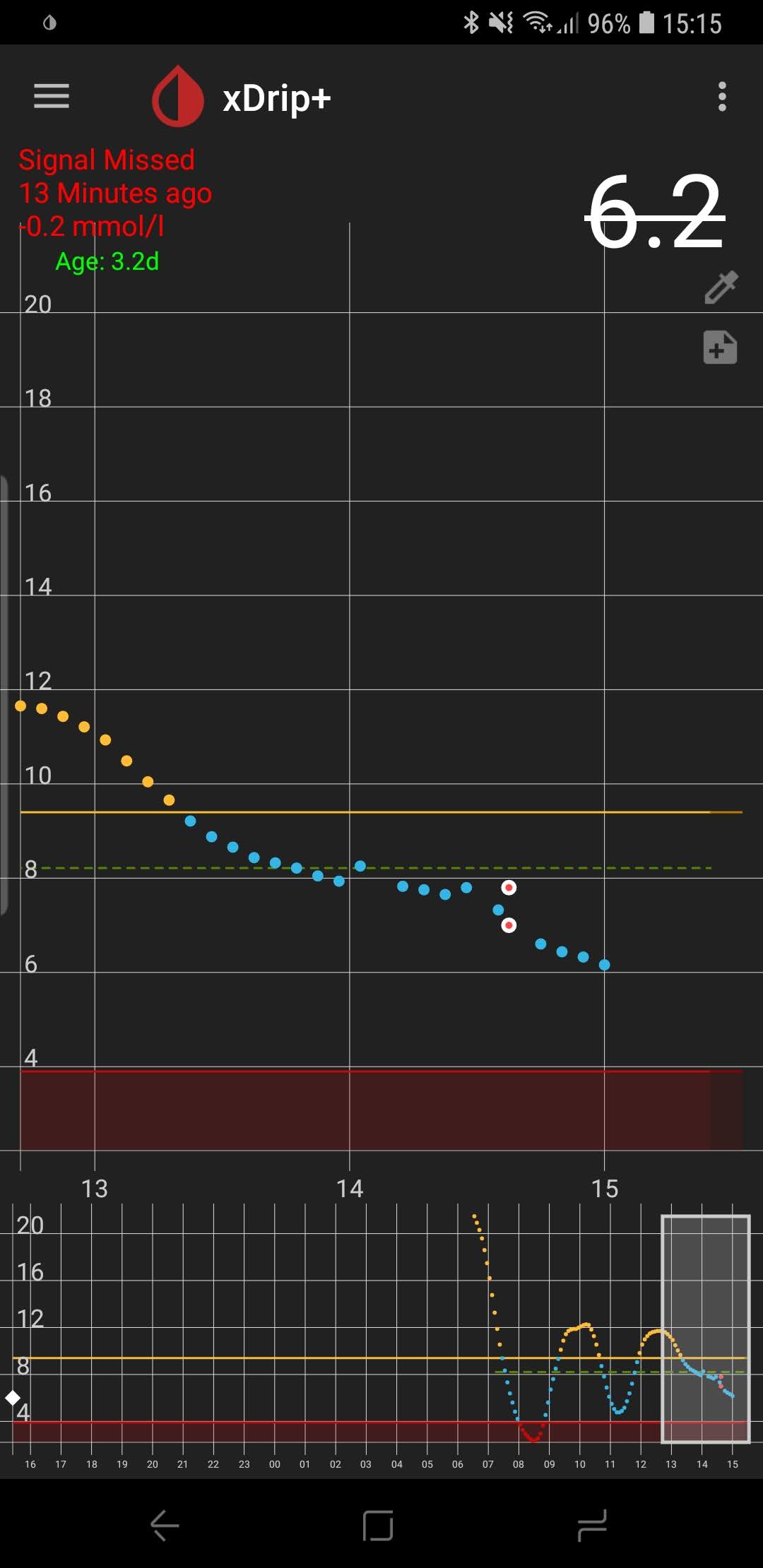
And....... it didn't work :(
Same story, disconnects after about 12 minutes, but stays connected as long as the phone is unlocked and xDrip is open.
mistermintsgh
on 18 Nov 2018
I just want to share the info that it seams that only flagship samsung models are affected. When I heard for this issue I was reluctant to update my a8 2018 but yesterday I did and everything works fine with latest October patch on Galaxy A8 2018.
bordeb
on 18 Nov 2018
Any hope at all yet?
Really don't want to sell the Note 9, battery life is amazing (compared to a Google Pixel 2 XL already), but knowing every update could bombard the app :( :( :(
tjir81
on 21 Nov 2018
Not so far @tjir81 :(
With the 15th Nov release I am finding that it reconnects quicker, and doesn't disconnect as frequently (provided the phone is unlocked) but still doesn't work great at all.
I've complained again to Samsung telling them how important it is to get this Bluetooth implementation right, but no reply yet
mistermintsgh
on 21 Nov 2018
@jamorham did you look at the logs? Anything found?
could you please send it to me?
gregorybel
on 22 Nov 2018
Can any users who are having this problem tell me whether in the System Status tab for the collector you are using whether it says Buggy Samsung - Using Workaround or not? (it may take >30 minutes to appear after collection fails) Also when reporting this please state which collector you are using, for example OB1 G5 etc. Thanks
jamorham
on 28 Nov 2018
It does say buggy Samsung workaround on mine, but it says that all the time and not just after connection fails.
Using Libre with MiaoMiao. With G6 I couldn't get them connected at all
mistermintsgh
on 28 Nov 2018
@jamorham This might be foolish of me, but I have just installed the Samsung One UI Beta (or Android Pie Beta as it should really be called).
It took a bit of fiddling to get it connected, and I had to installed the 2 hour old 28th Nov xDrip update, but things seem OK at the moment. Admittedly though, I have only been using it for 10 minutes!
I'll keep you posted on it.
EDIT: Spoke too soon. Still missing the signal.
The System Status page does say though that MM is connected, and it doesn't show up as a new/unconnected device in the BT menu to scan for. Signal is being missed at 11 minutes as per previously.
I've just uploaded my logs with the contact reference of mistermintsgh, and turned on the auto-send logs to developer option
mistermintsgh
on 28 Nov 2018
@jamorham I've been monitoring and playing around with things for about 2 hours, since my last post and despite my edit earlier saying things weren't working, they now are, and almost flawlessly.
Firstly, I'm on a Samsung S9+ Exynos variant, running the Samsung Android Pie beta so I don't know if this will be the same for Snapdragon variants.
Once Android had finished updating, what I didn't do before was actually let it completely update and that may be what was causing problems. If you've ever received an OTA Android update you may have seen that once the phone restarts there is a progress bar in the notification panel while it finishes off and tidies up the update. When I posted earlier this hadn't finished.
After that had finished, I turned Bluetooth off and back on again and reconnected and it appeared to be working fine. For good measure, I also then rebooted the phone.
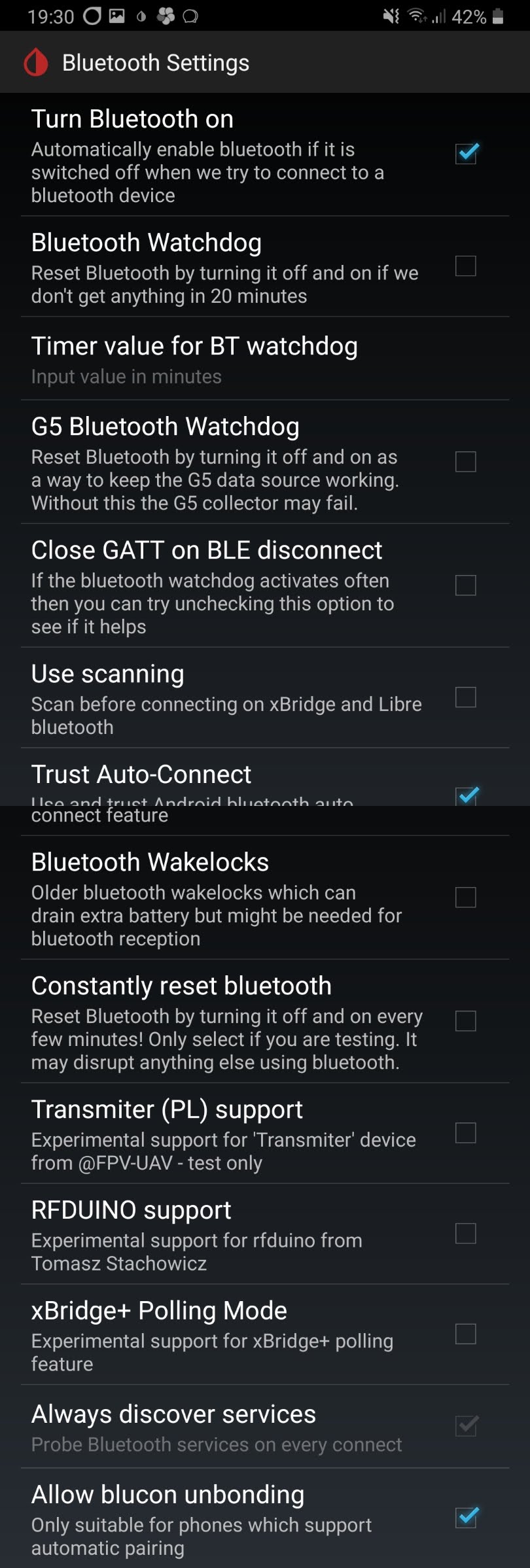
Connection now is being maintained, and I haven't missed any signals since I completed the above. I also made sure that my Bluetooth settings were altered to this (Bluecon unbonding probably isn't necessary but it is enabled anyway):
However, I said it was almost perfect. The one issue I have come across so far is the notification panel being incorrect and I haven't worked out how to get this to update - if you have any ideas please let me know! But I can live with it. See the screenshots for examples of the differences between the notification pull down reading and the widget reading (which matches the Home Screen):
Notification reading 9.6mmol which was updated at 18:19 but time this screenshot was taken was 19:32 (above that is the G6 reading - ignore that!)
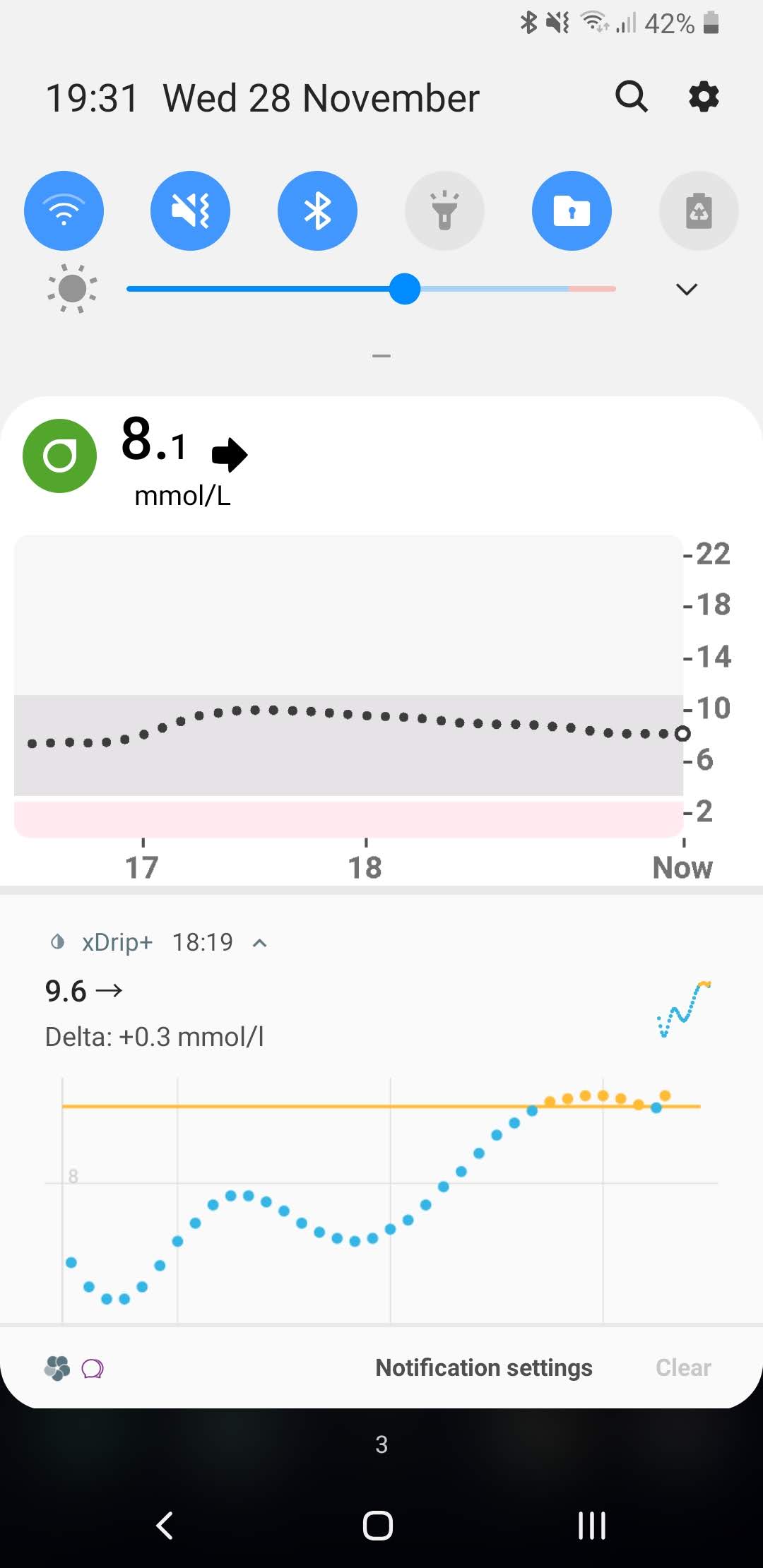
Widget giving the actual reading of 8.4:
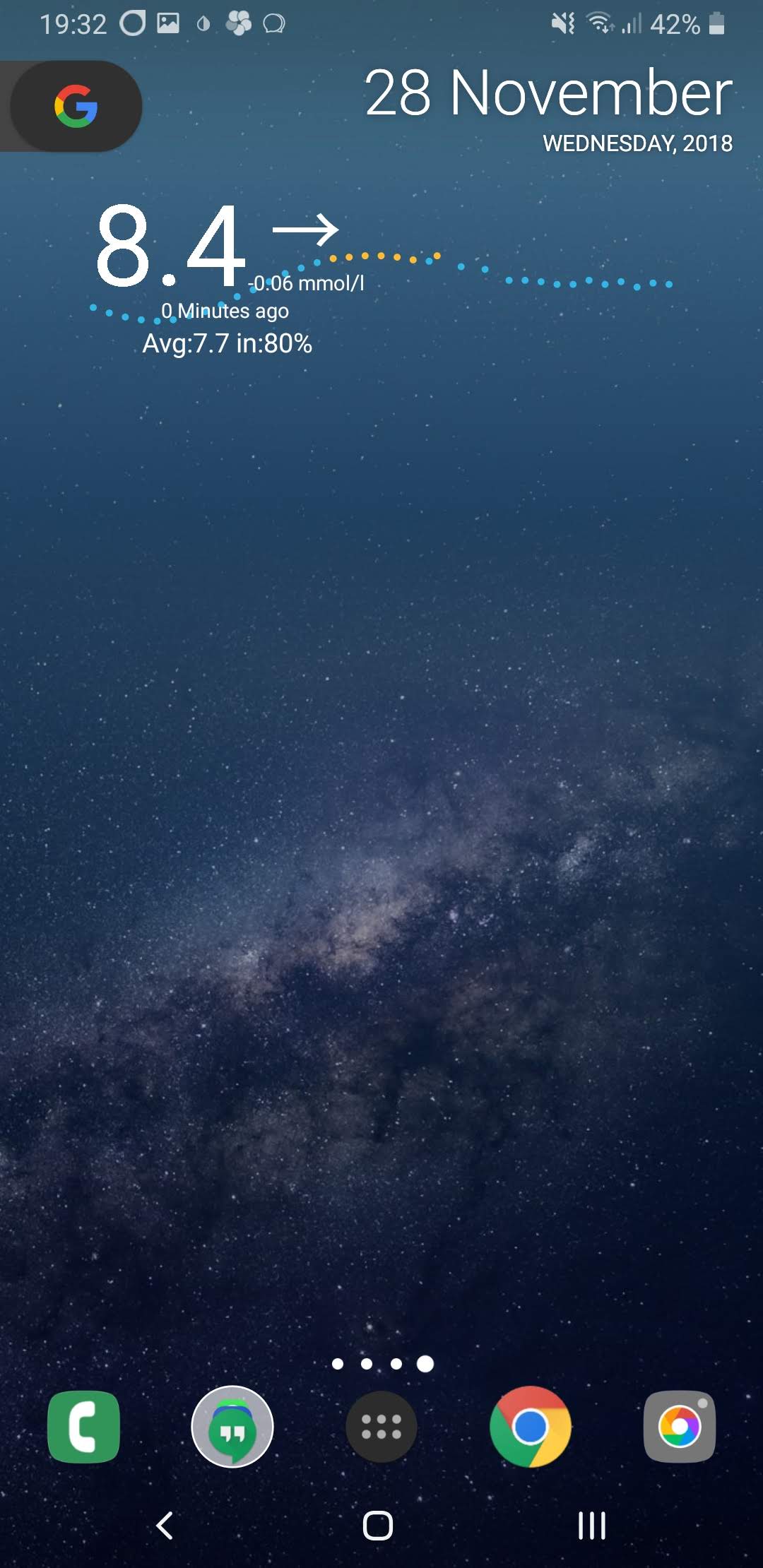
If there is any easy way I can fix/update this in the settings then please share. Otherwise, FYI for you and other developers that it could need looking into if others can replicate the issue.
Hopefully though, when Pie becomes available to all Samsung flagship users these issues may finally be resolved.
mistermintsgh
on 28 Nov 2018
got my note 9 running...
Bluetooth settings
turn bl... on
bluetoo… watchdog
timer for bl. watchd… 5
g5 bluetoth watch
trust auto c
allow bluecon
hope that helps others too
werner f
 wefink
on 2 Dec 2018
wefink
on 2 Dec 2018
sorry..my solution worked only for 30 minutes
werner f
wefink
on 2 Dec 2018
Could anyone having problems please check these additional settings to try:
xDrip Settings -> Alarms and Alerts -> Glucose Alerts Settings -> Notification Channels -> Enabled
and
xDrip Settings -> Alarms and Alerts -> Glucose Alerts Settings -> Use Ongoing Notification channel -> Enabled
Please let me know if this makes any difference. Thanks.
jamorham
on 2 Dec 2018
I had the first selected and not the second. Have made the change and will report back. Are you implying notification channels are impacting BT? What's the theory? And thanks.
 old-square-eyes
on 2 Dec 2018
old-square-eyes
on 2 Dec 2018
can't recommend BT watchdog at 5min but if you really want it...
gregorybel
on 3 Dec 2018
did someone try "run collector in foreground" under misc options?
gregorybel
on 3 Dec 2018
All
I was having this same issue on my Note 9 I got on Black Friday, it
worked great on my S7.
I'd run through most of the settings and suggestions here and on the site.
Then on Sunday night, the wife says somebody on the FB page report they
disabled the OB1 collector and got it working.
I did the same after a reinstall to ensure everything was back to
default, I've gotten 99% of the readings since.
Its unclear to me what Collector it is now using but its working.
John
On 12/3/2018 9:31 AM, Grégory Beloncle wrote:
>
did someone try "run collector in foreground" under misc options?
—
You are receiving this because you are subscribed to this thread.
Reply to this email directly, view it on GitHub
https://github.com/NightscoutFoundation/xDrip/issues/663#issuecomment-443796573,
or mute the thread
https://github.com/notifications/unsubscribe-auth/AGPEIyo5g_zOIMtKrzCy0-wSCgtuSEw5ks5u1WAJgaJpZM4YLhaU.
This email has been checked for viruses by Avast antivirus software.
https://www.avast.com/antivirus
 johnmccoyjr
on 3 Dec 2018
johnmccoyjr
on 3 Dec 2018
now here my final settings for g5 note 9 and sony smartwatch with September!! update of note
g5/6 debug settings:
scan for g5 constantly
force g5 ui thread
android wear integration:
android wear in....
nothing else!
less common settings
Bluetooth settings
turn Bluetooth on
Bluetooth watchdog
timer set to 5
g5 Bluetooth watchdog
trust auto-connect
with this settings I have 100% data
hope that helps ..others in the same situation
wf
authenticate g5 before....
wefink
on 4 Dec 2018
one thing more....
"authenticate g5 before" belongs to old g5 collector settings. must be marked too...my firmware is 1.0.4.10 so seems something older
wf
wefink
on 4 Dec 2018
@wefink do you have the OB1 collector enabled? Didn't this issue only start after the October update? You mention September in your message.
jamorham
on 4 Dec 2018
Hi,
It says
Android security patch level
- September 2018
Seems the October patch is not send yet…
wf
From: JamOrHam [mailto:[email protected]]
Sent: Tuesday, December 4, 2018 5:57 AM
To: NightscoutFoundation/xDrip
Cc: wefink; Mention
Subject: Re: [NightscoutFoundation/xDrip] Samsung October patch causing signal loss issues (#663)
@wefink https://github.com/wefink do you have the OB1 collector enabled? Didn't this issue only start after the October update? You mention September in your message.
—
You are receiving this because you were mentioned.
Reply to this email directly, view it on GitHub https://github.com/NightscoutFoundation/xDrip/issues/663#issuecomment-444059637 , or mute the thread https://github.com/notifications/unsubscribe-auth/AMzO_1kkDskdfWb-yIiZ3fyv_D8nu8zIks5u1lUDgaJpZM4YLhaU . https://github.com/notifications/beacon/AMzO_7n2lWtbaJYqVi-Yhigyu3gZUT7Fks5u1lUDgaJpZM4YLhaU.gif
wefink
on 4 Dec 2018
Obi collector is not enabled
w
From: JamOrHam [mailto:[email protected]]
Sent: Tuesday, December 4, 2018 5:57 AM
To: NightscoutFoundation/xDrip
Cc: wefink; Mention
Subject: Re: [NightscoutFoundation/xDrip] Samsung October patch causing signal loss issues (#663)
@wefink https://github.com/wefink do you have the OB1 collector enabled? Didn't this issue only start after the October update? You mention September in your message.
—
You are receiving this because you were mentioned.
Reply to this email directly, view it on GitHub https://github.com/NightscoutFoundation/xDrip/issues/663#issuecomment-444059637 , or mute the thread https://github.com/notifications/unsubscribe-auth/AMzO_1kkDskdfWb-yIiZ3fyv_D8nu8zIks5u1lUDgaJpZM4YLhaU . https://github.com/notifications/beacon/AMzO_7n2lWtbaJYqVi-Yhigyu3gZUT7Fks5u1lUDgaJpZM4YLhaU.gif
wefink
on 4 Dec 2018
Hi, I have a UK Note 9 and went back to firmware build N960FXXS2ARH6 to get it working without disconnects. That shows a security patch level 1st September.
I had trouble in October with the OTA firmwares. Tried many different variations on the xdrip settings over several weeks. Sometimes it would work for a while and I would think it was fixed, but would always disconnect in the end.
Sammobile does have an ever newer build ARK2 from 18th November that I have not tried...
 detellis
on 4 Dec 2018
detellis
on 4 Dec 2018
I just wanted to report that the workaround proposed by @johnmccoyjr is also working for us. We were behind in allowing the update to our Note 9 and allowed it just over a week ago, developing the same symptoms identified in this thread (xdrip would receive data fine as long as the phone was one and it was in the foreground, but "sleeping" the screen would kill data transmission - we had a partially functional workaround by classifying xdrip as a game so the phone would dim the screen and 'slide lock' without actually locking the device, but the security and accidental tap issues make this less than ideal). Following @johnmccoyjr suggestion of disabling the OB1 collector has resolved the primary issue. It seems the polling window on the older collector is longer - the OB1 seemed to update every five minutes, where the original appears to be collecting data every ten - but getting data as expected, even at half speed, is far superior.
 aeliaran
on 15 Dec 2018
aeliaran
on 15 Dec 2018
aeliaran, what I'd like to know is have you tried the 7/15/18 version of xDrip on the Note 9? I've had issues (that so far have not been addressed by the xDrip coders) with versions newer than 7/15. I'd love to hear if your problems disappear by using that version.
dave1812
on 15 Dec 2018
I have seen one report that the December Samsung update may resolve this.
jamorham
on 20 Dec 2018
I have installed latest firmware ARL3 for Note 9, but the OB1 collector still disconnects with screen off.
However, just as @aeliaran reports, disabling the OB1 collector seems to work. The data only arrives every 10 minutes now instead of every 5, but it hasn't disconnected for 12 hours so far.
detellis
on 21 Dec 2018
@detellis can you also see if the Dec 20th nightly makes any difference with the OB1 collector. thanks
jamorham
on 21 Dec 2018
@jamorham I have now tried the 20th Dec build but it doesn't help. OK when I had sat nav running, but always disconnects with screen off.
I've disabled OB1 again to get data on a 10 min interval.
detellis
on 22 Dec 2018
I am suffering from this with my S8. Nov and Dec patches didn't help. I have reset network, and last night, out of desperation I reset my phone. xDrip Dec 20th didn't help. Though, most of my disconnections are actually happening between my SW3 and my phone since I force Wear collection. In this state SW3 continues to collect, but a crossed out cloud icon appears on the watch and the phone doesn't get readings. Tabbing airplane mode on and off sometimes restores connection.
Since I reset my phone I had to reset my SW3, it's been 24hrs and the xDrip app hasn't synced to my watch. This is weirdly common and if I were to guess related to Google breaking parts of Google Play Services for Wear 1.5 (broken also is Play Music Syncing and xDrip over WiFi sync). I make a note of this because while I wait for the xDrip Wear app to sync I have actually had pretty good collection from my S8, around 90-95%. It still hurts because I'm used to 99% and even one or two missed readings can destabalise treatment or lead to additional sleep loss (we all know the drill).
I have complained to Samsung and so should everyone else. They were the ones to tell me to reset network, but obviously it didn't help. I have of course reported this but haven't heard back.
old-square-eyes
on 22 Dec 2018
Why doesn't someone take my suggestion and try the 7/15/18 version??? It will take less than 3 minutes to install it.
dave1812
on 23 Dec 2018
@dave1812 apologies, I missed your earlier suggestion to try that version. I just tested it out now (https://github.com/NightscoutFoundation/xDrip/releases/download/2018.07.15/xDrip-plus-20180715-de8abbd.apk) and it's working well for me. No missed updates while in sleep.
yarmatr
on 23 Dec 2018
just installed 7/15/18 will see what happens..
btw what means resistance 534 in green
wefink
on 23 Dec 2018
@dave1812 Seems like even with 2018.07.15 build, I started losing connectivity after 30 mins or so. Disabling OB1 has me back to reliable 10 min readings.
yarmatr
on 23 Dec 2018
@dave1812 Seems like even with 2018.07.15 build, I started losing connectivity after 30 mins or so. Disabling OB1 has me back to reliable 10 min readings.
that's a bummer! I use OB1, as does my wife, with the G5 on Samsung S7 with 8.0.0. (the 7/15 version). once in a while we have to reset the BT device--maybe every week or two. no biggie unless it drops it while sleeping but I also use a receiver, clipped to my shorts. if i get out of bounds, the vibration and alarm helps wake up myself or my wife so that I can deal.
dave1812
on 23 Dec 2018
Reports this morning that Samsung have started the Pie rollout earlier than planned with phones in Germany starting to get the stable/full release right now.
I've had no problems since using to the beta on my S9+ so fingers crossed others are as lucky
mistermintsgh
on 24 Dec 2018
@mistermintsgh ok so you think there is a good chance that the update to Android 9 will resolve the problem?
jamorham
on 24 Dec 2018
It has for me on the beta. No issues at all since I updated including 2 further beta updates with security it's and bug fixes
mistermintsgh
on 24 Dec 2018
Okay there is a 26th Dec nightly which I would be interested for people to try. I have reworked some of the wake locking so I would like to know if that helps with this problem.
If it doesn't help there is also an additional option you can try which is buried deep in Settings -> Less common Settings -> Other Misc Options -> Samsung Workarounds - Please try disabling this to see whether the Samsung workarounds we are using are no longer applicable. If it doesn't help please remember to re-enable the setting again because normally without this enabled Samsung collectors wont work at all!
jamorham
on 26 Dec 2018
@jamorham, I downloaded the new build last night and have been trying it out. Unfortunately the OB1 collector still fails with the screen off. Same with the Samsung workaround disabled.
However, with OB1 disabled I am now receiving data every 5 minutes instead of every 10 mins as it was with the older build.
Thank you for your effort on this issue over Christmas. It's very much appreciated by me and no doubt countless others.
detellis
on 27 Dec 2018
@jamorham, I tried as well and had the same experience reported by @detellis, right down to the improved 5 min updates with OB1 disabled. Thanks for all your efforts on this.
yarmatr
on 27 Dec 2018
@detellis @yarmatr Can you tell me the exact phone model numbers you are using, Should start with SM- ?
jamorham
on 1 Jan 2019
Mine is SM-N960F
detellis
on 1 Jan 2019
SM-N960W
yarmatr
on 1 Jan 2019
Using a resource grant provided by the Nightscout Foundation I now have access to a Samsung S9 SM-G960F running Android 8.0.0 with Patch Level Oct 1st 2018.
I am now attempting to reproduce the problem.
jamorham
on 3 Jan 2019
Just to let you know. I recently installed Android 9.0 on my S9+ Dual Sim SM-G965F with Security Patch 1. Dec 2018 and it seems to work as it did the whole time. I will post an update if anything happens. Here are my settings (translated from german -> names can be slightly different):
under G5 Debug settings:
OB1 Collector
Native Algorithm
Restart Sensor
Preemptive restarts
Allow OB1 unbonding
Allow OB1 initiate bonding
Authenticate G5 before each read
under advanced settings:
Aggressive collector restarts
advanced settings -> bluetooth settings:
turn bluetooth on
bluetooth watchdog
G5 Bluetooth watchdog
Trust Auto-Connect
Allow blucon unbonding
advanced settings -> other misc options:
run collector in foreground
On the status page it always says 'Buggy Samsung: Using workaround'
App version: 7a3a6fc-2018.12.01
 Feromrk
on 10 Jan 2019
Feromrk
on 10 Jan 2019
Nevermind, it just worked for a few hours and then stopped. Now it only works when the screen is on and the app is opened.
Feromrk
on 10 Jan 2019
Like others already mentioned disabling the OB1 Collector works. I get readings every 10 sometimes every 5 minutes. Missing the backfill of the native algo though.
App Version 2019.01.09
on Android 9, 1.Dec Patch
Feromrk
on 11 Jan 2019
Using 10th Jan 2019 Nightly and OB1 collector with a G5 test unit, I get 100% capture rate on a SM-G960F (Samsung S9) with security patch level 1st Oct 2018 running system build R16NW.G960FXXU2BRJ3
jamorham
on 14 Jan 2019
Just tried 10th jan nightly with 1st dec patch on android 9 and OB1 does still not work.
Feromrk
on 14 Jan 2019
I have tried the 10th Jan build on my Note 9 SM-N960F on build N960FXXU2ARL2 with a G6 sensor. Still failing to get readings with OB1 enabled and the screen off.
Maybe I need to adjust some of the Bluetooth settings in Xdrip. Will play with those tonight and see if I can get OB1 working.
detellis
on 14 Jan 2019
@jamorham can you post your overall xdrip settings please? :)
Feromrk
on 14 Jan 2019
Just installed 1st Jan Patch but OB1 still doesn't work for me
Feromrk
on 15 Jan 2019
@Feromrk This is with default settings, OB1 Collector (not using native mode but shouldn't make any difference) Minimize scanning is enabled in the G5 debug options, but that is also a default now.
On the phone in Samsung battery settings Power Saving mode is set to OFF the phone isn't doing much else so there are unlikely to be any memory pressures. Indeed the battery life is looking like it will do 5 days with 100% xDrip collection on a single charge.
jamorham
on 15 Jan 2019
Have tried playing with the Bluetooth settings in both the debug and less common settings sections, but no luck with the OB1 collector enabled. BG readings always missed when the screen is off.
detellis
on 16 Jan 2019
Salut tout le monde
Désolée j'ai pas pu m'exprimer bien en anglais!
J'espère bien trouver quelqu'un qui m'aide à régler mon problème avec le
miao miao de mon fils
Donc j'ai un miao miao associé à une montre finowe comme maître mais j'ai
pas pu associer mon téléphone Samsung j6+ comme follower !!! Ça fait une
semaine que j'essaye sans résultat ! Au secouuuuuuuurs! J'en ai vrai besoin
parce qu' mon fils de 5 ans est scolarisé et j'ai besoin d'être au courant
de ses Glycémies
Quelqu me sauve de ce grand problème en me guidant étape par étape Svp
Et merci d'avance
Le mer. 16 janv. 2019 à 15:12, detellis notifications@github.com a écrit :
Have tried playing with the Bluetooth settings in both the debug and less
common settings sections, but no luck with the OB1 collector enabled. BG
readings always missed when the screen is off.—
You are receiving this because you are subscribed to this thread.
Reply to this email directly, view it on GitHub
https://github.com/NightscoutFoundation/xDrip/issues/663#issuecomment-454792754,
or mute the thread
https://github.com/notifications/unsubscribe-auth/AsckLXImga_mwdX4enLJUpd88PH2bNtWks5vDzM5gaJpZM4YLhaU
.
 bahi2013
on 16 Jan 2019
bahi2013
on 16 Jan 2019
So the good news is that using the exact same Samsung S9 which got 100% flawless capture rate on Android 8, as soon as it is upgraded to Android 9 it doesn't work at all with the screen off. So I can reproduce the reported problem here now!
I have isolated it to the Samsung bluetooth stack so far but don't have a resolution yet but will keep working on it.
jamorham
on 25 Jan 2019
I received my official OTA Android 9 update the other day (I was previously on the 9 Beta) and it is still working (almost flawlessly).
I get a few signal missed errors when a checksum has been missed, and occasionally have to "forget device" to reset and re-pair, but it happens pretty rarely and certainly not stopping it working like when the October patch came out.
Hope you get to the bottom of it @jamorham ! :)
mistermintsgh
on 25 Jan 2019
Everyone please try the 25th Jan nightly and let me know if this improves things with the OB1 collector.
jamorham
on 25 Jan 2019
I've installed the 25th nightly but still not getting reading with screen off.
Using Note 9 on Android 8. This device is supposed to receive the Pie update in January but it's not available yet.
detellis
on 25 Jan 2019
@detellis In the G5 Debug options, can you see if you have Minimize Scanning enabled and if so, try disabling it?
jamorham
on 25 Jan 2019
This looks promising. With Minimise Scanning disabled I am getting readings with screen off.
I shall try it out for the next day or so and report in over the weekend.
Thank you!
detellis
on 25 Jan 2019
First, see some background contained in #753 which describes similar steps everyone here has tried. I understand XDrip+ had many options to debug this issue including switching Bluetooth connections or rebonding, but I also wanted to try to see if a admittedly poor automated workaround helped. I went into Tasker and toggled Bluetooth, waited 1 second, and toggled Bluetooth again. This Task was added to a Timer profile which ran it every 5 minutes all day.
It seemed to extend the time period between missed readings considerably, and was more consistent when the screen was off and when the app wasn't on screen. Nevertheless, readings where missed from time to time so the timer may need some adjustment.
I do not suggest going this method, and I have now turned to try the _25th of Jan_ nightly with Minimize Scanning off.
 m1st0
on 25 Jan 2019
m1st0
on 25 Jan 2019
This looks good for 2 hours now.
US Note 9 (SM-N960U) on Verizon, Android 8.1, Security Patch Dec. 1st 2018
On 1/25/2019 8:05 AM, JamOrHam wrote:
>
@detellis https://github.com/detellis In the G5 Debug options, can
you see if you have |Minimize Scanning| enabled and if so, try
disabling it?—
You are receiving this because you were mentioned.
Reply to this email directly, view it on GitHub
https://github.com/NightscoutFoundation/xDrip/issues/663#issuecomment-457622883,
or mute the thread
https://github.com/notifications/unsubscribe-auth/AGPEI2WQQmwYiaMrq6v4Pnjk4evz2fPUks5vGytmgaJpZM4YLhaU.
This email has been checked for viruses by Avast antivirus software.
https://www.avast.com/antivirus
johnmccoyjr
on 25 Jan 2019
Good for 4 hours now since Minimize Scanning was disabled. No disconnects shown in log. My automated Tasker effort is also off.
Jan 25, 2019 release, Galaxy S9+, Android 9 Samsung ROM, security patch January 1, 2019
m1st0
on 25 Jan 2019
Minimize scanning seems to have fixed this for me. A whole day with no
issues.
On Fri, Jan 25, 2019, 4:56 PM Maulik Mistry notifications@github.com
wrote:
Good for 4 hours now since Minimize Scanning was disabled. No disconnects
shown in log. My automated Tasker effort is also off.Galaxy S9+, Android 9 Samsung ROM, security patch January 1, 2019
—
You are receiving this because you were mentioned.
Reply to this email directly, view it on GitHub
https://github.com/NightscoutFoundation/xDrip/issues/663#issuecomment-457762562,
or mute the thread
https://github.com/notifications/unsubscribe-auth/AqhesBfFTDTqIF_IofNW6kMj_dyqJKzPks5vG4uHgaJpZM4YLhaU
.
dougstanton
on 26 Jan 2019
Jep, I can confirm that OB1 is working since the update to 25th nightly with minimize scanning turned off. At least a few hours.
Feromrk
on 26 Jan 2019
For me, this problem also occured when updating my Galaxy S9+ to Android 9. First solution that worked for me (after many tries) is going back to Android 8.
Due your fix @jamorham I updated to Android 9 again, and it's been working perfectly for around 15 hours now! Thank you very much! :)
 maberlin
on 27 Jan 2019
maberlin
on 27 Jan 2019
I now have a 100% capture rate for the last two days using the latest build, but there is a large number of backfilled data points. This seems to happen even when I am adjacent to the phone.
Last night while sleeping every other data point was backfilled. It seems like it is collecting at the same 10 minute interval as with OB1 disabled, but now is able to recover the missed data.
One other thing is that I appear to be getting an Unclear Sensor Reading alert every 20 minutes.
detellis
on 27 Jan 2019
I received the Android 9 Pie update for my Note 9 this morning.
Still getting readings with screen off, but frequent backfilled data. Seems to normally miss only a single reading each time. The phone is always within a few feet of me so I don't think this is due to being out of range.
I note the slowest wakeup is 4 minutes on the status page. Also still seeing the unclear sensor readings message every 20 mins.
Thanks.
detellis
on 28 Jan 2019
I have seen that the pie version of Android have some additional special settings in battery optimization. You can find it under.settings, battery, battery optimization, and then the three dots top right, there.you came to an additional setting were you can set deep and settings for sleeping modes... Maybe it helps.to.turn all off (me has helped it for.my bluereader and sweetreader, as they only read values all 20 minutes with that setting on).
 MasterPlexus
on 28 Jan 2019
MasterPlexus
on 28 Jan 2019
The new version 25 works great. I'm on beta pie and there are no issues!!!!
playingbball20
on 30 Jan 2019
I received Android 9.0 with the Jan 1st 2019 security patch OTA for my SM-G960F Galaxy S9 today. Sure enough with xDrip+ version 14fecb8-2019.01.10 all readings were missed when the screen was off. Even if just for a few seconds before a receival of a reading would happen. Data was backfilled when the device wasn't sleeping. The most rudimentary solution for the moment for me was to keep the Galaxy S9 awake when connected to a power source, which can be done via developer settings. That gave me time to read around.
I have updated to 8c42120-2019.01.31 nightly build of xDrip+ and enabled _Minimize Scanning_ as per @jamorham 's instruction. I also went into Android settings -> Device care -> Battery -> Settings (three dot menu), and disabled the Pie's new _Adaptive battery_ AI which I suspect has something to do with the issue. Enabling _Scan constantly_ in xDrip+ G5/G6 Debug settings wasn't necessary (although you may find the 13:10 message in the log attached below of some clarification regarding this). I have now been running this for 9 hours with the device locked more or less and I have just one backfilled reading.
I am attaching a log minus EH for this 9 hour period, it shows more Bluetooth problems:
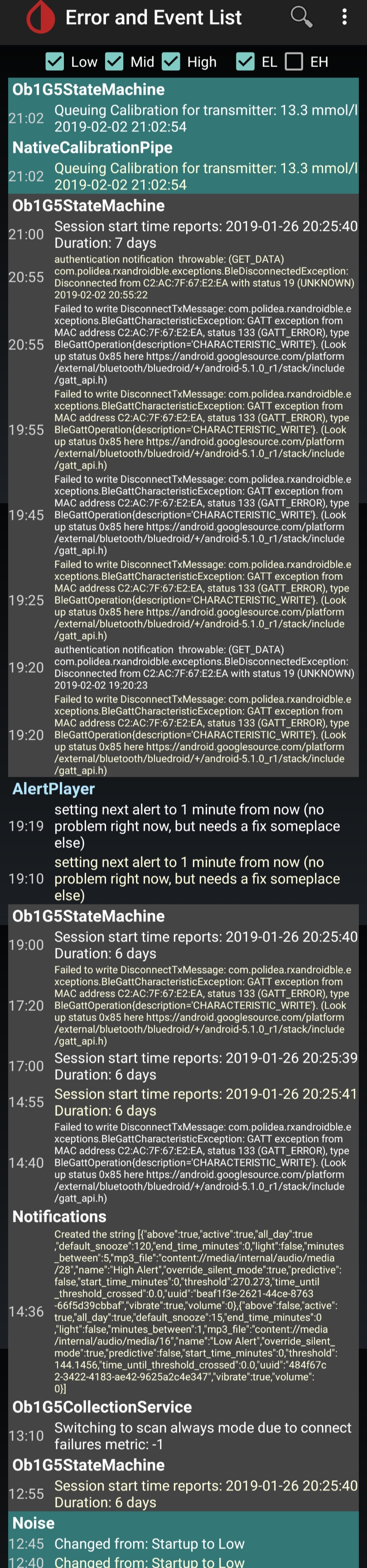
It appears to me as if the issue isn't fully resolved by these workarounds. Hope it helps. Looking forward to seeing it resolved.
 Meekelis
on 2 Feb 2019
Meekelis
on 2 Feb 2019
Rock solid 100% capture using 31st Jan build. No unexpected backfill data for several days. Thank you!
detellis
on 8 Feb 2019
@detellis Does everything including minimize scanning work again?
Meekelis
on 8 Feb 2019
@Meekelis I enabled Minimise Scanning but started getting missed readings almost immediately.
detellis
on 8 Feb 2019
I have installed the lasted nightly but I see "no sensord found" every time :|
Anyone can help me?
I have a samsung s7 edge with the last security patch.
Where i find minimize scanning?
 chip83
on 14 Feb 2019
chip83
on 14 Feb 2019
- Disabled the "Minimize scanning"
- Updated to the latest nightly version
- Disabled Adaptive battery
xdrip gets the data no problem
But Adaptive battery is a nice feature to have so
- Enabled back Adaptive battery
- Entered Android Developer options
- Scrolled to the "Background check" and ticked the Xdrip there
Seems to be working for now
 checkatillo
on 15 Feb 2019
checkatillo
on 15 Feb 2019
I've just tried the Background check, and see that it influence the intended internal data transfer between apps (Aaps to xDrip on my OnePlus 5). So I would suggested to don't touch that area and leave the adaptive battery off .... Battery optimization for xdrip and aaps users is not a good idea, as it is more and more blackboxed stuff.
MasterPlexus
on 16 Feb 2019
Finally solution for Android 9? Version xDrip? Options on and options off
 BanHop
on 19 Feb 2019
BanHop
on 19 Feb 2019
It would be nice to have a list with working Android Versions together with the settings and App Versions. Is it possible to integrate something like that to github?
Otherwise we could share a Google tables link... I'm sure I'm not the first person thinking about that, is it even allowed?
Feromrk
on 19 Feb 2019
Lots of good info here https://dontkillmyapp.com/
 miiihi
on 21 Feb 2019
miiihi
on 21 Feb 2019
hi, don't know if it's relevant anymore or if you found a solution but I had the same issue and after disabling the option 'Put unused apps to sleep' in the phone settings, looks like the connection isn't lost.
hope this helps
btw, S9+ last version, xDrip+ most recent stable. disabled 'trust auto connect'
 frankaxela
on 4 Mar 2019
frankaxela
on 4 Mar 2019
Hi,
For those that have this working, please can you advise if you get readings every 5 minutes with screen off?
Mine appears to backfill every other data point. You can enable the visibility of this by adjusting the settings:
Settings > xDrip+ Display Settings > Graph Settings > Show backfilled data
A data point can have a corona indicating it was backfilled.
Note 9 - SM-960F - N960FXXS2CSB3 (1st Feb security patch)
Dexcom G6
detellis
on 8 Mar 2019
I've just upgraded to the S10 and also getting this same problem.
 HenBrenn
on 9 Mar 2019
HenBrenn
on 9 Mar 2019
@detellis No backfilling on either my S9+ or my new S10+
Since Android 9 beta came out I've had no problems with any of this at all. I do get occasional signal loss and xDrip can't see the BT signal of the MM, but nothing a pin in the reset hole won't fix and it only appears every now and then.
mistermintsgh
on 9 Mar 2019
You want people to leave "adaptive battery OFF"?? That is a new feature to improve battery life on Samsung's new phones. xDrip is requiring the user to turn that, OFF, rendering battery life inferior to what it can be? that's gonna be the last straw for me, if that's the case--if I have to upgrade my phone (it's 3+ years old and battery life is dismal) to a new Samsung 10 or 10+, I'll lose out on the MAIN reason I want a new phone for, which is to drastically improve battery life. SAY IT ISN'T SO!!
dave1812
on 10 Mar 2019
I don't find it an issue to turn off adaptive battery for just the app. I
don't turn it off generally, just not let it kill XDrip+.
On Sun, Mar 10, 2019, 2:46 PM Dave A notifications@github.com wrote:
You want people to leave "adaptive battery OFF"?? That is a new feature to
improve battery life on Samsung's new phones. xDrip is requiring the user
to turn that, OFF, rendering battery life inferior to what it can be?
that's gonna be the last straw for me, if that's the case--if I have to
upgrade my phone (it's 3+ years old and battery life is dismal) to a new
Samsung 10 or 10+, I'll lose out on the MAIN reason I want a new phone for,
which is to drastically improve battery life. SAY IT ISN'T SO!!—
You are receiving this because you commented.
Reply to this email directly, view it on GitHub
https://github.com/NightscoutFoundation/xDrip/issues/663#issuecomment-471357149,
or mute the thread
https://github.com/notifications/unsubscribe-auth/AGFAeFgoiXYSK5gnuu5ethrhgUOMb7LPks5vVX0pgaJpZM4YLhaU
.
m1st0
on 10 Mar 2019
I thought Adaptive Battery was a phone-wide setting. No? On my S7, I have xdrip not be managed by Battery Optimization, so that xDrip runs properly. I haven't yet seen the settings on the S10.
dave1812
on 10 Mar 2019
Maybe we are talking about different things. Do you mean Settings > Device
Care > Battery icon > per app settings to allow/disallow putting the app to
sleep?
On Sun, Mar 10, 2019, 3:06 PM Dave A notifications@github.com wrote:
I thought Adaptive Battery was a phone-wide setting. No?
—
You are receiving this because you commented.
Reply to this email directly, view it on GitHub
https://github.com/NightscoutFoundation/xDrip/issues/663#issuecomment-471358793,
or mute the thread
https://github.com/notifications/unsubscribe-auth/AGFAeEmqlYT-MKzCfviH0uE1zdGUNPKUks5vVYHdgaJpZM4YLhaU
.
m1st0
on 10 Mar 2019
Nope not that one. Isn't there an Adaptive Battery option that comes with Android Pie that uses AI to place apps into 5 categories? that's the feature that MasterPlexus said to disable. If so, I'm very concerned that would impact battery life. (I'm still using an s7 but may get the S10 soon)
dave1812
on 10 Mar 2019
Ah, I see what you mean. I found that setting and have it on. It says, "Limit
battery usage for apps I don't use very often," but I use xDrip+
extensively so I haven't had any issues with the setting. I also have
xDrip+ set to never be able to be put to sleep. MasterPlexus may have had
more info on issues or versions this affects, but I've been safe with it on
an S9+ with Android Pie One UI.
On Sun, Mar 10, 2019, 3:33 PM Dave A notifications@github.com wrote:
Nope not that one. Isn't there an Adaptive Battery option that comes with
Android Pie that uses AI to place apps into 5 categories? that's the
feature that MasterPlexus said to disable. If so, I'm very concerned that
would impact battery life. (I'm still using an s7 but may get the S10 soon)—
You are receiving this because you commented.
Reply to this email directly, view it on GitHub
https://github.com/NightscoutFoundation/xDrip/issues/663#issuecomment-471360972,
or mute the thread
https://github.com/notifications/unsubscribe-auth/AGFAeOhXsZclOMIoXTyikwYJ5DwY5Hu8ks5vVYhMgaJpZM4YLhaU
.
m1st0
on 11 Mar 2019
Sorry for the long away, life happens. We're still encountering the same
issue, but we've had a hardware change - we're now using the Dexcom G6
transmitter. As a result, we haven't been able to disable the OB1
collector - G6 appears to require it. And with it on, we continue to have
the behaviour where signal is only received when the app is active and the
device is not sleeping. Minimize scanning has been disabled with no
effect. Device is a Samsung SM-N960U on Android 8.1.0, xDrip version
14feb8-2019.01.10.
Trying now with Samsung workarounds disabled, will report back.
On Sun, Mar 10, 2019, 20:03 Maulik Mistry notifications@github.com wrote:
Ah, I see what you mean. I found that setting and have it on. It says,
"Limit
battery usage for apps I don't use very often," but I use xDrip+
extensively so I haven't had any issues with the setting. I also have
xDrip+ set to never be able to be put to sleep. MasterPlexus may have had
more info on issues or versions this affects, but I've been safe with it on
an S9+ with Android Pie One UI.On Sun, Mar 10, 2019, 3:33 PM Dave A notifications@github.com wrote:
Nope not that one. Isn't there an Adaptive Battery option that comes with
Android Pie that uses AI to place apps into 5 categories? that's the
feature that MasterPlexus said to disable. If so, I'm very concerned that
would impact battery life. (I'm still using an s7 but may get the S10
soon)—
You are receiving this because you commented.
Reply to this email directly, view it on GitHub
<
https://github.com/NightscoutFoundation/xDrip/issues/663#issuecomment-471360972
,
or mute the thread
<
https://github.com/notifications/unsubscribe-auth/AGFAeOhXsZclOMIoXTyikwYJ5DwY5Hu8ks5vVYhMgaJpZM4YLhaU.
—
You are receiving this because you were mentioned.
Reply to this email directly, view it on GitHub
https://github.com/NightscoutFoundation/xDrip/issues/663#issuecomment-471373152,
or mute the thread
https://github.com/notifications/unsubscribe-auth/AcXgYSWNF3H70m_rhT0g66JNFQ5FCgXlks5vVatEgaJpZM4YLhaU
.
aeliaran
on 19 Mar 2019
I've been having this issue since I changed from the patched g5 app to xdrip. My readings were dropping off when screen locked. Originally I was trying the following:
G5 new firmware
Note 9, most recent security update.
OB1 collector, xdrip+ beta (most recent).
I have a ticwatch E, but I was not using it.
Messed around with several settings combinations suggested in this thread with no success.
Decided today to try two things:
Connected Wear to xdrip as a follower. In theory, this would ask xdrip for updates constantly. (If it works the other way around the concept is still the same)
Update to the latest nightly (today is April 6, so whichever is latest).
So far, this has been working for 4 hours without lost readings. With the phone locked and wear's always on turned off, I'm still getting OB1 readings every 5 minutes.
 THSA00458
on 6 Apr 2019
THSA00458
on 6 Apr 2019
Interesting idea. We're using a Pebble, but I think theoretically we should
be able to set up Android Wear anyway, especially if you're not
actually using it. I'll play around and report back. Thanks!
On Sat, Apr 6, 2019, 10:53 THSA00458 notifications@github.com wrote:
I've been having this issue since I changed from the patched g5 app to
xdrip. My readings were dropping off when screen locked. Originally I was
trying the following:
G5 new firmware
Note 9, most recent security update.
OB1 collector, xdrip+ beta (most recent).
I have a ticwatch E, but I was not using it.
Messed around with several settings combinations suggested in this thread
with no success.Decided today to try three things:
Connected Wear to xdrip as a follower. I theory, this would ask xdrip for
updates constantly. (If it works the other way around the concept is still
the same)Update to the latest nightly (today is April 6, so whichever is latest).
So far, this has been working for 4 hours without lost readings. With the
phone locked and wear's always on turned off, I'm still getting OB1
readings every 5 minutes.—
You are receiving this because you were mentioned.
Reply to this email directly, view it on GitHub
https://github.com/NightscoutFoundation/xDrip/issues/663#issuecomment-480514874,
or mute the thread
https://github.com/notifications/unsubscribe-auth/AcXgYZhnjNJ4X3bGl0SuiOTBUyCxwZb3ks5veMMKgaJpZM4YLhaU
.
aeliaran
on 6 Apr 2019
Still working!
THSA00458
on 6 Apr 2019
Well, I enabled the Android Wear settings in xdrip. I can't set up Wear OS
as a follower since I can't get into the program without a Wear capable
device connected, so we'll see if it works the other way around. If not,
it may be worth picking up a cheap Wear capsule watch just to have a backup
anyway...
On Sat, Apr 6, 2019, 16:23 THSA00458 notifications@github.com wrote:
Still working!
—
You are receiving this because you were mentioned.
Reply to this email directly, view it on GitHub
https://github.com/NightscoutFoundation/xDrip/issues/663#issuecomment-480538811,
or mute the thread
https://github.com/notifications/unsubscribe-auth/AcXgYa8vv1t4j_MZoLLVkMdpF43lN_PEks5veRBUgaJpZM4YLhaU
.
aeliaran
on 7 Apr 2019
@jamorham. Great info above.
Im a new S9, Maiomaio, Xdrip+ user this week. And have set up my Galaxy Watch. Working wonderfully for the first 3 days. But now disconnecting when screen off.
Ive followed all the threads intently but cant seam to get into G5 bug settings and disable minimize scanning. Can the steps be listed just for that. I looked on u tube for advice but the G5 bug options setting is not obvious. Rob
 Robkeano
on 3 May 2019
Robkeano
on 3 May 2019
Update.
I made sure I had Jan XDrip latest version (which already had) and downloaded latest security Samsung patch 1st May then went with the advise to go into Android settings -> Device care -> Battery -> Settings (three dot menu), and disabled the ADAPTIVE BATTERY AI, which was suspected as having something to do with the issue.
I attempted using voice command in XDrip to enable minimize scanning. So may have done it. But I think the key is the switching off of the ADAPTIVE BATTERY.
I have now also set battery life to high performance, which does drain battery. I may test if go back to optimised level, but as running fully again leaving for moment. Did buy a 3 day charging memory power bank, as back up.
So now running all night and all day yesterday. So working great again. Thankyou for the advise https://github.com/jamorham and https://github.com/detellis
Robkeano
on 4 May 2019
Samsung released the October update/security patch recently which was installed on my S9+ on 31st October (I assume that the S9, Note 9 and potentially other 2018 Samsung phones got the update on or around the same time).
Since then I am having frequent "signal not received" issues with the MiaoMiao, however Bluetooth _is_ connected according to the system status screen. No other items or settings on my phone or in xDrip have changed other than this update.
- Bluetooth is on
- Trust auto connect is turned off
- Bluetooth watchdog is on
- All other settings under Bluetooth menu are off
Anyone else lose battery function on S8+ after October security patch? Or is this a migration issue Sprint >T-Mobile? Coincidentally my military bank was hacked too. Ideas?
 chickcrypto
on 15 Oct 2020
chickcrypto
on 15 Oct 2020
Related issues
 malloy139
·
6Comments
malloy139
·
6Comments
 xannasavin
·
10Comments
xannasavin
·
10Comments
 gruoner
·
5Comments
gruoner
·
5Comments
 ARkaine2
·
3Comments
ARkaine2
·
3Comments
 aeonsablaze
·
12Comments
aeonsablaze
·
12Comments
Most helpful comment
Please contact Samsung to tell them that they have broken bluetooth with their update again.