Xaringan: moonreader often messes up the Rmd file when saving
Hi there,
Loving this package, but there's an odd and potentially serious bug with inf_mr, which I didn't see listed elsewhere.
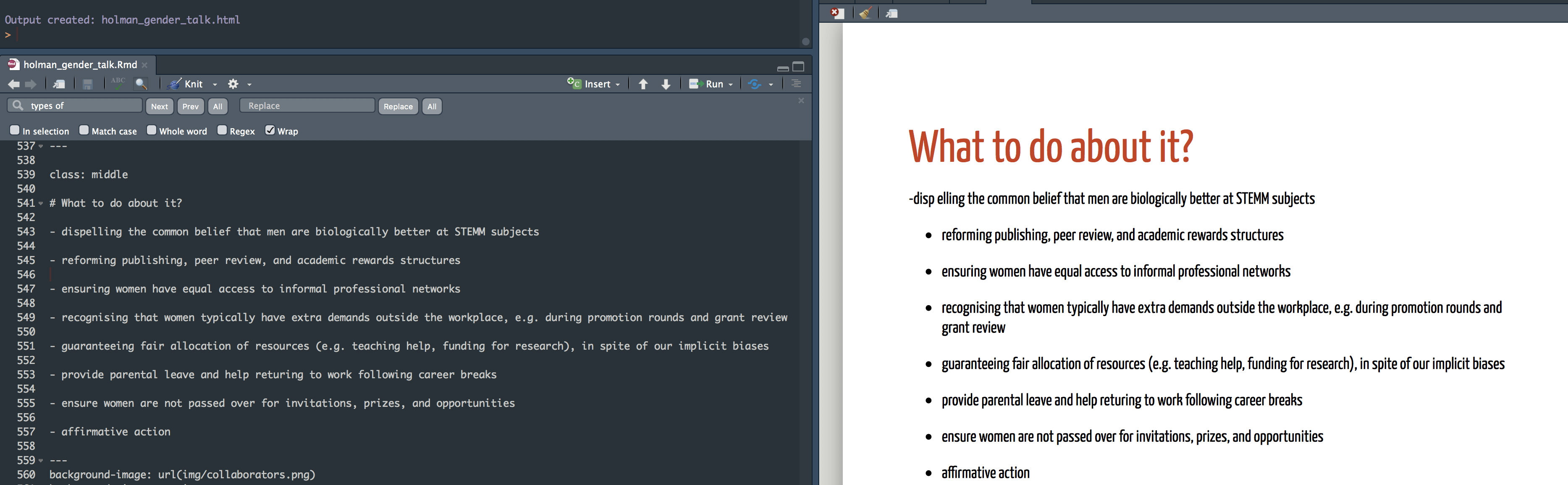
When I save the Rmd file, often the text on the slide doesn't look right, and tracing the source of the error, it seems to be that RStudio or the inf_mr function messes up the actual Rmd file! If you have a look in the first screenshot, you can see that the Rmd has been saved and the HTML has been automatically created by the RStudio add-in, but the slide is not showing up right (first bullet point is wrong). When I open the Rmd file with sublime text, we see that inf_mr has removed a space and added another one, causing the problem with the HTML output (though this problem in the code is invisible in RStudio). The only way to fix it seems to be to edit the Rmd outside of RStudio and re-load it. I guess this is an issue with the add-in to RStudio?
Cheers!

 lukeholman
All 12 comments
Can you provide an example Rmd for reproducibility?
I tested in the following content and it looks normal:
````
title: "Presentation Ninja"
subtitle: "⚔
with xaringan"
author: "Yihui Xie"
date: "2016/12/12 (updated: r Sys.Date())"
output:
xaringan::moon_reader:
lib_dir: libs
nature:
highlightStyle: github
highlightLines: true
countIncrementalSlides: false
{r setup, include=FALSE}
options(htmltools.dir.version = FALSE)
class: middle
What to do about it
aasdfqwer
basdrqwer
c asdfqwerasdf
dd
````
 tcgriffith
on 9 Nov 2018
tcgriffith
on 9 Nov 2018
inf_mr isn't modifying the source (.Rmd) file. It is just rendering it, so if there were to be extra characters inserted it should be in the output html.
Could you have hit some sticky / hidden key that the editor in RStudio just doesn't show?
 ekstroem
on 9 Nov 2018
ekstroem
on 9 Nov 2018
Hey, I’d have to send the entire presentation for reproducibility, and I’m pretty sure it’s an RStudio side thing, so who knows if it would work for your machine too. See the pictures- the RStudio window shows code that is not actually in the real RMD file. This happens when I change something and moonreader re-renders the HTML (so it does seem to change the rmd file - I know, that’s really weird and sort of unbelievable!). It’s not a sticky key issue - note that everything is saved in my screenshot, and the Rmd is not showing up the same when viewed in RStudio versus in another text editor.
lukeholman
on 9 Nov 2018
It is difficult to help you without a reproducible example. You should be able to supply just the yaml front matter and the content of one or two slides. I also use ST3 and often have issues with sticky/hidden keys. That said I often type in other languages and that doesn't seem to be the issue here. Consider using a theme that shows all characters in your editor (i.e., spaces). In any case, without a way to reproduce the problem there is little to be done, I'm afraid.
 jvcasillas
on 9 Nov 2018
jvcasillas
on 9 Nov 2018
I can upload it later, but I don’t see how what I typed in the YAML (ie a copy-paste of the Ninja template one, given that it’s my first presentation) could possibly cause the Rmd file to not show up properly in RStudio! Given that I am using essentially the same code as dozens of other people, I thought maybe others had seen this behaviour, but it doesn’t seem like it?
Do you want just the Rmd, or the dozens of other files (eg in the lib folder, all the images)? I could take a video to show it happening too?
lukeholman
on 9 Nov 2018
just upload the rmd in a repo will do
tcgriffith
on 9 Nov 2018
OK, here's the whole project as a repo. I just confirmed that the problem is still there on my other laptop (Mac OS). If you download it, open the project in RStudio, change something, and save it, chances are that everything will look correct in RStudio, but the actual Rmd file be saved wrong, and thus generate an HTML that does not match what RStudio shows: https://github.com/lukeholman/genderTalk. In another piece of the puzzle, it seems that the errors that are added to the Rmd file seem to be because deleting text does not work properly. I just changed one line that said .color-main1 to color-main2, and it saved the file as color-main12, which of course breaks the HTML since there is no twelfth color. RStudio shows it as color-main2, but opening the .Rmd in another editor shows that the file actually says color-main12. Closing and re-opening the file in RStudio does not fix it! Very weird.
lukeholman
on 10 Nov 2018
Try replacing the 🙈 emoji on line 465 with the html code 🙈. Sometimes unicode emoji characters cause similar problems to the one you're seeing (see #157).
 gadenbuie
on 10 Nov 2018
gadenbuie
on 10 Nov 2018
Aye. If I modify the line suggested by @gadenbuie by adding the string "is all the rage" before the emoji and save the file again (in RStudio) then the saved code becomes
Double-blind peer review 🙈
<is all the rage br></br>
When html reads the second line it is kicked out since the code in the < > will not be parsed correctly.
Looks like a possible glitch in the RStudio editor and not a problem with xaringan per se .
ekstroem
on 10 Nov 2018
Thanks, that does look like the right fix! I'll come back to this later when I have time. I read that one can just paste emoji into the script and it works fine, but clearly it's not foolproof.
lukeholman
on 10 Nov 2018
This is not surprising. In my experience RStudio seems to have trouble with emoji and diacritics related to IPA characters. You often get "surprises" that are not evident in the editor.
jvcasillas
on 10 Nov 2018
Thanks, that does look like the right fix! I'll come back to this later when I have time. I read that one can just paste emoji into the script and it works fine, but clearly it's not foolproof.
wow that's my answer!
tcgriffith
on 11 Nov 2018
Related issues
 DarioS
·
4Comments
DarioS
·
4Comments
 royfrancis
·
4Comments
royfrancis
·
4Comments
 burgerga
·
3Comments
burgerga
·
3Comments
 pat-s
·
4Comments
pat-s
·
4Comments
 DavisVaughan
·
3Comments
DavisVaughan
·
3Comments
Most helpful comment
wow that's my answer!