Xamarincommunitytoolkit: [Spec] Popup Control
Popup Control
Create a Popup Control that renders the native implementations of popups for the 3 main platforms of Xamarin.Forms (Android, iOS, and UWP). The goal will be to render the 100% native equivalent of a Popup as it is not a composite control.
| Platform | Native Implementation |
|----------|---------------------------|
| Android | Dialog |
| iOS | Popover |
| UWP | Flyout |
This was originally documented for Xamarin.Forms and after discussing with @PureWeen @jsuarezruiz and @jfversluis we decided it makes the most sense to move the specification over to the community toolkit.
- Original Spec - Xamarin/Xamarin.Forms#1778
- Original Pull Request - Xamarin/Xamarin.Forms#9616
Requirements
- The popup must support both asynchronous and synchronous API invocations
- The popup must support retrieving custom response data after the popup has been dismissed. This can be accomplished by using the asynchronous return object or listening to a
Dismissedevent handler. - The popup control will be modal which means only 1 popup can be displayed at a time. The control should not be allowed to stack on top of each other.
- All popups must be light-dismissable which means the user can tap outside of the popup to close it. This is only to be implemented when the platform allows it. Since it is a native control, if the platform doesn't support light-dismissable then it is okay to not be implemented.
- The content of a popup control must accept the following Xamarin.Forms View structures
- View
- NavigationPage
- ContentPage
- Popups must allow for specifying an
Anchoron the screen. This would center the Popup control over the anchor - Popups must allow for a Size that designates how large the Popup will be on screen.
API
Popup
The Popup class will be treated just like a ContentPage as it's own type that your custom popup will inherit from. This will allow developers to use the current tools they are familiar with writing their views but as a Popup Control.
The popup should allow for the different return type scenarios
- void - no return
- Generic Type - a specified type
- Object - a general purpose return
This means we will have 3 types of Popup implementations
```c#
public class BasePopup : View { }
public class Popup
public class Popup : Popup
### Properties

| API | Type | Description |
| ------------|- | ------------- |
| Content | View | The main `View` to be rendered inside of the native popup control. |
| Background | Color | The native background color of the popup. This background is independent of the background set on the content view. |
| Anchor | View | (optional) When set the popup control will render centered over the Anchor or as close as possible |
| Size | Size | The size in width & height of the popup controll. How big or small to render the popup. |
| IsLightDismissEnabled | bool | If true then the popup can be dismissed by tapping outside of the native popup control. |

### Events

| API | Description |
| ------------- | ------------- |
| Dismissed | The dismissed event is invoked when the popup is dismissed. |
| Opened | The opened event is invoked with the popup is first opened. |

**PopupDismissedEventArgs**
```c#
object Result { get; set; }
bool IsLightDismissed { get; set; }
PopupOpenedEventArgs
No specific event arguments are necessary, we will create it's own type to allow for updates in the future.
Navigation
This part of the specification was originally written for Xamarin.Forms and not the community toolkit. This may need to change to work effectively with the community toolkit
The popup control will implement asynchronous navigation that will complete when the popup is dismissed. This will allow developers to use async/await Task based programming to wait for user interaction.
Methods
New navigation methods should be added to the Navigation or similar implementation
```c#
void ShowPopup(Popup popup);
Task ShowPopupAsync(Popup popup);
Task
The synchronous API doesn't return anything by design. This is because the synchronous API is focused on rendering the popup and nothing else. Prior to rendering the popup it would be a best practice to configure an event handler for the `Dismissed` event. This will allow the synchronous invocation to render the popup and still listen for when the popup is closed. An example of this invocation may look something like this.
```c#
void DisplayPopup()
{
    var popup = new MyCustomPopup();
    popup.Dismissed += (s, e) =>
    {
        Console.WriteLine("The popup has been dismissed!");
    }

    Navigation.ShowPopup(popup);
}
The asynchronous API uses the async/await Task based programming pattern to wait for use feedback. The Task will complete when the Dismissed event is invoking, in other words when the popup is closed. An example of the exact same code with asynchronous programming may look like this example:
```c#
async Task DisplayPopupAsync()
{
var popup = new MyCustomPopup();
await Navigation.ShowPopupAsync(popup);
Console.WriteLine("The popup has been dismissed!");
}
If the code invoking the popup wants to get a return object it can be included as part of the Popup. In the example below the popup is displayed and once it is closed the popup shares a string message with the invocation
```c#
async Task DisplayPopupAsync()
{
    var popup = new MyCustomPopup();
    string message = await Navigation.ShowPopupAsync(popup);
    Console.WriteLine(message);
}
Since the community toolkit doesn't have direct access to change the Xamarin.Forms.INavigation interface the implementation bits may be significantly different than the specification or how it was originally implemented for the original PR Xamarin/Xamarin.Forms#9616
Scenarios
As a developer that wants to create a custom popup in their application, they will create a new Popup View similar to the idea of a Content View. The example below is XAML but the same concepts apply to C#
MyCustomPopup.xaml
<?xml version="1.0" encoding="UTF-8"?>
<xct:Popup xmlns="http://xamarin.com/schemas/2014/forms"
    xmlns:x="http://schemas.microsoft.com/winfx/2009/xaml"
    xmlns:d="http://xamarin.com/schemas/2014/forms/design"
    xmlns:mc="http://schemas.openxmlformats.org/markup-compatibility/2006"
    xmlns:xct="clr-namespace:Xamarin.CommunityToolkit.UI.Views"
    x:Class="SampleApp.MyCustomPopup">

    <xct:Popup.Content>

        <Grid>
            <Label Text="Hello World from a Popup Control"
                VerticalOptions="CenterAndExpand"
                HorizontalOptions="CenterAndExpand" />
        </Grid>

    </xct:Popup.Content>

</xct:Popup>
MyCustomPopup.xaml.cs
c#
// If you wanted to define a specific response type you could swap out the parent class
// for the generic type such as `Popup<string>`. In this instance the code will return
// an object which can be casted to whatever is needed.
public partial class MyCustomPopup : Popup
{
    public MyCustomPopup()
    {
        InitializeComponent();
    }
}
Screenshots
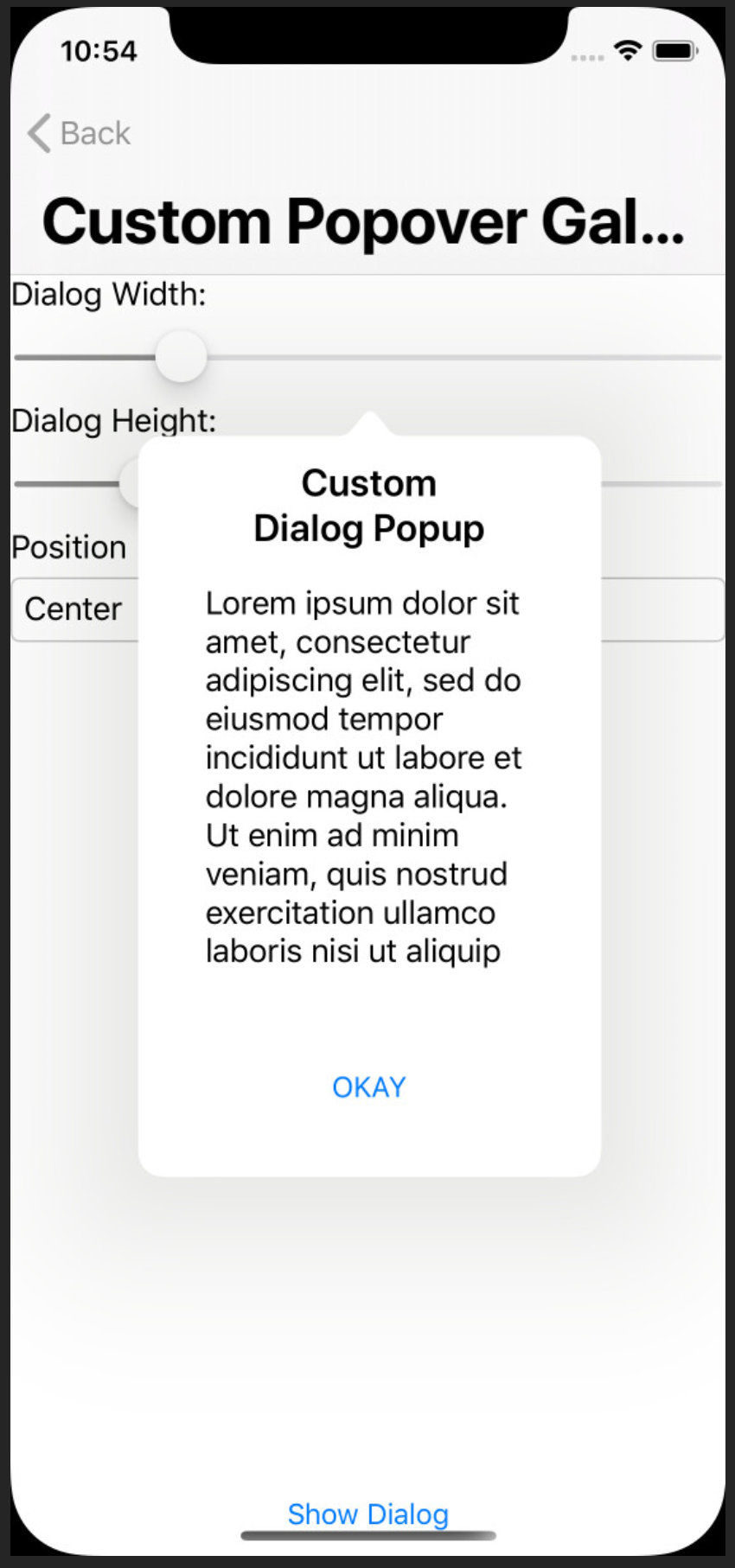
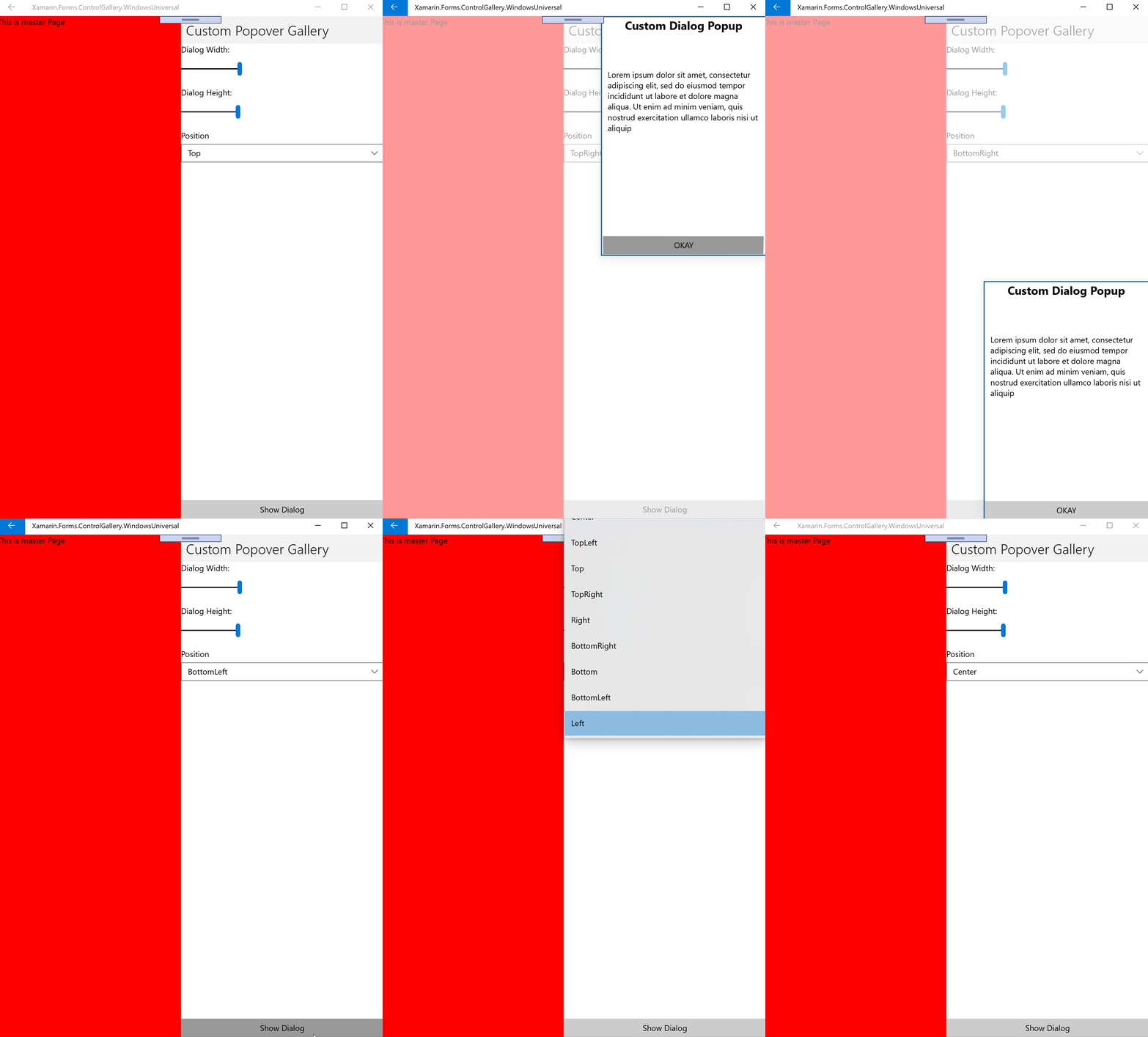
Since I have been working on this for about 1.5 years I have many screenshots that show exactly what we are trying to accomplish.

Platform Compatibility
| Target Framework | Supported |
|----------------------|--------------|
| iOS | ✅ |
| Android | ✅ |
| UWP | ✅ |
Backward Compatibility
N/A (not sure if any details are needed here)
Difficulty : high
 ahoefling
All 11 comments
I plan to take the existing PR at Xamarin/Xamarin.Forms#9616 and submit a new PR to the community toolkit
ahoefling
on 11 Sep 2020
@ahoefling couple questions for you...
- How does this differ from Rg.Plugins.Popup?
- What benefit is there for this API over just utilizing a transparent background on a modal page?
- Why should someone want this as part of the Community Toolkit rather than just using a well established library?
Ultimately keep in mind while I think this looks really cool, my biggest fear for the Community Toolkit is that the community will try to do too much and it will end up super bloated and stop being maintained like the old XLabs.Forms
 dansiegel
on 1 Oct 2020
dansiegel
on 1 Oct 2020
@dansiegel thank you for the questions, there are all valid concerns that have been answered on phone calls and other threads. I really should have documented the why in the description
How does this differ from Rg.Plugins.Popup?
As far as I understand Rg.Plugins.Popup does not use native popups but composite controls to simulate a popup. This control is 100% native giving developers the native look and feel
What benefit is there for this API over just utilizing a transparent background on a modal page?
Using transparent backgrounds is a great technique for building popups on a page. This effort is porting over 1 year worth of work from my personal contributions and Xamarin.Forms core team in PR reviews from Xamarin.Forms platform to the toolkit. The code for this is 90% ready to PR, I am currently working through some of the difference between Xamarin.Forms custom renderers and the toolkit.
Getting back to the question about transparent backgrounds, it is a tough decision for me as transparent backgrounds provide a lot of value getting pixel perfection between the platforms. However, I still see value being able to draw the native popup and then rendering a ContentView inside. This is especially true when you are trying to get native look and feel
Why should someone want this as part of the Community Toolkit rather than just using a well established library?
As far as I understand there is no well established library that uses native popups. I think part of the problem deals with the native vs composite control debates. It really doesn't matter to a user if it is a native popup or composite control that looks like a popup. With that being said this has been an ongoing conversation I have been having with the Xamarin.Forms teams since late 2019 when I started implementing the original specification for Xamarin.Forms platform.
A few weeks I spoke with @PureWeen @jfversluis @jsuarezruiz about this control and it was decided that it makes the most sense for it to be contributed to the toolkit instead of Xamarin.Forms Platform. Since the toolkit has such a close relationship to Xamarin.Forms I personally find value in having this control. Especially for large enterprises that struggle with consuming 3rd party libraries.
my biggest fear for the Community Toolkit is that the community will try to do too much and it will end up super bloated and stop being maintained like the old XLabs.Forms
I have this exact same fear and appreciate the concern. I don't think this particular control will be one that adds too much to the toolkit. Everything I have seen in the toolkit appears to be isolated and the linker should keep our package sizes small.
ahoefling
on 1 Oct 2020
Awww, wow. That's awesome) I definitely want to see it in the toolkit :)
 AndreiMisiukevich
on 1 Oct 2020
AndreiMisiukevich
on 1 Oct 2020
@ahoefling yep.. I wasn't really against it... but thought it would be good just to address the elephants in the room... looking forward to seeing this added :)
dansiegel
on 1 Oct 2020
@dansiegel thank you for addressing those questions. While I have answered those questions several times, they have happened on phone calls or in chat and not here on GitHub. It is really important to get the visibility to the GitHub issues for consumers of the project or people that aren't involved in those conversations.
ahoefling
on 1 Oct 2020
So i understand the push for a "native" look, but the designers i've worked with dont seem to care for native look, they want the platforms to look the same. In the above pictures android has square corners and ios has round. Will this allow us to change the look of the popup and not just the content inside of it?
 dwightbennett
on 5 Oct 2020
dwightbennett
on 5 Oct 2020
@dwightbennett understood, but this is an implementation that exists currently and is useful
At a later point the popups can be added onto to provide symmetrical styling for the platforms.
The desire for the same styling doesn't invalidate the usefulness of this PR
Plus there are solution inside XF with transparent modals, absolute layouts, or something like rg popups that help to provide the same style for a popup
 PureWeen
on 5 Oct 2020
PureWeen
on 5 Oct 2020
@dwightbennett
So i understand the push for a "native" look, but the designers i've worked with dont seem to care for native look, they want the platforms to look the same.
The goal is to give developers complete control over the native popups which will be 100% control on each platform. However, the implementation that I wrote against Xamarin.Forms had the iOS implementation about 98% of the way complete. I had trouble customizing the rounded corners and don't plan to fix it for the initial iOS implementation here. Once we get the initial implementation done PRs are welcomed to assess that problem.
If you are truly looking for 100% consistency across the platforms I would use transparent backgrounds or Rg Popups. Those are composite popups that don't render a true popup but simulated popups. As far as a user is concerned it doesn't matter if it is using a transparent background or a native popup.
Even though these are competing techniques here I see a lot of value in supporting native popups. The ability to use a standard Xamarin.Forms ContentView inside of a native popup enables lots of scenarios that are currently not supported.
ahoefling
on 5 Oct 2020
@PureWeen @ahoefling I think this is a great addition. Currently I use RG plugins and it works nicely for me. I was just seeing if it would fit my situation because if I can use an out of the box Xamarin team implementation I prefer it over a 3rd party solution. Love to see these new additions coming down the pipeline.
dwightbennett
on 5 Oct 2020
Some additional context, not directed at anyone but useful information to share.
This control is not intended to replace RG or other popular techniques such as transparent backgrounds. It gives developers the option to draw Xamarin.Forms controls inside a native popup. The target audience would be designs that focus more on following native look and feel rather than making popups look pixel perfect across the platforms.
ahoefling
on 6 Oct 2020
Related issues
 Tommigun1980
·
7Comments
Tommigun1980
·
7Comments
 hnabbasi
·
6Comments
hnabbasi
·
6Comments
 jBijsterboschNL
·
5Comments
jBijsterboschNL
·
5Comments
 rdelrosario
·
3Comments
rdelrosario
·
3Comments
 jvlppm
·
6Comments
jvlppm
·
6Comments
Most helpful comment
@dansiegel thank you for the questions, there are all valid concerns that have been answered on phone calls and other threads. I really should have documented the why in the description
As far as I understand Rg.Plugins.Popup does not use native popups but composite controls to simulate a popup. This control is 100% native giving developers the native look and feel
Using transparent backgrounds is a great technique for building popups on a page. This effort is porting over 1 year worth of work from my personal contributions and Xamarin.Forms core team in PR reviews from Xamarin.Forms platform to the toolkit. The code for this is 90% ready to PR, I am currently working through some of the difference between Xamarin.Forms custom renderers and the toolkit.
Getting back to the question about transparent backgrounds, it is a tough decision for me as transparent backgrounds provide a lot of value getting pixel perfection between the platforms. However, I still see value being able to draw the native popup and then rendering a
ContentViewinside. This is especially true when you are trying to get native look and feelAs far as I understand there is no well established library that uses native popups. I think part of the problem deals with the native vs composite control debates. It really doesn't matter to a user if it is a native popup or composite control that looks like a popup. With that being said this has been an ongoing conversation I have been having with the Xamarin.Forms teams since late 2019 when I started implementing the original specification for Xamarin.Forms platform.
A few weeks I spoke with @PureWeen @jfversluis @jsuarezruiz about this control and it was decided that it makes the most sense for it to be contributed to the toolkit instead of Xamarin.Forms Platform. Since the toolkit has such a close relationship to Xamarin.Forms I personally find value in having this control. Especially for large enterprises that struggle with consuming 3rd party libraries.
I have this exact same fear and appreciate the concern. I don't think this particular control will be one that adds too much to the toolkit. Everything I have seen in the toolkit appears to be isolated and the linker should keep our package sizes small.