Xamarin-macios: [Bug] iOS app icon does not show in devices
HI,
I have newly created iOS app using VS 2019.
And I added Images for Asset Catalog and when I run the app on simulator or when we use ad-hock distribution to a device, the app Icon does not.
It happen in both local Mac and VSTS pipeline deployed app.
We have an urgent delivery of an app. So can you please advice us how to overcome this ?
Steps to Reproduce
- Add iOS app icons to Assest catalog
- Set AppIcons path in Info.plist
- Deploy the app to Simulator or get ad-hock ipa using VSTS Build pipelines and AppCenter
Expected Behavior
When Install the app on iOS devices or Simulator, the app icon should be shown
Actual Behavior
It shows an Empty(Compass like) image
Basic Information
- IDE: VS for Mac 2019 latest
Platform Target Frameworks:
- iOS: 13.1,13.2
Affected Devices: iPhone6 S, iPhone7, iPhone X,
-Simulators - iPhone XI, iPhone XI Pro
 kgbuddhima
All 22 comments
To check whether the app icons is the issue I did following things,
- Created a new Xamarin forms app
- Copied app icons generated by default by Visual studio Xamarin template
- Then copied them to Current project's iOS app
- then deployed the app again using VSTS to AppCenter
- Downloaded the app using AppCenter
But it also does not show the icon
Note : The icon appears in Debug mode
kgbuddhima
on 29 Jan 2020
Did you try following this?
https://alexdunn.org/2020/01/06/xamarin-tip-fixing-missing-ios-app-icons/
https://stackoverflow.com/questions/48375681/ios-app-icon-missing-on-ios-11
https://xamarin.github.io/bugzilla-archives/59/59515/bug.html
https://docs.microsoft.com/en-us/xamarin/ios/app-fundamentals/images-icons/app-store-icon
https://blog.rthand.com/post/2017/10/17/app-icons-missing-after-upgrading-to-ios-11-xamarin.aspx
You have to make sure they were added correctly in the .csproj file in iOS.
Sometimes they are not added correctly in the itemgroup and that could be a reason why they are not visible.
 J35u527
on 29 Jan 2020
J35u527
on 29 Jan 2020
Thank you for your feedback!
For us to investigate this further, could you please provide your full build logs and test case (to reproduce).
To get full build logs just set the log verbosity to diagnostic at the following locations:
- On Visual Studio for Mac: Preferences > Projects > Build
- On Visual Studio for Windows: Tools > Options > Projects and Solutions > Build and Run
On Visual Studio for Windows you also want to add -v -v -v -v to the mtouch additional arguments by right-clicking the project in the solution explorer and selecting Properties.
Note: this is done automatically on Visual Studio for Mac when the log verbosity is set to diagnostic.
We look forward to hearing from you, however it is not a support line. If you are looking to contact support, I'd suggest starting here.
 chamons
on 29 Jan 2020
chamons
on 29 Jan 2020
Thank you for your feedback!
For us to investigate this further, could you please provide your full build logs and test case (to reproduce).
To get full build logs just set the log verbosity to diagnostic at the following locations:
- On Visual Studio for Mac: Preferences > Projects > Build
- On Visual Studio for Windows: Tools > Options > Projects and Solutions > Build and Run
On Visual Studio for Windows you also want to add
-v -v -v -vto the mtouch additional arguments by right-clicking the project in the solution explorer and selectingProperties.Note: this is done automatically on Visual Studio for Mac when the log verbosity is set to diagnostic.
We look forward to hearing from you, however it is not a support line. If you are looking to contact support, I'd suggest starting here.
I added all necessary files to this support ticket. 120013023000375
I can't share the details publicly because of confidential reasons

kgbuddhima
on 30 Jan 2020
Did you try following this?
https://alexdunn.org/2020/01/06/xamarin-tip-fixing-missing-ios-app-icons/https://stackoverflow.com/questions/48375681/ios-app-icon-missing-on-ios-11
https://xamarin.github.io/bugzilla-archives/59/59515/bug.html
https://docs.microsoft.com/en-us/xamarin/ios/app-fundamentals/images-icons/app-store-icon
https://blog.rthand.com/post/2017/10/17/app-icons-missing-after-upgrading-to-ios-11-xamarin.aspx
You have to make sure they were added correctly in the .csproj file in iOS.
Sometimes they are not added correctly in the itemgroup and that could be a reason why they are not visible.
I did as you suggested using https://makeappicon.com/ generated icons. but I'm having the same issue with it too.

kgbuddhima
on 30 Jan 2020

<key>XSAppIconAssets</key>
    <string>Assets.xcassets/AppIcon.appiconset</string>
the csproj
<ImageAsset Include="Assets.xcassets\AppIcon.appiconset\Contents.json">
      <Visible>false</Visible>
    </ImageAsset>
    <ImageAsset Include="Assets.xcassets\AppIcon.appiconset\[email protected]">
      <Visible>false</Visible>
    </ImageAsset>
    <ImageAsset Include="Assets.xcassets\AppIcon.appiconset\[email protected]">
      <Visible>false</Visible>
    </ImageAsset>
    <ImageAsset Include="Assets.xcassets\AppIcon.appiconset\[email protected]">
      <Visible>false</Visible>
    </ImageAsset>
    <ImageAsset Include="Assets.xcassets\AppIcon.appiconset\[email protected]">
      <Visible>false</Visible>
    </ImageAsset>
    <ImageAsset Include="Assets.xcassets\AppIcon.appiconset\[email protected]">
      <Visible>false</Visible>
    </ImageAsset>
    <ImageAsset Include="Assets.xcassets\AppIcon.appiconset\[email protected]">
      <Visible>false</Visible>
    </ImageAsset>
    <ImageAsset Include="Assets.xcassets\AppIcon.appiconset\[email protected]">
      <Visible>false</Visible>
    </ImageAsset>
    <ImageAsset Include="Assets.xcassets\AppIcon.appiconset\[email protected]">
      <Visible>false</Visible>
    </ImageAsset>
    <ImageAsset Include="Assets.xcassets\AppIcon.appiconset\[email protected]">
      <Visible>false</Visible>
    </ImageAsset>
    <ImageAsset Include="Assets.xcassets\AppIcon.appiconset\[email protected]">
      <Visible>false</Visible>
    </ImageAsset>
    <ImageAsset Include="Assets.xcassets\AppIcon.appiconset\[email protected]">
      <Visible>false</Visible>
    </ImageAsset>
    <ImageAsset Include="Assets.xcassets\AppIcon.appiconset\[email protected]">
      <Visible>false</Visible>
    </ImageAsset>
    <ImageAsset Include="Assets.xcassets\AppIcon.appiconset\[email protected]">
      <Visible>false</Visible>
    </ImageAsset>
    <ImageAsset Include="Assets.xcassets\AppIcon.appiconset\[email protected]">
      <Visible>false</Visible>
    </ImageAsset>
    <ImageAsset Include="Assets.xcassets\AppIcon.appiconset\[email protected]">
      <Visible>false</Visible>
    </ImageAsset>
    <ImageAsset Include="Assets.xcassets\AppIconsDefault.appiconset\Contents.json">
      <Visible>false</Visible>
    </ImageAsset>
kgbuddhima
on 30 Jan 2020
Please note that I'm doing Ad-Hock deployment.
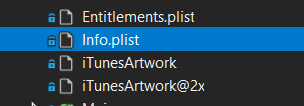
And I added the icons to iTunesArtwork section

Now they show like this,
They are in Assets.xcassets folder
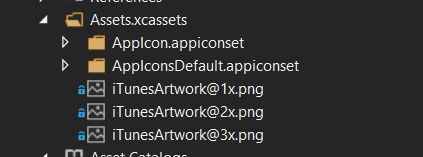
<ImageAsset Include="Assets.xcassets\AppIcon.appiconset\[email protected]">
      <Visible>false</Visible>
    </ImageAsset>
<ImageAsset Include="Assets.xcassets\AppIcon.appiconset\ItunesArtwork%402x.png">
      <Visible>false</Visible>
    </ImageAsset>

kgbuddhima
on 30 Jan 2020
As I noted before, we need a full diagnostic build log to be able to help you here.
chamons
on 30 Jan 2020
As I noted before, we need a full diagnostic build log to be able to help you here.
VSTS iOS build log.txt
@chamons Here I have attached.
kgbuddhima
on 30 Jan 2020
Hi @kgbuddhima, I was looking at the support issue you opened and noticed one of my colleagues already helped you. However I would still like to investigate this with your test case to better understand what happened. I'll be reporting here shortly.
 VincentDondain
on 3 Feb 2020
VincentDondain
on 3 Feb 2020
Hi @kgbuddhima, I was looking at the support issue you opened and noticed one of my colleagues already helped you. However I would still like to investigate this with your test case to better understand what happened. I'll be reporting here shortly.
Then I created a fresh project and used default icons to deploy the app. then the icon appeared on the device.
after that I replaced my icons with the same name to Assets.xcassets folder with Apple's documentation. (With square cornders, no transparent background). Then the project fails on VSTS which saying "/Library/Frameworks/Mono.framework/External/xbuild/Xamarin/iOS/Xamarin.iOS.Common.targets(535,3): error : System.IO.FileNotFoundException: Could not find file "/Users/runner/runners/2.164.6/work/1/s/src/MyAppAI.iOS/obj/iPhone/AppStore/actool/bundle/[email protected]" [/Users/runner/runners/2.164.6/work/1/s/src/MyAppAI.iOS/MyApp.iOS.csproj]
"
I checked the references on csproj files and they are exists.
kgbuddhima
on 4 Feb 2020
I created a sample project and I found it happen when when we set supported CPU architecture as ARM64 .
And when I set supported CPU architectures as ARM64,ARMV7,ARMV7s the icon appears.
But the issue is, when I set ARM64,ARMV7,ARMV7s Linking does not work. and pipeline fails.
kgbuddhima
on 4 Feb 2020
Then I tried to set "Don't link assemblies"
Then I'm having this error
MTOUCH : error MT5107: The assembly 'Xamarin.iOS.dll' can't be AOT-compiled for 32-bit architectures because the native code is too big for the 32-bit ARM architecture. [/Users/runner/runners/2.164.7/work/1/s/src/MyApp.iOS/MyApp.iOS.csproj]
kgbuddhima
on 4 Feb 2020
Hi, for this last issue it looks like something is wrong with your Assets.xcassets (the AppIcon.appiconset inside) but I don't yet see what exactly.
All I can tell is that actool (Apple's asset tooling) when running with your Assets.xcassets does not produce the right bundle. It generates the Assets.car file but it doesn't move the resources from obj/iPhone/AppStore/actool/cloned-assets over to the bundle. If I use a brand new Assets.xcassets and just add it to DermAssist.iOS/obj/iPhone/Debug/actool/cloned-assets then actool is happy again and moves it over.
It's possible recreating the Assets.xcassets solves it for your or maybe it's a VS Windows specific asset creation issue. I'm testing on VS Mac, maybe the asset creation is slightly different there.
In any case I will continue the investigation until we understand where that difference is coming from exactly.
VincentDondain
on 4 Feb 2020
HI,
I'm happy to say that I could solve the issue.
The main issue was in ImageCropper.Forms library.
it has 3 different versions.
v.0.1.6 - https://www.nuget.org/packages/ImageCropper.Forms
v.0.1.8 - https://www.nuget.org/packages/ImageCropper.Forms.Fix
v.0.3.0 - https://www.nuget.org/packages/ImageCropper.Forms.Fix.v3/
Both v.0.16 and 0.18 make the issue.
Then I accidentally found /ImageCropper.Forms.Fix.v3 package when I was looking for a solution for VSTS pipeline issue when I have added all supported architectures like
There I got this error in AzureDevOps iOS pipeline
error MT5209 : Native linking error : warning: ignoring file /Users/runner/runners/2.164.7/work/1/s/src/MyApp.iOS/obj/iPhone/AppStore/mtouch-cache/TOCropViewController.framework/TOCropViewController, missing required architecture armv7s in file /Users/runner/runners/2.164.7/work/1/s/src/MyApp.iOS/obj/iPhone/AppStore/mtouch-cache/TOCropViewController.framework/TOCropViewController (4 slices) [/Users/runner/runners/2.164.7/work/1/s/src/MyApp.iOS/MyApp.iOS.csproj]
error MT5209 : Native linking error : warning: ignoring file /Users/runner/runners/2.164.7/work/1/s/src/MyApp.iOS/obj/iPhone/AppStore/mtouch-cache/IQKeyboardManager.framework/IQKeyboardManager, missing required architecture armv7s in file /Users/runner/runners/2.164.7/work/1/s/src/MyApp.iOS/obj/iPhone/AppStore/mtouch-cache/IQKeyboardManager.framework/IQKeyboardManager (4 slices) [/Users/runner/runners/2.164.7/work/1/s/src/MyApp.iOS/MyApp.iOS.csproj]
MTOUCH : error MT5211: Native linking failed, undefined Objective-C class: IQBarButtonItem. The symbol '_OBJC_CLASS_$_IQBarButtonItem' could not be found in any of the libraries or frameworks linked with your application. [/Users/runner/runners/2.164.7/work/1/s/src/MyApp.iOS/MyApp.iOS.csproj]
MTOUCH : error MT5211: Native linking failed, undefined Objective-C class: IQKeyboardManager. The symbol '_OBJC_CLASS_$_IQKeyboardManager' could not be found in any of the libraries or frameworks linked with your application. [/Users/runner/runners/2.164.7/work/1/s/src/MyApp.iOS/MyApp.iOS.csproj]
MTOUCH : error MT5211: Native linking failed, undefined Objective-C class: IQKeyboardReturnKeyHandler. The symbol '_OBJC_CLASS_$_IQKeyboardReturnKeyHandler' could not be found in any of the libraries or frameworks linked with your application. [/Users/runner/runners/2.164.7/work/1/s/src/MyApp.iOS/MyApp.iOS.csproj]
MTOUCH : error MT5211: Native linking failed, undefined Objective-C class: IQPreviousNextView. The symbol '_OBJC_CLASS_$_IQPreviousNextView' could not be found in any of the libraries or frameworks linked with your application. [/Users/runner/runners/2.164.7/work/1/s/src/MyApp.iOS/MyApp.iOS.csproj]
MTOUCH : error MT5211: Native linking failed, undefined Objective-C class: IQTextView. The symbol '_OBJC_CLASS_$_IQTextView' could not be found in any of the libraries or frameworks linked with your application. [/Users/runner/runners/2.164.7/work/1/s/src/MyApp.iOS/MyApp.iOS.csproj]
MTOUCH : error MT5211: Native linking failed, undefined Objective-C class: IQTitleBarButtonItem. The symbol '_OBJC_CLASS_$_IQTitleBarButtonItem' could not be found in any of the libraries or frameworks linked with your application. [/Users/runner/runners/2.164.7/work/1/s/src/MyApp.iOS/MyApp.iOS.csproj]
MTOUCH : error MT5211: Native linking failed, undefined Objective-C class: IQToolbar. The symbol '_OBJC_CLASS_$_IQToolbar' could not be found in any of the libraries or frameworks linked with your application. [/Users/runner/runners/2.164.7/work/1/s/src/MyApp.iOS/MyApp.iOS.csproj]
MTOUCH : error MT5211: Native linking failed, undefined Objective-C class: TOActivityCroppedImageProvider. The symbol '_OBJC_CLASS_$_TOActivityCroppedImageProvider' could not be found in any of the libraries or frameworks linked with your application. [/Users/runner/runners/2.164.7/work/1/s/src/MyApp.iOS/MyApp.iOS.csproj]
MTOUCH : error MT5211: Native linking failed, undefined Objective-C class: TOCropOverlayView. The symbol '_OBJC_CLASS_$_TOCropOverlayView' could not be found in any of the libraries or frameworks linked with your application. [/Users/runner/runners/2.164.7/work/1/s/src/MyApp.iOS/MyApp.iOS.csproj]
MTOUCH : error MT5211: Native linking failed, undefined Objective-C class: TOCropScrollView. The symbol '_OBJC_CLASS_$_TOCropScrollView' could not be found in any of the libraries or frameworks linked with your application. [/Users/runner/runners/2.164.7/work/1/s/src/MyApp.iOS/MyApp.iOS.csproj]
MTOUCH : error MT5211: Native linking failed, undefined Objective-C class: TOCropToolbar. The symbol '_OBJC_CLASS_$_TOCropToolbar' could not be found in any of the libraries or frameworks linked with your application. [/Users/runner/runners/2.164.7/work/1/s/src/MyApp.iOS/MyApp.iOS.csproj]
MTOUCH : error MT5211: Native linking failed, undefined Objective-C class: TOCropView. The symbol '_OBJC_CLASS_$_TOCropView' could not be found in any of the libraries or frameworks linked with your application. [/Users/runner/runners/2.164.7/work/1/s/src/MyApp.iOS/MyApp.iOS.csproj]
MTOUCH : error MT5211: Native linking failed, undefined Objective-C class: TOCropViewController. The symbol '_OBJC_CLASS_$_TOCropViewController' could not be found in any of the libraries or frameworks linked with your application. [/Users/runner/runners/2.164.7/work/1/s/src/MyApp.iOS/MyApp.iOS.csproj]
MTOUCH : error MT5211: Native linking failed, undefined Objective-C class: TOCropViewControllerTransitioning. The symbol '_OBJC_CLASS_$_TOCropViewControllerTransitioning' could not be found in any of the libraries or frameworks linked with your application. [/Users/runner/runners/2.164.7/work/1/s/src/MyApp.iOS/MyApp.iOS.csproj]
clang : error : linker command failed with exit code 1 (use -v to see invocation) [/Users/runner/runners/2.164.7/work/1/s/src/MyApp.iOS/MyApp.iOS.csproj]
MTOUCH : error MT5211: Native linking failed, undefined Objective-C class: TOCroppedImageAttributes. The symbol '_OBJC_CLASS_$_TOCroppedImageAttributes' could not be found in any of the libraries or frameworks linked with your application. [/Users/runner/runners/2.164.7/work/1/s/src/MyApp.iOS/MyApp.iOS.csproj]
MTOUCH : error MT5202: Native linking failed. Please review the build log. [/Users/runner/runners/2.164.7/work/1/s/src/MyApp.iOS/MyApp.iOS.csproj]
kgbuddhima
on 5 Feb 2020
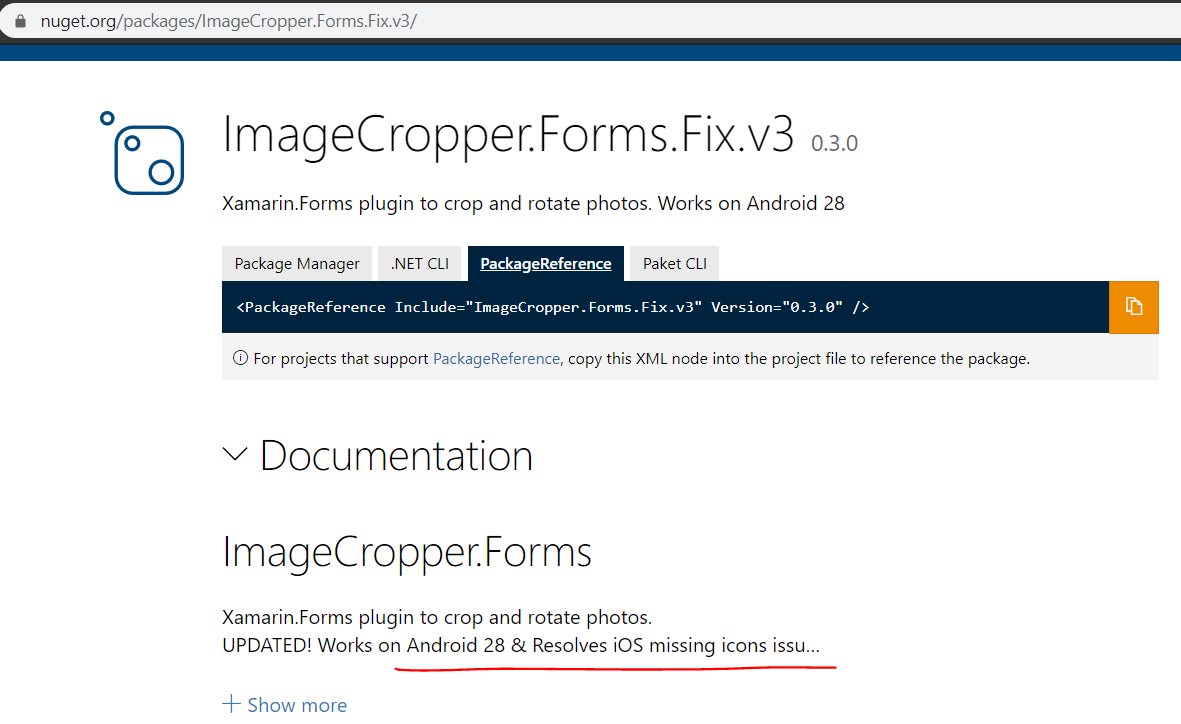
The solution was Upgrading the library to
ImageCropper.Forms.Fix.v3 v.0.3.0
https://www.nuget.org/packages/ImageCropper.Forms.Fix.v3/
Now the app icon works fine.
make sure to Set the supported architectures to ARM64.
this library does nto support ARMV7s or ARMV7
Thanks. Specially Thanks to Jon Goldberger Jonathan.Goldberger@microsoft.com for communicating with me.
kgbuddhima
on 5 Feb 2020
kgbuddhima
on 5 Feb 2020
Still an issue with the v3 library and the official build, if you remove ImageCropper you get no asset issues.
 mackayn
on 13 Apr 2020
mackayn
on 13 Apr 2020
@mackayn - If you believe this is still an issue, consider filing another issue with steps to reproduce and details.
chamons
on 15 Apr 2020
@chamons It's an issue with ImageCropper.Forms still. When we removed ImageCropper it all was good in ad-hoc AppCenter builds to iOS and release builds to store, I just wanted anyone who runs into the same issue to be aware of it, wasted a lot of time re-going on everything asset related and it was the nuget package all along.
mackayn
on 15 Apr 2020
Thanks a lot @kgbuddhima. Your finding related to the image cropper library helped us a lot. We were running around in circles trying to figure out why the icon wont show up in iOS.
 uksreejith
on 14 Jul 2020
uksreejith
on 14 Jul 2020
HI,
I'm happy to say that I could solve the issue.
The main issue was in ImageCropper.Forms library.
it has 3 different versions.
v.0.1.6 - https://www.nuget.org/packages/ImageCropper.Forms
v.0.1.8 - https://www.nuget.org/packages/ImageCropper.Forms.Fix
v.0.3.0 - https://www.nuget.org/packages/ImageCropper.Forms.Fix.v3/Both v.0.16 and 0.18 make the issue.
Then I accidentally found /ImageCropper.Forms.Fix.v3 package when I was looking for a solution for VSTS pipeline issue when I have added all supported architectures like ARMv7, ARMv7s, ARM64
There I got this error in AzureDevOps iOS pipelineerror MT5209 : Native linking error : warning: ignoring file /Users/runner/runners/2.164.7/work/1/s/src/MyApp.iOS/obj/iPhone/AppStore/mtouch-cache/TOCropViewController.framework/TOCropViewController, missing required architecture armv7s in file /Users/runner/runners/2.164.7/work/1/s/src/MyApp.iOS/obj/iPhone/AppStore/mtouch-cache/TOCropViewController.framework/TOCropViewController (4 slices) [/Users/runner/runners/2.164.7/work/1/s/src/MyApp.iOS/MyApp.iOS.csproj]
error MT5209 : Native linking error : warning: ignoring file /Users/runner/runners/2.164.7/work/1/s/src/MyApp.iOS/obj/iPhone/AppStore/mtouch-cache/IQKeyboardManager.framework/IQKeyboardManager, missing required architecture armv7s in file /Users/runner/runners/2.164.7/work/1/s/src/MyApp.iOS/obj/iPhone/AppStore/mtouch-cache/IQKeyboardManager.framework/IQKeyboardManager (4 slices) [/Users/runner/runners/2.164.7/work/1/s/src/MyApp.iOS/MyApp.iOS.csproj]
MTOUCH : error MT5211: Native linking failed, undefined Objective-C class: IQBarButtonItem. The symbol '_OBJC_CLASS_$_IQBarButtonItem' could not be found in any of the libraries or frameworks linked with your application. [/Users/runner/runners/2.164.7/work/1/s/src/MyApp.iOS/MyApp.iOS.csproj]
MTOUCH : error MT5211: Native linking failed, undefined Objective-C class: IQKeyboardManager. The symbol '_OBJC_CLASS_$_IQKeyboardManager' could not be found in any of the libraries or frameworks linked with your application. [/Users/runner/runners/2.164.7/work/1/s/src/MyApp.iOS/MyApp.iOS.csproj]
MTOUCH : error MT5211: Native linking failed, undefined Objective-C class: IQKeyboardReturnKeyHandler. The symbol '_OBJC_CLASS_$_IQKeyboardReturnKeyHandler' could not be found in any of the libraries or frameworks linked with your application. [/Users/runner/runners/2.164.7/work/1/s/src/MyApp.iOS/MyApp.iOS.csproj]
MTOUCH : error MT5211: Native linking failed, undefined Objective-C class: IQPreviousNextView. The symbol '_OBJC_CLASS_$_IQPreviousNextView' could not be found in any of the libraries or frameworks linked with your application. [/Users/runner/runners/2.164.7/work/1/s/src/MyApp.iOS/MyApp.iOS.csproj]
MTOUCH : error MT5211: Native linking failed, undefined Objective-C class: IQTextView. The symbol '_OBJC_CLASS_$_IQTextView' could not be found in any of the libraries or frameworks linked with your application. [/Users/runner/runners/2.164.7/work/1/s/src/MyApp.iOS/MyApp.iOS.csproj]
MTOUCH : error MT5211: Native linking failed, undefined Objective-C class: IQTitleBarButtonItem. The symbol '_OBJC_CLASS_$_IQTitleBarButtonItem' could not be found in any of the libraries or frameworks linked with your application. [/Users/runner/runners/2.164.7/work/1/s/src/MyApp.iOS/MyApp.iOS.csproj]
MTOUCH : error MT5211: Native linking failed, undefined Objective-C class: IQToolbar. The symbol '_OBJC_CLASS_$_IQToolbar' could not be found in any of the libraries or frameworks linked with your application. [/Users/runner/runners/2.164.7/work/1/s/src/MyApp.iOS/MyApp.iOS.csproj]
MTOUCH : error MT5211: Native linking failed, undefined Objective-C class: TOActivityCroppedImageProvider. The symbol '_OBJC_CLASS_$_TOActivityCroppedImageProvider' could not be found in any of the libraries or frameworks linked with your application. [/Users/runner/runners/2.164.7/work/1/s/src/MyApp.iOS/MyApp.iOS.csproj]
MTOUCH : error MT5211: Native linking failed, undefined Objective-C class: TOCropOverlayView. The symbol '_OBJC_CLASS_$_TOCropOverlayView' could not be found in any of the libraries or frameworks linked with your application. [/Users/runner/runners/2.164.7/work/1/s/src/MyApp.iOS/MyApp.iOS.csproj]
MTOUCH : error MT5211: Native linking failed, undefined Objective-C class: TOCropScrollView. The symbol '_OBJC_CLASS_$_TOCropScrollView' could not be found in any of the libraries or frameworks linked with your application. [/Users/runner/runners/2.164.7/work/1/s/src/MyApp.iOS/MyApp.iOS.csproj]
MTOUCH : error MT5211: Native linking failed, undefined Objective-C class: TOCropToolbar. The symbol '_OBJC_CLASS_$_TOCropToolbar' could not be found in any of the libraries or frameworks linked with your application. [/Users/runner/runners/2.164.7/work/1/s/src/MyApp.iOS/MyApp.iOS.csproj]
MTOUCH : error MT5211: Native linking failed, undefined Objective-C class: TOCropView. The symbol '_OBJC_CLASS_$_TOCropView' could not be found in any of the libraries or frameworks linked with your application. [/Users/runner/runners/2.164.7/work/1/s/src/MyApp.iOS/MyApp.iOS.csproj]
MTOUCH : error MT5211: Native linking failed, undefined Objective-C class: TOCropViewController. The symbol '_OBJC_CLASS_$_TOCropViewController' could not be found in any of the libraries or frameworks linked with your application. [/Users/runner/runners/2.164.7/work/1/s/src/MyApp.iOS/MyApp.iOS.csproj]
MTOUCH : error MT5211: Native linking failed, undefined Objective-C class: TOCropViewControllerTransitioning. The symbol '_OBJC_CLASS_$_TOCropViewControllerTransitioning' could not be found in any of the libraries or frameworks linked with your application. [/Users/runner/runners/2.164.7/work/1/s/src/MyApp.iOS/MyApp.iOS.csproj]
clang : error : linker command failed with exit code 1 (use -v to see invocation) [/Users/runner/runners/2.164.7/work/1/s/src/MyApp.iOS/MyApp.iOS.csproj]
MTOUCH : error MT5211: Native linking failed, undefined Objective-C class: TOCroppedImageAttributes. The symbol '_OBJC_CLASS_$_TOCroppedImageAttributes' could not be found in any of the libraries or frameworks linked with your application. [/Users/runner/runners/2.164.7/work/1/s/src/MyApp.iOS/MyApp.iOS.csproj]
MTOUCH : error MT5202: Native linking failed. Please review the build log. [/Users/runner/runners/2.164.7/work/1/s/src/MyApp.iOS/MyApp.iOS.csproj]
Thanks for this it saved my day. I had the same issue.
 Adeel984
on 27 Aug 2020
Adeel984
on 27 Aug 2020
Related issues
 mrward
·
4Comments
mrward
·
4Comments
 therealjohn
·
3Comments
therealjohn
·
3Comments
 wcoder
·
3Comments
wcoder
·
3Comments
 nickmask
·
3Comments
nickmask
·
3Comments
 whitneyschmidt
·
3Comments
whitneyschmidt
·
3Comments
Most helpful comment
The solution was Upgrading the library to
ImageCropper.Forms.Fix.v3 v.0.3.0
https://www.nuget.org/packages/ImageCropper.Forms.Fix.v3/
Now the app icon works fine.
make sure to Set the supported architectures to ARM64.
this library does nto support ARMV7s or ARMV7
Thanks. Specially Thanks to Jon Goldberger Jonathan.Goldberger@microsoft.com for communicating with me.