Xamarin-macios: [Apple Submission]LinkPresentation framework isn't being linked away.
Your app uses or references the following non-public APIs:
- “LinkPresentation.framework, LPLinkMetadata”
When no use of LinkPresentation namespace is used in my code w/ a solution search.
Steps to Reproduce
VS for mac 8.3.1 (build 18), Xcode 11.0.
- Create new native iOS project
- Set iOS.csproj Linking setting to "LinkSDKs" only
- Build project.
- Open terminal and cd to binary output.
Run
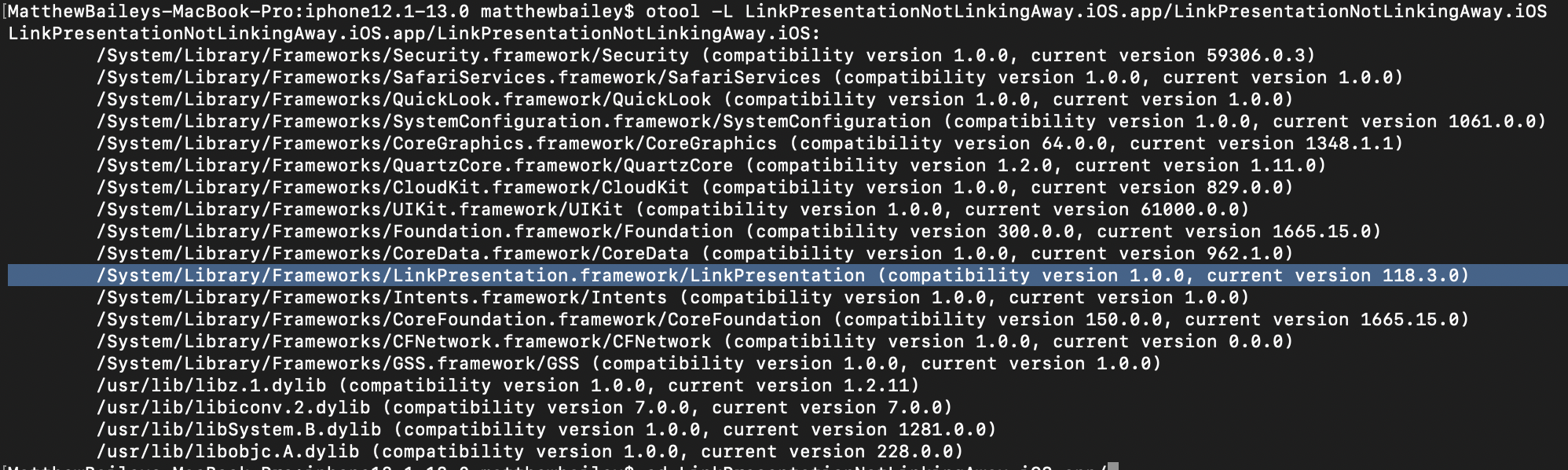
otool -L {projectbinary}Alternatively. grep -r LPLinkMetadata
Expected Behavior
/System/Library/Frameworks/LinkPresentation.framework/LinkPresentationis not presentNo binaries contain
LPLinkMetadataActual Behavior
/System/Library/Frameworks/LinkPresentation.framework/LinkPresentation- Xamarin.iOS.pdb matches and Xamarin.iOS.dll matches
Environment
Visual Studio Community 2019 for Mac
Version 8.3.1 (build 18)
Installation UUID: 21285d89-d4c7-42f2-899b-7ae148eee093
    GTK+ 2.24.23 (Raleigh theme)
    Xamarin.Mac 5.16.1.24 (d16-3 / 08809f5b)

    Package version: 604000198

Mono Framework MDK
Runtime:
    Mono 6.4.0.198 (2019-06/fe64a4765e6) (64-bit)
    Package version: 604000198

NuGet
Version: 5.3.0.6192

.NET Core SDK
SDK: /usr/local/share/dotnet/sdk/3.0.100/Sdks
SDK Version: 3.0.100
MSBuild SDKs: /Library/Frameworks/Mono.framework/Versions/6.4.0/lib/mono/msbuild/Current/bin/Sdks

.NET Core Runtime
Runtime: /usr/local/share/dotnet/dotnet
Runtime Versions:
    3.0.0
    2.1.13

Xamarin.Profiler
Version: 1.6.12.26
Location: /Applications/Xamarin Profiler.app/Contents/MacOS/Xamarin Profiler

Updater
Version: 11

Apple Developer Tools
Xcode 11.0 (14936)
Build 11A420a

Xamarin.Mac
Version: 6.2.0.42 (Visual Studio Community)
Hash: 5e8a208b
Branch: d16-3
Build date: 2019-09-17 14:19:30-0400

Xamarin.iOS
Version: 13.2.0.42 (Visual Studio Community)
Hash: 5e8a208b
Branch: d16-3
Build date: 2019-09-17 14:19:30-0400

Xamarin Designer
Version: 16.3.0.244
Hash: e15b2ee97
Branch: remotes/origin/d16-3
Build date: 2019-09-25 00:03:16 UTC

Xamarin.Android
Version: 10.0.0.43 (Visual Studio Community)
Commit: xamarin-android/d16-3/8af1ca8
Android SDK: /Users/matthewbailey/Library/Developer/Xamarin/android-sdk-macosx
    Supported Android versions:
        None installed

SDK Tools Version: 26.1.1
SDK Platform Tools Version: 28.0.2
SDK Build Tools Version: 28.0.3

Build Information:
Mono: mono/mono/2019-06@7af64d1ebe9
Java.Interop: xamarin/java.interop/d16-3@5836f58
LibZipSharp: grendello/LibZipSharp/d16-3@71f4a94
LibZip: nih-at/libzip/rel-1-5-1@b95cf3f
ProGuard: xamarin/proguard/master@905836d
SQLite: xamarin/sqlite/3.27.1@8212a2d
Xamarin.Android Tools: xamarin/xamarin-android-tools/d16-3@cb41333

Microsoft Mobile OpenJDK
Java SDK: /Users/matthewbailey/Library/Developer/Xamarin/jdk/microsoft_dist_openjdk_1.8.0.25
1.8.0-25
Android Designer EPL code available here:
https://github.com/xamarin/AndroidDesigner.EPL

Android SDK Manager
Version: 1.4.0.65
Hash: c33b107
Branch: remotes/origin/d16-3
Build date: 2019-09-19 20:42:44 UTC

Android Device Manager
Version: 1.2.0.115
Hash: 724ea69
Branch: remotes/origin/d16-3
Build date: 2019-09-19 20:43:06 UTC

Xamarin Inspector
Version: 1.4.3
Hash: db27525
Branch: 1.4-release
Build date: Mon, 09 Jul 2018 21:20:18 GMT
Client compatibility: 1

Build Information
Release ID: 803010018
Git revision: 272ab73f00ab2b13ec97dc8b31d02980cf66d47f
Build date: 2019-09-27 19:26:51+00
Build branch: release-8.3
Xamarin extensions: 451b00e65052c11c16b79e6d31a24c4cf0d1b794

Operating System
Mac OS X 10.14.6
Darwin 18.7.0 Darwin Kernel Version 18.7.0
    Tue Aug 20 16:57:14 PDT 2019
    root:xnu-4903.271.2~2/RELEASE_X86_64 x86_64
Build Logs
https://gist.github.com/NSGangster/98b1ad2b3f16ffcf601e71d21bad90d5
Example Project (If Possible)
 NSGangster
All 27 comments
Screenshots of terminal outputl.

NSGangster
on 4 Oct 2019
That's weird, since we have tests to ensure things are removed. We need logs or a test case to investigate further. However
- Your log file is for a iPhoneSimulator, which is not what was submitted. You need to provide the build logs for the submitted application (so a device build).
Directory "bin/iPhoneSimulator/Debug/device-builds/iphone12.1-13.0/LinkPresentationNotLinkingAway.iOS.app.dSYM" doesn't exist. Skipping.
It also does not have enough verbosity to let us see what's being done. Please add
-v -v -v -vto the Additional touch arguments of your project.You attached the zipped
.slnfile, i.e. not the whole project, so we do not have any way to get those details ourselves.
 spouliot
on 4 Oct 2019
spouliot
on 4 Oct 2019
@spouliot @NSGangster LPLinkMetadata inherits from NSObject, so the call initWithFrame
https://github.com/xamarin/xamarin-macios/blob/b8f9dccdcc09f43a44d591fd0eaf9ba954ea2752/src/linkpresentation.cs#L64
could be causing the rejection from Apple.
Also:
http://codeworkshop.net/objc-diff/sdkdiffs/ios/13.0/LinkPresentation.html
 BMcS
on 4 Oct 2019
BMcS
on 4 Oct 2019
@BMcS correct, but line 64 is under the interface that applies to UIViews. None of my views implement that interface. But perhaps the signature is close enough to the initWithFrame: combined its for typeof(UIView) the linker picks it up since i use UIView(initWithFrame:). The objective-C selector maybe identical and therefore linked.
@spouliot I built several times in each with same environment and configs for both are the same, I did both iPhone and iPhoneSimulator (configs are same minus architecture, which I assumed would not cause an issue). I'll try to get some new logs in a few. In the meantime, here is the whole solution
NSGangster
on 4 Oct 2019
Hmm won't let me with the entire folder since zipped up its 26 MB and limit is 10. Have you tried the repro steps w/ just a new project and environment?
NSGangster
on 4 Oct 2019
Ah just need to remove obj and bin folders, Try this.
NSGangster
on 4 Oct 2019
@BMcS the line you're pointing to is for LPLinkView (not LPLinkMetadata), which subclass UIView, which requires to re-expose the init* since C# constructors are not virtual like ObjC init* methods.
spouliot
on 4 Oct 2019
LPLinkMetadata is a public API https://developer.apple.com/documentation/linkpresentation/lplinkmetadata?language=objc in both header files and documentation.
However it was a private framework before Xcode11. Are you sure the submitted app was built with Xcode 11 ?
Image: /System/Library/PrivateFrameworks/LinkPresentation.framework/LinkPresentation
Note that it's not the path that from your screenshot (but it might not be the rejected binary).
spouliot
on 4 Oct 2019
When I build your attached sample, for Release|iPhone (what should be submitted), without any changes I get
otool -L LinkPresentationNotLinkingAway.iOS
LinkPresentationNotLinkingAway.iOS:
    /System/Library/Frameworks/Security.framework/Security (compatibility version 1.0.0, current version 59306.0.3)
    /System/Library/Frameworks/SafariServices.framework/SafariServices (compatibility version 1.0.0, current version 1.0.0)
    /System/Library/Frameworks/SystemConfiguration.framework/SystemConfiguration (compatibility version 1.0.0, current version 1061.0.0)
    /System/Library/Frameworks/CoreGraphics.framework/CoreGraphics (compatibility version 64.0.0, current version 1348.1.1)
    /System/Library/Frameworks/UIKit.framework/UIKit (compatibility version 1.0.0, current version 61000.0.0)
    /System/Library/Frameworks/Foundation.framework/Foundation (compatibility version 300.0.0, current version 1665.15.0)
    /System/Library/Frameworks/CoreFoundation.framework/CoreFoundation (compatibility version 150.0.0, current version 1665.15.0)
    /System/Library/Frameworks/CFNetwork.framework/CFNetwork (compatibility version 1.0.0, current version 0.0.0)
    /System/Library/Frameworks/GSS.framework/GSS (compatibility version 1.0.0, current version 1.0.0)
    /usr/lib/libz.1.dylib (compatibility version 1.0.0, current version 1.2.11)
    /usr/lib/libiconv.2.dylib (compatibility version 7.0.0, current version 7.0.0)
    /usr/lib/libSystem.B.dylib (compatibility version 1.0.0, current version 1281.0.0)
    /usr/lib/libobjc.A.dylib (compatibility version 1.0.0, current version 228.0.0)
which is what I would expect. I do not know what you have QuickLook and LinkPresentation in your version.
Even then we have submission tests that includes them (and all API we ship) and have not got such a rejection by Apple. That makes me think the build you have was not (entirely) done with Xcode11 and it linked to the older, private LinkPresentation.framework.
I can have a look at the build logs and, if you can share it, the IPA you submitted but right now I do not believe this is an issue with the SDK.
spouliot
on 4 Oct 2019
Hi @spouliot , we are still experiencing this issue - I will email the build log for our app to you. We are unable to share our IPA at this time.
Running
grep -r LPLinkMetadata . or grep -r LinkPresentation .
references show up in:
Binary` file ./OurApp.App.iOS matches
Binary file ./Xamarin.iOS.dll matches
BMcS
on 15 Oct 2019
Hi, we are having the same issue as @NSGangster and @BMcS
We are building an iOS app, using Visual Studio Enterprise 2019 and compiling on our MacMini. Everything is latest, Visual Studio for Mac, XCode, and Xamarin SDKs.
The app store review rejected the submission because of the use or reference of LinkPresentation.framework private APIs.
Using otool we discovered, that LinkPresentation is actually used in the binary.
 dave-1185
on 21 Nov 2019
dave-1185
on 21 Nov 2019
Bump ! Same issue today. I cannot ship my product to my client. Any workaround here ?
 Daddoon
on 21 Nov 2019
Daddoon
on 21 Nov 2019
Resolved by setting linker setting to Link Framework SDKs Only and just for double checking, adding this to the Additional mtouch arguments input in my project:
--linksdkonly --linkskip=LinkPresentation --linkskip=QuickLookThumbnailing
@Daddoon Nice to know, can you confirm your app functionality though? We always used no linking option for apps.
dave-1185
on 21 Nov 2019
I was using "No Linking", and my app seem to still work with "Link Sdk Only". For the rest, it depend of your app usage.
However, in my opinion, nothing prevent you to do something like only:
--linkskip=LinkPresentation --linkskip=QuickLookThumbnailing
And preserving Don't Link in your configuration. I have not tested, but it should then skip theses Framework. Take a look with otool then in order to be sure.
EDIT: At least i can confirm that doing my initial command changed from a very big list of linked framework to a very shorter one, and with theses specific framework skipped from the build.
Daddoon
on 21 Nov 2019
Did a quick build using your advice and can confirm that this works. Nice job @Daddoon and thanks!
dave-1185
on 21 Nov 2019
The option --linkskip applies to assemblies, not (Apple) frameworks or namespace.
Unless you have an assembly named LinkPresentation.dll or QuickLookThumbnailing.dll in your project then it won't change the output.
The option --linksdkonly is identical to the project option Link Framework SDKs Only in the IDE. This is the default for all device builds since it removes unused code (like stuff inside the LinkPresentation namespace if you're not using them) producing smaller assemblies that can be AOT'ed faster and deployed in less time.
spouliot
on 22 Nov 2019
Thanks for the information about linkskip !
Yes linksdkonly is identical to Link Framework SDK only but some people stated that some versions of Visual Studio doesn't take this parameter into account, but it's a bug.
Daddoon
on 22 Nov 2019
Closing. Link SDK should be all that's needed to make the symbols go away.
If anyone can repro this, with linking, please provide us with build logs or (better) a test case.
Thanks!
spouliot
on 27 Nov 2019
I am using the LPLinkMetaData and LPMetadataProvider to retrieve link previews for my iOS app. I am compiling against iOS13, Xcode 11 and my app is being rejected by Apple citing the reason as:
Specifically, your app uses the following non-public URL scheme:
- LinkPresentation.framework
As was rightly pointed out above, as of iOS13 this is now a public API so I am a little confused. Does anyone have any suggestions? I have queried this with Apple but not getting any response.
Cheers
 FinniusFrog
on 18 Feb 2020
FinniusFrog
on 18 Feb 2020
This might be something else as our submission testing includes applications that are linking with LinkPresentation.framework.
Specifically, your app uses the following non-public URL scheme:
This is not the commonly used message that Apple use when a private (non public) framework (not URL scheme) is used. Now the message might have changed recently or it's something else...
@FinniusFrog can you share the full build log (with additional -v -v -v -v) and the .ipa with us for analysis ? thanks!
spouliot
on 18 Feb 2020
Thanks for your help @spouliot , I've attached the BuildLog but it is not letting me attach the .ipa (it's 31.1MB is it to large?)
FinniusFrog
on 18 Feb 2020
@FinniusFrog likely too large, can you give us a link to download it ?
You can send it the link (or maybe the .ipa, not sure) to sebastien dot Pouliot at microsoft dot com. Thanks!
spouliot
on 18 Feb 2020
@spouliot Sorry for taking so long to respond to this thread since I solved our issue awhile back and had seen this as closed, but seeing as @FinniusFrog maybe having similar issues. Here's a short explanation of what was going on:
Our app uses a lot of reflection and so we had a lot of issues with various UIComponent classes having various selectors/methods which were linked out causing crash at runtime. My old iOS 12 solution was to use wildcard. Taking this out and handling each component 1 by 1 solved my issue. xml file looked something along the lines of:
<?xml version="1.0" encoding="UTF-8"?>
<linker>
    <assembly fullname="Xamarin.iOS">
        <type fullname="UIKit.UI*" />
    </assembly>
</linker>
So my only guess is it's some reference of a class in UIKit that references the LP framework through non public methods, but hadn't narrowed it down to which one. @FinniusFrog I noticed in your build logs you don't have an xml but you have a file called "LinkerPleaseInclude.cs". Check for unnecessary inclusions of UI frameworks.
Another thing of curiosity since you are actually trying to use the LP framework. Have you made sure all code has a if(iOS>13.0) check in it? I'm wondering if since the framework isn't new but just changed its protection level from private to public your versions targeting < 13 it might look to apple like you're accessing something private.
NSGangster
on 19 Feb 2020
Hi @NSGangster,
Thanks for responding. What I suspect is happening is that although I thought I had all the code in a if(iOS.13.0) check I spotted a LPLinkView field outside of that check. I am just refactoring now and will resubmit.
Thanks to yourself and @spouliot for your help. I post once I find out from Apple if this is indeed the case.
FinniusFrog
on 19 Feb 2020
Another thing to try (probably not pushing it live as I'm sure you still have consumers < iOS13) is seeing if min targeting iOS 13 apple ACCEPTS submission, that might confirm that there is indeed some issue w/ linking the target framework < iOS 13 and apple thinking you are trying to use it in iOS 12 privately
NSGangster
on 19 Feb 2020
@NSGangster , @spouliot , it was as I guessed, I had a field referencing a class in the api which was set in all iOS versions.
Really appreciate your help and suggestions. Thank you.
FinniusFrog
on 22 Feb 2020
Related issues
 ThumbGen
·
43Comments
ThumbGen
·
43Comments
 simeon052
·
114Comments
simeon052
·
114Comments
 jfversluis
·
72Comments
jfversluis
·
72Comments
 FlxGen
·
34Comments
FlxGen
·
34Comments
 robertsundstrom
·
65Comments
robertsundstrom
·
65Comments