Xamarin-macios: Visual Studio for Mac freezes on Sign and Distribute for iOS archive
Steps to Reproduce
- After creating an archive for the iOS build.
- Right click on the archive to Sign and Distribute.
- Select App Store for the "iOS Distribution Channel".
- Select Export for the "Select a destination".
- In the Provisioning Profile, after selecting signing identity and all that, and click on "Next".
- The Visual Studio for Mac freezes.
Expected Behavior
Able to sign and store the iOS archive successfully.
Actual Behavior
The entire Visual Studio for Mac freezes.
Environment
=== Visual Studio Community 2019 for Mac ===

Version 8.3 (build 1805)
Installation UUID: 7bf4150e-35e0-4cfb-bd20-083c1c710b4c
    GTK+ 2.24.23 (Raleigh theme)
    Xamarin.Mac 5.16.1.24 (d16-3 / 08809f5b)

    Package version: 604000198

=== Mono Framework MDK ===

Runtime:
    Mono 6.4.0.198 (2019-06/fe64a4765e6) (64-bit)
    Package version: 604000198

=== NuGet ===

Version: 5.3.0.6192

=== .NET Core SDK ===

SDK: /usr/local/share/dotnet/sdk/3.0.100/Sdks
SDK Versions:
    3.0.100
    2.1.701
    2.1.700
    2.1.505
    2.1.504
    2.1.503
    2.1.302
    2.1.301
    2.1.4
    2.0.0
    1.0.3
MSBuild SDKs: /Library/Frameworks/Mono.framework/Versions/6.4.0/lib/mono/msbuild/Current/bin/Sdks

=== .NET Core Runtime ===

Runtime: /usr/local/share/dotnet/dotnet
Runtime Versions:
    3.0.0
    2.1.13
    2.1.12
    2.1.11
    2.1.9
    2.1.8
    2.1.7
    2.1.2
    2.1.1
    2.0.5
    2.0.0
    1.1.1
    1.0.4

=== Xamarin.Profiler ===

Version: 1.6.12.26
Location: /Applications/Xamarin Profiler.app/Contents/MacOS/Xamarin Profiler

=== Updater ===

Version: 11

=== Xamarin.Android ===

Version: 10.0.0.43 (Visual Studio Community)
Commit: xamarin-android/d16-3/8af1ca8
Android SDK: /Users/joeli/Library/Developer/Xamarin/android-sdk-macosx
    Supported Android versions:
        6.0 (API level 23)
        7.0 (API level 24)
        7.1 (API level 25)
        8.1 (API level 27)

SDK Tools Version: 26.1.1
SDK Platform Tools Version: 28.0.2
SDK Build Tools Version: 28.0.3

Build Information:
Mono: mono/mono/2019-06@7af64d1ebe9
Java.Interop: xamarin/java.interop/d16-3@5836f58
LibZipSharp: grendello/LibZipSharp/d16-3@71f4a94
LibZip: nih-at/libzip/rel-1-5-1@b95cf3f
ProGuard: xamarin/proguard/master@905836d
SQLite: xamarin/sqlite/3.27.1@8212a2d
Xamarin.Android Tools: xamarin/xamarin-android-tools/d16-3@cb41333

=== Microsoft Mobile OpenJDK ===

Java SDK: /Users/joeli/Library/Developer/Xamarin/jdk/microsoft_dist_openjdk_8.0.25
1.8.0-25
Android Designer EPL code available here:
https://github.com/xamarin/AndroidDesigner.EPL

=== Android SDK Manager ===

Version: 1.4.0.65
Hash: c33b107
Branch: remotes/origin/d16-3
Build date: 2019-09-19 20:42:44 UTC

=== Android Device Manager ===

Version: 1.2.0.115
Hash: 724ea69
Branch: remotes/origin/d16-3
Build date: 2019-09-19 20:43:06 UTC

=== Xamarin Inspector ===

Version: 1.4.3
Hash: db27525
Branch: 1.4-release
Build date: Mon, 09 Jul 2018 21:20:18 GMT
Client compatibility: 1

=== Apple Developer Tools ===

Xcode 11.0 (14936)
Build 11A420a

=== Xamarin.Mac ===

Version: 6.2.0.42 (Visual Studio Community)
Hash: 5e8a208b
Branch: d16-3
Build date: 2019-09-17 14:19:30-0400

=== Xamarin.iOS ===

Version: 13.2.0.42 (Visual Studio Community)
Hash: 5e8a208b
Branch: d16-3
Build date: 2019-09-17 14:19:30-0400

=== Xamarin Designer ===

Version: 16.3.0.230
Hash: bbe518670
Branch: remotes/origin/d16-3-xcode11
Build date: 2019-09-17 18:39:30 UTC

=== Build Information ===

Release ID: 803001805
Git revision: df50511ccb08d4d84a53939f1d7fc0b40cbb0ee1
Build date: 2019-09-20 16:10:55+00
Build branch: release-8.3
Xamarin extensions: da8d448cd65f2cc87c5e6dc7e2c2ca7b96d20c72

=== Operating System ===

Mac OS X 10.14.6
Darwin 18.7.0 Darwin Kernel Version 18.7.0
    Tue Aug 20 16:57:14 PDT 2019
    root:xnu-4903.271.2~2/RELEASE_X86_64 x86_64
Build Logs
Screenshot below shows where it freezes (after clicking Next button)

Example Project (If Possible)
VS bug #989629
 mingxli
All 35 comments
Thanks for the report. I've moved it to appropriate team for consideration.
 chamons
on 26 Sep 2019
chamons
on 26 Sep 2019
Thanks for the report. I've moved it to appropriate team for consideration.
Hi chamons,
Can this be done through command line? This is very urgent! Thanks a lot!
mingxli
on 26 Sep 2019
You can look into the approach suggested here:
https://github.com/xamarin/xamarin-macios/issues/7058#issuecomment-535052566
Also - @jimmgarrido
chamons
on 26 Sep 2019
Hi chamons,
Thanks for the quick response. I have looked at issue #7058 prior to open this issue. It seemed like DM1155 was having issue with uploading app to the App Store using the (now missing) App Loader. For me, I didn't get that far... I am stuck on the step to create an *.ipa file from the archive (using the Sign and Distribute wizard). I cannot directly upload to the store, because this app uses the iOSCharts nuget package and I need to manually do some work (after *.ipa is created) prior to uploading the app to App Store. Thanks again for the suggestion! :)
mingxli
on 26 Sep 2019
In case anyone else is having this same issue. I just realized that you can build the *.ipa file from the command line, using the "msbuild" command. If you are building from a Mac, you'll just have to include "/p:BuildIpa=true". Keep in mind, you should have the correct Provisioning Profile available on the machine that is doing the build.
mingxli
on 28 Sep 2019
I'm having the same issue, pretty annoying because now I have to use the "upload" option, which would be a more awesome way for me...if it wasn't because I needed to get a "app specific password" EVERYTIME I have to upload. Very annoying...as I use to just use a normal login.
Hoping this gets fixed.
 Laumania
on 4 Oct 2019
Laumania
on 4 Oct 2019
@Laumania Are you using Visual Studio on Windows? On VS for Mac the app specific password should be saved between sessions, and we're working to do the same on Windows.
 jimmgarrido
on 8 Oct 2019
jimmgarrido
on 8 Oct 2019
@mingxli I am also experiencing exactly the same issue. I tried to restart visual studio several times but it's still not working. Any workaround found?
 harouf
on 8 Oct 2019
harouf
on 8 Oct 2019
@jimmgarrido It's Visual Studio for Mac I'm using and it's like it's starting from nothing everytime I need to publish a new version of my app. Very annoying.
Laumania
on 8 Oct 2019
Hey folks - We are looking at fixing this. I have a hot off the presses preview that _might_ improve this. We are having trouble reproducing this locally, so I can't know for sure.
Can you install this:
https://dl.xamarin.com/uploads/c3jimhiirp2/VisualStudioForMac-8.3.3.6.dmg
And report back if it improves this or not?
chamons
on 8 Oct 2019
And report back if it improves this or not?
Just checked. It still freezes after clicking on Next button :(
 softeip
on 9 Oct 2019
softeip
on 9 Oct 2019
I was mistaken - we _are_ able to reproducing this internally and a fix is in work.
Sorry for the confusion everyone. Until it is fixed, you could try using the command line build suggested here.
chamons
on 9 Oct 2019
Hi All, I'm having the very same issue.
 martinstanek
on 9 Oct 2019
martinstanek
on 9 Oct 2019
Hi Guys, this was fixed by the latest update of VS2019 Mac.
 pedropendz
on 15 Oct 2019
pedropendz
on 15 Oct 2019
@martinstanek @softeip @Laumania @mingxli
Sorry for the inconvenience. Could you please try the latest update of Visual Studio For Mac?
 olegoid
on 15 Oct 2019
olegoid
on 15 Oct 2019
Hi all,
it still freezes after clicking on Next button after updating to Visual Studio for Mac Version 8.3.4 (build 8)
 makl23
on 16 Oct 2019
makl23
on 16 Oct 2019
Hi, @olegoid
unfortunately it is still freezing (8.3.4.8). However the "Upload" path works for me, and the .ipa package is generated during the proces as well, or the <BuildIpa>true></BuildIpa> needs to be added to the .csproj file.
Thx for the affort anyway ;)
martinstanek
on 16 Oct 2019
Hi guys, it still freezes for me as well. Just updated to 8.3.4 (build 8). The "upload" option does create the .ipa just fine. Thanks for trying to fix.
 YARG
on 16 Oct 2019
YARG
on 16 Oct 2019
Hi @olegoid,
Still freezes also... Thanks for working on this!
mingxli
on 16 Oct 2019
This is hard to understand that this is not yet been fixed. This fix should be released as HotFix. Guys this must be addressed quickly. Many many people are facing issues with VS Mac latest version.
 SagarPanwala
on 18 Oct 2019
SagarPanwala
on 18 Oct 2019
Ya, still freezes with 8.3.4.8. Using the MSBuild work around for now.
 PerryD
on 28 Oct 2019
PerryD
on 28 Oct 2019
Still freezes with 8.3.5 (build 13)
 eli191
on 31 Oct 2019
eli191
on 31 Oct 2019
The bug fix was released as part of Visual Studio 2019 for Mac Version 8.3.6 (build 4), sorry again for the inconvenience.
Best,
Oleg
olegoid
on 1 Nov 2019
8.3.6.4 still freezes after hitting next button.
 NebulaSleuth
on 2 Nov 2019
NebulaSleuth
on 2 Nov 2019
@NebulaSleuth please share the IDE log (Help -> Open Log Directory) and full setup information (Visual Studio For Mac -> About Visual Studio -> ). I can't reproduce the issue on my end.
That's how it goes for me. Upload scenario:
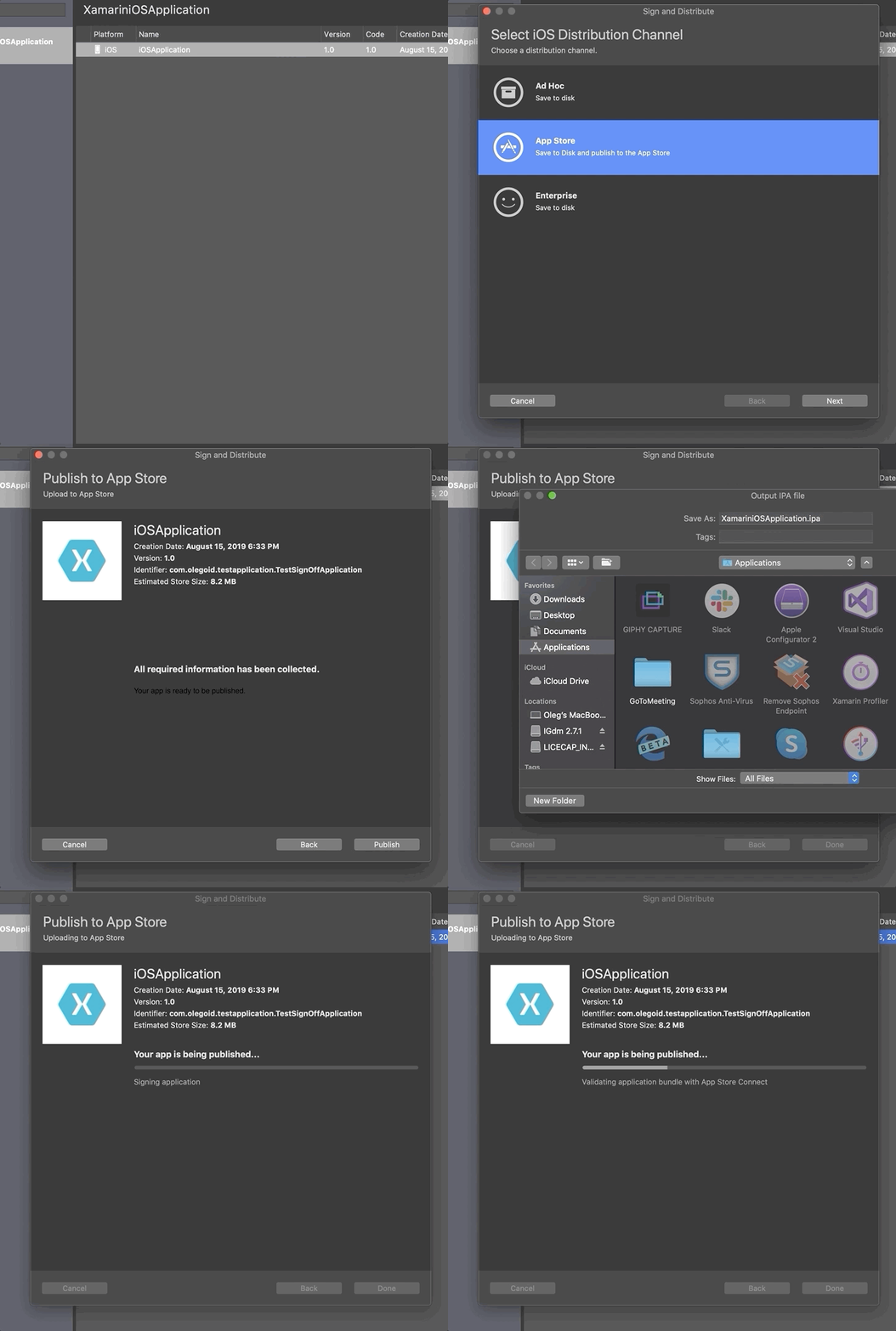
Export scenario:
My setup details: https://gist.github.com/olegoid/048582e01621f27004c1b19140891757
olegoid
on 4 Nov 2019
After yet another round of investigation, I think we finally got a lead.
olegoid
on 4 Nov 2019
I'm facing the same issue ...
 rachael-ross
on 5 Nov 2019
rachael-ross
on 5 Nov 2019
I have the same. Please fix it.
 bradlak
on 5 Nov 2019
bradlak
on 5 Nov 2019
Same issue here.
 jayrlsw
on 5 Nov 2019
jayrlsw
on 5 Nov 2019
Just to put my nose in on here, I'm also having this issue.
 joecons97
on 6 Nov 2019
joecons97
on 6 Nov 2019
@martinstanek @softeip @Laumania @mingxli
Sorry for the inconvenience. Could you please try the latest update of Visual Studio For Mac?
I can confirm that updating to the latest version fixed this for me.
jayrlsw
on 6 Nov 2019
But not for me. VS for Mac 8.3.7 (build 1)
softeip
on 7 Nov 2019
Still freezing with VS for Mac 8.3.7 (build 1)
makl23
on 7 Nov 2019
same issue...
 rex232
on 8 Nov 2019
rex232
on 8 Nov 2019
I had the same issue on VS for Mac 8.3.1 (build 1). It reproduces only on an Export scenario.
 ukod
on 8 Nov 2019
ukod
on 8 Nov 2019
Related issues
 iulian-mirica
·
3Comments
iulian-mirica
·
3Comments
 cwensley
·
3Comments
cwensley
·
3Comments
 Mikilll94
·
4Comments
Mikilll94
·
4Comments
 nickplee
·
3Comments
nickplee
·
3Comments
 mandel-macaque
·
3Comments
mandel-macaque
·
3Comments
Most helpful comment
Hi Guys, this was fixed by the latest update of VS2019 Mac.