Xamarin-macios: ERROR ITMS-90733: "Missing architecture. Apps built with Watch OS 5.0 and later SDKs must contain additional architectures."
Steps to Reproduce
- Followed Article from Microsoft: https://devblogs.microsoft.com/xamarin/apple-new-processor-architecture/
- Tried adding arm64_32 to MtouchArch in csproj.
- Could not parse TargetArchitectures 'ARMv7k, ARM64_32'
Expected Behavior
.ipa file uploads successfully for processing in AppStoreConnect
Actual Behavior
Removing the Arm64_32 architecture, allows for compile but the workaround(https://github.com/xamarin/xamarin-macios/issues/4810) of manipulating the plist to for watchos4.3 no longer works for submission.
Error is returned after Application Loader runs analysis
ERROR ITMS-90733: "Missing architecture. Apps built with Watch OS 5.0 and later SDKs must contain additional architectures."
Environment
=== Visual Studio Professional 2019 for Mac ===
Version 8.0.4 (build 0)
Installation UUID: de421c27-00ed-45c0-89ee-830552b71368
GTK+ 2.24.23 (Raleigh theme)
Xamarin.Mac 5.6.0.2 (d16-0 / 040682909)
Package version: 518010003
=== Mono Framework MDK ===
Runtime:
Mono 5.18.1.3 (2018-08/fdb26b0a445) (64-bit)
Package version: 518010003
=== NuGet ===
Version: 4.8.2.5835
=== .NET Core ===
Runtime: /usr/local/share/dotnet/dotnet
Runtime Versions:
2.1.9
2.1.8
2.1.7
2.1.6
2.0.5
SDK: /usr/local/share/dotnet/sdk/2.1.505/Sdks
SDK Versions:
2.1.505
2.1.504
2.1.503
2.1.500
2.1.4
MSBuild SDKs: /Library/Frameworks/Mono.framework/Versions/5.18.1/lib/mono/msbuild/15.0/bin/Sdks
=== Xamarin.Profiler ===
Version: 1.6.9
Location: /Applications/Xamarin Profiler.app/Contents/MacOS/Xamarin Profiler
=== Updater ===
Version: 11
=== Apple Developer Tools ===
Xcode 10.2.1 (14490.122)
Build 10E1001
=== Xamarin.Mac ===
Version: 5.10.0.147 (Visual Studio Professional)
Hash: a5f2633f
Branch: d16-1
Build date: 2019-04-10 09:42:20-0400
=== Xamarin.iOS ===
Version: 12.10.0.147 (Visual Studio Professional)
Hash: a5f2633f
Branch: d16-1
Build date: 2019-04-10 09:42:19-0400
=== Xamarin.Android ===
Version: 9.1.8.0 (Visual Studio Professional)
Android SDK: /Users/a206411610/Library/Developer/Xamarin/android-sdk-macosx
Supported Android versions:
4.4 (API level 19)
5.0 (API level 21)
8.0 (API level 26)
8.1 (API level 27)
SDK Tools Version: 26.1.1
SDK Platform Tools Version: 28.0.2
SDK Build Tools Version: 27.0.3
=== Microsoft Mobile OpenJDK ===
Java SDK: /Users/a206411610/Library/Developer/Xamarin/jdk/microsoft_dist_openjdk_8.0.25
1.8.0-25
Android Designer EPL code available here:
https://github.com/xamarin/AndroidDesigner.EPL
=== Android Device Manager ===
Version: 1.2.0.14
Hash: 86df26f
Branch: remotes/origin/d16-0
Build date: 2019-04-05 16:58:56 UTC
=== Xamarin Designer ===
Version: 4.17.4.418
Hash: 3d086e814
Branch: remotes/origin/d16-0
Build date: 2019-04-01 09:20:10 UTC
=== Xamarin Inspector ===
Version: 1.4.3
Hash: db27525
Branch: 1.4-release
Build date: Mon, 09 Jul 2018 21:20:18 GMT
Client compatibility: 1
=== Build Information ===
Release ID: 800040000
Git revision: 09831ae7eef8ea58cdfad2e923c65a5bf70d27fd
Build date: 2019-04-15 23:04:13+00
Build branch: master
Xamarin extensions: 5efedb990d786142d3b54351c01ce867af7b7680
=== Operating System ===
Mac OS X 10.14.4
Darwin 18.5.0 Darwin Kernel Version 18.5.0
Mon Mar 11 20:40:32 PDT 2019
root:xnu-4903.251.3~3/RELEASE_X86_64 x86_64
=== Enabled user installed extensions ===
MFractor 3.8.0
AddinMaker 1.5.0
NuGet Package Management Extensions 0.17
Build Logs
Example Project (If Possible)
 chrissingh
All 27 comments
The workaround stopped working once Apple required the new architecture to be part of the submission.
This feature (new arch) is still in preview (not in our normal builds). You're using a different preview build (for d16-1) which does not, today, include it.
Version: 12.10.0.147 (Visual Studio Professional)
If you need to submit a watchOS application please use the package mentioned in the blog post, i.e.
https://dl.xamarin.com/uploads/05uvso0cndi/xamarin.ios-12.6.0.59.pkg
 spouliot
on 26 Apr 2019
spouliot
on 26 Apr 2019
Do we have an ETA for when this will be fixed in VS 2019? (I'm using VS on PC)
 grantkiwi
on 3 May 2019
grantkiwi
on 3 May 2019
I have used the proposed 12.6.0.59, I can submit but the Watch app is huge now, 84MB (max limit 80MB). No idea how to get it smaller :( The only 3rd party references I have are Newtonsoft.JSON and Polly. I am linking SDK only and applied all other tricks.
After removing Polly the build was approved by Apple, which means I am "on the edge" now.
Most probably using an older Newtonsoft version will save some more KBs...
Are both 32 and 64bit counting against the 80MB quota?
 ThumbGen
on 3 May 2019
ThumbGen
on 3 May 2019
Newtonsoft.JSON and its dependencies are pretty huge, and a universal binary means that the size scales up progressively.
My solution a while back was to write a JSOn parser from scratch.
 Dids
on 3 May 2019
Dids
on 3 May 2019
This solution is valid but ultimately this is recommending the use of a preview package which doesn't speak to stability. When is the ETA for this issue to be resolved in the stable branch?
 BrentLanphear
on 6 May 2019
BrentLanphear
on 6 May 2019
Dosen't work in preview as I installed VS preview on my PC yesterday (and also changed MAC to preview). So at the moment my company cannot submit their watch app. Man this is getting frustrating!!!
grantkiwi
on 6 May 2019
Dosen't work in preview asI installed VS preview on my PC yesterday (and also changed MAC to preview). So at the moment my company cannot submit their watch app.
With latest Xcode and the Xamarin.iOS pointed to in https://devblogs.microsoft.com/xamarin/apple-new-processor-architecture/ + project hack described there I was able to submit to App Store for TestFlight and install AdHoc directly.
I do have issue where build fails and I have to retry one or two times before it will succeed. So at first I thought I had not configured the MtouchArch stuff correctly.
 t9mike
on 7 May 2019
t9mike
on 7 May 2019
In preview when I do a build I get the following error from VS:
Error Could not parse TargetArchitectures 'ARMv7k, ARM64_32'
grantkiwi
on 7 May 2019
In preview when I do a build I get the following error from VS:
Error Could not parse TargetArchitectures 'ARMv7k, ARM64_32'
Did you install https://dl.xamarin.com/uploads/05uvso0cndi/xamarin.ios-12.6.0.59.pkg? My workflow happened to be:
Install latest from Preview channel
Then I installed https://dl.xamarin.com/uploads/05uvso0cndi/xamarin.ios-12.6.0.59.pkg which overwrote that newer Xamarin.iOS
Not sure if the latest Preview is supposed to have the fix.
t9mike
on 7 May 2019
@spouliot Is there any ETA when this will be included in the stable release? Because working with an outdated Xamarin.iOS is not the best solution if any further update include any important bugfix...
 Sebastian1989101
on 7 May 2019
Sebastian1989101
on 7 May 2019
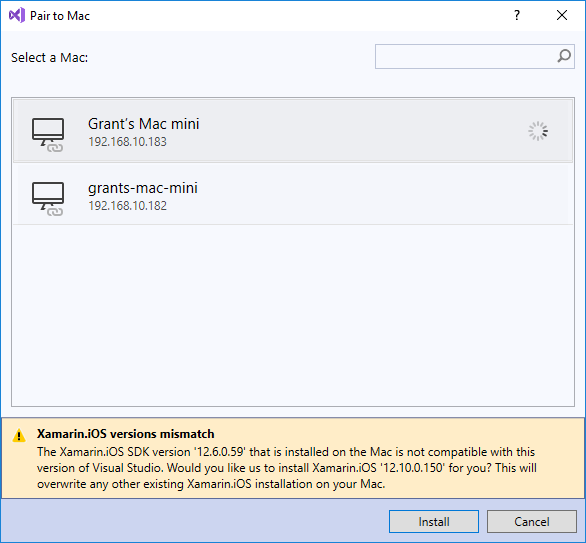
I can install the Xamarin.ios 12.6 package on my Mac however VS on my PC complains of a mismatch and wont compile.
grantkiwi
on 7 May 2019
grantkiwi
on 7 May 2019
Does anyone know if this is being actively worked on? And if not who do we raise this with?
grantkiwi
on 7 May 2019
In my case I used the stable channel on macOS (VS4Mac), then installed the Xamarin.iOS preview package. I didn't need to switch to the preview channel.
Dids
on 7 May 2019
Yes, I have refactored the code and eliminated the Polly library dependency. After that I was able to push the build to TestFlight.
Next (big) candidate is NewtonsoftJSON.
On 9. May 2019, at 07:33, Brent notifications@github.com wrote:
I have used the proposed 12.6.0.59, I can submit but the Watch app is huge now, 84MB (max limit 80MB). No idea how to get it smaller :( The only 3rd party references I have are Newtonsoft.JSON and Polly. I am linking SDK only and applied all other tricks.
After removing Polly the build was approved by Apple, which means I am "on the edge" now.
Most probably using an older Newtonsoft version will save some more KBs...Are both 32 and 64bit counting against the 80MB quota?
I'm running into the same issue now. Size of 77MB when limit is 75MB. Were you able to get past this @ThumbGen?
—
You are receiving this because you were mentioned.
Reply to this email directly, view it on GitHub, or mute the thread.
ThumbGen
on 9 May 2019
Yes, I have refactored the code and eliminated the Polly library dependency. After that I was able to push the build to TestFlight. Next (big) candidate is NewtonsoftJSON.
…
On 9. May 2019, at 07:33, Brent @.*> wrote: I have used the proposed 12.6.0.59, I can submit but the Watch app is huge now, 84MB (max limit 80MB). No idea how to get it smaller :( The only 3rd party references I have are Newtonsoft.JSON and Polly. I am linking SDK only and applied all other tricks. After removing Polly the build was approved by Apple, which means I am "on the edge" now. Most probably using an older Newtonsoft version will save some more KBs... Are both 32 and 64bit counting against the 80MB quota? I'm running into the same issue now. Size of 77MB when limit is 75MB. Were you able to get past this @ThumbGen? — You are receiving this because you were mentioned. Reply to this email directly, view it on GitHub, or mute the thread.
It might be hacky and incomplete, but here's my lightweight implementation of a JSON parser/serializer: https://github.com/Didstopia/FeatherJSON
I'm sure there are plenty of other libraries out there, but my main and only goal with this one was to make it as tiny as possible, specifically for working with iOS and watchOS.
Dids
on 9 May 2019
Thanks, all of these additional comments helped quite a bit. I was able to get my build uploaded after trimming some files out of the project but the fact remains that this is using a preview build that I can't get on my Azure DevOps pipeline (using the hosted build agent). Working outside of my CI/CD pipeline and building with a preview build is quite a big issue in my mind and I'm struggling with the fact that this issue is "closed". @spouliot can you clarify why this issue is closed and if possible, comment on timing for an expected fix?
BrentLanphear
on 9 May 2019
@BrentLanphear this particular issue is closed because the original reporter's problem is not a bug in Xamarin.iOS (he wasn't using the Xamarin.iOS package with support for ARM64_32).
The work for ARM64_32 is tracked here: https://github.com/xamarin/xamarin-macios/issues/4864, which is still open.
 rolfbjarne
on 9 May 2019
rolfbjarne
on 9 May 2019
Could we get a new preview with the patch cut based on the latest stable? You're asking us to go back a few significant releases to get this patch, which is the only option we have now to actually do a release for apps with WatchOS support. Thanks.
EDIT: https://github.com/xamarin/xamarin-macios/issues/4864#issuecomment-493362110
 jahmai
on 17 May 2019
jahmai
on 17 May 2019
To trim your ipa more, activate "link all", build, run, observe the logs for any error/crash, add [Preserve] attributes to classes, methods, properties or events that are optimized away because the static analyser did not found usage for them, build, run, observe logs ... loop until all is working. Cover 100% of your code like this (if you can). Of course you need a strong error logging infrastructure in your code.
 softlion
on 13 Jun 2019
softlion
on 13 Jun 2019
Can I switch to latest Preview Xamarin.iOS, compile against Xcode 11 Beta, and deploy to watch?
I already have report from customer running watchOS 6 Beta that my app, while running, has a UI glitch that makes the app unusable. Yes Beta I know. But I need to see if I can fix.
I changed SDK pref to point to my Xcode 11 Beta but when I compile I get and error compiling the watch extension:
Undefined symbols for architecture i386:
  "_main", referenced from:
      _xamarin_initialize_extension_main in libwatchextension.a(watchextension-main.x86.o)
     (maybe you meant: _mono_threads_platform_is_main_thread, _mono_runtime_try_run_main , _mono_runtime_get_main_args , _mono_runtime_set_main_args , _mono_runtime_get_main_args_handle , _mono_thread_get_main , _xamarin_extension_main , _mono_runtime_exec_main , _mono_main , _mono_runtime_run_main_checked , _xamarin_watchextension_main , _mono_assembly_set_main , _mono_thread_set_main , _xamarin_main , _mono_runtime_exec_main_checked , _xamarin_release_block_on_main_thread , _mono_runtime_run_main , _xamarin_initialize_extension_main , _mono_runtime_try_exec_main , _mono_assembly_get_main )
ld: symbol(s) not found for architecture i386
clang : error : linker command failed with exit code 1 (use -v to see invocation)

MTOUCH : error MT5210: Native linking failed, undefined symbol: _main. Please verify that all the necessary frameworks have been referenced and native libraries are properly linked in.
MTOUCH : error MT5201: Native linking failed. Please review the build log and the user flags provided to gcc: -Xlinker -sectcreate -Xlinker __TEXT -Xlinker __entitlements -Xlinker <path>/WatchExtension/obj/iPhoneSimulator/Debug/device-builds/watch4.4-6.0/Entitlements.xcent
MTOUCH : error MT5202: Native linking failed. Please review the build log.
=== Visual Studio Enterprise 2019 (Preview) for Mac ===
Version 8.1 Preview (8.1 build 2697)
Installation UUID: 49afa5cc-00b9-4c18-a240-552efe177384
GTK+ 2.24.23 (Raleigh theme)
Xamarin.Mac 5.6.0.25 (d16-0 / 50f75273)
Package version: 518010028
=== Mono Framework MDK ===
Runtime:
Mono 5.18.1.28 (2018-08/223ea7ef92e) (64-bit)
Package version: 518010028
=== NuGet ===
Version: 5.0.2.5988
=== .NET Core ===
Runtime: /usr/local/share/dotnet/dotnet
Runtime Versions:
2.2.4
2.1.9
2.1.8
2.1.7
2.1.6
2.1.2
2.0.0
1.1.0
SDK: /usr/local/share/dotnet/sdk/2.2.203/Sdks
SDK Versions:
2.2.203
2.1.505
2.1.504
2.1.503
2.1.500
2.1.302
2.0.0
1.0.0-preview2-1-003177
MSBuild SDKs: /Library/Frameworks/Mono.framework/Versions/5.18.1/lib/mono/msbuild/Current/bin/Sdks
=== Xamarin.Profiler ===
Version: 1.6.10
Location: /Applications/Xamarin Profiler.app/Contents/MacOS/Xamarin Profiler
=== Updater ===
Version: 11
=== Xamarin.Android ===
Version: 9.3.0.22 (Visual Studio Enterprise)
Commit: HEAD/8e7764fdf
Android SDK: /Users/mmuegel/Library/Developer/Xamarin/android-sdk-macosx
Supported Android versions:
8.1 (API level 27)
SDK Tools Version: 26.1.1
SDK Platform Tools Version: 28.0.0
SDK Build Tools Version: 27.0.3
Build Information:
Mono: mono/mono/2018-08@3cb36842fc4
Java.Interop: xamarin/java.interop/d16-1@5ddc3e3
LibZipSharp: grendello/LibZipSharp/d16-1@44de300
LibZip: nih-at/libzip/rel-1-5-1@b95cf3f
ProGuard: xamarin/proguard/master@905836d
SQLite: xamarin/sqlite/3.27.1@8212a2d
Xamarin.Android Tools: xamarin/xamarin-android-tools/d16-1@acabd26
=== Microsoft Mobile OpenJDK ===
Java SDK: /Users/mmuegel/Library/Developer/Xamarin/jdk/microsoft_dist_openjdk_8.0.25
1.8.0-25
Android Designer EPL code available here:
https://github.com/xamarin/AndroidDesigner.EPL
=== Android Device Manager ===
Version: 1.2.0.44
Hash: aac645b
Branch: remotes/origin/d16-1
Build date: 2019-05-29 19:55:24 UTC
=== Apple Developer Tools ===
Xcode 11.0 (14855.18)
Build 11M336w
=== Xamarin.Mac ===
Version: 5.10.0.153 (Visual Studio Enterprise)
Hash: 750a8798
Branch: d16-1-artifacts
Build date: 2019-04-30 15:17:54-0400
=== Xamarin.iOS ===
Version: 12.10.0.172 (Visual Studio Enterprise)
Hash: 5484a9a7
Branch: d16-1-arm64-32
Build date: 2019-05-09 03:18:04-0400
=== Xamarin Designer ===
Version: 16.1.0.459
Hash: aa1cc9a67
Branch: remotes/origin/d16-1-new-document-model
Build date: 2019-05-09 18:28:48 UTC
=== Xamarin Inspector ===
Version: 1.4.3
Hash: db27525
Branch: 1.4-release
Build date: Mon, 09 Jul 2018 21:20:18 GMT
Client compatibility: 1
=== Build Information ===
Release ID: 801002697
Git revision: a128ffb65cb7045b2d4c0bbedc1db1b78a34ace7
Build date: 2019-05-31 22:15:33+00
Build branch: release-8.1
Xamarin extensions: f3e01946e5fdc7e28d90cef2e4f935e07bf6b330
=== Operating System ===
Mac OS X 10.14.5
Darwin 18.6.0 Darwin Kernel Version 18.6.0
Thu Apr 25 23:16:27 PDT 2019
root:xnu-4903.261.4~2/RELEASE_X86_64 x86_64
t9mike
on 18 Jun 2019
@t9mike
I changed SDK pref to point to my Xcode 11 Beta but when I compile I get and error compiling the watch extension:
Yes, the current stable and the upcoming d16-2 release won't work with Xcode 11.
We've already fixed this particular problem in our work to support Xcode 11, which can be found here: https://github.com/xamarin/xamarin-macios/commits/xcode11. You can download packages by clicking on the red cross next to a commit, and then the details for the PKG-Xamarin.iOS entry (if a particular commit doesn't have a package, you can just check the previous commit - also it's normal that it's red, we haven't managed to update all our tests for the Xcode 11 changes yet, so some are still failing)
rolfbjarne
on 18 Jun 2019
Excellent @rolfbjarne!
With preview channel + xamarin.ios-12.99.0.96.pkg I was able to deploy to Xcode 11 watchOS 6 simulator. Note: I did have to kill the first deploy from the Watch app on the paired iPhone. It was stuck and re-run from VS.NET did not fix.
t9mike
on 19 Jun 2019
Update on deployment to watch sim: I have not been able to get it to just install and run like normal. I have to stop the VS.NET debugger, stop the install from Watch companion app, and then click INSTALL in Watch companion app.
If I do nothing and wait, VS.NET will eventually timeout:
The connection with the debugger has been lost. The target application may have exited.
t9mike
on 19 Jun 2019
@t9mike yes, there might be kinks we haven't quite been able to iron out with Xcode 11 yet (they changed a lot of things regarding the watch this year). Do you see the same behavior if you use Visual Studio for Mac?
rolfbjarne
on 19 Jun 2019
Do you see the same behavior if you use Visual Studio for Mac?
That is what I use full time.
I thought I could not stop the install on companion app before killing VS.NET. User error I think %-). This worked to get debug session:
- Have Watch companion app open on phone with my watch, showing my watch app already installed
- Start debug run from VS for Mac
- The Watch companion app will show my app install in progress (but will never complete)
- So... stop it by clicking ([]) button
- Click INSTALL once the un-install is complete on the watch
- Debug session in VS for Mac will commence
So workable. Thanks for the assist!
t9mike
on 19 Jun 2019
@t9mike great, thanks for testing this! I'll look into the launching/installing issues and fix them (this will be tracked in #6362 if you want to subscribe and be notified when it's fixed).
rolfbjarne
on 19 Jun 2019
Related issues
 simeon052
·
114Comments
simeon052
·
114Comments
 mingxli
·
35Comments
mingxli
·
35Comments
 VincentDondain
·
108Comments
VincentDondain
·
108Comments
 jfversluis
·
72Comments
jfversluis
·
72Comments
 Uncommon
·
83Comments
Uncommon
·
83Comments