Xamarin-macios: iOS depends on private symbols which prevents builds with no linking from submission (Xamarin.Forms and others)
Description
Steps to Reproduce
- Use latest XF nuget 3.6.0.293080
- Archive for publishing in release mode
- Upload using Application Loader
Expected Behaviour
It should work fine as before
Actual Behavior
Apple complains that the app makes reference to non-public APIs:
We identified one or more issues with a recent delivery for your app. Please correct the following issues, then upload again.
Non-public API usage:
The app references non-public selectors in App.iOS: addTemporaryAttribute:value:forCharacterRange:, addTemporaryAttributes:forCharacterRange:, behaviorWithType:, defaultBaselineOffsetForFont:, defaultLineHeightForFont:, finished, greekingThreshold, horizontalCornerRadius, initWithSource:convolutionState:weights:, initWithType:, postSession:didAddPlayer:, postSession:didReceiveData:fromPlayer:, postSession:didReceiveMessage:withData:fromPlayer:, postSession:didRemovePlayer:, postSession:player:didChangeConnectionState:, postSession:player:didSaveData:, preferredMetalContext, removeData:, removeTemporaryAttribute:forCharacterRange:, setGreekingThreshold:, setHorizontalCornerRadius:, setIsPrimary:, setShouldAntiAlias:, setUUID:, setVerticalCornerRadius:, shouldAntiAlias, temporaryAttribute:atCharacterIndex:effectiveRange:, temporaryAttribute:atCharacterIndex:longestEffectiveRange:inRange:, temporaryAttributesAtCharacterIndex:effectiveRange:, temporaryAttributesAtCharacterIndex:longestEffectiveRange:inRange:, textContainerChangedTextView:, toolTip, usesBackgroundSession, verticalCornerRadius
If method names in your source code match the private Apple APIs listed above, altering your method names will help prevent this app from being flagged in future submissions. In addition, note that one or more of the above APIs may be located in a static library that was included with your app. If so, they must be removed.
VS bug #855982
 amirvenus
All 53 comments
@amirvenus Do you know what version of Xamarin.Forms you were using in your last successful publish? Are you using any other libraries? Can you please attach a small project that demonstrates this issue? Thanks!
 samhouts
on 16 Apr 2019
samhouts
on 16 Apr 2019
@amirvenus Was this message sent to you after uploading the build via Application Loader, or did you have to submit your app for review? I was able to successfully upload a build via Application Loader using 3.6.0.293080. Thanks!
samhouts
on 17 Apr 2019
It was sent to me after the app was uploaded using Application Loader in an email from Apple.
amirvenus
on 17 Apr 2019
@amirvenus @samhouts
I've tried with Application Loader as well and had the same rejection with 3.6.0.293080 Xamarin.Forms and VS2019.
Also tried with an old version from Xamarin.Forms which we used to publish successfully before:
2.5.1.527436, but it didn't work either, rejected.
 EpicDrakkar
on 17 Apr 2019
EpicDrakkar
on 17 Apr 2019
@amirvenus @samhouts
I've tried with Application Loader as well and had the same rejection with 3.6.0.293080 Xamarin.Forms and VS2019.Also tried with an old version from Xamarin.Forms which we used to publish successfully before:
2.5.1.527436, but it didn't work either, rejected.
Are you using the latest VS 2019 for Mac and Xamarin.iOS?
I am a n00b, but I am thinking that could be a problem.
amirvenus
on 17 Apr 2019
@amirvenus @samhouts
I've tried with Application Loader as well and had the same rejection with 3.6.0.293080 Xamarin.Forms and VS2019.
Also tried with an old version from Xamarin.Forms which we used to publish successfully before:
2.5.1.527436, but it didn't work either, rejected.Are you using the latest VS 2019 for Mac and Xamarin.iOS?
I am a n00b, but I am thinking that could be a problem.
Yes using the latest version of everything.
EpicDrakkar
on 17 Apr 2019
@amirvenus @samhouts
I've tried with Application Loader as well and had the same rejection with 3.6.0.293080 Xamarin.Forms and VS2019.
Also tried with an old version from Xamarin.Forms which we used to publish successfully before:
2.5.1.527436, but it didn't work either, rejected.Are you using the latest VS 2019 for Mac and Xamarin.iOS?
I am a n00b, but I am thinking that could be a problem.Yes using the latest version of everything.
Would be brilliant if we could test it using the good old VS for mac 2017 and possibly an earlier version of Xamarin.iOS installed
amirvenus
on 17 Apr 2019
Maybe @samhouts can en light us?
EpicDrakkar
on 17 Apr 2019
@EpicDrakkar @amirvenus would you please:
- confirm the Xcode version you're using as well?
- share a gist of your environment details. VSMac (About > VS > Show Details) and VS19 it's under the Help > Xamarin
 davidortinau
on 17 Apr 2019
davidortinau
on 17 Apr 2019
@EpicDrakkar @amirvenus would you please:
* confirm the Xcode version you're using as well?

* share a gist of your environment details. VSMac (About > VS > Show Details) and VS19 it's under the Help > Xamarin
Xcode: 10.2 (10E125)
VS-Details.txt
EpicDrakkar
on 17 Apr 2019
@EpicDrakkar (or anyone else) can you attach the complete build logs ? adding -v -v -v -v to the Additional mtouch arguments and doing a Rebuild. Thanks!
 spouliot
on 17 Apr 2019
spouliot
on 17 Apr 2019
-v -v -v -v
EpicDrakkar
on 17 Apr 2019
-v -v -v -v
Is that a Debug build or Release?
I think you should try Archive for publish
I will provide my logs as well when I get home
amirvenus
on 17 Apr 2019
-v -v -v -v
Is that a Debug build or Release?
I think you should try Archive for publishI will provide my logs as well when I get home
This is Debug Build, since using Archive I didn't return any result in the Build Output window.
EpicDrakkar
on 17 Apr 2019
I think it's worth trying a release mode as well with LLVM and Linker enabled.
amirvenus
on 17 Apr 2019
I think it's worth trying a release mode as well with LLVM and Linker enabled.
It was enabled for release or app store, still not working
EpicDrakkar
on 17 Apr 2019
I have exactly the same issue ... here is the required diagnoses info
diagnostic_build_output.txt
 engmsaleh
on 17 Apr 2019
engmsaleh
on 17 Apr 2019
For some reason (template?) you are not linking your application (i.e. --nolink is i the build logs). While not linking should work (for submission) you're strongly encouraged to enable the managed linker. This produce a (much) smaller application and has extraneous performance (including startup) enhancements.
Can you try changing your "Linker behavior" from "Don't link" (current) to the _normal_ default of "Link Framework SDKs only" and try to submit again ? Thanks!
spouliot
on 17 Apr 2019
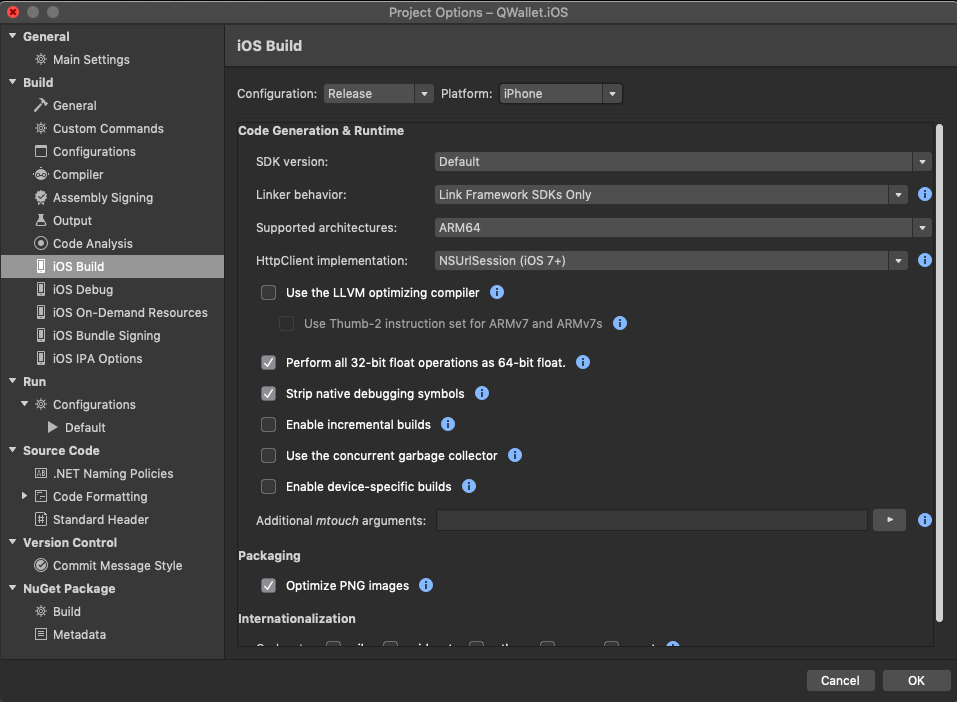
@spouliot This is the first thing that I have checked on the beginning and this is the selected option actually and I got rejected with it
Please advise if there are anything I miss
engmsaleh
on 17 Apr 2019
For some reason (template?) you are not linking your application (i.e.
--nolinkis i the build logs). While _not_ linking should work (for submission) you're strongly encouraged to enable the managed linker. This produce a (much) smaller application and has extraneous performance (including startup) enhancements.Can you try changing your "Linker behavior" from "Don't link" (current) to the _normal_ default of "Link Framework SDKs only" and try to submit again ? Thanks!
The issue exists in all 3 Linker modes.
Building (Release).txt
amirvenus
on 18 Apr 2019
Right now I can only duplicate this issue when using "Don't Link". Please attach the full build log (with -v -v -v -v and msbuild set to diagnostic level) and Apple's rejection email (the details could be different from the ones above). Thanks!
spouliot
on 18 Apr 2019
How do I msbuild set to diagnostic level?
amirvenus
on 18 Apr 2019
@amirvenus follow these steps for diagnostic level
engmsaleh
on 18 Apr 2019
@spouliot I have make diagnostic level build report for the iOS device as the last one I have sent was for iOS simulator
diagnostic_build_output_device.txt
I have noticed a thing and I think it might be the problem, I have made sure that Link Framework SDKs only is selected as per the screenshot here, but for some reason on the build output --nolink is still selected
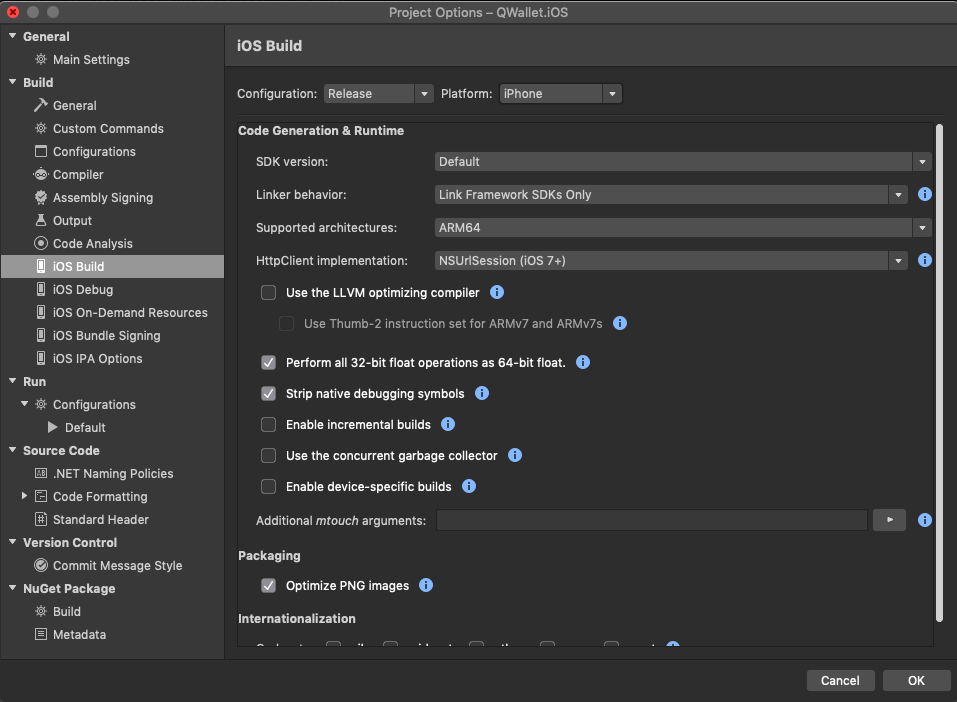
Could this be the issue?
engmsaleh
on 18 Apr 2019
After filling an internal issue with the Xamarin team, they advised doing the following
adding --linksdkonly to the Additional mtouch arguments on the iOS Build settings page
As it seems that Visual Studio ignores the settings in GUI as a screenshot above
I have tested it and now get my build accepted by Apple without the above error
Please @amirvenus try the above suggestion and confirm if it solved yours also
engmsaleh
on 18 Apr 2019
Also, one another notice that I’m getting the following warning, although I’m not using location or any other modules that use it and it started also to appear randomly one week ago,
Please advise if you have any suggestion for that.
Missing Purpose String in Info.plist File - Your app's code references one or more APIs that access sensitive user data. The app's Info.plist file should contain a NSLocationAlwaysUsageDescription key with a user-facing purpose string explaining clearly and completely why your app needs the data. Starting Spring 2019, all apps submitted to the App Store that access user data will be required to include a purpose string. If you're using external libraries or SDKs, they may reference APIs that require a purpose string. While your app might not use these APIs, a purpose string is still required. You can contact the developer of the library or SDK and request they release a version of their code that doesn't contain the APIs. Learn more (https://developer.apple.com/documentation/uikit/core_app/protecting_the_user_s_privacy).
Missing Purpose String in Info.plist File - Your app's code references one or more APIs that access sensitive user data. The app's Info.plist file should contain a NSLocationWhenInUseUsageDescription key with a user-facing purpose string explaining clearly and completely why your app needs the data. Starting Spring 2019, all apps submitted to the App Store that access user data will be required to include a purpose string. If you're using external libraries or SDKs, they may reference APIs that require a purpose string. While your app might not use these APIs, a purpose string is still required. You can contact the developer of the library or SDK and request they release a version of their code that doesn't contain the APIs. Learn more (https://developer.apple.com/documentation/uikit/core_app/protecting_the_user_s_privacy).
After you’ve corrected the issues, you can use Xcode or Application Loader to upload a new binary to App Store Connect.
engmsaleh
on 18 Apr 2019
@spouliot
I have had two reports in support cases where despite the setting for the linker options being "Link Framework SDKs only" and the
So there is a bug here in that the Linker setting in the GUI iOS BUild settings page, and the MtouchLink element in the .csproj file, are being ignored and the build is done with "Don't Link" option.
I have not been able to reproduce this on my end though.
 jgold6
on 18 Apr 2019
jgold6
on 18 Apr 2019
@jgold6 the GUI issue is a different issue then :(
@engmsaleh do not worry about the Info,plist warnings - they should disappear when linking properly.
What happens is that Apple sees extra API and warn you that using them requires some (privacy) entries in the Info.plist. Enabling the linker will remove those API (in most cases) and the warnings will disappear too.
spouliot
on 18 Apr 2019
I will test it then
What’s the mtouch argument for link all?
amirvenus
on 18 Apr 2019
Using --linksdkonly it worked for me. Nevertheless I had a crash using WKwebView with DecidePolicy which I didnt had before, but I did a work around to fix this, and now its published. Thanks!
EpicDrakkar
on 18 Apr 2019
I tried --linksdkonly but it is still the same issue. This is the email I get straightaway from Apple:
Dear Developer,
We identified one or more issues with a recent delivery for your app. Please correct the following issues, then upload again.
Non-public API usage:
The app references non-public selectors in App.iOS: addTemporaryAttribute:value:forCharacterRange:, addTemporaryAttributes:forCharacterRange:, behaviorWithType:, defaultBaselineOffsetForFont:, defaultLineHeightForFont:, finished, greekingThreshold, horizontalCornerRadius, initWithSource:convolutionState:weights:, initWithType:, postSession:didAddPlayer:, postSession:didReceiveData:fromPlayer:, postSession:didReceiveMessage:withData:fromPlayer:, postSession:didRemovePlayer:, postSession:player:didChangeConnectionState:, postSession:player:didSaveData:, preferredMetalContext, removeData:, removeTemporaryAttribute:forCharacterRange:, setGreekingThreshold:, setHorizontalCornerRadius:, setIsPrimary:, setShouldAntiAlias:, setUUID:, setVerticalCornerRadius:, shouldAntiAlias, temporaryAttribute:atCharacterIndex:effectiveRange:, temporaryAttribute:atCharacterIndex:longestEffectiveRange:inRange:, temporaryAttributesAtCharacterIndex:effectiveRange:, temporaryAttributesAtCharacterIndex:longestEffectiveRange:inRange:, textContainerChangedTextView:, toolTip, usesBackgroundSession, verticalCornerRadius
If method names in your source code match the private Apple APIs listed above, altering your method names will help prevent this app from being flagged in future submissions. In addition, note that one or more of the above APIs may be located in a static library that was included with your app. If so, they must be removed.
If you think this message was sent in error and that you have only used Apple-published APIs in accordance with the guidelines, send the app's nine-digit Apple ID, along with detailed information about why you believe the above APIs were incorrectly flagged, to [email protected]. For further information, visit the Technical Support Information page.
Though you are not required to fix the following issues, we wanted to make you aware of them:
Missing Purpose String in Info.plist File - Your app's code references one or more APIs that access sensitive user data. The app's Info.plist file should contain a NSLocationAlwaysUsageDescription key with a user-facing purpose string explaining clearly and completely why your app needs the data. Starting Spring 2019, all apps submitted to the App Store that access user data will be required to include a purpose string. If you're using external libraries or SDKs, they may reference APIs that require a purpose string. While your app might not use these APIs, a purpose string is still required. You can contact the developer of the library or SDK and request they release a version of their code that doesn't contain the APIs. Learn more (https://developer.apple.com/documentation/uikit/core_app/protecting_the_user_s_privacy).
Missing Purpose String in Info.plist File - Your app's code references one or more APIs that access sensitive user data. The app's Info.plist file should contain a NSLocationWhenInUseUsageDescription key with a user-facing purpose string explaining clearly and completely why your app needs the data. Starting Spring 2019, all apps submitted to the App Store that access user data will be required to include a purpose string. If you're using external libraries or SDKs, they may reference APIs that require a purpose string. While your app might not use these APIs, a purpose string is still required. You can contact the developer of the library or SDK and request they release a version of their code that doesn't contain the APIs. Learn more (https://developer.apple.com/documentation/uikit/core_app/protecting_the_user_s_privacy).
Best regards,
The App Store Team
amirvenus
on 18 Apr 2019
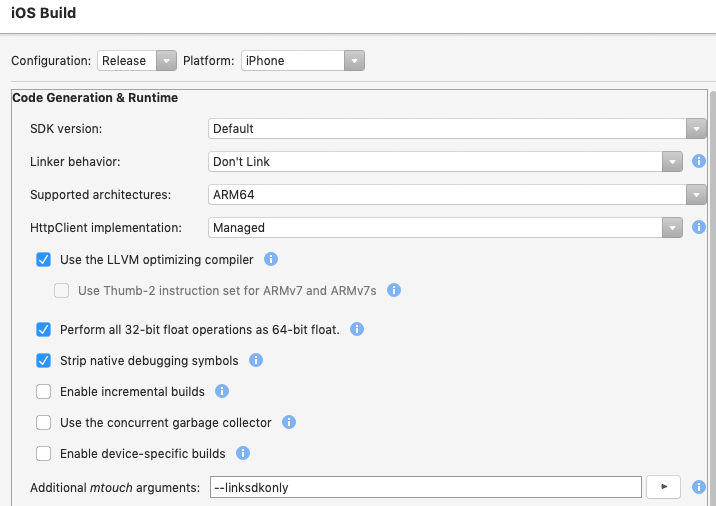
--linksdkonly
Are you sure that you put the --linksdkonly with Release & Appstore selection?
EpicDrakkar
on 18 Apr 2019
@amirvenus "link all" is mtouch default, i.e. if --nolink or linksdkonly is not used (and not seen in your build logs). However using this option means you're responsible to preserve anything required by 3rd party code (e.g. things used thru reflection).
spouliot
on 18 Apr 2019
This is my latest build using --linksdkonly switch again
amirvenus
on 18 Apr 2019
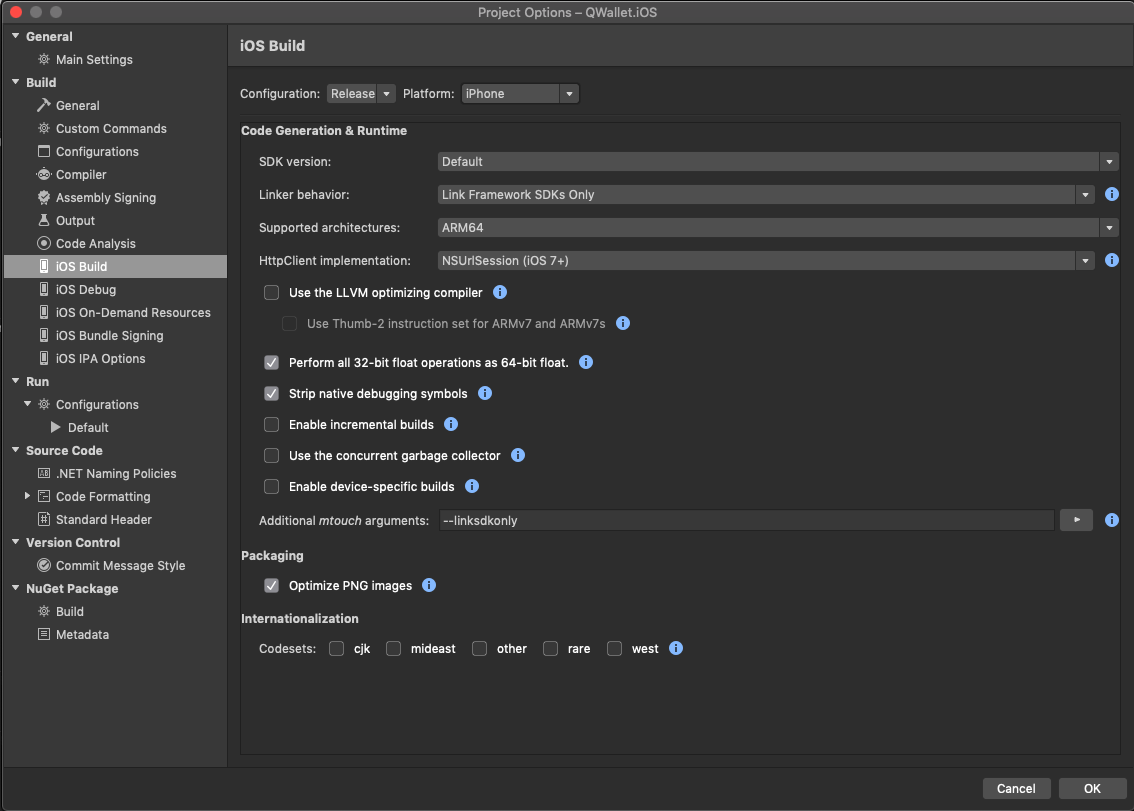
@EpicDrakkar This is the configurations that worked for me
engmsaleh
on 18 Apr 2019
@EpicDrakkar This is the configurations that worked for me
So you don't have LLVM enabled? I should try that too
amirvenus
on 18 Apr 2019
@amirvenus Yes
engmsaleh
on 18 Apr 2019
I have some local fixes (so the following list is partial) but here are the mentioned selected and who/where git blames.
addTemporaryAttribute:value:forCharacterRange:
Found in:
xkit.cs
788b63d96f (Rolf Bjarne Kvinge 2018-10-01 14:17:28 +0200  800)      [Export ("addTemporaryAttribute:value:forCharacterRange:")]
788b63d96f (Rolf Bjarne Kvinge 2018-10-01 14:17:28 +0200  806)      [Export ("addTemporaryAttribute:value:forCharacterRange:")]
addTemporaryAttributes:forCharacterRange:
Found in:
xkit.cs
788b63d96f (Rolf Bjarne Kvinge 2018-10-01 14:17:28 +0200 730) [Export ("addTemporaryAttributes:forCharacterRange:")]
behaviorWithType:
Found in:
coreanimation.cs
5830166c63 (Rolf Bjarne Kvinge 2016-04-21 14:30:02 +0200 1783) [Static][Export ("behaviorWithType:")]
defaultBaselineOffsetForFont:
Found in:
xkit.cs
788b63d96f (Rolf Bjarne Kvinge 2018-10-01 14:17:28 +0200 827) [Export ("defaultBaselineOffsetForFont:")]
defaultLineHeightForFont:
Found in:
xkit.cs
788b63d96f (Rolf Bjarne Kvinge 2018-10-01 14:17:28 +0200 820) [Export ("defaultLineHeightForFont:")]
finished
Found in:
avfoundation.cs
5830166c63 (Rolf Bjarne Kvinge 2016-04-21 14:30:02 +0200 3819) [Export ("finished")]
foundation.cs
bcc05aa5ff (Timothy Risi 2017-08-15 04:32:51 -0800 11803) [Export ("finished")]
greekingThreshold
Found in:
pdfkit.cs
5830166c63 (Rolf Bjarne Kvinge 2016-04-21 14:30:02 +0200 1775) [Export ("greekingThreshold")]
initWithSource:convolutionState:weights:
Found in:
metalperformanceshaders.cs
87f9e23989 (Timothy Risi 2017-11-28 11:29:05 -0900 3678) [Export ("initWithSource:convolutionState:weights:")]
initWithType:
Found in:
coreanimation.cs
5830166c63 (Rolf Bjarne Kvinge 2016-04-21 14:30:02 +0200 1767) [Export ("initWithType:")]
postSession:didAddPlayer:
Found in:
gamekit.cs
832db98110 (Alex Soto 2018-02-14 09:38:49 -0600 2447) [Export ("postSession:didAddPlayer:")]
postSession:didReceiveData:fromPlayer:
Found in:
gamekit.cs
832db98110 (Alex Soto 2018-02-14 09:38:49 -0600 2467) [Export ("postSession:didReceiveData:fromPlayer:")]
postSession:didReceiveMessage:withData:fromPlayer:
Found in:
gamekit.cs
832db98110 (Alex Soto 2018-02-14 09:38:49 -0600 2472) [Export ("postSession:didReceiveMessage:withData:fromPlayer:")]
postSession:didRemovePlayer:
Found in:
gamekit.cs
832db98110 (Alex Soto 2018-02-14 09:38:49 -0600 2452) [Export ("postSession:didRemovePlayer:")]
postSession:player:didChangeConnectionState:
Found in:
gamekit.cs
832db98110 (Alex Soto 2018-02-14 09:38:49 -0600 2457) [Export ("postSession:player:didChangeConnectionState:")]
postSession:player:didSaveData:
Found in:
gamekit.cs
832db98110 (Alex Soto 2018-02-14 09:38:49 -0600 2462) [Export ("postSession:player:didSaveData:")]
preferredMetalContext
Found in:
vision.cs
89071bc19d (Alex Soto 2017-07-18 11:12:10 -0500 1342) [NullAllowed, Export ("preferredMetalContext", ArgumentSemantic.Retain)]
removeData:
Found in:
gameplaykit.cs
5830166c63 (Rolf Bjarne Kvinge 2016-04-21 14:30:02 +0200 1991) [Export ("removeData:")]
removeTemporaryAttribute:forCharacterRange:
Found in:
xkit.cs
788b63d96f (Rolf Bjarne Kvinge 2018-10-01 14:17:28 +0200  743)      [Export ("removeTemporaryAttribute:forCharacterRange:")]
788b63d96f (Rolf Bjarne Kvinge 2018-10-01 14:17:28 +0200  749)      [Export ("removeTemporaryAttribute:forCharacterRange:")]
setGreekingThreshold:
- Not found - try without
setprefix.
Found in:
setIsPrimary:
- Not found - try without
setprefix.
Found in:
setShouldAntiAlias:
- Not found - try without
setprefix.
Found in:
setUUID:
- Not found - try without
setprefix.
Found in:
shouldAntiAlias
Found in:
pdfkit.cs
5830166c63 (Rolf Bjarne Kvinge 2016-04-21 14:30:02 +0200 1770) [Export ("shouldAntiAlias")]
temporaryAttribute:atCharacterIndex:effectiveRange:
Found in:
xkit.cs
788b63d96f (Rolf Bjarne Kvinge 2018-10-01 14:17:28 +0200  758)      [Export ("temporaryAttribute:atCharacterIndex:effectiveRange:")]
788b63d96f (Rolf Bjarne Kvinge 2018-10-01 14:17:28 +0200  765)      [Export ("temporaryAttribute:atCharacterIndex:effectiveRange:")]
temporaryAttribute:atCharacterIndex:longestEffectiveRange:inRange:
Found in:
xkit.cs
788b63d96f (Rolf Bjarne Kvinge 2018-10-01 14:17:28 +0200  771)      [Export ("temporaryAttribute:atCharacterIndex:longestEffectiveRange:inRange:")]
788b63d96f (Rolf Bjarne Kvinge 2018-10-01 14:17:28 +0200  778)      [Export ("temporaryAttribute:atCharacterIndex:longestEffectiveRange:inRange:")]
temporaryAttributesAtCharacterIndex:effectiveRange:
Found in:
xkit.cs
788b63d96f (Rolf Bjarne Kvinge 2018-10-01 14:17:28 +0200  713)      [Export ("temporaryAttributesAtCharacterIndex:effectiveRange:")]
788b63d96f (Rolf Bjarne Kvinge 2018-10-01 14:17:28 +0200  720)      [Export ("temporaryAttributesAtCharacterIndex:effectiveRange:")]
temporaryAttributesAtCharacterIndex:longestEffectiveRange:inRange:
Found in:
xkit.cs
788b63d96f (Rolf Bjarne Kvinge 2018-10-01 14:17:28 +0200  784)      [Export ("temporaryAttributesAtCharacterIndex:longestEffectiveRange:inRange:")]
788b63d96f (Rolf Bjarne Kvinge 2018-10-01 14:17:28 +0200  791)      [Export ("temporaryAttributesAtCharacterIndex:longestEffectiveRange:inRange:")]
textContainerChangedTextView:
Found in:
xkit.cs
788b63d96f (Rolf Bjarne Kvinge 2018-10-01 14:17:28 +0200 85) [Export ("textContainerChangedTextView:")]
toolTip
Found in:
appkit.cs
5830166c63 (Rolf Bjarne Kvinge 2016-04-21 14:30:02 +0200  8213)         [Export ("toolTip")]
5830166c63 (Rolf Bjarne Kvinge 2016-04-21 14:30:02 +0200 14842)         [Export ("toolTip")]
5830166c63 (Rolf Bjarne Kvinge 2016-04-21 14:30:02 +0200 15755)         [Export ("toolTip")]
5830166c63 (Rolf Bjarne Kvinge 2016-04-21 14:30:02 +0200 17618)         [Export ("toolTip")]
5830166c63 (Rolf Bjarne Kvinge 2016-04-21 14:30:02 +0200 19633)         [Export ("toolTip")]
b59a82e6db (Chris Hamons       2017-07-19 09:00:13 -0500 26618)         [Export ("toolTip")]
pdfkit.cs
5830166c63 (Rolf Bjarne Kvinge 2016-04-21 14:30:02 +0200 606) [Export ("toolTip")]
usesBackgroundSession
Found in:
cloudkit.cs
5830166c63 (Rolf Bjarne Kvinge 2016-04-21 14:30:02 +0200 1251) [Export ("usesBackgroundSession", ArgumentSemantic.UnsafeUnretained)]
@EpicDrakkar This is the configurations that worked for me
I was able to fix this issue this morning. linksdkonly did the trick for me. Thanks
EpicDrakkar
on 18 Apr 2019
Removing the LLVM, setting Linker behvaiour to Link Framework SDKs and adding --linksdkonly did the job.
Thanks
amirvenus
on 18 Apr 2019
Hi, we've been blocked by this issue for the past week or so now. I appreciate from all the activity above there is work being done to address this but unfortunately, we think, due to us being dependant on an SQLite package, we cannot use the --linksdkonly fix as the build then fails with MT2002: Failed to resolve "System.Diagnostics.CounterCreationDataCollection". Once this has all be merged in, is there any ETA on when an update version of the package will be available? I know that can sometimes be like asking how long a piece of string is, but any additional timeframes would be greatly appreciated :)
 jak-hammond
on 26 Apr 2019
jak-hammond
on 26 Apr 2019
@Jak893 it's already merged in master so it should [1] be part of d16-2 (not yet branched) and we're seeking approval to back port it into the next stable release (d16-1).
Specific dates are harder... but you can get a _good_ guess by reading https://docs.microsoft.com/en-us/visualstudio/productinfo/release-rhythm
[1] unless something cause us to revert it (not a common situation)
There's several assemblies that provide SQLite support. It looks like the one you're using is not built against .NET Standard (or against the XI BCL SDK) and that can create a few problems (like the one you mention). If possible see if there's a different build against .NET Standard as this will reduce future pain in addition to fixing this - e.g. by disabling the managed linker you are making your application much larger, disabling optimizations (so slower) and you get longer build times...
spouliot
on 26 Apr 2019
@spouliot That's perfect, definitely gives us something to work with in the meantime, thanks for the advice! Have a great weekend :)
jak-hammond
on 26 Apr 2019
This is landed now in d16-1, the next major release, and master for future releases.
Thanks for the report everyone 👋
 chamons
on 29 Apr 2019
chamons
on 29 Apr 2019
This issue is back....
I've got
- Xamarin.iOS version 12.10.0.153 (so I got the update when this issue should have been closed according to the releasenotes
- Xamarin.Forms 4.0.0.497661
- Visual Studio for Mac 2019, 8.1 (build2742)
and it is set to Link Framework SDKs only
And when I build my application to publish to the app store, I get a nice message from Apple:
You application has one or more issues.
ITMS-90338: Non-public API usage - The app references non-public selectors in MyApp.iOS: applicationWillTerminate, ddSetLogLevel:, donothingatall:, localTarget, newSocketQueueForConnectionFromAddress:onSocket:, setOrientation:animated:, socket:didConnectToHost:port:, socket:didReadPartialDataOfLength:tag:, socket:didReceiveTrust:completionHandler:, socket:didWritePartialDataOfLength:tag:, socket:shouldTimeoutReadWithTag:elapsed:bytesDone:, socket:shouldTimeoutWriteWithTag:elapsed:bytesDone:, socketDidCloseReadStream:, socketDidSecure:, terminateWithSuccess, webSocket:didReceiveMessage:, webSocketDidClose:, webSocketDidOpen:.
Anyone know how to solve this?
 svrooij
on 14 Jun 2019
svrooij
on 14 Jun 2019
@svrooij are you using any third-party libraries? I couldn't find any of those selectors in Xamarin.iOS, so my guess is that they're coming from somewhere else.
 rolfbjarne
on 14 Jun 2019
rolfbjarne
on 14 Jun 2019
@rolfbjarne You're right it was a project created for the Xamarin.Forms MasterDetail template a few weeks ago, this includes a reference to Xamarin.TextCloud.Agent which is now unsupported. So maybe the template should be adjusted.
svrooij
on 15 Jun 2019
@rolfbjarne You're right it was a project created for the
Xamarin.Forms MasterDetailtemplate a few weeks ago, this includes a reference toXamarin.TextCloud.Agentwhich is now unsupported. So maybe the template should be adjusted.
Great, thanks for letting us know. I've filed this internally (#923024) so hopefully we'll get around to fix it .
rolfbjarne
on 17 Jun 2019
by the way, I realised using link all option results in a bigger binary than using linksdkonly option (almost double in size)
amirvenus
on 18 Jun 2019
I am getting the same rejection from Apple - but the Linker setting was not the problem for me. Turning off LLVM solved it.
I am still getting this warning though:
ITMS-90809: Deprecated API Usage - Apple will stop accepting submissions of apps that
use UIWebView APIs. See https://developer.apple.com/documentation/uikit/uiwebview for
more information
despite having added the appropriate attribute to Assembly.cs
[assembly: ExportRenderer(typeof(WebView), typeof(Xamarin.Forms.Platform.iOS.WkWebViewRenderer))]
 joehanna
on 3 Sep 2019
joehanna
on 3 Sep 2019
@joehanna Forms discussion about that issue going on here https://github.com/xamarin/Xamarin.Forms/issues/7323
 PureWeen
on 3 Sep 2019
PureWeen
on 3 Sep 2019
How to add --linksdkonly and where to add
 swapnil591
on 22 Oct 2019
swapnil591
on 22 Oct 2019
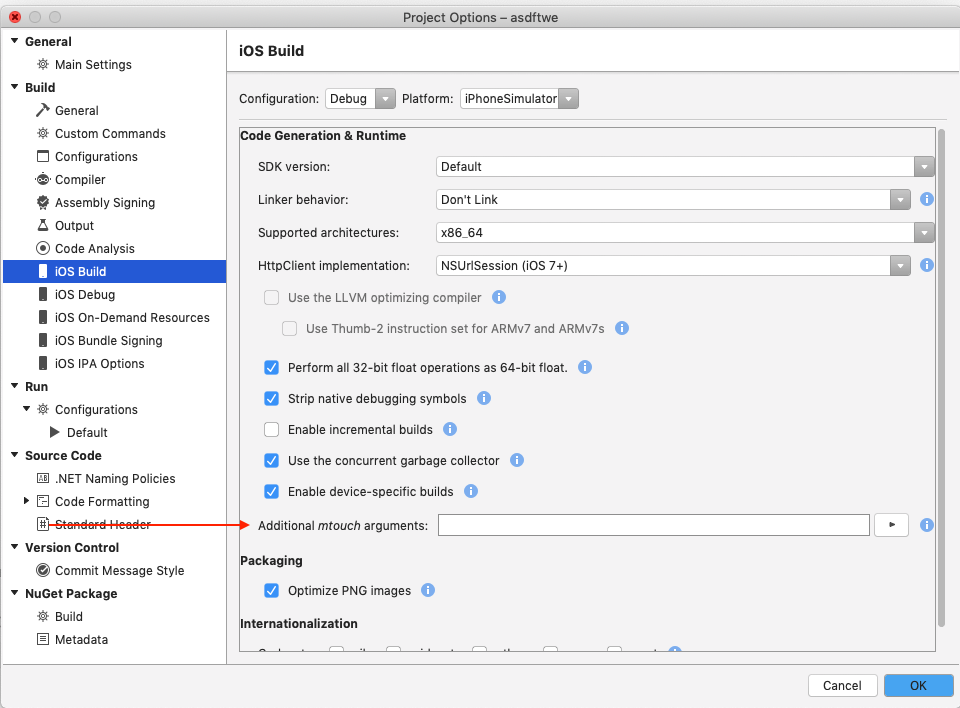
@swapnil591 - In your iOS project options, look for iOS Build -> Additional mtouch arguments.
chamons
on 22 Oct 2019
Related issues
 mrward
·
4Comments
mrward
·
4Comments
 iulian-mirica
·
3Comments
iulian-mirica
·
3Comments
 Mikilll94
·
4Comments
Mikilll94
·
4Comments
 ormaa
·
3Comments
rolfbjarne
·
4Comments
ormaa
·
3Comments
rolfbjarne
·
4Comments
Most helpful comment
Removing the LLVM, setting Linker behvaiour to Link Framework SDKs and adding --linksdkonly did the job.
Thanks