Xamarin.forms: [Bug] Why the hamburger icon of MasterDetailPage is still the default icon even after we changed the hamburger icon when we switch pages.
Description
After we used MasterDetailPageRenderer to change the hamburger icon of MasterDetailPage, it worked.
But the problem is that during page switching, the icon is still the default icon not the icon we want.
Steps to Reproduce
- create a MasterDetailPage app;
- create a class MyMasterDetailRenderer which implements MasterDetailPageRenderer in android platform;
[assembly: ExportRenderer(typeof(MasterDetailPage), typeof(MyMasterDetailRenderer))]
namespace MasterApp0316.Droid
{
    public  class MyMasterDetailRenderer: MasterDetailPageRenderer
    {

        public MyMasterDetailRenderer(Context context) : base(context)
        {
        }

        protected override void OnLayout(bool changed, int l, int t, int r, int b)
        {
            base.OnLayout(changed, l, t, r, b);
            var toolbar = FindViewById<Android.Support.V7.Widget.Toolbar>(Resource.Id.toolbar);
            for (var i = 0; i < toolbar.ChildCount; i++)
            {
                var imageButton = toolbar.GetChildAt(i) as Android.Widget.ImageButton;

                var drawerArrow = imageButton?.Drawable as DrawerArrowDrawable;
                if (drawerArrow == null)
                    continue;

                bool displayBack = false;
                var app = Xamarin.Forms.Application.Current;

                var detailPage = (app.MainPage as MasterDetailPage).Detail;

                var navPageLevel = detailPage.Navigation.NavigationStack.Count;
                if (navPageLevel > 1)
                    displayBack = true;

                if (!displayBack)
                    ChangeIcon(imageButton, Resource.Drawable.test2);
                //if (displayBack)
                //    ChangeIcon(imageButton, Resource.Drawable.test2);

            }

        }

        private void ChangeIcon(Android.Widget.ImageButton imageButton, int id)
        {
            if (Android.OS.Build.VERSION.SdkInt >= Android.OS.BuildVersionCodes.Lollipop)
                imageButton.SetImageDrawable(Context.GetDrawable(id));
            imageButton.SetImageResource(id);
        }
    }
}
- run in android device;
Expected Behavior
We hope the hamburger icon of MasterDetailPage will been changed all the time even when we switch pages.
Actual Behavior
The hamburger icon of MasterDetailPage is indeed changed , but when we switch pages, the hamburger icon is still the default icon.
Basic Information
Screenshots
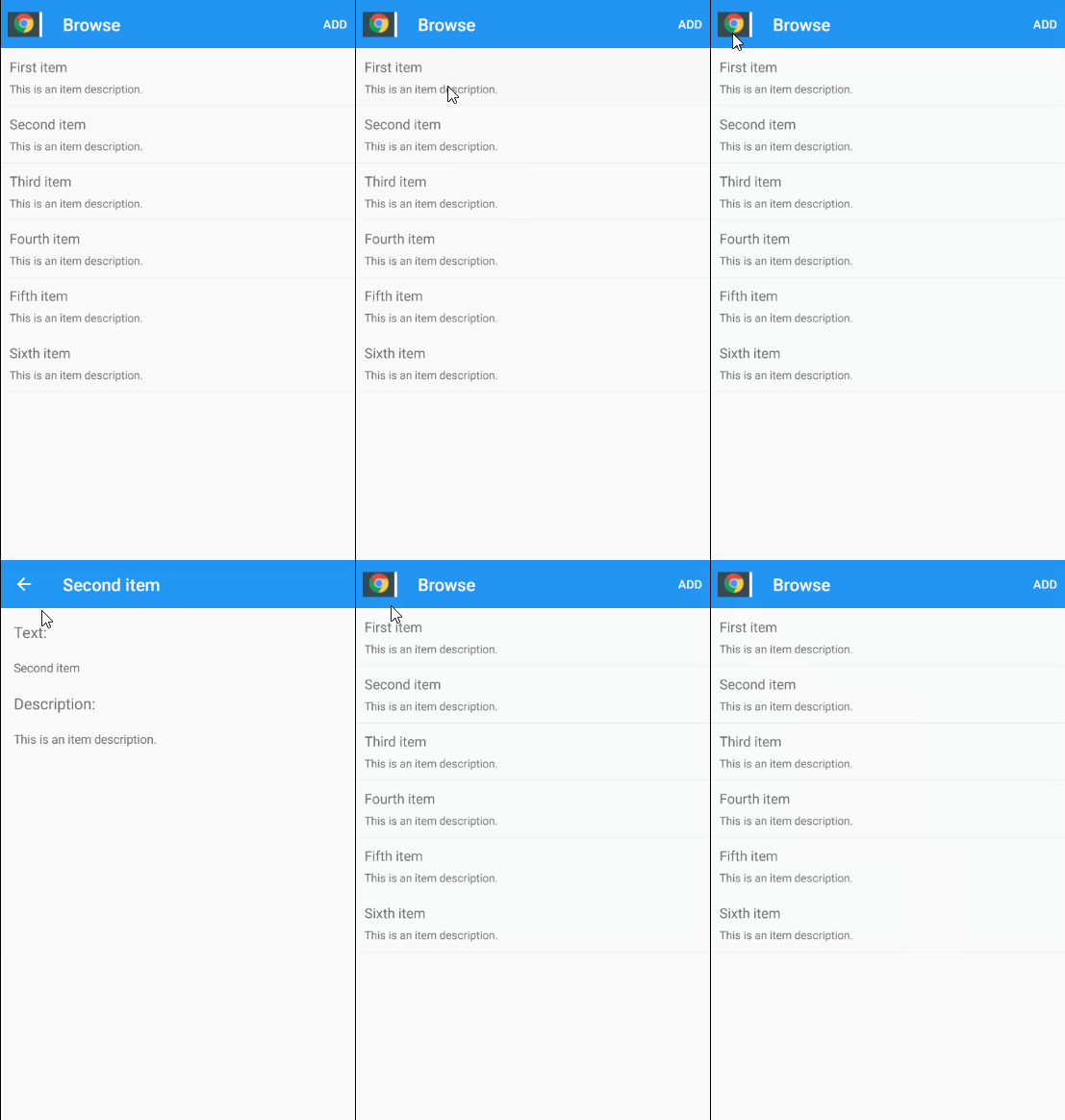
Reproduction Link
Workaround
 jessiezh0320
All 4 comments
The custom icon is set only when there is no hierarchy in the navigation stack and when the page transition ends.
You have different options:
- Create a cusotm renderer of
NavigationPageRendererand disable the animation when doing Pop. - If you want to keep the animation, overwrite the hamburger icon and back icon.
I have modified your sample:
Issue122742.zip

 jsuarezruiz
on 8 Oct 2020
jsuarezruiz
on 8 Oct 2020
@jsuarezruiz , so there is no way to inject custom transition animation? It's either disable animation completely, or use default "three-lines-to-arrow" animation, right?
 SergTomcat
on 12 Oct 2020
SergTomcat
on 12 Oct 2020
@SergTomcat I'm not quite following the conversation here.
If you want to use a custom icon you can try to copy what Shell does here and implement your own DrawerArrowDrawable
And then you could apply some sort of animation to that
For example if I do this on a NavigationRenderer I can control the animation
```C#
using System.Threading.Tasks;
using Android.Animation;
using Android.Content;
using Android.Support.V7.Graphics.Drawable;
using Issue122742.Droid.Renderers;
using Xamarin.Forms;
using Xamarin.Forms.Platform.Android.AppCompat;
[assembly: ExportRenderer(typeof(NavigationPage), typeof(MyNavigationPageRenderer))]
namespace Issue122742.Droid.Renderers
{
public class MyNavigationPageRenderer : NavigationPageRenderer
{
public MyNavigationPageRenderer(Context c) : base(c)
{ }
    protected override Task<bool> OnPopToRootAsync(Page page, bool animated)
    {
        AnimateArrowOut();
        return base.OnPopToRootAsync(page, false);
    }

    protected override Task<bool> OnPopViewAsync(Page page, bool animated)
    {
        AnimateArrowOut();
        return base.OnPopViewAsync(page, false);
    }

    protected override Task<bool> OnPushAsync(Page view, bool animated)
    {
        return base.OnPushAsync(view, true);
    }

    async void AnimateArrowOut()
    {
        await Task.Delay(1);
        var toolbar = FindViewById<Android.Support.V7.Widget.Toolbar>(Resource.Id.toolbar);
        var icon = toolbar.NavigationIcon as DrawerArrowDrawable;

        if (icon == null)
            return;

        ValueAnimator valueAnim = ValueAnimator.OfFloat(1, 0);
        valueAnim.SetDuration(2000);
        valueAnim.Update += (s, a) => icon.Progress = (float)a.Animation.AnimatedValue;
        valueAnim.Start();
    }
}
}
```
i'm guessing the switch back to Hamburger is happening inside native android as the progress value on DrawerArrowDrawable changes from 1 to 0. I don't think that's something we are doing
 PureWeen
on 31 Oct 2020
PureWeen
on 31 Oct 2020
@PureWeen, thank you. I think that's what I was looking for.
SergTomcat
on 1 Nov 2020
Related issues
 jgold6
·
3Comments
jgold6
·
3Comments
 deakjahn
·
3Comments
deakjahn
·
3Comments
 simontocknell
·
3Comments
simontocknell
·
3Comments
 Hudhud
·
3Comments
Hudhud
·
3Comments
 mattregul
·
3Comments
mattregul
·
3Comments