Xamarin.forms: [Bug] ITMS-90809: Deprecated API Usage - App updates that use UIWebView will no longer be accepted as of December 2020.
Description
Once again, App Store Connect is warning about deprecated API usage for UIWebView. This issue was occurring with Xamarin 3.3.1 and we followed https://devblogs.microsoft.com/xamarin/uiwebview-deprecation-xamarin-forms/ in order to suppress this warning. Recently we have updated to Xamarin 4.8 and the problem is back.
Can find nothing online to correct this issue.
Steps to Reproduce
- NuGet latest Xamarin 4.8.0.1451
- Use Xamarin.Forms.WebView
- [AEGFuelsMobileApp.iOS project properties]
iOS Build - Additional mtouch arguments
--optimize=experimental-xforms-product-type - Submit IPA to App Store Connect
Expected Behavior
No depreciation message.
Actual Behavior
Received depreciation message...
We identified one or more issues with a recent delivery for your app, "AEG Fuels Mobile" 1.18.7 (2020.9.22.1). Your delivery was successful, but you may wish to correct the following issues in your next delivery:
ITMS-90809: Deprecated API Usage - App updates that use UIWebView will no longer be accepted as of December 2020. Instead, use WKWebView for improved security and reliability. Learn more (https://developer.apple.com/documentation/uikit/uiwebview).
Basic Information
- Version with issue: 4.8
- Last known good version: 3.3.1
- IDE: Visual Studio Professional 2019 Version 4.8.03752
Platform Target Frameworks:
- iOS: 14.0.0.0
- Android: 11.0.2.0
- UWP: N/A
Nuget Packages:
Microsoft Visual Studio Professional 2019
Version 16.7.4
VisualStudio.16.Release/16.7.4+30517.126
Microsoft .NET Framework
Version 4.8.03752
Installed Version: Professional
Visual C++ 2019 00435-20052-85367-AA449
Microsoft Visual C++ 2019
ADL Tools Service Provider 1.0
This package contains services used by Data Lake tools
ASA Service Provider 1.0
ASP.NET AJAX Control Toolkit 1.0
ASP.NET AJAX Control Toolkit Visual Studio integration package
ASP.NET and Web Tools 2019 16.7.532.28833
ASP.NET and Web Tools 2019
ASP.NET Core Razor Language Services 16.1.0.2035807+72d099b977d3a85e65fa3b0614ca8cfc803fef02
Provides languages services for ASP.NET Core Razor.
ASP.NET Web Frameworks and Tools 2012 16.7.532.28833
For additional information, visit https://www.asp.net/
ASP.NET Web Frameworks and Tools 2019 16.7.532.28833
For additional information, visit https://www.asp.net/
Azure App Service Tools v3.0.0 16.7.532.28833
Azure App Service Tools v3.0.0
Azure Data Lake Node 1.0
This package contains the Data Lake integration nodes for Server Explorer.
Azure Data Lake Tools for Visual Studio 2.4.6000.0
Microsoft Azure Data Lake Tools for Visual Studio
Azure Functions and Web Jobs Tools 16.7.532.28833
Azure Functions and Web Jobs Tools
Azure Stream Analytics Tools for Visual Studio 2.4.6000.0
Microsoft Azure Stream Analytics Tools for Visual Studio
C# Tools 3.7.0-6.20459.4+7ee7c540e3bf19765695b1331c946ddf986d1516
C# components used in the IDE. Depending on your project type and settings, a different version of the compiler may be used.
Common Azure Tools 1.10
Provides common services for use by Azure Mobile Services and Microsoft Azure Tools.
Extensibility Message Bus 1.2.6 (master@34d6af2)
Provides common messaging-based MEF services for loosely coupled Visual Studio extension components communication and integration.
Fabric.DiagnosticEvents 1.0
Fabric Diagnostic Events
IntelliCode Extension 1.0
IntelliCode Visual Studio Extension Detailed Info
Microsoft Azure HDInsight Azure Node 2.4.6000.0
HDInsight Node under Azure Node
Microsoft Azure Hive Query Language Service 2.4.6000.0
Language service for Hive query
Microsoft Azure Service Fabric Tools for Visual Studio 16.0
Microsoft Azure Service Fabric Tools for Visual Studio
Microsoft Azure Stream Analytics Language Service 2.4.6000.0
Language service for Azure Stream Analytics
Microsoft Azure Stream Analytics Node 1.0
Azure Stream Analytics Node under Azure Node
Microsoft Azure Tools 2.9
Microsoft Azure Tools for Microsoft Visual Studio 2019 - v2.9.30701.1
Microsoft Continuous Delivery Tools for Visual Studio 0.4
Simplifying the configuration of Azure DevOps pipelines from within the Visual Studio IDE.
Microsoft JVM Debugger 1.0
Provides support for connecting the Visual Studio debugger to JDWP compatible Java Virtual Machines
Microsoft Library Manager 2.1.79+ge3567815aa.RR
Install client-side libraries easily to any web project
Microsoft MI-Based Debugger 1.0
Provides support for connecting Visual Studio to MI compatible debuggers
Microsoft Visual C++ Wizards 1.0
Microsoft Visual C++ Wizards
Microsoft Visual Studio Tools for Containers 1.1
Develop, run, validate your ASP.NET Core applications in the target environment. F5 your application directly into a container with debugging, or CTRL + F5 to edit & refresh your app without having to rebuild the container.
Microsoft Visual Studio VC Package 1.0
Microsoft Visual Studio VC Package
Mono Debugging for Visual Studio 16.7.5 (112c7bc)
Support for debugging Mono processes with Visual Studio.
Node.js Tools 1.5.20701.1 Commit Hash:b0da3724234b78593207434292d9f891440edea1
Adds support for developing and debugging Node.js apps in Visual Studio
NuGet Package Manager 5.7.0
NuGet Package Manager in Visual Studio. For more information about NuGet, visit https://docs.nuget.org/
Office Developer Tools for Visual Studio 16.0.30215.00
Microsoft Office Developer Tools for Visual Studio
ProjectServicesPackage Extension 1.0
ProjectServicesPackage Visual Studio Extension Detailed Info
SQL Server Data Tools 16.0.62008.03130
Microsoft SQL Server Data Tools
Test Adapter for Boost.Test 1.0
Enables Visual Studio's testing tools with unit tests written for Boost.Test. The use terms and Third Party Notices are available in the extension installation directory.
Test Adapter for Google Test 1.0
Enables Visual Studio's testing tools with unit tests written for Google Test. The use terms and Third Party Notices are available in the extension installation directory.
ToolWindowHostedEditor 1.0
Hosting json editor into a tool window
TypeScript Tools 16.0.20702.2001
TypeScript Tools for Microsoft Visual Studio
Visual Basic Tools 3.7.0-6.20459.4+7ee7c540e3bf19765695b1331c946ddf986d1516
Visual Basic components used in the IDE. Depending on your project type and settings, a different version of the compiler may be used.
Visual C++ for Cross Platform Mobile Development (Android) 16.0.30309.115
Visual C++ for Cross Platform Mobile Development (Android)
Visual F# Tools 10.10.0.0 for F# 4.7 16.7.0-beta.20361.3+3ef6f0b514198c0bfa6c2c09fefe41a740b024d5
Microsoft Visual F# Tools 10.10.0.0 for F# 4.7
Visual Studio Code Debug Adapter Host Package 1.0
Interop layer for hosting Visual Studio Code debug adapters in Visual Studio
Visual Studio Container Tools Extensions (Preview) 1.0
View, manage, and diagnose containers within Visual Studio.
Visual Studio Tools for CMake 1.0
Visual Studio Tools for CMake
Visual Studio Tools for Containers 1.0
Visual Studio Tools for Containers
Visual Studio Tools for Kubernetes 1.0
Visual Studio Tools for Kubernetes
VisualStudio.DeviceLog 1.0
Information about my package
VisualStudio.Foo 1.0
Information about my package
VisualStudio.Mac 1.0
Mac Extension for Visual Studio
Workflow Manager Tools 1.0 1.0
This package contains the necessary Visual Studio integration components for Workflow Manager.
Xamarin 16.7.000.452 (d16-7@033b1a7)
Visual Studio extension to enable development for Xamarin.iOS and Xamarin.Android.
Xamarin Designer 16.7.0.495 (remotes/origin/d16-7@79c0c522c)
Visual Studio extension to enable Xamarin Designer tools in Visual Studio.
Xamarin Templates 16.7.85 (1bcbbdf)
Templates for building iOS, Android, and Windows apps with Xamarin and Xamarin.Forms.
Xamarin.Android SDK 11.0.2.0 (d16-7/025fde9)
Xamarin.Android Reference Assemblies and MSBuild support.
Mono: 83105ba
Java.Interop: xamarin/java.interop/d16-7@1f3388a
ProGuard: Guardsquare/proguard/proguard6.2.2@ebe9000
SQLite: xamarin/sqlite/3.32.1@1a3276b
Xamarin.Android Tools: xamarin/xamarin-android-tools/d16-7@017078f
Xamarin.iOS and Xamarin.Mac SDK 14.0.0.0 (7ec3751a1)
Xamarin.iOS and Xamarin.Mac Reference Assemblies and MSBuild support.
- Affected Devices:
Workaround
This no longer works...
https://devblogs.microsoft.com/xamarin/uiwebview-deprecation-xamarin-forms/
 donaldashworth
All 11 comments
@donaldashworth Maybe some libs you recently added contain UIWebView? You can build app bundle, change file extension from .ipa to .zip, unpack and use "grep" command in terminal to search for UIWebView, it should return file name which contain this deprecated control.
 kcrg
on 23 Sep 2020
kcrg
on 23 Sep 2020
Nope.
From: Kacper Tryniecki notifications@github.com
Sent: Wednesday, September 23, 2020 10:23
To: xamarin/Xamarin.Forms Xamarin.Forms@noreply.github.com
Cc: Donald Ashworth donald.ashworth@mmcinc.com; Mention mention@noreply.github.com
Subject: Re: [xamarin/Xamarin.Forms] [Bug] ITMS-90809: Deprecated API Usage - App updates that use UIWebView will no longer be accepted as of December 2020. (#12217)
@donaldashworthhttps://github.com/donaldashworth Maybe some libs you recently added contain UIWebView? You can build app bundle, change file extension from .ipa to .zip, unpack and use "grep" command in terminal to search for UIWebView, it should return path to file which contain this deprecated control.
—
You are receiving this because you were mentioned.
Reply to this email directly, view it on GitHubhttps://github.com/xamarin/Xamarin.Forms/issues/12217#issuecomment-697534439, or unsubscribehttps://github.com/notifications/unsubscribe-auth/APMOEMS3HL4MMV5YKGMZSDDSHIHERANCNFSM4RXDRTSA.
donaldashworth
on 23 Sep 2020
@donaldashworth can you test with the latest 5.0 pre1?
 PureWeen
on 24 Sep 2020
PureWeen
on 24 Sep 2020
No. I've wasted hundreds of hours on various Xamarin issues. I think you guys can find a WebView sample and try that yourselves.
donaldashworth
on 24 Sep 2020
Add this --optimize=force-rejected-types-removal,experimental-xforms-product-type --warn-on-type-ref=UIKit.UIWebView to your MtouchExtraArgs in the csproj file. and make sure you're on Xamarin.Forms 4.6 or higher
 AmrAlSayed0
on 24 Sep 2020
AmrAlSayed0
on 24 Sep 2020
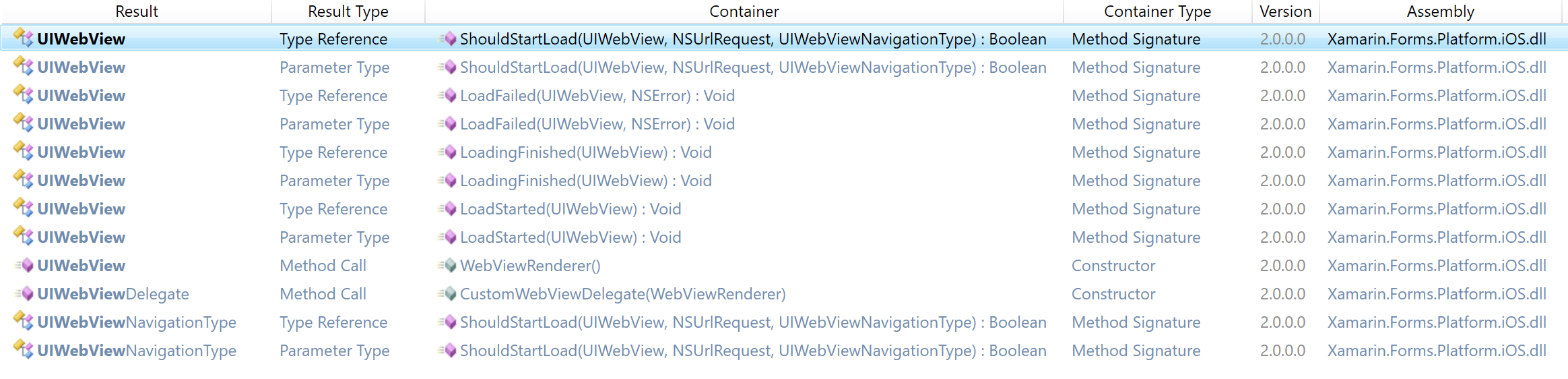
I am using Xamarin.Forms 4.8.0.1451
I have used the following grep command from my App.iOS/bin/iPhone/Debug (terminal) folder:
grep -r "UIWebView" *
returned:
Binary file Xamarin.Forms.Platform.iOS.dll
Binary file device-builds/iphone8.1-14.0/App.iOS.app/App.iOS
 KMWenyon
on 25 Sep 2020
KMWenyon
on 25 Sep 2020
I am pretty sure that is normal since the Xamarin team left UIWebView in Forms for backward compatibility….until December 2020
From: Kenneth Wenyon notifications@github.com
Sent: Thursday, September 24, 2020 17:55
To: xamarin/Xamarin.Forms Xamarin.Forms@noreply.github.com
Cc: Donald Ashworth donald.ashworth@mmcinc.com; Mention mention@noreply.github.com
Subject: Re: [xamarin/Xamarin.Forms] [Bug] ITMS-90809: Deprecated API Usage - App updates that use UIWebView will no longer be accepted as of December 2020. (#12217)
I am using Xamarin.Forms 4.8.0.1451
I have used the following grep command from my App.iOS/bin/iPhone/Debug (terminal) folder:
grep -r "UIWebView" *
returned:
Binary file Xamarin.Forms.Platform.iOS.dll
Binary file device-builds/iphone8.1-14.0/App.iOS.app/App.iOS
https://user-images.githubusercontent.com/3248973/94208130-20153900-fe97-11ea-87b5-8d57bc171a99.png
—
You are receiving this because you were mentioned.
Reply to this email directly, view it on GitHubhttps://github.com/xamarin/Xamarin.Forms/issues/12217#issuecomment-698629035, or unsubscribehttps://github.com/notifications/unsubscribe-auth/APMOEMQQLGL6PZLNXUWKEFTSHPE4TANCNFSM4RXDRTSA.
donaldashworth
on 25 Sep 2020
I am pretty sure that is normal since the Xamarin team left UIWebView in Forms for backward compatibility….until December 2020 From: Kenneth Wenyon notifications@github.com Sent: Thursday, September 24, 2020 17:55 To: xamarin/Xamarin.Forms Xamarin.Forms@noreply.github.com Cc: Donald Ashworth donald.ashworth@mmcinc.com; Mention mention@noreply.github.com Subject: Re: [xamarin/Xamarin.Forms] [Bug] ITMS-90809: Deprecated API Usage - App updates that use UIWebView will no longer be accepted as of December 2020. (#12217) I am using Xamarin.Forms 4.8.0.1451 I have used the following grep command from my App.iOS/bin/iPhone/Debug (terminal) folder: grep -r "UIWebView" * returned: Binary file Xamarin.Forms.Platform.iOS.dll Binary file device-builds/iphone8.1-14.0/App.iOS.app/App.iOS https://user-images.githubusercontent.com/3248973/94208130-20153900-fe97-11ea-87b5-8d57bc171a99.png — You are receiving this because you were mentioned. Reply to this email directly, view it on GitHub<#12217 (comment)>, or unsubscribehttps://github.com/notifications/unsubscribe-auth/APMOEMQQLGL6PZLNXUWKEFTSHPE4TANCNFSM4RXDRTSA.
The results mentioned above was also after adding the --optimize=force-rejected-types-removal,experimental-xforms-product-type --warn-on-type-ref=UIKit.UIWebView to my MtouchExtraArgs in the csproj file with link behavior 'Link All'
KMWenyon
on 25 Sep 2020
Really? Still the UIWebView wasn't removed? For me those flags removed all references of UIWebView even when Linking was set to None. It even worked in Debug configuration. I don't want to sound cliche but ... clean bin & obj folders and rebuild?
AmrAlSayed0
on 25 Sep 2020
Hey @donaldashworth (and others), sorry you're having trouble with this. I just verified with my sample I have been using for this, that 4.8.0.1451 and with the right configuration in place is accepted by Apple without any problem.
It seems unfortunately something doesn't play well in your scenarios. Could you double check that all the flags and things are still in the right place or that something has changed in that regard?
Also, the comment about trying it with 5.0-pre1 is with good reason; in that version the UIWebViewRenderer has been removed so there should be no additional flags or confusion things required. So if you could verify all is fixed with 5.0-pre1, it will make your life easier.
Anyway, I am more than happy to go through some things and see what we can find to clear this up.
 jfversluis
on 28 Sep 2020
jfversluis
on 28 Sep 2020
Closing this since there hasn't been a response in a while. If you still have issues, let me know or give Xamarin.Forms 5 (pre-release right now) a spin, since the WebViewRenderer causing this issue has been removed.
jfversluis
on 6 Nov 2020
Related issues
 EmilAlipiev
·
3Comments
EmilAlipiev
·
3Comments
 suihanhbr
·
3Comments
suihanhbr
·
3Comments
 sonic1015
·
3Comments
sonic1015
·
3Comments
 jamiewest
·
3Comments
jamiewest
·
3Comments
 mfeingol
·
3Comments
mfeingol
·
3Comments