Xamarin.forms: [Bug] [UWP] Switch control doesn't respond to dark mode
Description
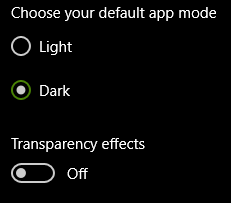
I have a Switch control in my app. It is always outlined in black with black text when it is off and therefore it goes invisible against a black/dark background. In the Windows 10 settings app, for example, a switch will become outlined in white with white text automatically when you switch to dark mode in the app. I would expect Xamarin to do the same thing.
Steps to Reproduce
- Add a switch to the page
- Have a black/dark background on the page
- Set the user theme
Application.Current.UserAppTheme = OSAppTheme.Dark; - Run the app on UWP
Expected Behavior
The switch is clearly visible with white outline and white text.
Actual Behavior
The switch blends into the background. Android works fine in this scenario. UWP is the only platform with text on a switch. The "OnColor" property works great on Android/UWP. I feel like there should be an "OffColor" property and/or a "TextColor" property that you could set for only UWP OR that the app should just react when you set the theme. I've written custom renderers before to try and get things to work better with a black background but in this case I just couldn't get to the bottom of it.
Basic Information
- Version with issue: 4.8
- Last known good version: N/A
- IDE: N/A
- Platform Target Frameworks:
- iOS:
- Android:
- UWP:
- Android Support Library Version:
- Nuget Packages:
- Affected Devices:
Screenshots
Light

Dark

Black

Reproduction Link
Just a regular Switch control, change the background of the page and switch the app theme
Application.Current.UserAppTheme = OSAppTheme.Dark;
<StackLayout Orientation="Horizontal">
<Label
Style="{StaticResource SettingsPropertyLabelStyle}"
Text="Fullscreen (UWP & Android):" />
<Switch />
</StackLayout>
Workaround
Cannot find one.
 BurkusCat
All 6 comments
Any general advice outside for dark mode theming outside of this particular issue would be much appreciated. I feel like I have to make quite odd "TextColor" settings on a per platform basis and things just don't end up looking like native dark mode apps (on Android or UWP).
BurkusCat
on 9 Aug 2020
I found out that I need to set the theme to the UWP app to correspond to the theme set in the Xamarin.Forms app code.
Here is what I did in the UWP MainPage.xaml.cs:
public sealed partial class MainPage
{
  public MainPage()
  {
      this.InitializeComponent();
      var app = new FindWords.App();
      LoadApplication(app);
      SetTheme(app.UserAppTheme);
      app.RequestedThemeChanged += App_RequestedThemeChanged;
    }

    private void App_RequestedThemeChanged(object sender, Xamarin.Forms.AppThemeChangedEventArgs e)
    {
      SetTheme(e.RequestedTheme);
    }

    private void SetTheme(Xamarin.Forms.OSAppTheme theme)
    {
      switch (theme)
      {
        case Xamarin.Forms.OSAppTheme.Dark: this.RequestedTheme = ElementTheme.Dark; break;
        case Xamarin.Forms.OSAppTheme.Light: this.RequestedTheme = ElementTheme.Light; break;
        case Xamarin.Forms.OSAppTheme.Unspecified: this.RequestedTheme = ElementTheme.Default; break;
      }
    }
  }
I did similar thing in the Android app as well, so that all controls follow the user-selected theme.
 JogyBlack
on 9 Aug 2020
JogyBlack
on 9 Aug 2020
Ah, that does the trick, thank you very much :). Out of curiosity, what were your equivalent changes in the Android project @JogyBlack?
Android works much better out of the box for me but I still needed to add some Xamarin styles for some controls. It would be nice if I could so a similar theme switch like your UWP example instead!
BurkusCat
on 9 Aug 2020
@BurkusCat Here is the equivalent code in MainActivity.cs in the Android project:
    protected override void OnCreate(Bundle savedInstanceState)
    {
      ...
      SetTheme(Xamarin.Forms.Application.Current.UserAppTheme);
      Xamarin.Forms.Application.Current.RequestedThemeChanged += App_RequestedThemeChanged;
    }

    private void App_RequestedThemeChanged(object sender, AppThemeChangedEventArgs e)
    {
      SetTheme(e.RequestedTheme);
    }

    private void SetTheme(OSAppTheme theme)
    {
      switch (theme)
      {
        case OSAppTheme.Dark: AppCompatDelegate.DefaultNightMode = AppCompatDelegate.ModeNightYes; break;
        case OSAppTheme.Light: AppCompatDelegate.DefaultNightMode = AppCompatDelegate.ModeNightNo; break;
        case OSAppTheme.Unspecified: AppCompatDelegate.DefaultNightMode = AppCompatDelegate.ModeNightFollowSystem; break;
      }
    }
There is a difference in the behavior - under UWP, when the theme is changed from my Settings page, it redraws the page, while on Android it apparently reloads the main activity, thus going to the main page of the app, but I think it was ok, so haven't looked for a way to keep the user in the settings page.
JogyBlack
on 9 Aug 2020
@JogyBlack Brilliant! Works perfectly. I did need to switch to using the DayNight theme in styles.xml like so:
<?xml version="1.0" encoding="utf-8" ?>
<resources>

  <style name="MainTheme" parent="MainTheme.Base">
  </style>

  <!-- Base theme applied no matter what API -->
  <style name="MainTheme.Base" parent="Theme.AppCompat.DayNight.DarkActionBar">
...
To fix your issue with the entire activity being reloaded you just need to set ConfigChanges.UiMode at the top of MainActivity.cs so the activity is able to handle the theme change:
        ...
        ConfigurationChanges = ConfigChanges.ScreenSize | ConfigChanges.Orientation | ConfigChanges.UiMode)]
    public class MainActivity : global::Xamarin.Forms.Platform.Android.FormsAppCompatActivity
    ...
@BurkusCat Thanks for the tip - adding the ConfigChanges.UiMode now does not reload the activity.
But there is a small issue that the RadioButtons on the page do not change their colors along with theme change until I navigate to another page and then back to that settings page.
JogyBlack
on 10 Aug 2020
Related issues
 simontocknell
·
3Comments
simontocknell
·
3Comments
 samhouts
·
3Comments
samhouts
·
3Comments
 Stensan
·
3Comments
Stensan
·
3Comments
 Papirosnik
·
3Comments
Papirosnik
·
3Comments
 jgold6
·
3Comments
jgold6
·
3Comments