Xamarin.Forms label not rendered correctly on iOS
_This issue has been moved from a ticket on Developer Community._
A label is not rendered correctly while others are.
Problem does not show on android or UWP, only on iOS.
The last words of the problematic label don't get rendered in some situations
the label does get broken up into 2 or 3 lines in some cases
added multiple screenshots and my view
not adding system logs because i'm reporting this problem from my windows pc and not my mac mini where i build my app.
Original Comments
Visual Studio Feedback System on 6/29/2020, 10:51 PM:
We have directed your feedback to the appropriate engineering team for further evaluation. The team will review the feedback and notify you about the next steps.
Original Solutions
(no solutions)
 vsfeedback
All 8 comments
Can you please attach a small project that demonstrates this issue? Thanks!
 samhouts
on 1 Jul 2020
samhouts
on 1 Jul 2020
see also #11266
samhouts
on 1 Jul 2020
I am not sure this is not a duplicate of #11266, my label was not overlapping, it was clipped (not rendering completely).
I found a fix for my problem.
The label in question had a padding assigned. After I updated it to a margin the rendering problem went away on iOS.
I am sorry to say I have no time to provide a sample project. I can however give you the xaml of the page in question, it is attached.
The label in question:
 sjorsmiltenburg
on 7 Jul 2020
sjorsmiltenburg
on 7 Jul 2020
@sjorsmiltenburg which label in your XAML is problematic? Can you attach a screen shot?
 PureWeen
on 10 Jul 2020
PureWeen
on 10 Jul 2020

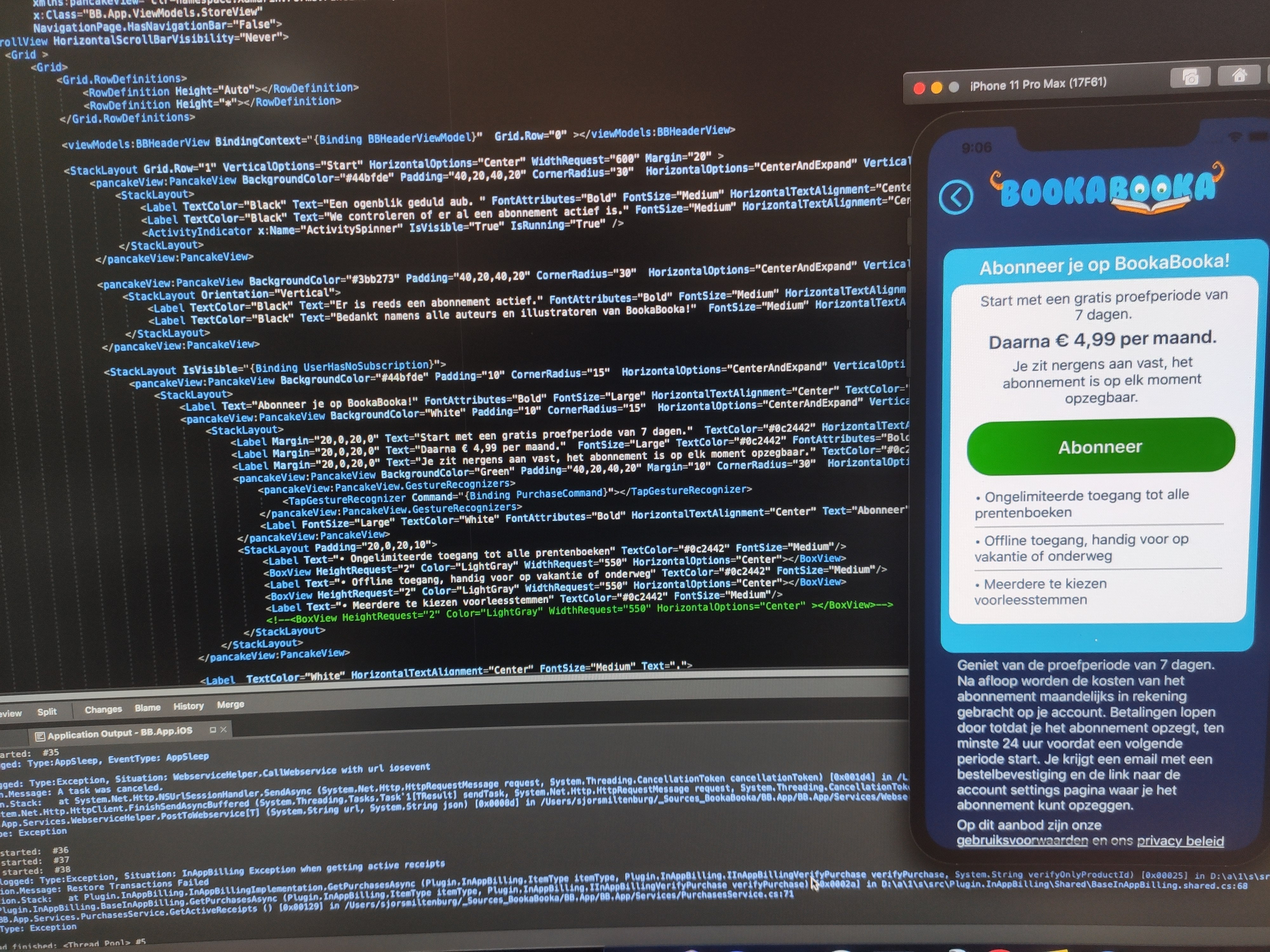
one screenshot with padding and text dissapearring, one with margin and text showing
sjorsmiltenburg
on 14 Jul 2020
Based on the XAML file I have created a repro sample:
Issue11270.zip
Can reproduce the issue on Xamarin.Forms 4.7 (and 4.6):

But works as expected in 4.5:

 jsuarezruiz
on 17 Jul 2020
jsuarezruiz
on 17 Jul 2020
More details about the differences (4.7 vs 4.5):
4.7

4.5

jsuarezruiz
on 17 Jul 2020
I have also hit this issue and remedied the problem by using margin instead of padding.
The attached is a simple example solution showing a word wrapped label, one with padding & one with margin. By varying the font size or text content it is possible to trigger this issue, but only in iOS. The behaviour doesn't occur at all font sizes and appears to just depend on where the text ends.

Running the attached in an iPhone 8 emulator should demonstrate the problem.
 Confusedfish
on 1 Oct 2020
Confusedfish
on 1 Oct 2020
Related issues
 xabre
·
3Comments
samhouts
·
3Comments
xabre
·
3Comments
samhouts
·
3Comments
 Papirosnik
·
3Comments
Papirosnik
·
3Comments
 mattregul
·
3Comments
mattregul
·
3Comments
 deakjahn
·
3Comments
deakjahn
·
3Comments
Most helpful comment
I am not sure this is not a duplicate of #11266, my label was not overlapping, it was clipped (not rendering completely).
I found a fix for my problem.
The label in question had a padding assigned. After I updated it to a margin the rendering problem went away on iOS.
I am sorry to say I have no time to provide a sample project. I can however give you the xaml of the page in question, it is attached.
The label in question:
New Text Document.txt