Xamarin.forms: [Bug] Xamarin.Forms 4.5.0.396 iOS FlexLayout and TemplateSelector issue
Description
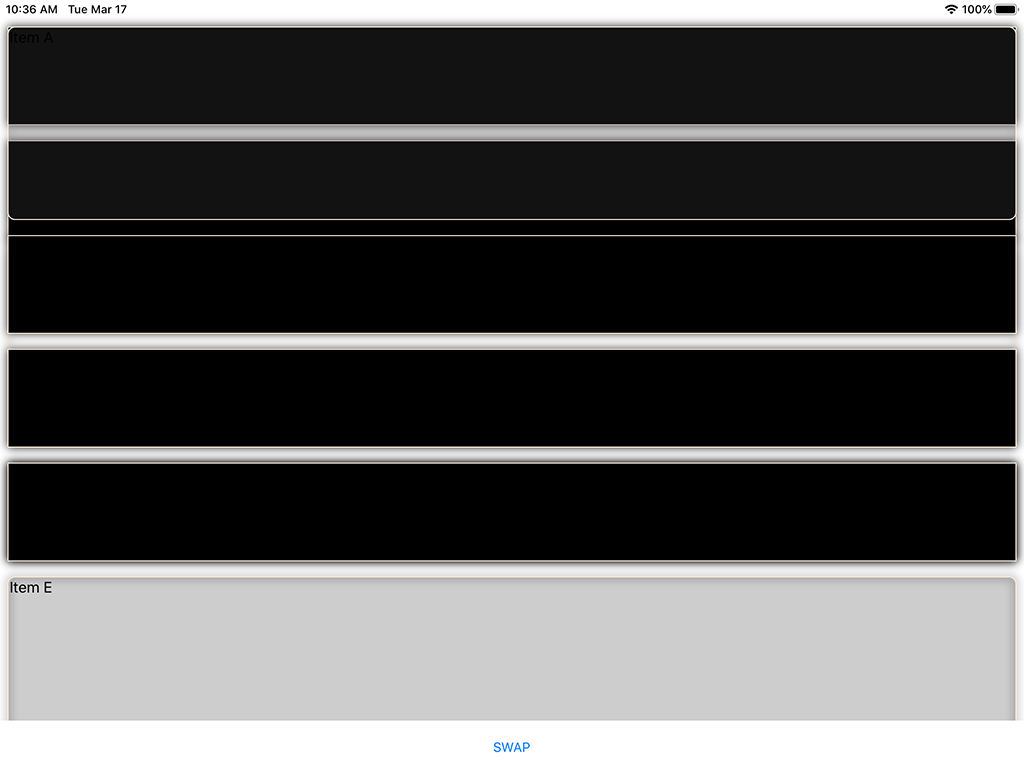
When using a FlexLayout with a TemplateSelector, rendering of the items in the collection becomes corrupted when switching between different collections.
Steps to Reproduce
- Create a page with a FlexLayout using BindableLayout.TemplateSelector with at least 2 different DataTemplates
- Bind the FlexLayout to a collection of objects.
- After displaying, change the collection of objects
Expected Behavior
Displays each DataTemplate correctly
Actual Behavior
Display is corrupted with overlapping renderings of DataTemplates
Basic Information
Version with issue:
4.5.0.396Last known good version:
4.4.0.991757IDE: VS 2019 16.4.6
- Platform Target Frameworks:
- iOS: 13.10.0.21
- Android: No Issues
- UWP: No Issues
- Affected Devices: All iOS devices
Screenshots

Reproduction Link
Workaround
Downgrade to Xamarin.Forms 4.4
 NebulaSleuth
All 4 comments
The second image is displaying correctly which occurs when first running. After clicking 'SWAP' button the first image is the result.
NebulaSleuth
on 17 Mar 2020
Also, I have tried:
            Xamarin.Forms.Forms.SetFlags("UseLegacyRenderers");
            global::Xamarin.Forms.Forms.Init();
But the problem still occurs.
This is a big problem because I need to release my App soon, and Apple is rejecting submissions because of the UIWebView issue, and the fix for that requires 4.5. Catch<->22
NebulaSleuth
on 17 Mar 2020
@NebulaSleuth Workaround is to set "HasShadow=false" for Frame in 4.5.x version. Problem is with Frame not with FlexLayout
 yurkinh
on 18 Mar 2020
yurkinh
on 18 Mar 2020
@yurkinh Thanks it works.
NebulaSleuth
on 18 Mar 2020
Related issues
 sonic1015
·
3Comments
sonic1015
·
3Comments
 mattregul
·
3Comments
mattregul
·
3Comments
 EmilAlipiev
·
3Comments
EmilAlipiev
·
3Comments
 Papirosnik
·
3Comments
Papirosnik
·
3Comments
 deakjahn
·
3Comments
deakjahn
·
3Comments