Xamarin.forms: iOS Only: Font icons do not always update when switching from light to dark mode (and vice-versa)[Bug]
Description
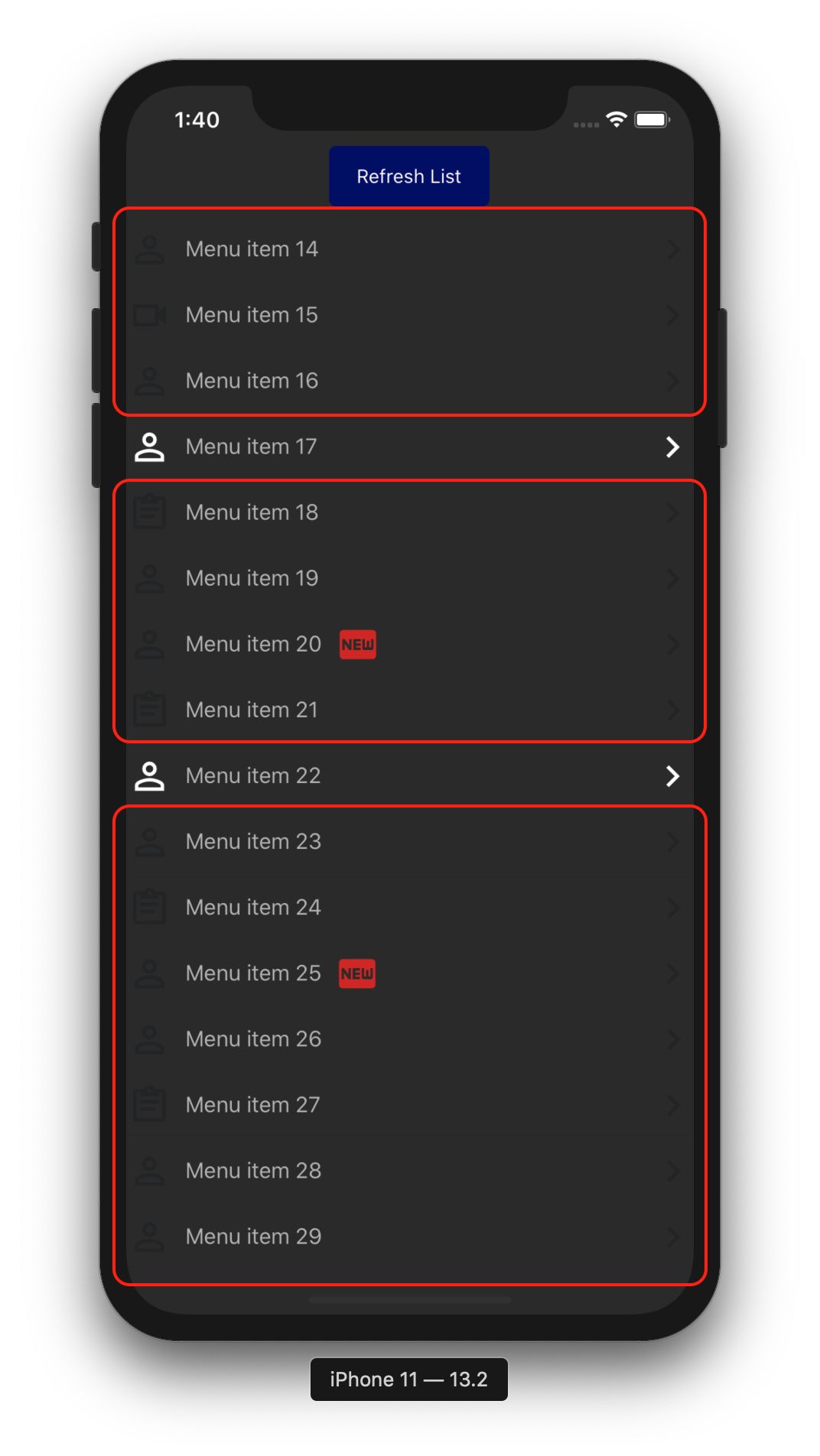
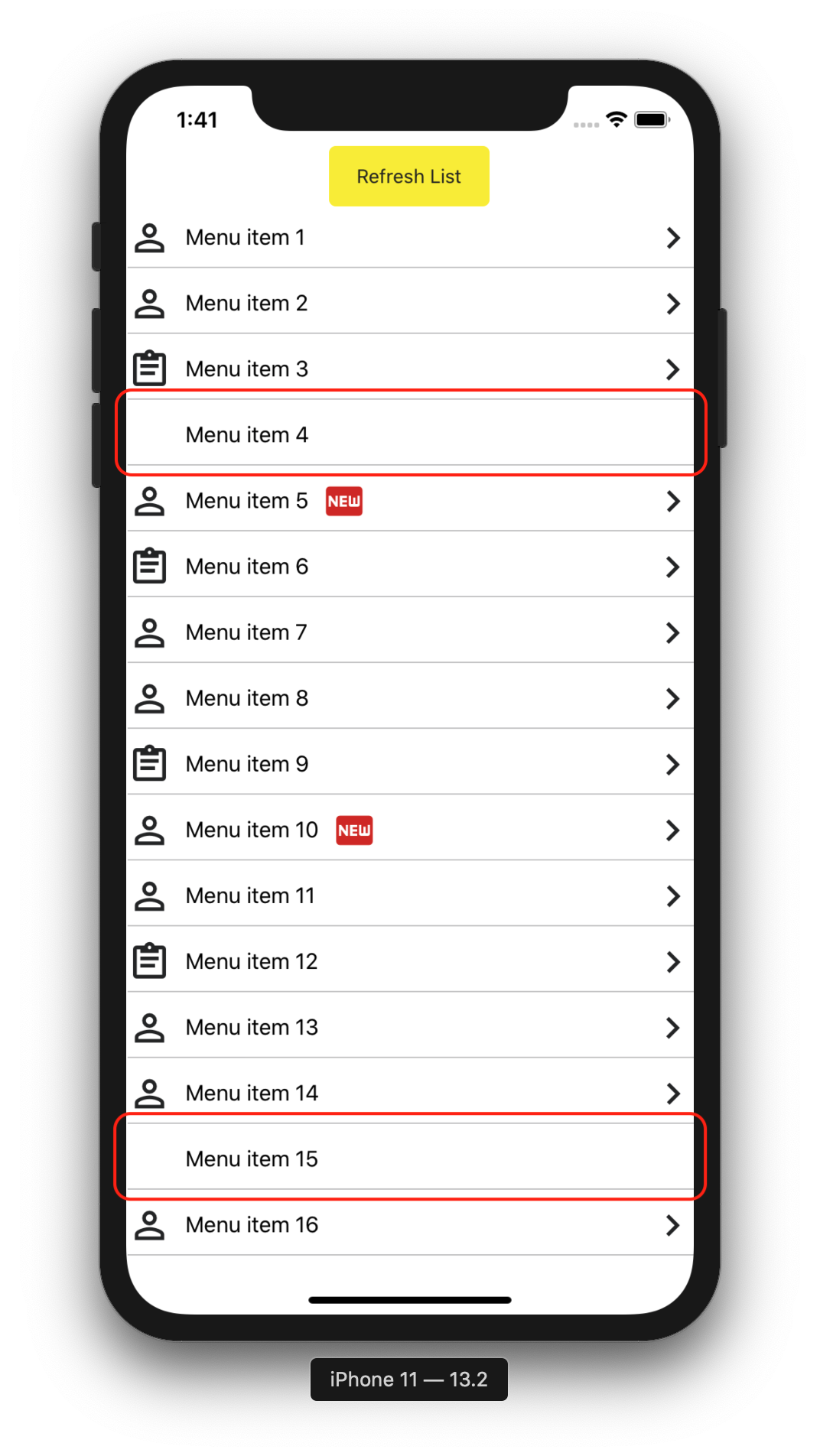
In a Xamarin.Forms app designed to support dark vs. light mode, font icons in CollectionView items will arbitrarily update to their correct colors based on dark/light mode. While switching back and forth with the app running in the background, icons will also fail to return to light mode after the app had been open in dark mode.
In addition, if the CollectionView has enough items in it to allow the user to scroll items in and out of view, the rows whose colors have updated to the appropriate mode will often actually change as you scroll items out and then back into view.
Steps to Reproduce
There is quite a bit of set-up involved, as this issue involves making use of font icons (I chose Material Design Icons as demonstrated in a blog by James Montemagno (https://montemagno.com/using-font-icons-in-xamarin-forms-goodbye-images-hello-fonts/).
Setting up dark mode support is also non-trivial in my opinion.
To make this easy to replicate and troubleshoot, I have created a demo app that reproduces the issue (again, this is on iOS only... Android seems to work flawlessly): https://github.com/jbachelor/FontIconColorChangeIssue
Expected Behavior
Icons should update on iOS exactly as seen in the Android version of the app.
Actual Behavior
Icons seem to update arbitrarily. Some will, some will not. Occasionally I have seen none of the icons update at all when switching from light to dark mode.
Basic Information
- Version with issue: 4.4.0.991265
- Last known good version: n/a
- IDE: VS4Mac
- Platform Target Frameworks:
- iOS: I've tried with 8.0, 9.3, 10.3, 11.4, 12.4, and 13.2
- Android: 9.0
- UWP: Not tested.
- Android Support Library Version: Xamarin.Android.Support.Core.Utils 28.0.0.3
- Nuget Packages: Plugin.CurrentActivity 2.1.0.4 (https://github.com/jamesmontemagno/CurrentActivityPlugin)
- Affected Devices: Several iOS simulators tested against as well as a physical iPhone X.
Screenshots
Reproduction Link
 jbachelor
All 2 comments
Hey @jbachelor thanks for the report!
With 4.6 we have completed a lot of the light/dark mode support and I have just tested your reproduction project against 4.6 stable that was just released and I can't seem to reproduce the issue anymore. Could you please verify that? Thanks!
 jfversluis
on 30 Apr 2020
jfversluis
on 30 Apr 2020
Thanks so much, @jfversluis... I just updated all nuget packages in the repro sln, and the icons switch back and forth perfectly now. Thanks so much for you and your team's hard work!
jbachelor
on 30 Apr 2020
Related issues
 suihanhbr
·
3Comments
suihanhbr
·
3Comments
 joseluisct
·
3Comments
joseluisct
·
3Comments
 leobragatti
·
3Comments
leobragatti
·
3Comments
 sonic1015
·
3Comments
sonic1015
·
3Comments
 simontocknell
·
3Comments
simontocknell
·
3Comments