Xamarin.forms: [Bug] IndicatorView -> Doesn't Go to Last Indicator When PeekAreaInsets is Set
Description
When we use PeekAreaInsets the indicator view never goes to the final dot. If it is set to 0 then it will work.
Steps to Reproduce
- Create a horizontal carouselview and set PeekAreaInsets
- Add Indicator below it
- Try to scroll through (5 items in my case)
Expected Behavior
Should reach last item in indicator
Actual Behavior
so close, but doesn't get it.
Basic Information
- Version with issue: 4.4.0-pre3
- Last known good version:
- IDE:
- Platform Target Frameworks:
- iOS: not tested
- Android: Android Q
- UWP:
- Android Support Library Version: 28.0.0.3
Screenshots

Reproduction Link
https://github.com/jamesmontemagno/Hanselman.Forms/tree/featured-items
 jamesmontemagno
All 6 comments
I think this issue may have been fixed with: https://github.com/xamarin/Xamarin.Forms/pull/8733/files#diff-7cc613c3265bf51dcffa3c09e16292efR85
I have done some tests.
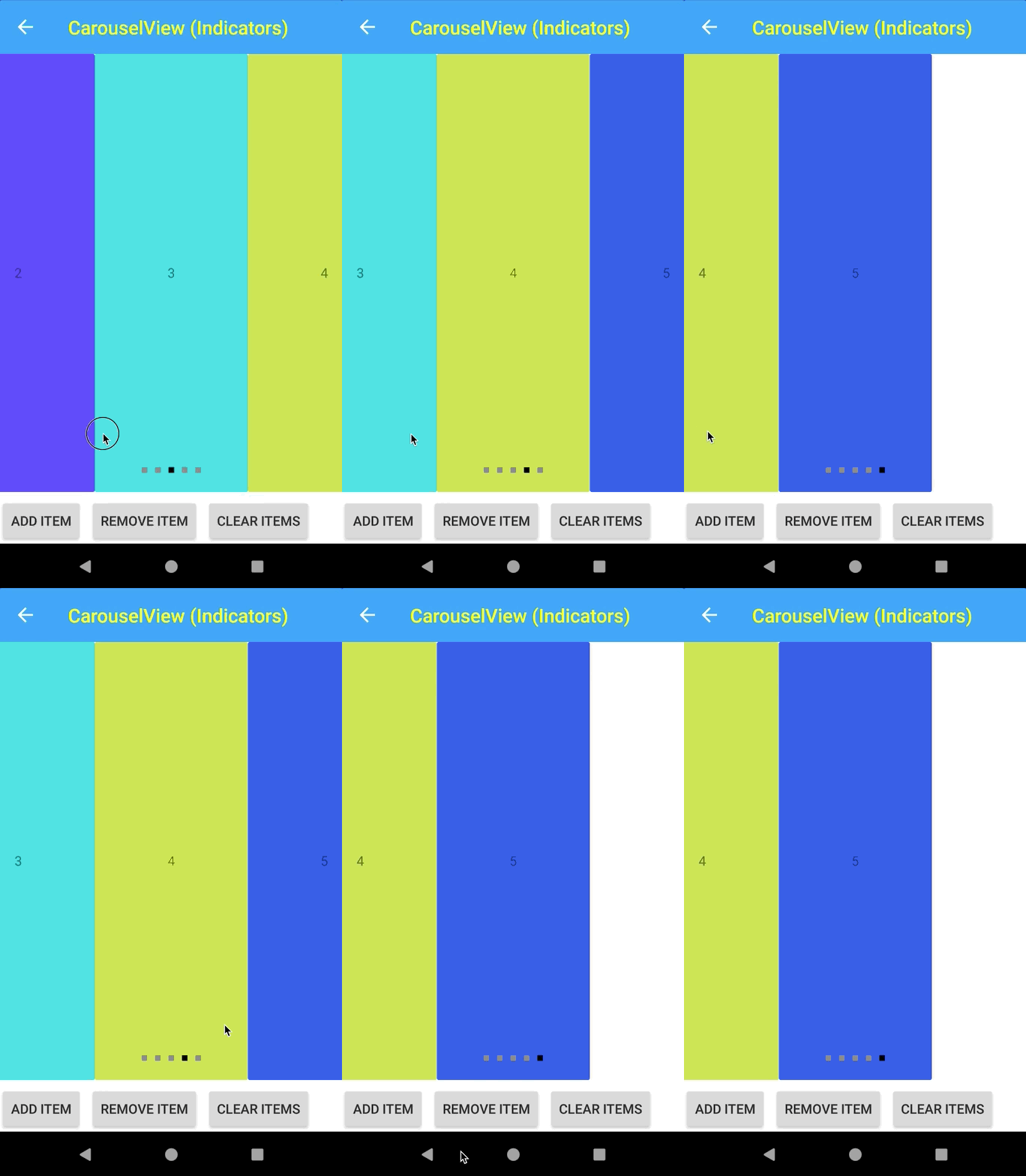
 jsuarezruiz
on 12 Dec 2019
jsuarezruiz
on 12 Dec 2019
👍1
Lovely! If there is a pacakge I can try it on my hanselman.forms app.
jamesmontemagno
on 12 Dec 2019
Ok?
 kingces95
on 14 Dec 2019
kingces95
on 14 Dec 2019
Couldn't get HanselForms to run locally :/
@jamesmontemagno can you try these packages.
 rmarinho
on 16 Dec 2019
rmarinho
on 16 Dec 2019
rmarinho
on 16 Dec 2019
rmarinho
on 16 Dec 2019
this should be fixed . Please reopen if it's not.
rmarinho
on 20 Dec 2019
👍1
Was this page helpful?
0 / 5 - 0 ratings
Related issues
 deakjahn
·
3Comments
deakjahn
·
3Comments
 jgold6
·
3Comments
jgold6
·
3Comments
 MartinWegner
·
3Comments
MartinWegner
·
3Comments
 samhouts
·
3Comments
samhouts
·
3Comments
 leobragatti
·
3Comments
leobragatti
·
3Comments