Xamarin.forms: ImageSource.FromStream retains stream references on UWP
_This issue has been moved from a ticket on Developer Community._
The following code seems to retain a reference to a MemoryStream indefinitely on UWP:
var stream = photo. GetStream();
var memStream = new MemoryStream();
stream. CopyTo(memStream);
memStream.Position = 0;
ImageControl.Source = ImageSource.FromStream(() => memStream);
I have a scenario where I am receiving video frame by frame and each frame is a single image stream. So I need to update the Source for the Image control frequently (about 30 fps maybe at best). That's a lot of streams.
I created a sample application to reproduce the behavior. It allows you to select multiple photos from your photo library and then animates through them quickly. The sample works on both UWP and Android (I have not tested iOS).
This somewhat contrived example emulates the behavior. Each frame is a MemoryStream and it appears that Xamarin is holding onto a reference to each stream.
An interesting note on UWP is that if I do NOT use the MemoryStream, then there is less memory usage. Perhaps the streams are being cached?
The Android implementation does not appear to have this problem. I can run for minutes and garbage collection regularly keeps memory use low as expected.
I'm using Xamarin Forms 4.3.0.947036.
Original Comments
Visual Studio Feedback System on 11/13/2019, 08:39 PM:
We have directed your feedback to the appropriate engineering team for further evaluation. The team will review the feedback and notify you about the next steps.
Original Solutions
(no solutions)
 vsfeedback
All 9 comments
Left comment on feedback ticket
https://developercommunity.visualstudio.com/comments/842322/view.html
 PureWeen
on 4 Dec 2019
PureWeen
on 4 Dec 2019
Here is a solution that presents the problem on UWP. The Android version does not appear to retain memory.
Steps to reproduce:
- Run the UWP program. I suggest x64 unless you want it to just run out of memory in a minute.
- Click on the Pick Photos button and choose a few photos.
- Observe memory usage rise in a pretty steady upward trend. Alternatively, with an x86 build, observe a crash rather quickly.
 keith-at-work
on 4 Dec 2019
keith-at-work
on 4 Dec 2019
@Keith-at-Trimble this is a really interesting one and I have a possible fix over here
https://github.com/xamarin/Xamarin.Forms/tree/fix_8509
It looks like there's a bug in the cancellation logic and the timing on UWP is just right (wrong?) to trigger it.
This await here
https://github.com/xamarin/Xamarin.Forms/blob/87d720c71ec1c8f8fea2daf2105ba4b6689d71f1/Xamarin.Forms.Core/ImageElement.cs#L122
is never completing which is causing a whole bunch of stuff to stay in memory.
PureWeen
on 5 Dec 2019
Seeing this issue as well, Forms 4.4.0 SR2 & Microsoft.NETCore.UniversalWindowsPlatform 6.2.9
 mackayn
on 17 Jan 2020
mackayn
on 17 Jan 2020
@samhouts Any feedback on why this has gone back on the backlog?
mackayn
on 3 Mar 2020
We need to focus on resolving regressions this sprint. This will make a comeback in 168!
 samhouts
on 3 Mar 2020
samhouts
on 3 Mar 2020
Thanks for the update
mackayn
on 3 Mar 2020
I've done some tests. Using the repro sample: https://github.com/xamarin/Xamarin.Forms/files/3923175/ImageSourceFromStreamMemoryUse.zip (Thanks @Keith-at-Trimble)
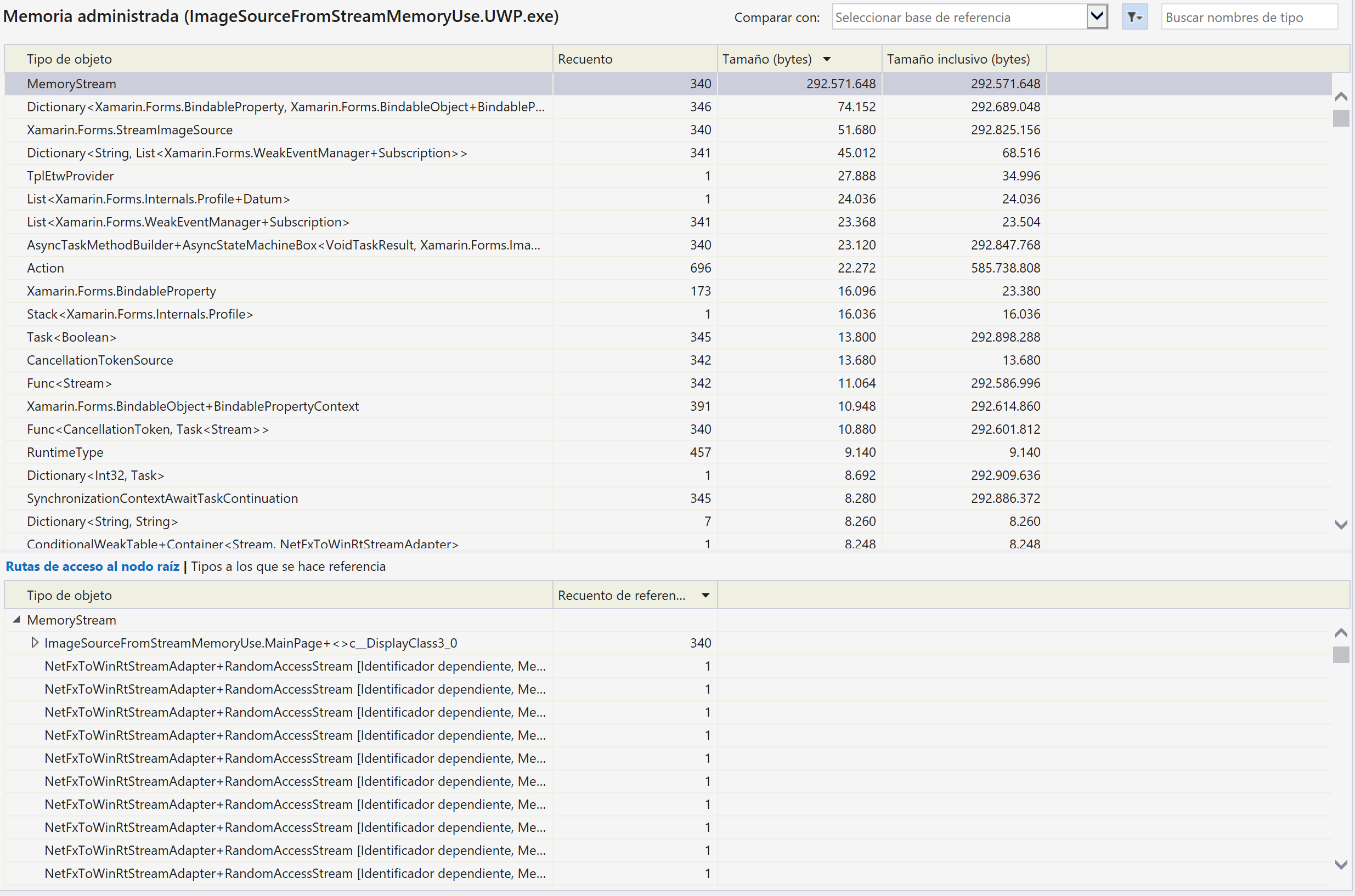
In the sample, use an infinite loop where a MemoryStream is created but is never disposed. After capture 3 images and wait 15 seconds.

These are the memory usage details:
Replacing the MemoryStream for this line:
ImageControl.Source = ImageSource.FromStream(() => photo.GetStream());

(Using the same 3 images and waiting 15 seconds)
Hope this change helps improve, we are going to review ImageSource internally.
 jsuarezruiz
on 7 May 2020
jsuarezruiz
on 7 May 2020
@jsuarezruiz
Our scenario was different, we were just assigning one image source in the ViewModel and binding to the view but setting to null in the View and ViewModel (Prism app has nice lifecycle hooks) the page was always retained.
I've moved on to another project so can't share the code but the leak only existed in UWP in a basic scenario.
mackayn
on 7 May 2020
Related issues
 jgold6
·
3Comments
jgold6
·
3Comments
 suihanhbr
·
3Comments
suihanhbr
·
3Comments
 deakjahn
·
3Comments
deakjahn
·
3Comments
 simontocknell
·
3Comments
simontocknell
·
3Comments
 AppGrate
·
3Comments
AppGrate
·
3Comments
Most helpful comment
Seeing this issue as well, Forms 4.4.0 SR2 & Microsoft.NETCore.UniversalWindowsPlatform 6.2.9