Xamarin.forms: [Bug]Grouped CollectionView shows the item source object name in each group
Description
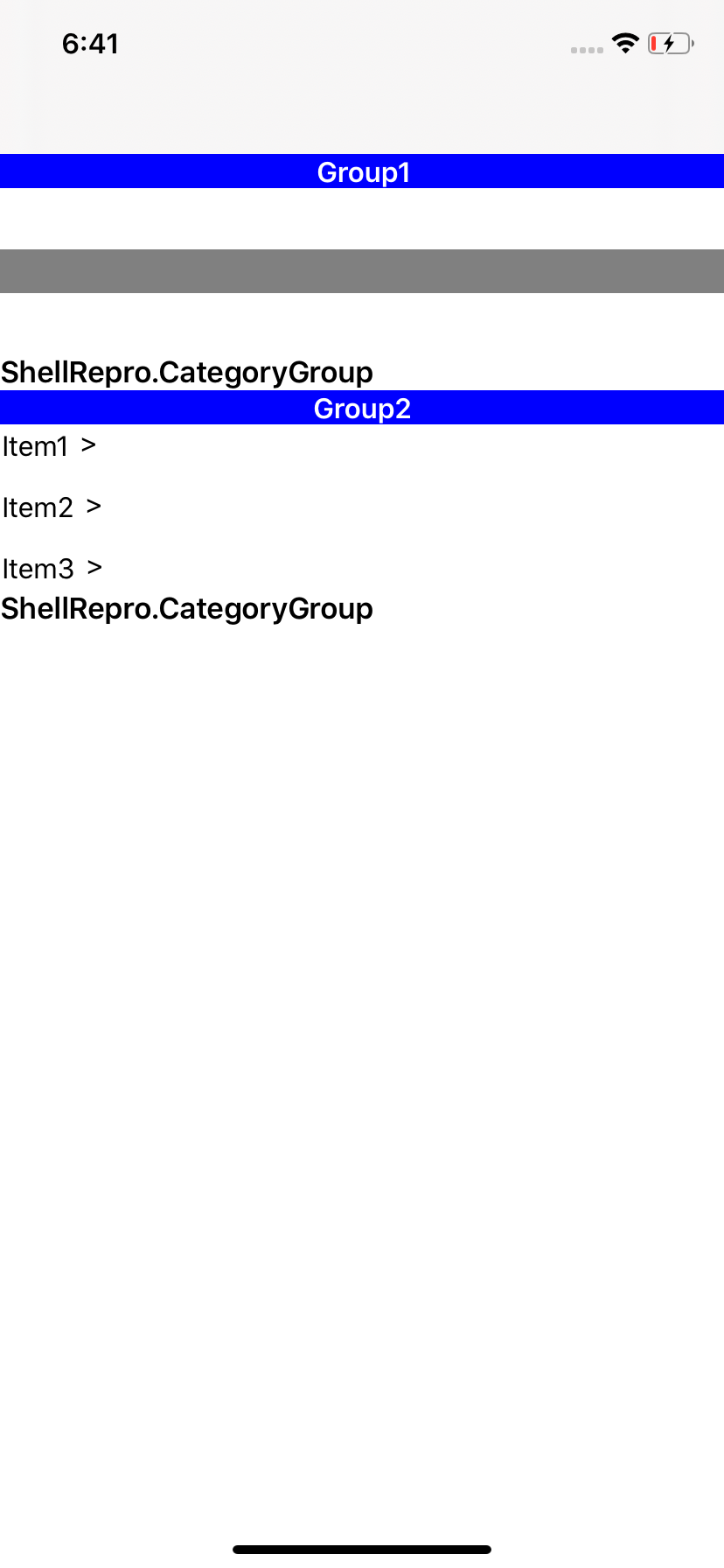
I am using Grouping with CollectionView. The Collection View shows the name of the itemssource object in the end of every group. The name of the object in this case happens to be ShellRepro.CategoryGroup.
- Version with issue:Xamarin.Forms-4.3.0.908675
- Affected Devices:iOS
Screenshots
Reproduction Link
 HobDev
All 6 comments
It seems to be the group footer. As a work around, adding
        <CollectionView.GroupFooterTemplate>
           <DataTemplate >
               <ContentView/>
           </DataTemplate>
        </CollectionView.GroupFooterTemplate>
Seems to make it go away.
 GalaxiaGuy
on 25 Oct 2019
GalaxiaGuy
on 25 Oct 2019
@GalaxiaGuy Thank you for the workaround. I can use this until issue is resolved.
HobDev
on 26 Oct 2019
@GalaxiaGuy Thank you for the workaround It worked.
 vishalpachori25
on 30 Oct 2019
vishalpachori25
on 30 Oct 2019
Yes, there is a footer added automatically for grouped views. We should only show a footer if there is a footer template assigned.
 Clancey
on 30 Oct 2019
Clancey
on 30 Oct 2019
@Clancey This is intentionally put in. If there is no template provided, we have a default fallback template. It makes sense for Items to have a fallback template. But for header and footer we shouldn't show anything.
@hartez Any update on this?
 shanranm
on 31 Oct 2019
shanranm
on 31 Oct 2019
@hartez sorry for hijacking the issue, just thought I might take a look. Replaced the default supplementals with empty view.
shanranm
on 31 Oct 2019
Related issues
 dan5602
·
124Comments
dan5602
·
124Comments
 jassmith
·
69Comments
jassmith
·
69Comments
 mfeingol
·
58Comments
mfeingol
·
58Comments
 JasonLooney
·
55Comments
JasonLooney
·
55Comments
 EdoardoCinelli
·
92Comments
EdoardoCinelli
·
92Comments
Most helpful comment
It seems to be the group footer. As a work around, adding
Seems to make it go away.