Xamarin.forms: iOS - Master Detail Page always displays
_This issue has been moved from a ticket on Developer Community._
We are using a MasterDetailPage for a hamburger menu on an iPad app with a binding of the IsPresented property to a variable of the associated class. When running the app on a simulator on iOS 13, the menu is always visible and cannot be hidden even when hardcoding IsPresented to false. If I run the code on an iPad on iOS 12 the menu works as expected and is not presented by default. Are there any code changes needed when using the MasterDetailPage component as a result of iOS 13?
Original Comments
Visual Studio Feedback System on 10/8/2019, 00:24 AM:
We have directed your feedback to the appropriate engineering team for further evaluation. The team will review the feedback and notify you about the next steps.
todd.mcmullen on 10/8/2019, 05:25 AM:
Same issue here. iOS 13.1.2 (and 13.2 beta) with XCode 11 (not 11.1 - app store keeps erroring out).
Debugging shows that IsPresented = true, setting it in code or through the immediate window does absolutely nothing. It's in PopOver mode if that matters.
Nothing I do seems to affect the presentation and the gesture to close it doesn't work either.
todd.mcmullen on 10/8/2019, 05:29 AM:
Also, it's like popover mode doesn't work. My details page isn't 'under' the master/menu page. They're on the same layer. Detail view is 'squished' to the right. (super technical)
quyen.castellanos on 10/8/2019, 00:38 PM:
Update: This issue is also happening on an iPad on iPadOS 13.1.2, when deploying from the latest version of VS for Mac. Launching a released version of the the application from TestFlight on the same iPad (13.1.2), the issue does not exist. I believe because the build was generated on an earlier version of Xamarin.
Original Solutions
(no solutions)
 vsfeedback
All 7 comments
HI Xamarin,
Any update on this bug? I also ran into this bug as well. The master side menu doesn't hide when in Popover mode. This bug is reproducible by simply creating a new Xamarin.Form project using the MasterDetailPage Project template from VisualStudio.
 chrisweihu
on 17 Oct 2019
chrisweihu
on 17 Oct 2019
@vsfeedback Can you please attach a small project that demonstrates this issue? Thanks!
 samhouts
on 17 Oct 2019
samhouts
on 17 Oct 2019
@samhouts
TestMasterDetail.zip
Here is the Xamarin.Form project using the MasterDetailPage Project template from VisualStudio.
Note that: MasterBehavior = MasterBehavior.Popover; but the Master Sidebar menu always show, can't be hidden.
The only workaround is to overwrite the MasterDetailPage renderer with "this.PreferredDisplayMode = UISplitViewControllerDisplayMode.PrimaryOverlay;"
using UIKit;
using Xamarin.Forms;
using Xamarin.Forms.Platform.iOS;
[assembly: ExportRenderer(typeof(MasterDetailPage), typeof(xxx.Mobile.Renderers.IPadMasterDetailRenderer), UIUserInterfaceIdiom.Pad)]
namespace xxx.Mobile.Renderers
{
    class IPadMasterDetailRenderer : TabletMasterDetailRenderer
    {
        public override void ViewDidLoad()
        {
            base.ViewDidLoad();

            this.PreferredDisplayMode = UISplitViewControllerDisplayMode.PrimaryOverlay;
        }
    }
}
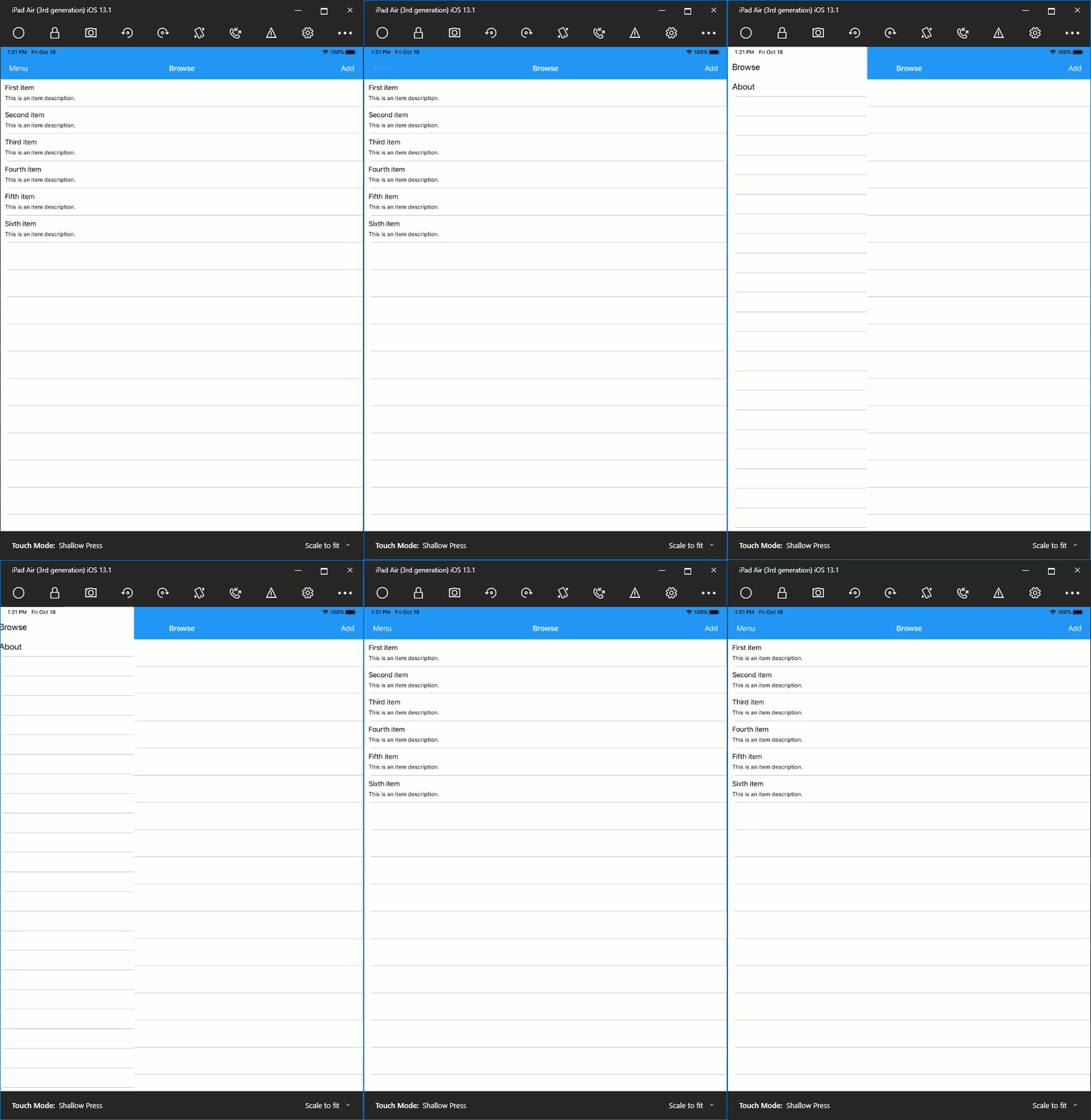
I'm able to expand and collapse the menu on master. Can you provide steps to go thru using the reproduction and the expected and actual behavior?
 kingces95
on 19 Oct 2019
kingces95
on 19 Oct 2019
@kingces95 Can you rotate the screen to landscape mode and retest? I can't collapse the menu in that orientation.
 qucas
on 21 Oct 2019
qucas
on 21 Oct 2019
@kingces95 @samhouts It looks like this issue still exists in the latest version. Where can I find an older version (pre-8.3) of VS for Mac? Any download link I find for earlier versions navigates me to the latest download page and I can't create builds of the app with this issue.
qucas
on 12 Dec 2019
@qucas I don't believe that older versions are available for download. Does the workaround in https://github.com/xamarin/Xamarin.Forms/issues/8005#issuecomment-543385160 work for you? Thanks!
samhouts
on 22 Jan 2020
Related issues
 Hudhud
·
3Comments
Hudhud
·
3Comments
 Stensan
·
3Comments
Stensan
·
3Comments
 EmilAlipiev
·
3Comments
EmilAlipiev
·
3Comments
 leobragatti
·
3Comments
leobragatti
·
3Comments
 mfeingol
·
3Comments
mfeingol
·
3Comments
Most helpful comment
@samhouts
TestMasterDetail.zip
Here is the Xamarin.Form project using the MasterDetailPage Project template from VisualStudio.
Note that: MasterBehavior = MasterBehavior.Popover; but the Master Sidebar menu always show, can't be hidden.
The only workaround is to overwrite the MasterDetailPage renderer with "this.PreferredDisplayMode = UISplitViewControllerDisplayMode.PrimaryOverlay;"