Xamarin.forms: [Bug] CheckBox Has Incosistent Paddings
Description
The CheckBox control has inconsistent padding/margin on iOS and UWP.
Steps to Reproduce
- Add a CheckBox to your view
- Set
BackgroundColortoColor.Silver - You will see the CheckBox not centered in the control.
XAML Content:
<StackLayout VerticalOptions="Center">
    <StackLayout Orientation="Horizontal" HorizontalOptions="Center">
        <CheckBox BackgroundColor="Silver"/>
        <Label Text="CheckBox" VerticalOptions="Center" />
    </StackLayout>
</StackLayout>
Sample Repo:
https://github.com/hnabbasi/XamarinFormsIssue7048
Expected Behavior
CheckBox appears in the middle of the control, with less padding preferably.
Actual Behavior
CheckBox appears slightly left of the middle of the control.
Basic Information
- Version with issue: 4.1.0.618606
- Last known good version:
- IDE: VS 2019 Windows & Mac
- Platform Target Frameworks:
- iOS: 12.2
- Android: API 28
- UWP: 10.0.17763.0
- Affected Devices: Tested on all three simulators/emulator.
Screenshots

 hnabbasi
All 10 comments
Would it be possible to provide a small sample project that shows this problem?
 jfversluis
on 2 Aug 2019
jfversluis
on 2 Aug 2019
Sure. Will add one today
hnabbasi
on 2 Aug 2019
Another part to this issue is that the spacing is inconsistent across platforms, so in order for things to look ok I've had to tinker with the margins on a per platform basis.
 MitchBomcanhao
on 2 Aug 2019
MitchBomcanhao
on 2 Aug 2019
@MitchBomcanhao can you attach a repro as well or expand on what differences you've had to apply?
 PureWeen
on 2 Aug 2019
PureWeen
on 2 Aug 2019
@jfversluis @PureWeen … Done. Added repo that shows both issues.
hnabbasi
on 2 Aug 2019
I'm guessing this is the problem on UWP:
https://github.com/xamarin/Xamarin.Forms/blob/d56942c5bee0a7c56255febc8bbcc6bc33d5e1cb/Xamarin.Forms.Platform.UAP/FormsCheckBoxStyle.xaml#L17
 jcmanke
on 16 Aug 2019
jcmanke
on 16 Aug 2019
@samhouts , i am still facing the issue in v4.4. Please check with iOS iPhone 11 13.3 version
 dinesh4official
on 17 Jan 2020
dinesh4official
on 17 Jan 2020
I have an issue on UWP at least where the checkbox will not correctly center in its container. This appears to be prominent when the checkbox has no text. The beige are is the container, a syncfusion button control but the same behavior is experienced with a stacklayout. You can see the checkbox is not centered.
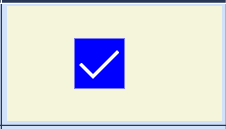
 gceaser
on 6 Feb 2020
gceaser
on 6 Feb 2020
For UWP, set these in a custom renderer (in OnElementChanged()):
Control.Padding = new Windows.UI.Xaml.Thickness(0);
Control.MinWidth = 0;
Control.HorizontalAlignment = Windows.UI.Xaml.HorizontalAlignment.Center;
This fixes the issue for me and the checkbox will be centered.
 Xyotic
on 3 Nov 2020
Xyotic
on 3 Nov 2020
My fix for iOS. Set this in a custom renderer (in OnElementPropertyChanged()) :
Control.HorizontalAlignment = UIControlContentHorizontalAlignment.Center;
Control.ContentEdgeInsets = new UIEdgeInsets(0, 7, 0, 7); (or new UIEdgeInsets(0, 0, 0,0))
Control.HorizontalAlignment will align it horizontal but you'll get some kind of padding/margin issue.
This seems to be caused by the ContentEdgeInsets beeing set to (0, 7, 0, 0)...
Xyotic
on 3 Nov 2020
Related issues
 MartinWegner
·
3Comments
MartinWegner
·
3Comments
 jgold6
·
3Comments
jgold6
·
3Comments
 Stensan
·
3Comments
Stensan
·
3Comments
 samhouts
·
3Comments
samhouts
·
3Comments
 rmarinho
·
3Comments
rmarinho
·
3Comments