Xamarin.forms: [Bug] CollectionView sometimes doesn't render label
Description
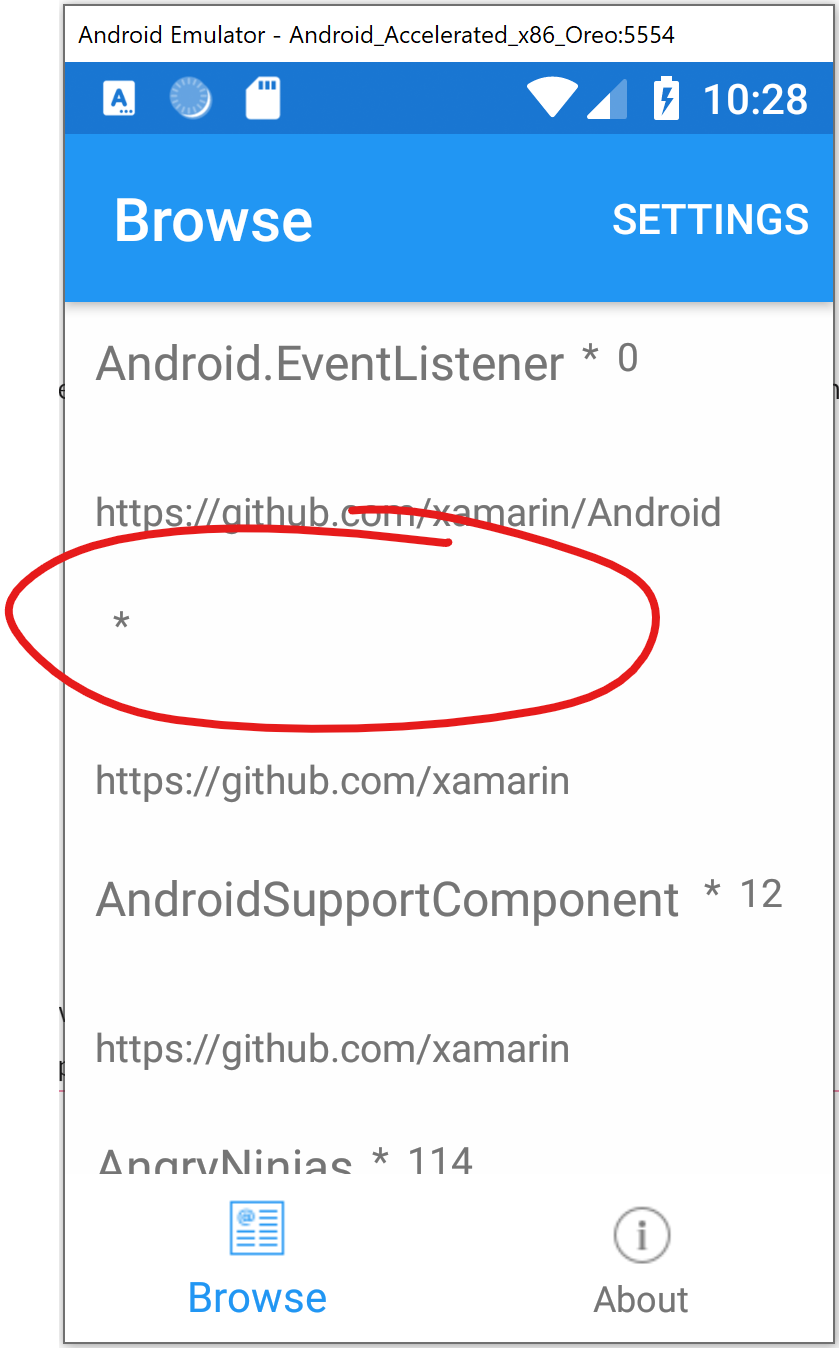
I"m migrating an app from ListView to CollectionView, otherwise using the same data and ItemTemplate, and sometimes some of the label content in the CollectionView doesn't render. If you scroll away and back again then it renders (but some other label might stop rendering).
Full repro app at https://github.com/Eilon/XamarinGitHubViewer/commit/24a231eac461531d208ff6e2435b6a1ffc0f7b9c
Steps to Reproduce
Have a CollectionView bound to some data, and with some ItemTemplate. Here's what my XAML looks like:
        <CollectionView
            x:Name="ReposCollectionView"
            ItemsSource="{Binding Repos}"
            SelectionMode="Single"
            SelectedItem="{Binding SelectedRepo}"
            SelectionChangedCommand="{Binding SelectionChangedCommand}"
        >
            <d:CollectionView.ItemsSource>
                <x:Array Type="{x:Type x:String}">
                    <x:String>First Item</x:String>
                    <x:String>Second Item</x:String>
                    <x:String>Third Item</x:String>
                    <x:String>Fourth Item</x:String>
                    <x:String>Fifth Item</x:String>
                    <x:String>Sixth Item</x:String>
                </x:Array>
            </d:CollectionView.ItemsSource>
            <CollectionView.ItemTemplate>
                <DataTemplate>
                    <StackLayout Padding="10" Orientation="Vertical">
                        <StackLayout Orientation="Horizontal">
                            <Label Text="{Binding Node.Name}"
                                    d:Text="{Binding .}"
                                    LineBreakMode="NoWrap"
                                    Style="{DynamicResource ListItemTextStyle}"
                                    FontSize="16" />
                            <Label Text="*"
                                    LineBreakMode="NoWrap"
                                    Style="{DynamicResource ListItemDetailTextStyle}"
                                    FontSize="13" />
                            <Label Text="{Binding Node.Stargazers.TotalCount}"
                                    d:Text="5"
                                    LineBreakMode="NoWrap"
                                    Style="{DynamicResource ListItemDetailTextStyle}"
                                    FontSize="13" />
                        </StackLayout>
                        <Label Text="{Binding Node.Description}"
                                d:Text="Item description"
                                LineBreakMode="NoWrap"
                                Style="{DynamicResource ListItemDetailTextStyle}"
                                FontSize="13" />
                        <Label Text="{Binding Node.Url}"
                                d:Text="http://repo_url"
                                LineBreakMode="NoWrap"
                                Style="{DynamicResource ListItemDetailTextStyle}"
                                FontSize="13" />
                    </StackLayout>
                </DataTemplate>
            </CollectionView.ItemTemplate>
        </CollectionView>
Expected Behavior
All visible controls should render.
Actual Behavior
Some controls don't render until you scroll away and scroll back to "force" them to re-render.
Basic Information
Broken with latest public packages:
- Xamarin.Forms 4.1.0.618606.
- Xamarin.Essentials 1.2.0.
And also broken with latest pre-rel on nuget.org:
- Xamarin.Forms 4.2.0.618605-pre2.
- Xamarin.Essentials 1.3.0-pre.
Reproed in Android x86 Oreo emulator on Win10.
Screenshots
Some labels not rendering:
Scrolled away and back, now the label renders:

Reproduction Link
Run this app:
https://github.com/Eilon/XamarinGitHubViewer/commit/24a231eac461531d208ff6e2435b6a1ffc0f7b9c
 Eilon
Eilon
All 20 comments
Small tidbit: When I have selection (single) enabled on my CollectionView, then selecting (i.e. tapping) an incorrectly-rendered item, will cause it to re-render properly.
Eilon
on 26 Jul 2019
Are you seeing any sort of error output in the debug window as this is happening?
 hartez
on 27 Jul 2019
hartez
on 27 Jul 2019
My understanding of this issue is the recycling of rows.
Suppose the list have rows with data
1) ABC
2) DEFGHI
3) JKL
4) MNOPQRST
5) UV
6) W
7) X
8) YZ12345678
and if at a time 3 rows are rendered, when you scroll to the second set (4,5,6) and scroll back (1,2,3), the space for text label requested is just for 5) UV and at same space, we are trying to show 2) DEFGHI, which will break DEFGHI to DE
 muhaym
on 27 Jul 2019
muhaym
on 27 Jul 2019
I looked at the debug output window and didn't see anything that seemed particularly interesting.
Eilon
on 29 Jul 2019
@hartez I noticed something similar happening on iOS and decided to fix that. I noticed this was just targeting Android, also, my cause cannot be the cause on Android, but maybe it gives you some hint.
On iOS I found out that when you bounced, the CellDisplayingEnded was called and the (templated) cell would be removed together with the BindingContext but never put back. So, I was thinking a fix like this: https://github.com/xamarin/Xamarin.Forms/commit/2902d480a2087fca12ea3017fb83015c78e14822
However, since Android does not bounce, this cannot be the cause here. 🤔 It does seem to have something to do with the BindingContext because the asterisk does stay visible while all the data bound values are cleared. So not sure if there is a shared root cause here or that this is just coincidentally a bug on both platforms
 jfversluis
on 30 Jul 2019
jfversluis
on 30 Jul 2019
Yeah that's a good point @jfversluis , the static text so far always seems to render. It's only the labels with the bindings that sometimes disappear.
Eilon
on 30 Jul 2019
On iOS I found out that when you bounced, the
CellDisplayingEndedwas called and the (templated) cell would be removed together with theBindingContextbut never put back. So, I was thinking a fix like this: 2902d48
Good call - definitely PR that fix.
hartez
on 30 Jul 2019
I noticed the same: A label with bound text inside the DataTemplate for a CollectionView, actually a Grid with column-Width="*". There's also a converter in the Binding. My converter is properly called when the binding source changes.
I noticed that the Label doesn't seem to resize when the Binding changes. Initially, my converter returned null for null and later some actual text. Nothing was displayed then. When I started to return some text for the initial null parts of my actual text appeared. Right now, there's "This is a very long placeholder text to enlarge the label" for null and my label properly sizes and shows content later.
 Tragetaschen
on 14 Aug 2019
Tragetaschen
on 14 Aug 2019
Same issue for nearly evry bigger list for me. It seems to appear even more often when i use Stringformat at the label.
 Codelisk
on 22 Aug 2019
Codelisk
on 22 Aug 2019
Additional piece of info on the topic: I have had the same thing happen in an almost identical layout as OP. While trying to figure out what was going on, I realized this only happens when the label/s are in a horizontal StackLayout, which is to say that when I change the Orientation to vertical, the labels always rendered. When I replaced the StackLayout container with a Grid, the labels sometimes failed to render again. With the container removed the labels also rendered again. Hope it helps.
 Riibit
on 17 Sep 2019
Riibit
on 17 Sep 2019
@Riibit and all, a PR (#7426) was merged that should address this problem. I see that unfortunately it didn't make it into 4.3-pre1 but is should be in 4.3-pre2. If it's not too much trouble would you please test it again whenever that is released?
Or, if you're a bit adventurous, dig into our nightly feed and see if the package currently in there fixes this for you?
jfversluis
on 17 Sep 2019
@Eilon I was unable to reproduce this with the 4.2.0 version _or_ with the 4.3.0-pre3 version of forms. I saw all the labels. Could you retest with 4.3.0-pre3 to see if it's resolved for you? Thanks!
 samhouts
on 8 Oct 2019
samhouts
on 8 Oct 2019
Also, this is probably the same as #6369
samhouts
on 8 Oct 2019
@samhouts @jfversluis Hi, been busy with other stuff for a while. I have managed to get back to this part of the project again and this issue does seem to have been fixed with pre2 or pre3. Thanks for the help guys.
Riibit
on 8 Oct 2019
Great @Riibit! Thanks for the confirmation!
jfversluis
on 8 Oct 2019
Not reproducible on pre3.
hartez
on 8 Oct 2019
@samhouts - I tried on the latest bits and couldn't repro it. Though, I couldn't repro it on whatever older build I was using, either. As mentioned earlier, it can be difficult to reproduce, though it often reproduced fairly quickly. So, I'm OK saying this is fixed. It could be I'm using a newer Android emulator, which maybe somehow affected this as well.
Eilon
on 10 Oct 2019
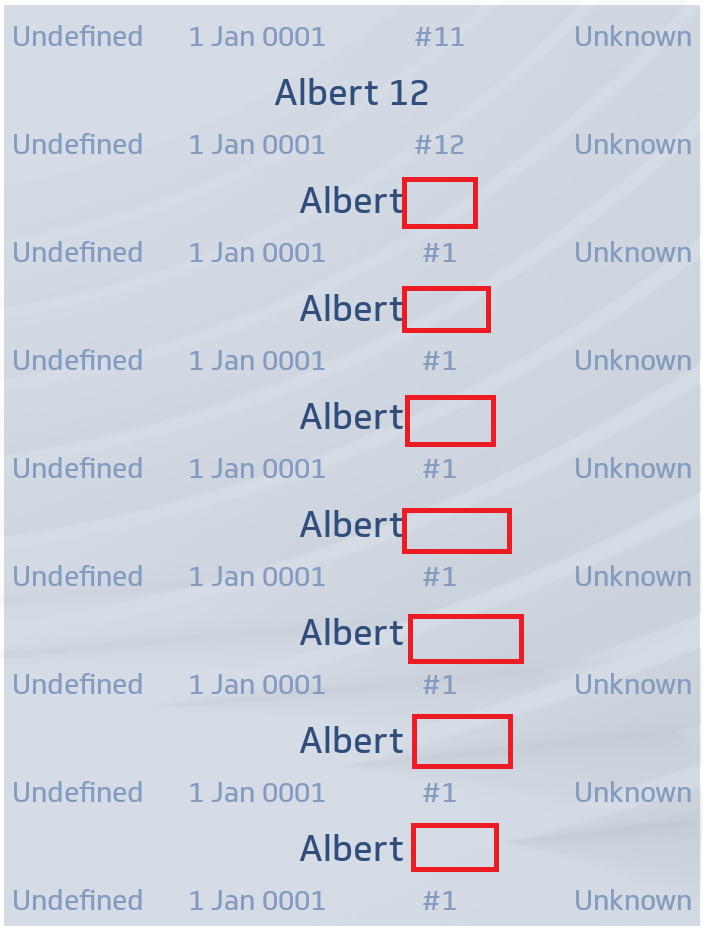
Hello. I reproduce this bug with release 4.3.
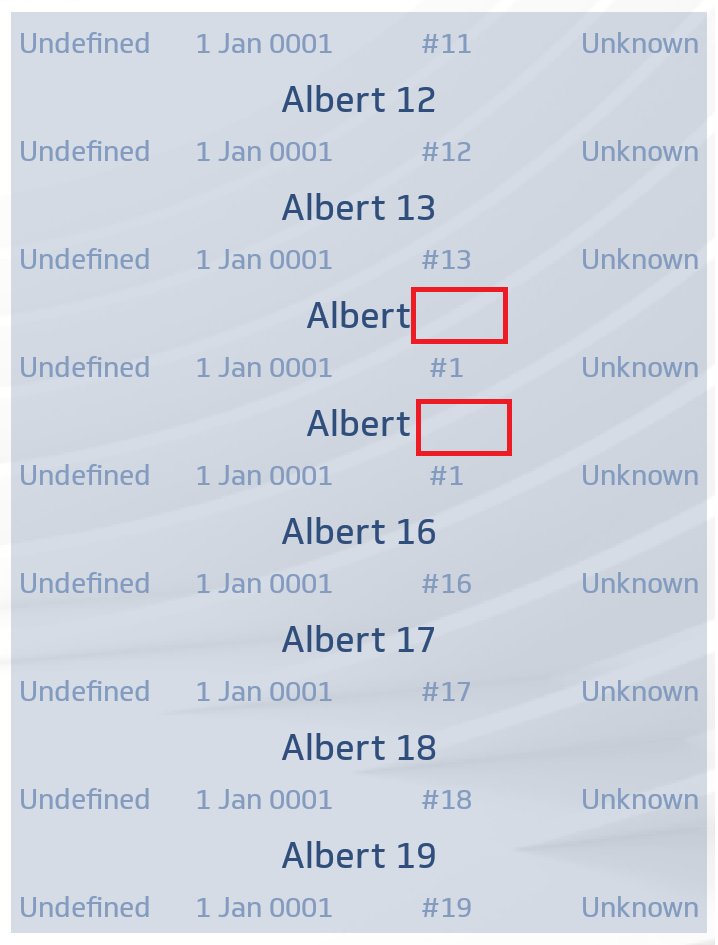
Same screen after scrolling up and down :
 agouriou
on 4 Nov 2019
agouriou
on 4 Nov 2019
This occurs with a grid in the data template. If I get rid of the grid and use multiple stack layouts instead, this seem to work
               <DataTemplate>
                        <Grid Padding="4" ColumnSpacing="12"
                              BackgroundColor="{StaticResource TransparentLightBlueColor}">
                            <Grid.RowDefinitions>
                                <RowDefinition Height="Auto" />
                                <RowDefinition Height="Auto" />
                            </Grid.RowDefinitions>
                            <Grid.ColumnDefinitions>
                                <ColumnDefinition Width="*" />
                                <ColumnDefinition Width="*" />
                                <ColumnDefinition Width="*" />
                                <ColumnDefinition Width="*" />
                            </Grid.ColumnDefinitions>
                            <Label Grid.Row="0" Grid.ColumnSpan="4"
                                   Text="{Binding Name}"
                                   TextColor="{StaticResource BlueColor}"
                                   FontSize="Medium"
                                   FontAttributes="Bold" />

                            <Label Grid.Row="1" Grid.Column="0"
                                   Style="{StaticResource subLabelStyle}"
                                   Text="{Binding Gender}" />
                            <Label Grid.Row="1" Grid.Column="1"
                                   Style="{StaticResource subLabelStyle}"
                                   Text="{Binding Birthdate, StringFormat='{0:d MMM yyyy}'}" />
                            <Label Grid.Row="1" Grid.Column="2"
                                   Style="{StaticResource subLabelStyle}"
                                   HorizontalOptions="Center"
                                   Text="{Binding PatientId}"/>
                            <Label Grid.Row="1" Grid.Column="3"
                                   Style="{StaticResource subLabelStyle}"
                                   HorizontalOptions="End"
                                   Text="{Binding BBB}"/>
                        </Grid>
                    </DataTemplate>
Using Forms 4.4 Pre and the same issue. It only happens on fast scroll down and then up again.

SelectionMode="Single"
SelectionChangedCommand="{Binding CardSelectedCommand}"
Margin="15"
ItemsSource="{Binding Cards}">
Span="2"/>
                        <Frame
                            BackgroundColor="#fcd1d7"
                            CornerRadius="10">
                            <Label
                                Text="{Binding CardName}"
                                HorizontalOptions="Center"
                                FontSize="Medium">
                            </Label>
                        </Frame>
                    </StackLayout>
                </DataTemplate>
            </CollectionView.ItemTemplate>
        </CollectionView>
 geojorg
on 20 Nov 2019
geojorg
on 20 Nov 2019
Related issues
 jamiewest
·
3Comments
jamiewest
·
3Comments
 deakjahn
·
3Comments
deakjahn
·
3Comments
 mfeingol
·
3Comments
mfeingol
·
3Comments
 leobragatti
·
3Comments
samhouts
·
3Comments
leobragatti
·
3Comments
samhouts
·
3Comments