Xamarin.forms: [Bug] ToolbarItem's should Listen to 'IconImageSource' PropertyChanged
Description
When updating a property on a class that inherits from ImageSource, such as the color, glyph, or size of a FontImageSource, ToolbarItem's IconImageSource does not reflect the updated properties in the UI.
Looking in the code for each platform, the ImageSource's PropertyChanged event is never subscribed to in order to receive updates and update the UI accordingly.
Steps to Reproduce
- Create Xamarin.Forms blank app
- Follow James Montemagno's article to use FontIcons in your application - James' Blog
- Create a page with ToolbarItem's and set an IconImageSource to (i.e.
FontImageSource) - Either through binding or manual
x:Name, modify a property of theFontImageSourceclsas at runtime. No changes will be reflected in the UI.
Expected Behavior
ToolbarItem's should Listen to ImageSource's PropertyChanged. Property changes should be subscribed to allow changes of ToolbarItem's color, glyph, FontFamily, etc at runtime. The change to a property could be done by either using x:Name and change manually or through a Binding.
Actual Behavior
Updating IconImageSource implementation properties at runtime does not affect ToolbarItem.
Example of properties to change (i.e. FontImageSource)
- FontFamily
- Glyph
- Size
- Color
<ToolbarItem>
    <ToolbarItem.IconImageSource>
        <FontImageSource FontFamily="ExampleFontFamily"
                         Glyph="{Binding Path=MyGlyph}"/>
    </ToolbarItem.IconImageSource>
</ToolbarItem>
Basic Information
- Version with issue: Xamarin.Forms 4.0+
- Last known good version: N/A
- IDE: Visual Studio 2019
- Platform Target Frameworks:
- iOS: Any
- Android: Any
- UWP: Any
- Affected Devices: All
Screenshots
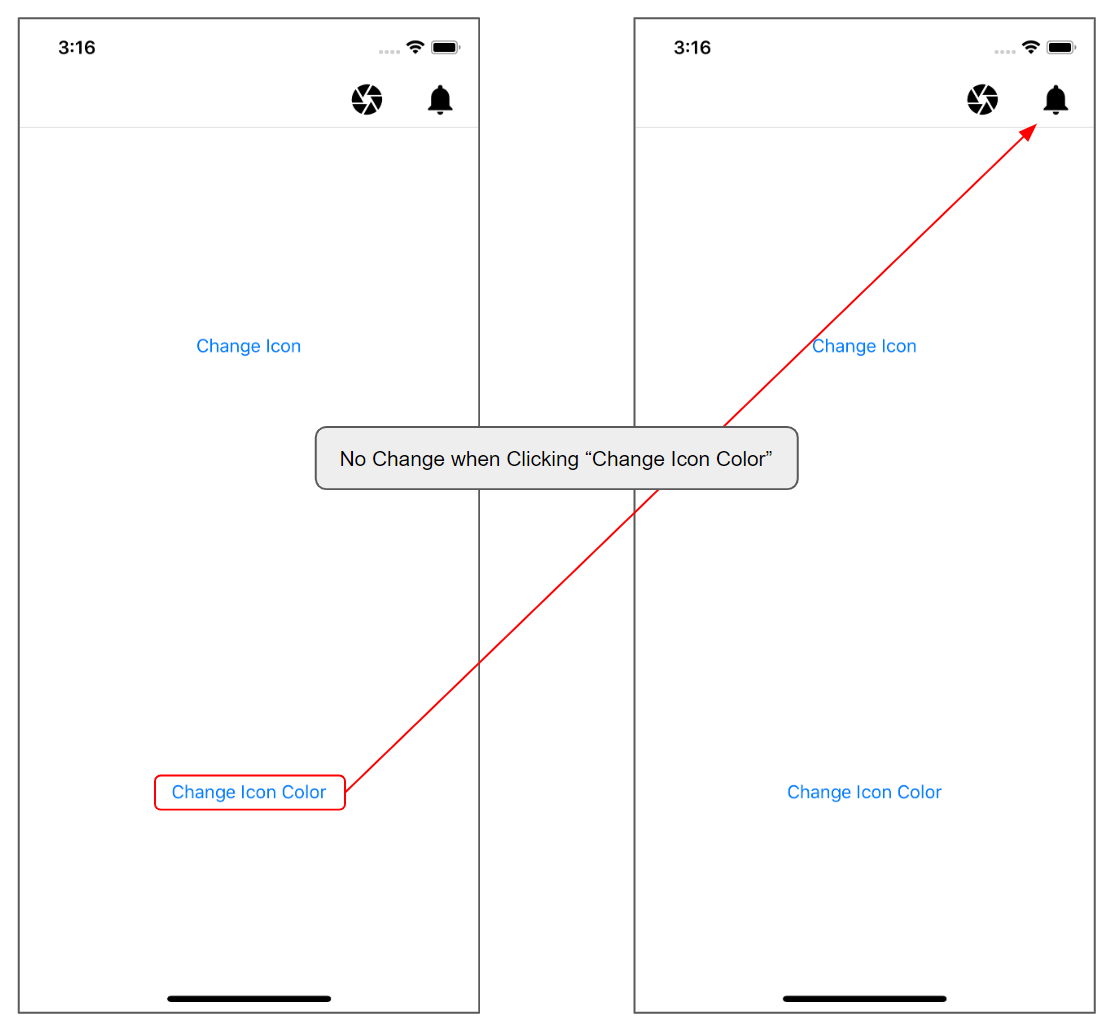
Reproduction Link
 tdoell
All 9 comments
Note: the issue seems to be on android only, I have the same issue and it doesn't work on Android but works on ios:
 pierre01
on 28 Aug 2019
pierre01
on 28 Aug 2019
@pierre01 That sounds like a separate issue. Binding the full IconImageSource property might work on iOS, but that is not what this issue is focused on.
This issue is in regards to PropertyChanged events on the IconImageSource class. Listening for changes in the color, glyph, size, etc. Updating those individual properties at runtime does not work on the platforms specified in the issue description. The renderers that handle the icon changing do not subscribe to the PropertyChanged event on any of the _IconImageSource_ classes/base classes. =
tdoell
on 28 Aug 2019

iOS

Android
@tdoell
I don't know but it looks like the IconImageSource PropertyChanged Event on the Android is not propagated or handled correctly...
pierre01
on 29 Aug 2019
@pierre01 You are binding the IconImageSource property itself and not a property of the class like the issues dictates at the beginning. I can see how it could be misleading so I will try to edit the issue and make it easier to follow. But to describe it slightly better, refer to the examples below.
Your example:
<ToolbarItem ... IconImageSource="{Binding LoveWineIcon, Mode=OneWay}" />
My example from the issue description:
<ToolbarItem>
    <ToolbarItem.IconImageSource>
        <FontImageSource FontFamily="ExampleFontFamily"
                         Glyph="{Binding Path=MyGlyph}" />
    </ToolbarItem.IconImageSource>
</ToolbarItem>
This issue describes the problem of trying to bind a property on the FontImageSource class which inherits from IconImageSource base class. Set a specific Icon, bind the Color property and then with a button click, try changing the color it's bound to. The icon will not update.
tdoell
on 29 Aug 2019
Any update on this?
 alizadehfard
on 23 Dec 2019
alizadehfard
on 23 Dec 2019
I did try and have a look into this, and I'd love to dig into it more, but I'm a bit out of my depth in understanding exactly what's going on.
 chowarth
on 8 Aug 2020
chowarth
on 8 Aug 2020
https://github.com/xamarin/Xamarin.Forms/blob/5.0.0/Xamarin.Forms.Platform.Android/Platform.cs
In method HandleToolbarItemPropertyChanged
When IconImageSourceProperty is changed, it calls InvalidateOptionsMenu, which redraws the icon.
But it does not un/subscribe to the propertychanged event of the IconImageSource object.
It should also subscribe to the propertychanged event of the IconImageSource object, and everytime this event is triggered, it should call InvalidateOptionsMenu to ask android to update the icon.
And of course it should properly unsubscribe. Maybe using a weak subscription would be enough.
 softlion
on 24 Sep 2020
softlion
on 24 Sep 2020
I'm running into the same issue, the Binding to the IconSource doesn't update, and if using a converter to get the proper imagesource (which work if set into the constructor of the toolbar content page), it doesn't even show up at all!
I did loose a few hour tryign to figure out why the image wasn't displayed. Damn I hate Xaml and all that notify mess. I wish someone port Qml to C# so we can get ride of that buggy mess.
 godboutj
on 4 Nov 2020
godboutj
on 4 Nov 2020
Is there a workaround available to switch out the glyph?
 mos379
on 28 Nov 2020
mos379
on 28 Nov 2020
Related issues
 AppGrate
·
3Comments
AppGrate
·
3Comments
 joseluisct
·
3Comments
joseluisct
·
3Comments
 sonic1015
·
3Comments
sonic1015
·
3Comments
 xabre
·
3Comments
xabre
·
3Comments
 EmilAlipiev
·
3Comments
EmilAlipiev
·
3Comments
Most helpful comment
Any update on this?