Xamarin.forms: [Bug] Shell - Shell.TabBarTitleColor no longer sets the active color for the tabbar on iOS
Description
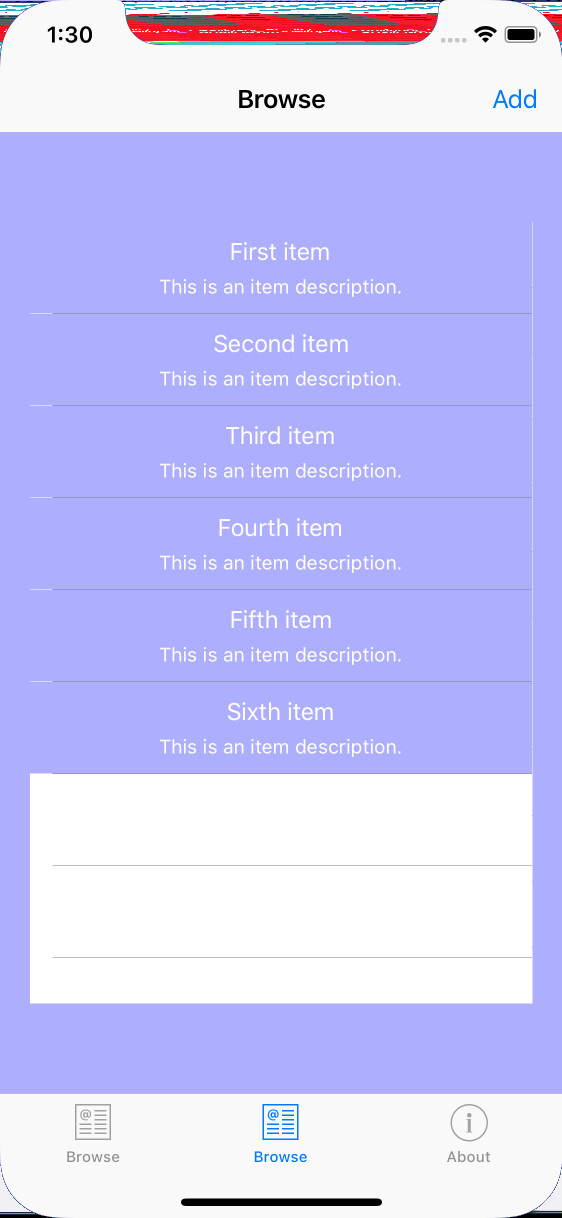
Shell no longer uses Shell.ShellTabBarTitleColor and Shell.TabBarTitleColor does not seem to work.
Steps to Reproduce
- Create Tabs
- Set the TabBarTitleColor
- Run the application and see it is not used.
Expected Behavior
This was working on a pre-release version. The active tab text/button should be highlighted with the Shell.TabBarTitleColor.
Actual Behavior
The tab bar just uses the default colors.
Basic Information
- Version with issue: 4.0.0.482894
- Last known good version: 4.0.0.346134-pre9
- IDE: Visual Studio 2019 for Windows 16.1.2
- Platform Target Frameworks:
- iOS: 12.10.0.153
- Android: N/A
- UWP: N/A
- Android Support Library Version: N/A
- Nuget Packages: Just what comes with the template
- Affected Devices:
Screenshots
Reproduction Link
https://github.com/seansparkman/ShellNavigationExample/tree/tabbar-titlecolor-ignored
 seansparkman
All 6 comments
This seems to not just affect shell. The following used to work fine (was on XF 3.5), but doesn't do anything on XF 4.0.0.497661.
UITabBar.Appearance.TintColor = SOME_UI_COLOR;
 skyapps-co
on 13 Jun 2019
skyapps-co
on 13 Jun 2019
@skyapps-co did you notice the new properties SelectedTabColorProperty and UnselectedTabColorProperty for this on the TabbedPage? You might want to use those :) more info here #4899.
@seansparkman I see you're doing it through a style in the resources. When setting it directly on the Shell object it does seem to work. Can you confirm that when you say...
This was working on a pre-release version.
That this was the exact way you implemented it then?
Also doesn't work on Android
 jfversluis
on 14 Jun 2019
jfversluis
on 14 Jun 2019
<FlyoutItem Title="Home">
        <Tab Title="First Tab">
            <Tab.Icon>
                <FontImageSource
                    Color="{StaticResource somecolor}"
                    FontFamily="{StaticResource myIcons}"
                    Glyph="{StaticResource myFirstTabGlyphIcon}" />
            </Tab.Icon>
            <ShellContent>
                <MyContentPageForTab1 />
            </ShellContent>
        </Tab>
        <Tab Title="Second Tab">
            <Tab.Icon>
                <FontImageSource
                    Color="{StaticResource somecolor}"
                    FontFamily="{StaticResource myIcons}"
                    Glyph="{StaticResource mySecondTabGlyphIcon}" />
            </Tab.Icon>
            <ShellContent>
                <MyContentPageForTab2 />
            </ShellContent>
        </Tab>
        <Tab Title="Third Tab">
            <Tab.Icon>
                <FontImageSource
                    Color="{StaticResource somecolor}"
                    FontFamily="{StaticResource myIcons}"
                    Glyph="{StaticResource myThirdTabGlyphIcon}" />
            </Tab.Icon>
            <ShellContent>
                <MyContentPageForTab3 />
            </ShellContent>
        </Tab>
</FlyoutItem>
@jfversluis Gerald, the above code creates a tabbed page with font-icons and titles underneath them. I am seeing the same problem on iOS, these font-icons are colored with the Color that is specified, all three of them, and the color does not react to tap events. On Android, however, the inactive tabs are colored grey (my Color is close to Cyan for active tab), and a tap makes the active tab change its color to Color and the tab we just left changes back to grey (this is the desired behavior). I'd like to confirm that this bug report is discussing the same problem? (if not , I will create a new issue with sample code).
I should also mention that I have every TabBarXxxColor value set on the <Shell> object containing the above XAML code.
 noahsanook
on 18 Nov 2019
noahsanook
on 18 Nov 2019
Hm I didn't see anything about tapping on it not working so it might be good to report something separate for this. Please don't forget to include a reproduction project :)
jfversluis
on 18 Nov 2019
@jfversluis I figured out my own problem - because every <FontImageSource> was defining a Color, this was forcing that color to always be used, regardless of the state of the tab. Removing Color from FontImageSource made it work on both platforms. It appears, however, that Android renderer of Shell ignores this Color in favor of TabBarXxxColor settings, but the iOS renderer honors it. I should probably remove my original comment from this bug, because it is not relevant.
noahsanook
on 18 Nov 2019
This isn't a bug
The style needs to indicate ApplyToDerivedTypes
<Style TargetType="ShellItem" BasedOn="{StaticResource BaseStyle}" ApplyToDerivedTypes="True" />
 PureWeen
on 20 Apr 2020
PureWeen
on 20 Apr 2020
Related issues
 mattregul
·
3Comments
mattregul
·
3Comments
 joseluisct
·
3Comments
joseluisct
·
3Comments
 rmarinho
·
3Comments
rmarinho
·
3Comments
 Stensan
·
3Comments
Stensan
·
3Comments
 EmilAlipiev
·
3Comments
EmilAlipiev
·
3Comments