Xamarin.forms: [Bug] Shell NavBar BackgroundColor
Description
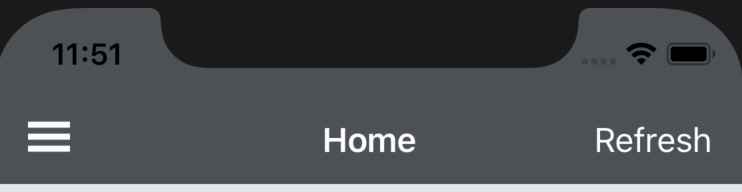
Navbar Color set using Shell.BackgroundColor is not accurate.
Steps to Reproduce
- Set background color of shell using Shell.BackgroundColor
Expected Behavior
Correct color.
Actual Behavior
Color is lighter than actual
Basic Information
- Version with issue: 4.0.0.425677
- IDE: Visual Studio for MAC 8.0.7
- Platform Target Frameworks:
- iOS: 12.2
<Style x:Key="BaseStyle"
           ApplyToDerivedTypes="True"
           TargetType="Element">
        <Setter Property="Shell.FlyoutBackgroundColor"
                Value="White" />
        <Setter Property="Shell.BackgroundColor"
                Value="#2f353a" />
        <Setter Property="Shell.ForegroundColor"
                Value="White" />
        <Setter Property="Shell.TitleColor"
                Value="White" />
        <Setter Property="Shell.DisabledColor"
                Value="#B4FFFFFF" />
        <Setter Property="Shell.UnselectedColor"
                Value="#95FFFFFF" />
    </Style>
<Shell xmlns="http://xamarin.com/schemas/2014/forms"
       xmlns:x="http://schemas.microsoft.com/winfx/2009/xaml"
       xmlns:local="clr-namespace:ABC"
       xmlns:controls="clr-namespace:ABC.Controls"
       xmlns:views="clr-namespace:ABC.Views"
       x:Name="self"
       Title="Shelltest" x:Class="ABC.AppShell" Style="{StaticResource BaseStyle}">

   <Shell.FlyoutHeader>
        <controls:FlyoutHeader />
    </Shell.FlyoutHeader>
    <FlyoutItem Title="Home" FlyoutIcon="icons8_home_30.png" FlyoutDisplayOptions="AsSingleItem">
       <!-- <ShellContent>
            <views:HomePage />
        </ShellContent>-->
        <Tab Title="Dashboard" Icon="icons8_home_30.png">
            <ShellContent>
                <views:HomePage />
            </ShellContent>
        </Tab>
        <Tab Title="Page1" Icon="icons8_user_shield_30.png">
            <ShellContent>
                <views:Page1 />
            </ShellContent>
        </Tab>
    </FlyoutItem>
Screenshots
Color in display:
Color without using shell:

Actual Color:

Reproduction Link
 Alkhajeh
All 7 comments
@Alkhajeh Can you please attach a small project that demonstrates this issue? Thanks!
 samhouts
on 1 Jun 2019
samhouts
on 1 Jun 2019
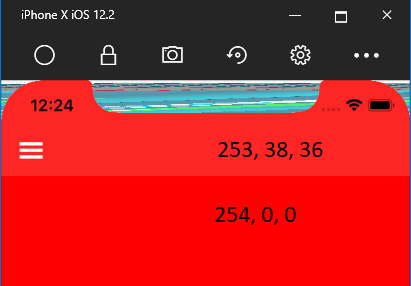
Hi @samhouts, I've updated my bug demo I made for #6373 to show this issue as well
https://github.com/Robtom5/XamarinBugDemo-6373
This is shown by selecting item2 on the flyout
 Robtom5
on 3 Jun 2019
Robtom5
on 3 Jun 2019
Verified reproduction, there is indeed a difference in color. It seems a PR (#6239) is already fixing this.
 jfversluis
on 13 Jun 2019
jfversluis
on 13 Jun 2019
+1
 simonemarra
on 31 Oct 2019
simonemarra
on 31 Oct 2019
@jfversluis the above linked PR has been closed with no changes as far as i can see. Any other progress for fixing this as the difference is quite stark when using some colors
Robtom5
on 21 Nov 2019
Sorry about that @Robtom5! Seems there is no PR attached to this issue at this time.
jfversluis
on 2 Dec 2019
Here's a workaround for anyone still struggling with this: https://forums.xamarin.com/discussion/comment/383797/#Comment_383797
 Woofo
on 6 Dec 2019
Woofo
on 6 Dec 2019
Related issues
samhouts
·
3Comments
 deakjahn
·
3Comments
deakjahn
·
3Comments
 fazil1987
·
3Comments
fazil1987
·
3Comments
 EmilAlipiev
·
3Comments
EmilAlipiev
·
3Comments
 suihanhbr
·
3Comments
suihanhbr
·
3Comments
Most helpful comment
Here's a workaround for anyone still struggling with this: https://forums.xamarin.com/discussion/comment/383797/#Comment_383797