Xamarin.forms: [Bug] System.NotSupportedException: Unable to activate instance of type Xamarin.Forms.Platform.Android.XXXRenderer from native handle
Description
The title speaks for itself.
We observe this crash in all our apps. Sometimes it's ScrollViewRenderer, sometimes MasterDetailPageRenderer. In this particular sample it's usually PageRenderer but sometimes LabelRenderer.
Any suggestion how to avoid this crash would be highly appreciated.
Steps to Reproduce
- Open attached project, build & and run in Release configuration
- Press the physical "Back" button so the activity is closed and the home screen appears (but the app is not closed!)
- Launch the app again by tapping on app icon on the home screen.
Expected Behavior
The main page is successfully re-created and the app works.
Actual Behavior
The app crashes. Stacktrace:
android.runtime.JavaProxyThrowable: System.NotSupportedException: Unable to activate instance of type Xamarin.Forms.Platform.Android.PageRenderer from native handle 0xbfb0ff0c (key_handle 0xfa1a17a). ---> System.MissingMethodException: No constructor found for Xamarin.Forms.Platform.Android.PageRenderer::.ctor(System.IntPtr, Android.Runtime.JniHandleOwnership) ---> Java.Interop.JavaLocationException: Exception of type 'Java.Interop.JavaLocationException' was thrown.
   --- End of inner exception stack trace ---
  at Java.Interop.TypeManager.CreateProxy (System.Type type, System.IntPtr handle, Android.Runtime.JniHandleOwnership transfer) [0x00055] in <1bab76874570475da27595819aee3371>:0
  at Java.Interop.TypeManager.CreateInstance (System.IntPtr handle, Android.Runtime.JniHandleOwnership transfer, System.Type targetType) [0x00116] in <1bab76874570475da27595819aee3371>:0
   --- End of inner exception stack trace ---
  at Java.Interop.TypeManager.CreateInstance (System.IntPtr handle, Android.Runtime.JniHandleOwnership transfer, System.Type targetType) [0x00182] in <1bab76874570475da27595819aee3371>:0
  at Java.Lang.Object.GetObject (System.IntPtr handle, Android.Runtime.JniHandleOwnership transfer, System.Type type) [0x000c1] in <1bab76874570475da27595819aee3371>:0
  at Java.Lang.Object._GetObject[T] (System.IntPtr handle, Android.Runtime.JniHandleOwnership transfer) [0x00017] in <1bab76874570475da27595819aee3371>:0
  at Java.Lang.Object.GetObject[T] (System.IntPtr handle, Android.Runtime.JniHandleOwnership transfer) [0x00000] in <1bab76874570475da27595819aee3371>:0
  at Java.Lang.Object.GetObject[T] (System.IntPtr jnienv, System.IntPtr handle, Android.Runtime.JniHandleOwnership transfer) [0x00006] in <1bab76874570475da27595819aee3371>:0
  at Android.Views.View.n_OnDetachedFromWindow (System.IntPtr jnienv, System.IntPtr native__this) [0x00000] in <1bab76874570475da27595819aee3371>:0
  at (wrapper dynamic-method) Android.Runtime.DynamicMethodNameCounter.40(intptr,intptr)
--- End of stack trace from previous location where exception was thrown ---

  at Java.Interop.JniEnvironment+InstanceMethods.CallBooleanMethod (Java.Interop.JniObjectReference instance, Java.Interop.JniMethodInfo method, Java.Interop.JniArgumentValue* args) [0x00069] in <d7f2b9bd15c64bcb95193fbdfb36a862>:0
  at Java.Interop.JniPeerMembers+JniInstanceMethods.InvokeAbstractBooleanMethod (System.String encodedMember, Java.Interop.IJavaPeerable self, Java.Interop.JniArgumentValue* parameters) [0x00014] in <d7f2b9bd15c64bcb95193fbdfb36a862>:0
  at Android.Support.V4.App.FragmentManagerInvoker.ExecutePendingTransactions () [0x0000a] in <8f9b95e50b74401b836c79405557e90a>:0
  at Xamarin.Forms.Platform.Android.FragmentManagerExtensions.ExecutePendingTransactionsEx (Android.Support.V4.App.FragmentManager fragmentTransaction) [0x00000] in <e11d74a01fc148949d5e89708470f54c>:0
  at Xamarin.Forms.Platform.Android.AppCompat.NavigationPageRenderer.Dispose (System.Boolean disposing) [0x00290] in <e11d74a01fc148949d5e89708470f54c>:0
  at Java.Lang.Object.Dispose () [0x00000] in <1bab76874570475da27595819aee3371>:0
  at Xamarin.Forms.Platform.Android.FormsAppCompatActivity.LoadApplication (Xamarin.Forms.Application application) [0x0026c] in <e11d74a01fc148949d5e89708470f54c>:0
  at MvvmCross.Forms.Platforms.Android.Views.MvxFormsAppCompatActivity.InitializeApplication () [0x00007] in <4ea0c9ab37e14fd8aa188ddf8fa8736e>:0
  at MvvmCross.Forms.Platforms.Android.Views.MvxFormsAppCompatActivity.RunAppStart (Android.OS.Bundle bundle) [0x0002a] in <4ea0c9ab37e14fd8aa188ddf8fa8736e>:0
  at MvvmCross.Forms.Platforms.Android.Views.MvxFormsAppCompatActivity.OnCreate (Android.OS.Bundle bundle) [0x00028] in <4ea0c9ab37e14fd8aa188ddf8fa8736e>:0
  at MyXamarinFormsApp.Droid.MainActivity.OnCreate (Android.OS.Bundle bundle) [0x00014] in <479aa9a0f42f4fe4af3e53fc8df13d8c>:0
  at Android.App.Activity.n_OnCreate_Landroid_os_Bundle_ (System.IntPtr jnienv, System.IntPtr native
Basic Information
- Version with issue: Xamarin.Forms 3.6.0.293080
- Last known good version: I don't know. _I feel_ like 3.5 was more stable.
- IDE: VS 4 Mac 8.0
- Platform Target Frameworks:
- Android: 9.2.0.5 (Visual Studio Community)
- Nuget Packages: Xamarin.Forms 3.6.0.293080, MvvmCross 6.2.3.
- Affected Devices: All Android devices. Confirmed on Xiaomi RedMi 3S with Android 6.0.
Reproduction Link
 lassana
All 28 comments
@lassana I tried the sample app on my OnePlus 3T. I had to enabled x64 to deploy it. I don't get the crash you described, but I wonder if that's a consequence of the ABI. Are you able to confirm that it still crashes if you enable x64? Thanks!
 samhouts
on 12 Apr 2019
samhouts
on 12 Apr 2019
@samhouts I'm not quite sure what you enabled because all ABIs are already enabled in the project:

  <PropertyGroup Condition=" '$(Configuration)|$(Platform)' == 'Release|AnyCPU' ">
    ...
    ....
    <AndroidSupportedAbis>armeabi-v7a;x86;arm64-v8a;x86_64</AndroidSupportedAbis>
  </PropertyGroup>
I also ran this on the x86_64 emulator and the crash also occurs there, here is a video:

lassana
on 12 Apr 2019
Ah, I see! I ran it in debug mode and did not experience the crash. If this is happening in Release mode, it is likely a problem with the Linker removing one of your classes. I'll take a look soon and let you know if I find anything. Thanks!
samhouts
on 12 Apr 2019
I don't know how MvvmCross work but I did have exactly the same issue with the same reproduction in my app because I was using a static App object.
When you click on the back arrow, the activity is destroyed and when you click after that on your app icon it's restart the app with a new activity.
If you use a static app object, the callback of main page change is called twice, one by activity and this cause the crash.
I made the PR #4707 to fix this.
Can you try if this patched version of Xamarin.Forms fix your issue ?
xamarin.forms.3.6.3.zip
Change the extension from .zip .to nupkg (because github limit extension type allowed).
To install the local package you can use the differents methods listed here.
It can also be another issue, because I have remaining crashs of this type but a lot less than before.
 kvpt
on 12 Apr 2019
kvpt
on 12 Apr 2019
@kvpt I tried your package, unfortunately it doesn't work well. The app no longer crashes however the layout cannot be displayed for some reason.

lassana
on 15 Apr 2019
@lassana Thanks for testing it.
I will try your sample and see if I find the issue with the fix.
kvpt
on 15 Apr 2019
Hello!
In my case, error occurs when receive Push Notification . If I click in notification and app stay in background, crash immediately and appear this error:
System.NotSupportedException: Unable to activate instance of type Xamarin.Forms.Platform.Android.PageRenderer from native handle 0xbf8e022c (key_handle 0xbc91b18). ---> System.MissingMethodException: No constructor found for Xamarin.Forms.Platform.Android.PageRenderer::.ctor(System.IntPtr, Android.Runtime.JniHandleOwnership) ---> Java.Interop.JavaLocationException: Exception of type 'Java.Interop.JavaLocationException' was thrown.
I try your package @kvpt and the same thing happens to me as to @lassana When open notification, app not crash but only show a white screen. :(
But you have done a good job fix the crash app. :)
 pablogupi
on 14 May 2019
pablogupi
on 14 May 2019
Also experiencing this issue in debug mode. The app launches ok - then go to droid settings, change the font size, switch back to the Xam Forms app.
The app then (in launchmode singletop or singleinstance, does not matter) crashes:
05-15 21:04:22.615 I/MonoDroid(24953): UNHANDLED EXCEPTION:
05-15 21:04:22.630 I/MonoDroid(24953): System.NotSupportedException: Unable to activate instance of type Xamarin.Forms.Platform.Android.PageRenderer from native handle 0x65 (key_handle 0x70d5535). ---> System.MissingMethodException: No constructor found for Xamarin.Forms.Platform.Android.PageRenderer::.ctor(System.IntPtr, Android.Runtime.JniHandleOwnership) ---> Java.Interop.JavaLocationException: Exception of type 'Java.Interop.JavaLocationException' was thrown.
05-15 21:04:22.630 I/MonoDroid(24953): --- End of inner exception stack trace ---
05-15 21:04:22.630 I/MonoDroid(24953): at Java.Interop.TypeManager.CreateProxy (System.Type type, System.IntPtr handle, Android.Runtime.JniHandleOwnership transfer) [0x00055] in <44fafc2e0f1847ee827456a85a04372d>:0
05-15 21:04:22.630 I/MonoDroid(24953): at Java.Interop.TypeManager.CreateInstance (System.IntPtr handle, Android.Runtime.JniHandleOwnership transfer, System.Type targetType) [0x00116] in <44fafc2e0f1847ee827456a85a04372d>:0
05-15 21:04:22.630 I/MonoDroid(24953): --- End of inner exception stack trace ---
05-15 21:04:22.630 I/MonoDroid(24953): at Java.Interop.TypeManager.CreateInstance (System.IntPtr handle, Android.Runtime.JniHandleOwnership transfer, System.Type targetType) [0x00182] in <44fafc2e0f1847ee827456a85a04372d>:0
05-15 21:04:22.630 I/MonoDroid(24953): at Java.Lang.Object.GetObject (System.IntPtr handle, Android.Runtime.JniHandleOwnership transfer, System.Type type) [0x000c1] in <44fafc2e0f1847ee827456a85a04372d>:0
05-15 21:04:22.630 I/MonoDroid(24953): at Java.Lang.Object._GetObject[T] (System.IntPtr handle, Android.Runtime.JniHandleOwnership transfer) [0x00017] in <44fafc2e0f1847ee827456a85a04372d>:0
05-15 21:04:22.630 I/MonoDroid(24953): at Java.Lang.Object.GetObject[T] (System.IntPtr handle, Android.Runtime.JniHandleOwnership transfer) [0x00000] in <44fafc2e0f1847ee827456a85a04372d>:0
05-15 21:04:22.630 I/MonoDroid(24953): at Android.Views.ViewGroup.GetChildAt (System.Int32 index) [0x00036] in <44fafc2e0f1847ee827456a85a04372d>:0
05-15 21:04:22.630 I/MonoDroid(24953): at Xamarin.Forms.Platform.Android.AppCompat.Platform.SetPageInternal (Xamarin.Forms.Page newRoot) [0x0001a] in D:\a1\s\Xamarin.Forms.Platform.Android\AppCompat\Platform.cs:301
05-15 21:04:22.630 I/MonoDroid(24953): at Xamarin.Forms.Platform.Android.AppCompat.Platform+<>c__DisplayClass36_0.
05-15 21:04:22.630 I/MonoDroid(24953): at Java.Lang.Thread+RunnableImplementor.Run () [0x00008] in <44fafc2e0f1847ee827456a85a04372d>:0
05-15 21:04:22.630 I/MonoDroid(24953): at Java.Lang.IRunnableInvoker.n_Run (System.IntPtr jnienv, System.IntPtr native__this) [0x00009] in <44fafc2e0f1847ee827456a85a04372d>:0
05-15 21:04:22.630 I/MonoDroid(24953): at (wrapper dynamic-method) Android.Runtime.DynamicMethodNameCounter.28(intptr,intptr)
 thomashoef
on 18 May 2019
thomashoef
on 18 May 2019
@lassana sorry for the delay.
I tried the version you posted with an emulator on marshmallow and I don't reproduce the blank screen.

I also forced the activity destruction in the developer settings to be sure but this seems to work as expected.
I know that certains users of my app reported that issue too but I never succeed to reproduce it.
I'm on windows your on mac, but I don't think this make a difference for this issue.
What is the configuration or your emulator ?

@pablogupi Have you a repro to test ?
@thomashoef From your stacktrace it is the issue that I fixed (method SetPageInternal)
Can you test with the preview version of Xamarin.Forms 4.1 on nuget ? The fix is included in it.
kvpt
on 6 Jun 2019
@kvpt My configuration is basically the same as yours. FYI: I tried 4.1.0.483098-pre1 and got blank screen.
MyXamarinFormsApp.zip
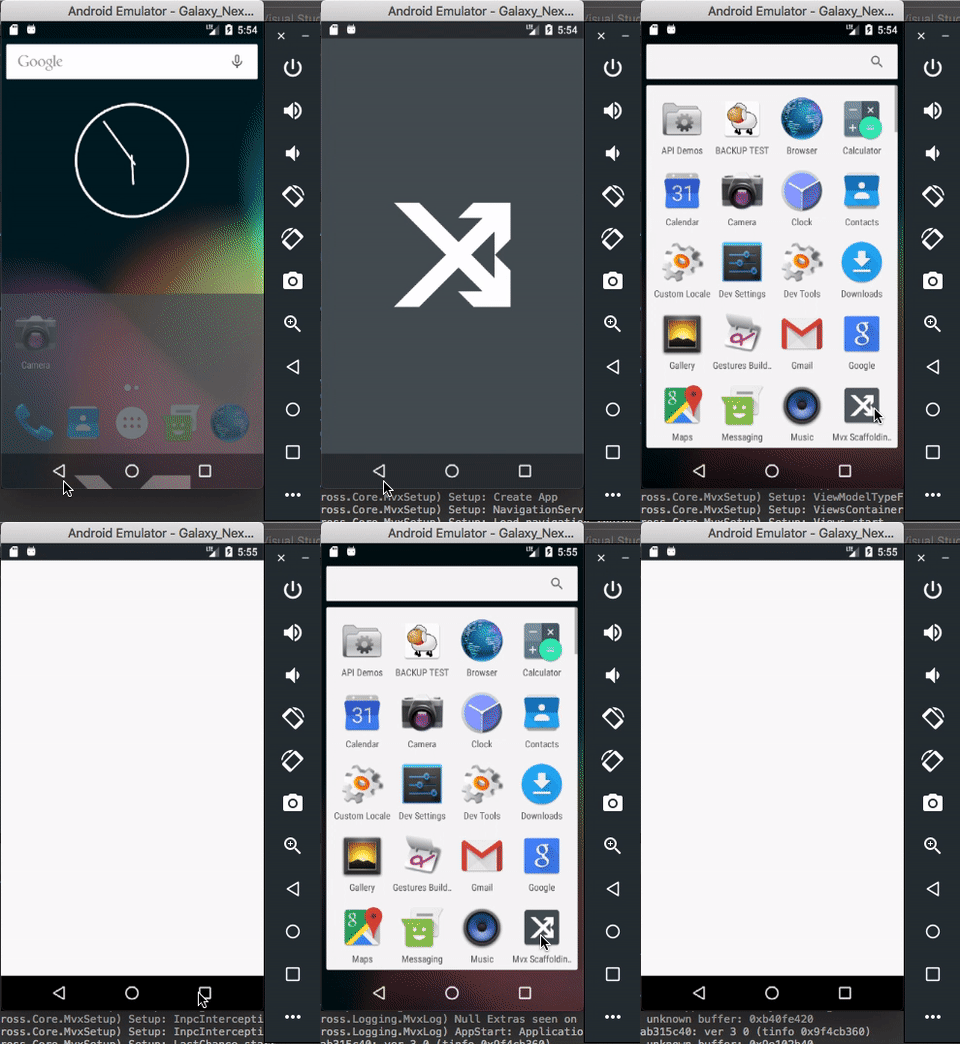
Screencast
AVD config.ini
AvdId=Galaxy_Nexus_API_23
PlayStore.enabled=false
abi.type=x86
avd.ini.displayname=Galaxy Nexus API 23
avd.ini.encoding=UTF-8
disk.dataPartition.size=800M
fastboot.chosenSnapshotFile=
fastboot.forceChosenSnapshotBoot=no
fastboot.forceColdBoot=no
fastboot.forceFastBoot=yes
hw.accelerometer=yes
hw.arc=false
hw.audioInput=yes
hw.battery=yes
hw.camera.back=virtualscene
hw.camera.front=emulated
hw.cpu.arch=x86
hw.cpu.ncore=2
hw.dPad=no
hw.device.hash2=MD5:5c288d27461585ecc73a535555e7cf61
hw.device.manufacturer=Google
hw.device.name=Galaxy Nexus
hw.gps=yes
hw.gpu.enabled=yes
hw.gpu.mode=auto
hw.initialOrientation=Portrait
hw.keyboard=yes
hw.lcd.density=320
hw.lcd.height=1280
hw.lcd.width=720
hw.mainKeys=no
hw.ramSize=1024
hw.sdCard=no
hw.sensors.orientation=yes
hw.sensors.proximity=yes
hw.trackBall=no
image.sysdir.1=system-images/android-23/google_apis/x86/
runtime.network.latency=none
runtime.network.speed=full
sdcard.size=512M
showDeviceFrame=no
skin.dynamic=yes
skin.name=720x1280
skin.path=_no_skin
skin.path.backup=_no_skin
tag.display=Google APIs
tag.id=google_apis
vm.heapSize=128
I have been getting this issue (at least) on versions 4.0.0 and 4.0.0 sr2, with the LabelRenderer being the thing that pops up as the missing method.
by process of elimination, the property in the labels that was triggering the crash was the vertical text alignment.
<Label Grid.Row="1"
FontAttributes="Bold"
FontSize="{x:Static local:AppConstants.MediumSize}"
LineBreakMode="TailTruncation"
MaxLines="2"
Text="{Binding Label, Converter={StaticResource TextCaseConverter}}"
VerticalOptions="End"
VerticalTextAlignment="End" />
Removing the text alignment prevents the crash.
for what its worth, this label lives in an ItemTemplate with a structure similar to:
<DataTemplate>
    <Grid>
        <Button />
        <Grid>
            <Grid.RowDefinitions>
                <RowDefinition Height="Auto" />
                <RowDefinition Height="Auto" />
            </Grid.RowDefinitions>
            <Label Grid.Row="1"/>
        </Grid>
    </Grid>
</DataTemplate>
 MitchBomcanhao
on 11 Jun 2019
MitchBomcanhao
on 11 Jun 2019
I'm sure it's caused by the dispose process.
I have made a new patched 3.6 version which contains more fix related to dispose.
@lassana If you want to test it (delete bin/obj first be sure)
@MitchBomcanhao Unfortunately I have not done a release for the branch v4 yet for you to test.
I think it's logic that the vertical alignment trigger the crash because it set the Gravity property on the android native control, and if the control has been disposed before unsubscribe the OnPropertyChangeHandler it crash. I think the PR #6467 will fix that.
kvpt
on 11 Jun 2019
I'm not sure if dispose is related to my particular variation of the issue.
To make it a bit clearer - I've got a custom grid control with an items source.
That items source, which had zero items before, is updated and will now try to render one item. This will fail when attempting to render the label in said template.
Relaunching the app and getting to the same page will render the control item without issues.
Edit:
I have however just tried replacing my custom grid control with a flexlayout (the items source and the template are exactly the same) and I'm not getting this crash anymore.
I'll do a bit more digging to see if I can find something in the original control that can be contributing to this.
MitchBomcanhao
on 11 Jun 2019
I finally succeed to reproduce the crash.
The issue was the dispose of the platform renderer which was deferred.
In function of timing, it can collide with the new page beeing layout.
So it can work fine, crash or make a blank screen.
I can only reproduce it with a splashscreen, I think it add a delay to the dispose process which make the issue more easily trigger.
The nuget is in the zip => xamarin.forms.3.6.7.zip
The PR #6467 will fix that case too.
kvpt
on 12 Jun 2019
Hmm, I still see the empty page with 3.6.7 however only when debugger is attached. If I start the app directly from the emulator, everything works fine.
MyXamarinFormsApp-X.F-3.6.7.zip
lassana
on 12 Jun 2019
Ok thanks,
So the good news is that I am on the good way.
But the bad news is that Android can call the destroy of the old activity in parallel with the creation of the new activity.
So I have to found a way to assure that destroy is executed before create in all case.
kvpt
on 12 Jun 2019
So I made a new version, which use a synchronization primitive to prevent dispose and create to be executed in parallel. In theory it should fix the issue.
But as I can't reproduce the crash since my previous fix, I'm not able to confirm it fix the issue.
@lassana If you can try it Xamarin.Forms.3.6.8.zip
kvpt
on 12 Jun 2019
@kvpt still the same white screen.
Frankly, I don't think it is a concurrency issue, because the white screen appears every time regardless of how long I wait after the first page is closed. So, if I run the app, press the physical Back button, _wait for 30 seconds_, start the app again: anyway the white screen appears.
Like I said earlier, currently I can reproduce it only if debugger is attached. Weird.
FYI: I probably found a workaround (using X.F 3.6.8), at least for the project attached to the original post.
My first though was to add NoHistory = true to the Forms activity, and in fact it does fix the white screen and no crash occurs, however for some reason the Forms activity recreates twice. It happens with and without debugger. It looks like a X.F bug but different from what I reported.
Screencast

My next try was to use LaunchMode = LaunchMode.SingleTask or LaunchMode = LaunchMode.SingleInstance with the Forms activity, and, believe it or not, it fixes the issue.
Screencast

Is there any downsides for using ActivityInfo.LAUNCH_SINGLE_TASK ActivityInfo.LAUNCH_SINGLE_INSTANCE with Xamarin.Forms? I found this post by Jon Douglas but it was 3 years ago.
lassana
on 13 Jun 2019
@lassana This issue is caused by invalid dispose of the old renderers, that is the same as the new when the app reload when the application is static (this seem to be the case with mvvmcross).
I solve an issue of that type in #4707 (which is also include in this custom package).
So there is another cause that can trigger issue fixed by #4707.
The renderer dispose can also be caused by race condition, it was the case for me, so I deduced it was the same for you.
Anyway, thanks for your time and help me to fix this issue, it is very hard to reproduce it.
When you have the double call, can you please dump the call stacktrace of the OnCreate method.
For the launchmode I always use SingleTop which from documention is very similar to other SingleTask or SingleInstance if the Xamarin.Forms activity is at the top. For me it has work fine for years.
That said, I don't tested SingleTask or SingleInstance mode, the only issue that I can think about is if you have to use an other activity like a camera, I don't know how will react Xamarin.Forms in this case.
If you dont use any other activity in your app, I think it's safe.
kvpt
on 13 Jun 2019
If I use SingleTop or NoHistory=True, the Forms activity is shown twice. Here is the stacktrace of the OnCreate method:
First launch (from VS for Mac)
MyXamarinFormsApp.Droid.MainActivity.OnCreate(Android.OS.Bundle bundle = (null)) in /Users/user/Desktop/MyXamarinFormsApp/src/MyXamarinFormsApp.Droid/Views/MainActivity.cs:27
Android.App.Activity.n_OnCreate_Landroid_os_Bundle_(System.IntPtr jnienv = 0xffffffffb4059a80, System.IntPtr native__this = 0xffffffffbfbdf65c, System.IntPtr native_savedInstanceState = 0x0) in
Android.Runtime.DynamicMethodNameCounter.3() in
Second launch (after the Back button pressed and the app icon tapped
MyXamarinFormsApp.Droid.MainActivity.OnCreate(Android.OS.Bundle bundle = (null)) in /Users/user/Desktop/MyXamarinFormsApp/src/MyXamarinFormsApp.Droid/Views/MainActivity.cs:27
Android.App.Activity.n_OnCreate_Landroid_os_Bundle_(System.IntPtr jnienv = 0xffffffffb4059a80, System.IntPtr native__this = 0xffffffffbfbdf65c, System.IntPtr native_savedInstanceState = 0x0) in
Android.Runtime.DynamicMethodNameCounter.3() in
After the app icon is pressed in the system launcher, the OnCreate method is called only once (these Stacktraces are identical), however I see two Foms activities after second launch. Does it mean the first activity wasn't properly destroyed? That's really weird, because OnPause, OnStop, OnDestroy methods are called right after the physical Back button is pressed.
lassana
on 13 Jun 2019
Ok I understand your new issue now.
It's not that you have two activities (the previous is destroy), it's you have now two pages.
I reproduce it with your sample but not I my app (which not use MvvmCross).
So I think that the issue is now either again in Xamarin.Forms or has moved to MvvmCross.
I need to check this.
kvpt
on 13 Jun 2019
Ok, so after setting a test project I can confirm that the problem seem to be in MvvmCross.
On the first call, the page passed to the framework is a navigation page that contains only one HomePage.
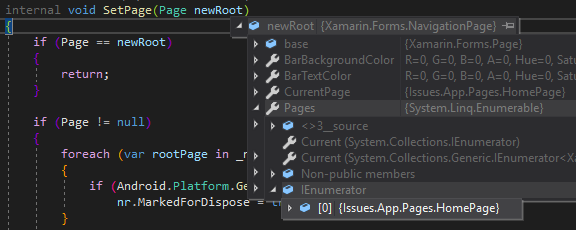
On the second, the page passed is also a navigation page but with two HomePage.
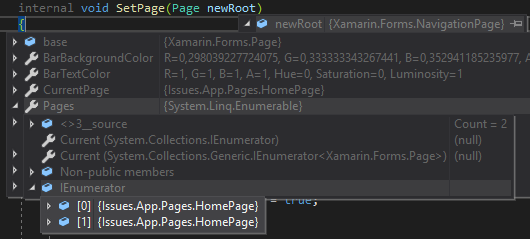
I will try to determine what cause this in MvvmCross but I promise nothing.
kvpt
on 13 Jun 2019
The root cause is because the MvvmCross Framework in MvxFormsPagePresenter.PushOrReplacePage recreate a page all the time and add it to the navigation page if it is the current root page.
I found that the process begin in MvxAppStart.NavigateToFirstViewModel which call NavigationService.Navigate
The good news is that this framework is greatly architectured and provide a very good extensibility.
So this process can be replaced, the documentation is here.
So to prevent the pushing of a new page at each start/restart, with overriding it's simple.
public class MvxApp : MvxApplication
{
    public override void Initialize()
    {
        CreatableTypes()
            .EndingWith("Service")
            .AsInterfaces()
            .RegisterAsLazySingleton();

        //RegisterAppStart<HomeViewModel>(); <= To be replaced

        RegisterCustomAppStart<AppStart<HomeViewModel>>(); // <= With this
    }

    public class AppStart<TViewModel> : MvxAppStart<TViewModel> where TViewModel : IMvxViewModel
    {
        bool Loaded { get; set; }

        public AppStart(IMvxApplication application, IMvxNavigationService navigationService)
            : base(application, navigationService)
        {
        }

        protected override async Task NavigateToFirstViewModel(object hint = null)
        {
            if (Loaded)
            {
                return;
            }

            await base.NavigateToFirstViewModel(hint);

            Loaded = true;
        }
    }
}
It's strange to me that the default behavior is like this, but it's perhaps like this because Xamarin.Forms was buggy.
If you want go further, you can perhaps use the MvvmCross support.
kvpt
on 13 Jun 2019
Thank you a lot!
lassana
on 14 Jun 2019
@kvpt @lassana is there still something that needs to be fixed because of this or is this something with MvvmCross? Can we close this issue?
 jfversluis
on 18 Jun 2019
jfversluis
on 18 Jun 2019
@jfversluis The crash initialy reported is solved by a fix that I have done in my fork.
I will make a PR during the week with explication of the root cause and the fix.
However, once this crash was solved MvvmCross need a tweak for handle the activity restart and don't recreate a new page.
So there is two issues here, one in Xamarin.Forms and one in MvvmCross.
kvpt
on 18 Jun 2019
@kvpt @jfversluis
Since there is no crash with _the project from the OP + the NuGet from the post above + the MvvmCross workaround_ I think you can close it.
I tried X.F 4.0 and this workaround in one of our Xamarin app and I am still able to get a crash after the main page is changed two or three times. However, because X.F 4.0 doesn't include all your changes and this crash happens only when the debugger is attached, I don't think I can provide another minimal reproducible sample.
Waiting for a new stable X.F release with all these changes included!
lassana
on 18 Jun 2019
closed by #6596
samhouts
on 29 Jul 2019
Related issues
 EmilAlipiev
·
3Comments
EmilAlipiev
·
3Comments
 joseluisct
·
3Comments
joseluisct
·
3Comments
 AppGrate
·
3Comments
AppGrate
·
3Comments
 leobragatti
·
3Comments
leobragatti
·
3Comments
 jgold6
·
3Comments
jgold6
·
3Comments