Xamarin.forms: WPF: ViewCell content width does not update on ListView width change
Description
If the ListView width changes on WPF (e.g. on resizing the window), the ViewCell's content is not resized to match the new width. The ViewCell itself seems to resize just fine (based on the hover effect), however the content does not.
Steps to Reproduce
- Create a new Xamarin WPF application
- Add a
ListViewas a root of aPageand give it some strings to display Set an
ItemTemplatelike such:<DataTemplate> <ViewCell> <Grid> <Grid.ColumnDefinitions> <ColumnDefinition Width="Auto" /> <ColumnDefinition Width="*" /> <ColumnDefinition Width="Auto" /> </Grid.ColumnDefinitions> <Label Grid.Column="0" Text="X" /> <Label Grid.Column="1" HorizontalOptions="Center" Text="{Binding}" /> <Label Grid.Column="2" Text="X" /> </Grid> </ViewCell> </DataTemplate>- Observe as the Xs (representing the boundaries of the content view) don't behave as expected.
Expected Behavior
The ViewCell's content should resize whenever the ListView's width changes, such that the Xs stay near the window borders.
Actual Behavior
The ViewCell's content does not resize, resulting in the content staying the same size and either being clipped if the window shrinks, or staying centered if the window widens.
Basic Information
- Version with issue: Latest stable (3.6.0) as well as latest prerelease (4.0.0.250467-pre7)
- IDE: Visual Studio 15.9.9
- Platform Target Frameworks:
- WPF: .NET Framework 4.7.2
Screenshots
Starting point:

Widened window:
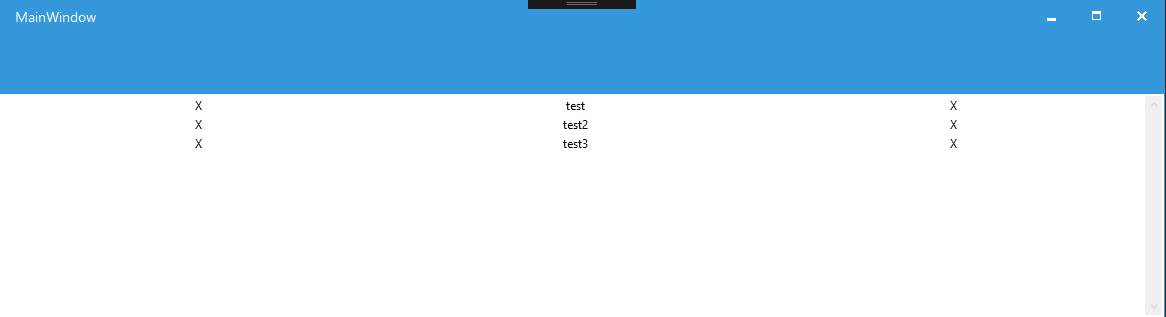
Shrunk window:

Reproduction Link
 domyd
domyd
>All comments
Added a PR for this if anyone can take a look https://github.com/xamarin/Xamarin.Forms/pull/6179
 jaytilly
on 13 May 2019
jaytilly
on 13 May 2019
👍2
🎉1
Was this page helpful?
0 / 5 - 0 ratings
Related issues
 samhouts
·
3Comments
samhouts
·
3Comments
 fazil1987
·
3Comments
fazil1987
·
3Comments
 rmarinho
·
3Comments
rmarinho
·
3Comments
 suihanhbr
·
3Comments
suihanhbr
·
3Comments
 mattregul
·
3Comments
mattregul
·
3Comments
Most helpful comment
Added a PR for this if anyone can take a look https://github.com/xamarin/Xamarin.Forms/pull/6179