Xamarin.forms: [Android] Label break text in ViewCell in XF 3.5
Description
Having Label wrapped by frame in ViewCell, text is randomly breaking
Steps to Reproduce
Label Wrapper:
<Frame Margin="0" Padding="0" BackgroundColor="#34495E" CornerRadius="2" HasShadow="False" OutlineColor="Transparent"><StackLayout Margin="6,2" Spacing="0"><Label x:Name="contentLabel" FontSize="Default" HorizontalTextAlignment="Center" /></StackLayout></Frame>
Actual Behavior
text is randomly breaking
Basic Information
- Version with issue: 3.5
- Last known good version: 3.4.0.1029999
- IDE: VS2017
- Platform Target Frameworks:
- Android: SDK 8.1
Screenshots
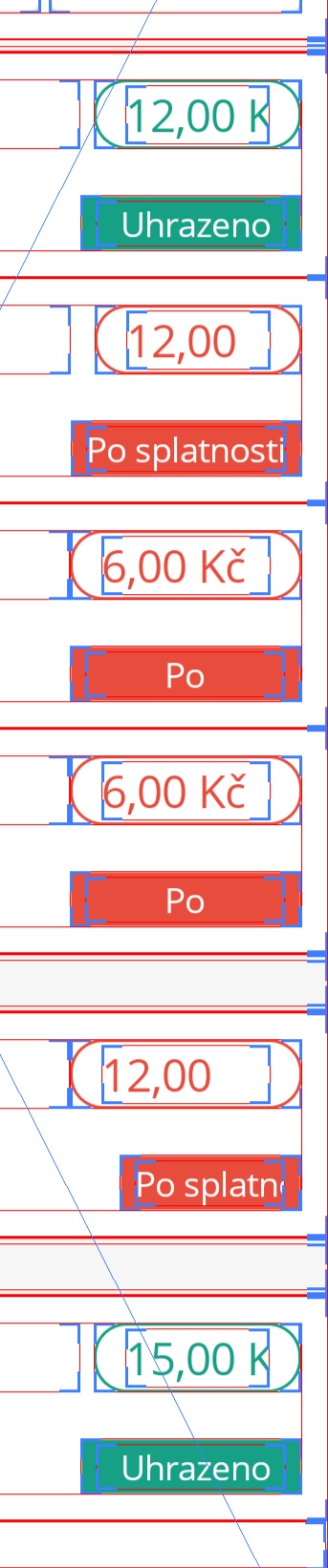
 MarMarIV
All 4 comments
Why is this schedule for 3.6 ? , basically 3.5 is unusable currently due to this issue. I have had to roll back 10 clients projects from 3.5 to 3.4 due to it and most of them are now putting in all sorts of overly complex 'integration and upgrade procedures' on the projects now which is really going to hamper uptake onto the latest version. A rapid SR with the fix may help ease managements minds.
It's also not just frameview its any listview with a label on Android in my experience.
Below is my listview template on a VERY simple list page - the label size calculation does not work at all on 3.5.0.169047 on Android, fine on iOS
                        <Grid.RowDefinitions>
                            <RowDefinition Height="*" />

                        </Grid.RowDefinitions>
                        <Grid.ColumnDefinitions>
                            <ColumnDefinition Width="10*" />
                            <ColumnDefinition Width="90*" />
                        </Grid.ColumnDefinitions>
                        <ffimageloading:CachedImage DownsampleToViewSize="True" Grid.Column="0" Grid.Row="0" HeightRequest="45" Source="{Binding ImageName}" />
                        <Label Grid.Column="1" Grid.Row="0" Text="{Binding Name}"
                                   VerticalTextAlignment="Center" FontSize="18" HorizontalOptions="StartAndExpand"
                                   TextColor="Black" Margin="15,0,0,0"  FontFamily ="{OnPlatform Android='Roboto-Regular.ttf#Roboto-Regular', iOS='Roboto-Regular'}"/>
                    </Grid>
 chrisfoulds
on 4 Mar 2019
chrisfoulds
on 4 Mar 2019
This seems to be a critical issue affecting multiple projects I am working on. As a nasty workaround that does not cover the issue 100% -> replace the Grid by a StackLayout on Android only.
 yuv4ik
on 14 Mar 2019
yuv4ik
on 14 Mar 2019
@yuv4ik we have downgraded all products to 3.4 and there they will remain until at least June now as the company has now put in a full impact process of xamarin forms upgrades after this basic but fundamental issue crept in and they failed to be fix through multiple releases.
chrisfoulds
on 14 Mar 2019
App1.zip
@chrisfoulds @yuv4ik Could you please include a reproduction solution with actual and expected (or annotated actual) screenshots using the latest version of forms similar to the attached? There are many ways of specifying how text is wrapped and clipped and without a complete reproduction we'd be unable to target the issue you are encountering.
 kingces95
on 21 Aug 2019
kingces95
on 21 Aug 2019
Related issues
 deakjahn
·
3Comments
deakjahn
·
3Comments
 joseluisct
·
3Comments
joseluisct
·
3Comments
 jgold6
·
3Comments
jgold6
·
3Comments
 suihanhbr
·
3Comments
suihanhbr
·
3Comments
 AppGrate
·
3Comments
AppGrate
·
3Comments
Most helpful comment
This seems to be a critical issue affecting multiple projects I am working on. As a nasty workaround that does not cover the issue 100% -> replace the
Gridby aStackLayouton Android only.