Xamarin.forms: Crash on launch after upgrading to 3.5
Description
Steps to Reproduce
- Upgrade project from 3.4.0.1029999 to 3.5.0.129452
Expected Behavior
There are no documented API/breaking changes, so project should be compatible.
Actual Behavior
Crash on launch, both Android and UWP, see screenshot below.

Basic Information
- Version with issue: 3.5.0.129452
- Last known good version: 3.4.0.1029999
- IDE: Visual Studio 2017 15.9.6
- Platform Target Frameworks:
- Android: 9.0
- UWP: 17763
- Android Support Library Version: 28.0.0.1
Reproduction Link
Managed to reproduce a similar exception, simply by taking a new Xamarin.Forms Master-Detail project and updating all nuget packages. See below.
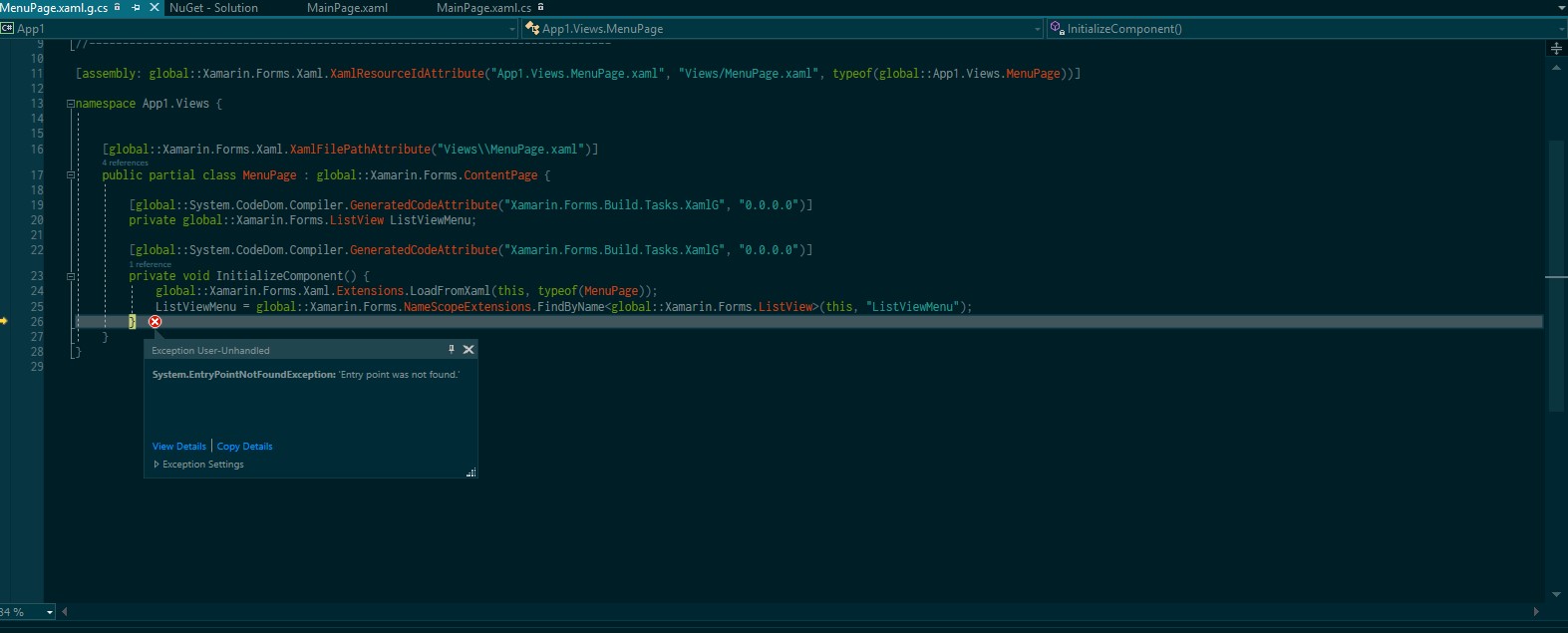
 EP01
EP01
All 12 comments
I'm curious about what that the Templates.xaml file looks like.
A new type got introduced called NavigableElement above VisualElement, and StyleProperty got moved to it so that gives a clue to the first problem...
 GalaxiaGuy
on 8 Feb 2019
GalaxiaGuy
on 8 Feb 2019
@GalaxiaGuy
Here's the file in question, hope it helps.
Templates.zip
EP01
on 8 Feb 2019
@EP01 did you attach the right project in your original issue? That one is 3.0 and I was able to upgrade it to 3.5 without a crash. A lot of times exception like that are from a mismatched version of forms. Make sure all your projects have the same version of forms and then you can also try deleting all your bin/obj folders just to make sure
 PureWeen
on 10 Feb 2019
PureWeen
on 10 Feb 2019
@PureWeen
I've just downloaded the project again to make sure, and it is indeed 3.5. You can check the csproj files to confirm for yourself that all projects are consuming 3.5. I've run into problems before that are resolved by deleting bin and obj folders (I'm sure everyone here has), therefore it's always a step that I take in debugging updates. Could you try re-downloading the file again to confirm? Thanks!
EP01
on 11 Feb 2019
Dangit :-/ too many App1 folders floating around. Sorry about that.
I was able to run the app though

PureWeen
on 11 Feb 2019
@PureWeen
No worries, I thought that would be the case. Today, the project runs fine for me too! 😄 Typical!
I think the problem does indeed lie in the left over build files as you said. I've found a way to reliably reproduce this if you want to give it a shot.
- Open new Xamarin.Forms Master-Detail project.
- Build.
- Update all nuget packages.
- Run.
If you update all the packages without building with 3.4, it works fine. I don't know if this is a valid bug now or not, feel free to close this if it is not. However, I could see people being put off upgrading existing projects to 3.5 when this is the first thing they see.
EP01
on 11 Feb 2019
I've spent a bit more time with the issue, and no amount of clearing build files, caches, etc. is getting rid of the original Templates.xaml StyleProperty issue. May be unrelated to the EntryPointNotFound exception.
EP01
on 11 Feb 2019
I'm running into this as well. For me, the exception is being thrown in the constructor of a custom control defined in a NuGet package that is built against Xamarin.Forms 3.4.0, when I bind the Style of a Label to a BindableProperty defined on the parent control.
 jcmanke
on 25 Feb 2019
jcmanke
on 25 Feb 2019
@jcmanke What is the custom control that is failing?
 samhouts
on 28 Feb 2019
samhouts
on 28 Feb 2019
@samhouts https://gist.github.com/jcmanke/8e545add0c7f55d2e42199a65286589f
The exception occurs at line 74.
jcmanke
on 28 Feb 2019
I'm curious about what that the Templates.xaml file looks like.
A new type got introduced called NavigableElement above VisualElement, and StyleProperty got moved to it so that gives a clue to the first problem...
Yep, this is the root cause. These were changes that were added in Shell, and we missed putting them in the release notes as breaking changes.
samhouts
on 1 Mar 2019
A possible solution, as recommended by @StephaneDelcroix in #4477 where I proposed making similar breaking changes:
public class VisualElement : NavigableElement
{
    public new static readonly BindableProperty StyleProperty = NavigableElement.StyleProperty;
}
Unless you plan to just acknowledge the breaking changes in the release notes.
jcmanke
on 1 Mar 2019
Related issues
 fazil1987
·
3Comments
fazil1987
·
3Comments
 simontocknell
·
3Comments
simontocknell
·
3Comments
 AppGrate
·
3Comments
AppGrate
·
3Comments
 mattregul
·
3Comments
mattregul
·
3Comments
 xabre
·
3Comments
xabre
·
3Comments
Most helpful comment
A possible solution, as recommended by @StephaneDelcroix in #4477 where I proposed making similar breaking changes:
Unless you plan to just acknowledge the breaking changes in the release notes.